
Disclosure: LabFin is reader-supported. If you sign up for a tool through links on this page, we may earn a commission at no extra cost to you. Commissions vary between providers and our ratings do not — here’s our full disclosure.
To use AI for API integration well, give it the current documentation, start from a minimal working call, and verify every endpoint and parameter against the docs. Models learn APIs from older material, so they may suggest outdated versions or endpoints that never existed.
This guide, moreover, covers the common mistakes, a six-step workflow and a production checklist. It applies to Claude Code, Codex, Cursor, GitHub Copilot or a chat assistant.
How to Use AI for API Integration: The Short Answer
First, paste or link the current API reference, ideally an OpenAPI spec, and name the SDK version. Then ask for the smallest call that works, with keys read from environment variables.
Next, however, test against a sandbox, then add authentication, rate limits, retries, pagination and error handling one at a time. Our list of the best AI tools for developers covers model APIs and prices.
Mistakes AI Makes With APIs
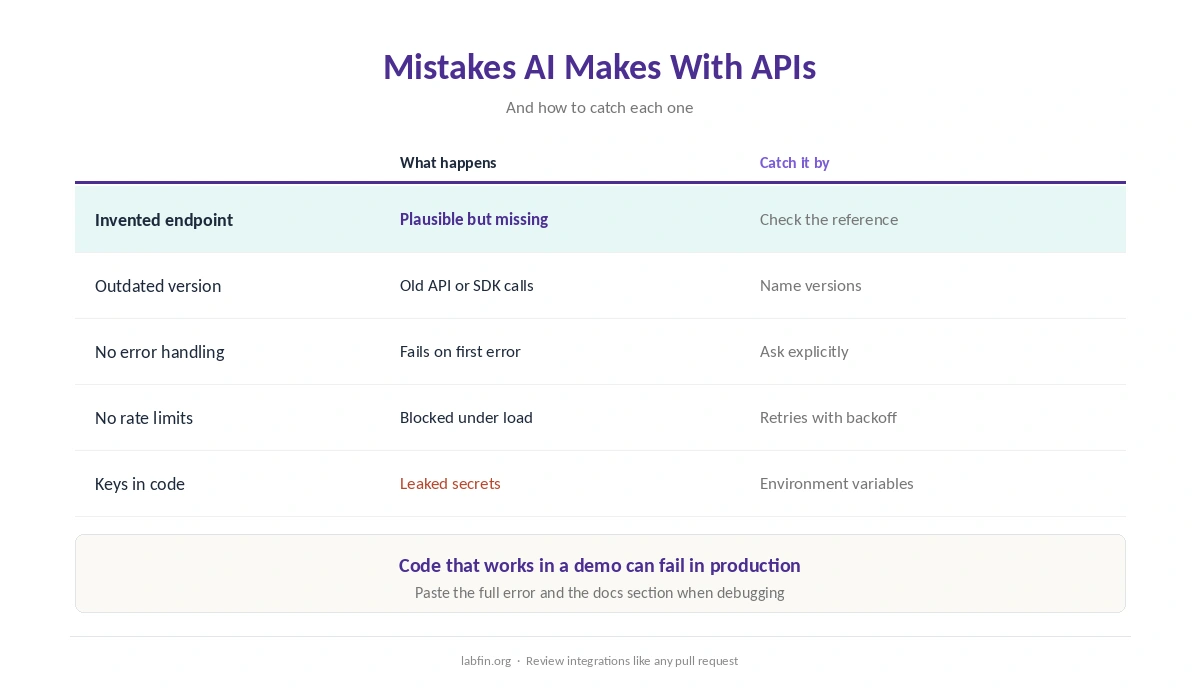
When you use AI for API integration, one visible mistake is an invented endpoint or parameter that looks plausible. Another is code for an older API version or SDK, since models learn from material that predates recent changes.
AI also tends to skip error handling, rate limits and pagination, so code works in a demo and fails in production. Our guide to why AI gets facts wrong explains the underlying cause.
Step 1: Give It the Current Docs
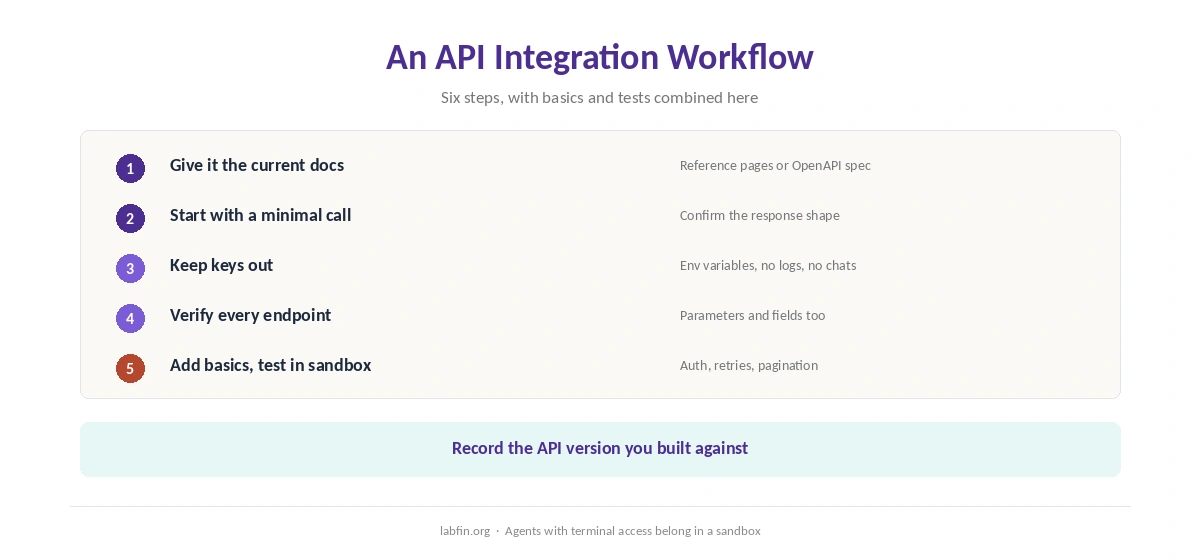
To use AI for API integration, first paste the relevant reference pages, attach the OpenAPI spec, or let an agent read the docs in your repository. Name the API version and SDK version explicitly.
Assistants with web search can also fetch docs, but check the page date. Our guide to Perplexity for research covers cited search.
Step 2: Start With a Minimal Call
Ask for the smallest request that returns real data, such as listing one resource. Run it, and confirm the response shape before building more on top.
Step 3: Keep Keys Out of Prompts and Code
Never paste live API keys into a chat. Instead, ask for code that reads keys from environment variables or a secrets manager, and keep them out of logs and version control.
Agents with terminal access, moreover, should run in a sandbox, as our guide to using AI for coding projects explains.
Step 4: Verify Every Endpoint and Field
Check each endpoint, parameter and response field against the reference. When something fails, paste the full error and the docs section into the chat, as our guide to using AI for debugging describes.
Step 5: Add the Production Basics
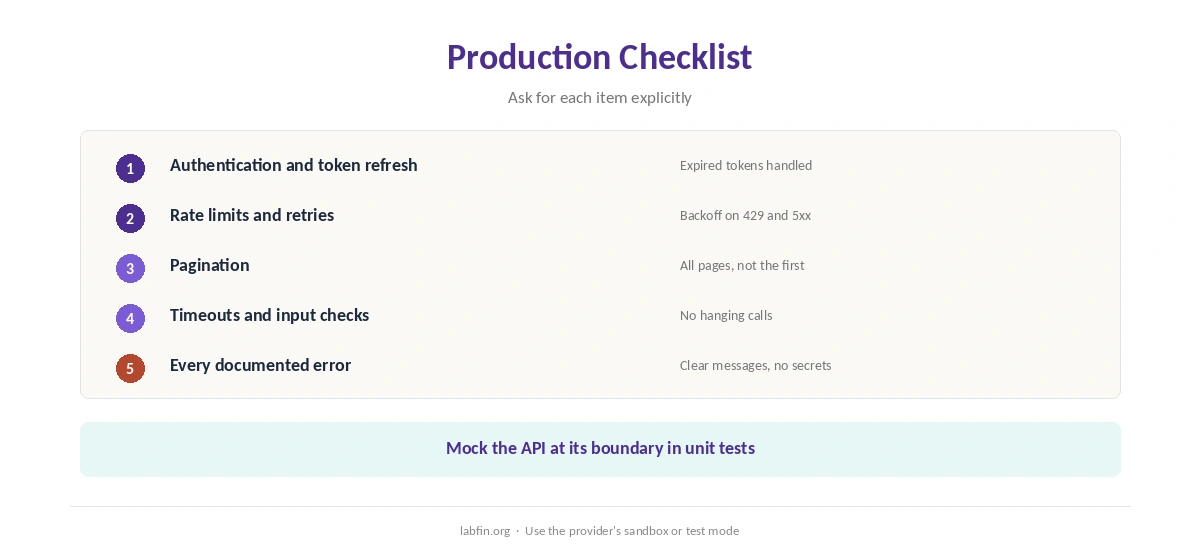
Ask for authentication refresh, retries with backoff on rate limits and server errors, pagination and timeouts, one at a time. Also validate inputs and handle every documented error code.
Agents such as Claude Code and Codex can add these and run your tests, as our Claude Code review and guide to ChatGPT for coding cover.
Editor tools such as Cursor, in addition, suggest these patterns inline, as our Cursor review explains.
Step 6: Test Against a Sandbox
Use the provider’s sandbox or test mode, and write tests that mock the API at its boundary. Our guide to using AI for unit testing covers tests that can fail.
Finally, review the integration like any pull request, as our guide to reviewing AI-generated code explains.
Document the Integration
Afterwards, record which version you built against, required scopes and known limits. Our guide to using AI for code documentation covers keeping that current.
How We Research
This guide draws on our reviews of each coding tool and on common API practice, read between August and October 3, 2026. One example source is the OpenAPI Specification.
We run no integration trials of our own. Our about page explains how we research, and our list of the best AI for coding ranks the agents.
How to Use AI for API Integration FAQ
Yes, especially with the current docs in context. Verify every endpoint and field against the reference.
It predicts plausible code from older training material, which may not match the current API.
No. Use environment variables or a secrets manager, and keep keys out of chats and logs.
Rate limits, retries, pagination, timeouts and error handling; ask for each explicitly.
Use the provider’s sandbox, mock the API in unit tests, and review the code before merging.
The Verdict
AI speeds up API work when it works from current docs and you verify every call. Without docs and checks, however, it writes plausible code for an API that no longer exists.
So give it the docs, start minimal, keep keys out, add production basics and test in a sandbox. That is how to use AI for API integration that holds up.