
A small ceramics seller has a slightly soft photograph of a hand-labeled glaze jar. The outline of the jar is useful, but the batch label and tiny safety text are difficult to read. Topaz Photo Super Focus is designed for missed-focus images and can generate plausible sharper detail. That is a visual improvement, not proof of what an unreadable label originally said. This hypothetical tutorial explains how to isolate the affected area, compare it with the original capture and stop when the result starts inventing packaging information that could mislead a customer.
Decide whether focus repair is appropriate
Inspect the original photograph at full size before choosing an AI model. Missed focus is different from motion blur, noise, heavy compression or a tiny low-resolution crop. Topaz describes Super Focus as a generative alternative when ordinary sharpening models cannot handle more stubborn missed-focus cases; it specifically recommends normal Sharpen models for images that are not missed-focus examples. Check whether a better original exists in the camera roll or whether a simple reshoot is practical. A reshoot often offers more reliable detail than any reconstruction. Do not promise the tool can recover information that the sensor did not record, particularly serial numbers, ingredient lists or regulatory text that must be factual.
Check hardware, raw-file and version restrictions
Topaz’s current Super Focus guide describes demanding local processing requirements: supported dedicated graphics hardware on Windows, supported Apple Silicon on Mac and memory constraints that can affect the newer model. It identifies Super Focus v3 as the most recent version and states that v3 is not currently supported for RAW files. Cloud processing can be an option for hardware below the local requirements, subject to plan, cost and content-handling policies. Verify these details in the installed version before promising a colleague a one-click operation. Treat cloud uploads as a separate privacy and rights decision for unreleased product photography. Record the original filename and software version without placing those internal notes onto public imagery.
Work from a duplicate and choose a small repair area
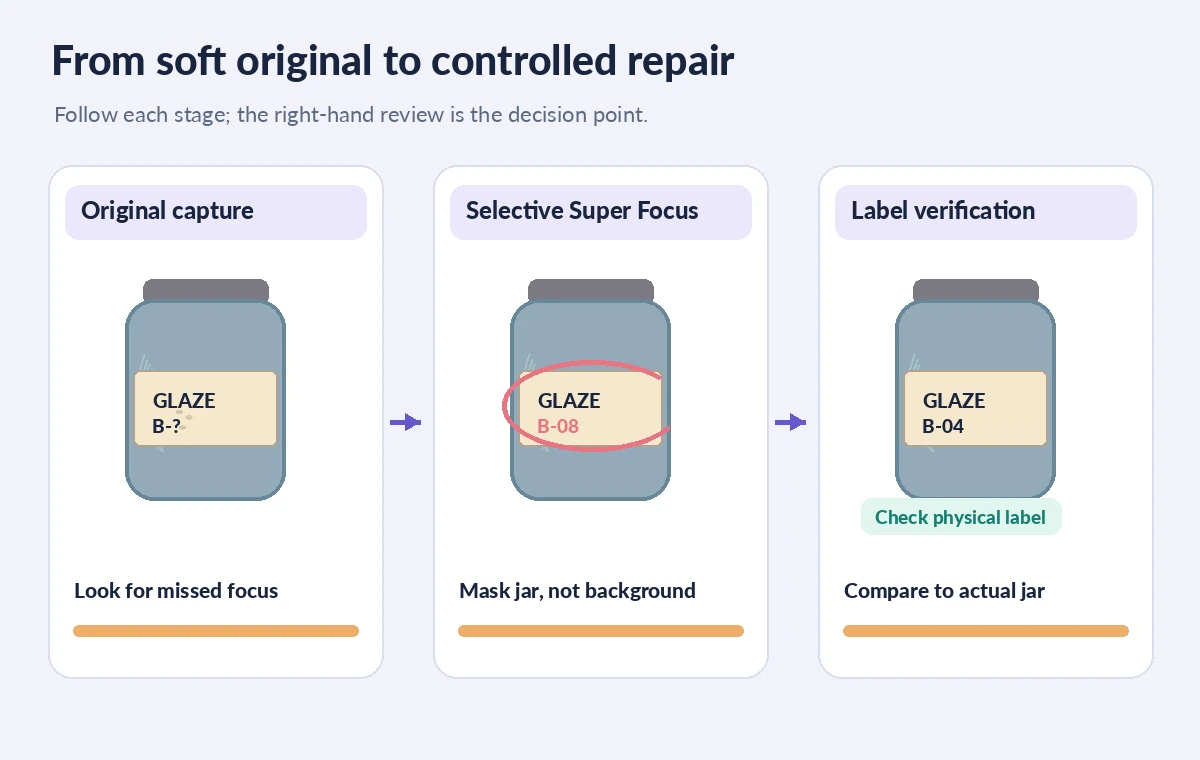
Export or copy a working image and leave the unmodified original unchanged. Topaz advises removing prior enhancements, except RAW Denoise where applicable, before running Super Focus. Locate the missed-focus area: for this jar it might be the central handle and the visible edge of the printed sticker, not the perfectly acceptable wooden shelf behind it. Use a representative preview area if the size and version permit it. After processing, use the Selection tool to constrain the affected region and adjust Strength. Topaz explicitly warns against using Super Focus on backgrounds, where new artifacts may appear. Avoid applying it globally merely because the entire image has a pleasing sharper appearance.
Compare the literal letters, not just the impression of clarity
Set the original beside the processed result at equal display size. Read the batch label from a trusted source: a second correctly focused reference photograph, the physical jar or an approved product record. If the AI version changes a faded ‘B’ to an ‘8’, fills in a missing ingredient or makes an invented lot code legible, reject that region. Do not replace the seller’s own label with plausible AI typography. The illustrated original, risky repair and approved target are schematic examples, not outputs measured from Topaz. A sharper edge may be acceptable while supposed recovered text is not. If the label is essential, reshoot or overlay an accurate, clearly attributed text detail from the real package.

Look for halos, doubled edges and strange textures
Inspect the rim, lid thread, sticker border and nearby highlights at one-to-one pixels. Excessive focus repair can make a ceramic chip look filled in, create a bright halo beside a dark line or redraw a brush texture as a repeating pattern. Zoom out too: an image that looks smooth at 300 percent can look unnaturally brittle at catalog thumbnail size. Compare the same crop with standard sharpening and a completely unenhanced export. If only the jar shoulder needs clarity, mask out the painted pattern and background. Keep lighting and product color consistent with the original so that image enhancement does not misrepresent the item being sold.
Protect product truth in the final listing
A marketplace listing must reflect the actual product condition, not an imagined pristine surface. Keep genuine cracks, irregular glaze marks and seal differences visible; do not use generative processing to hide faults from buyers. For required warnings, legal names, batch codes or provenance labels, rely on an independently verified transcription and another clear photograph. If you add enlarged readable label text to the listing layout, identify it as a separate faithful detail and do not claim it was restored from invisible pixels. Ask the seller to approve the exact export and the matching product identifier. When accuracy and beauty conflict, choose the image that tells the truth.
Choose local versus cloud processing deliberately
A stronger generative model may require different hardware resources or a cloud render. Check available credits, upload permissions, storage and export settings in the live account. If the photograph includes confidential prototypes, customer names or unreleased branding, get authorization before sending it to a cloud workflow. Avoid editing the sole master copy or sending assets from someone else’s account. Keep a small review log stating what was changed, which label details were independently checked and whether a lower-strength alternative looked more natural. That log is an internal asset-management record and should not appear in visible pixels of the customer-facing product image.

Approve with a paired crop and a reshoot fallback
For final quality control, check four areas against the untouched original: label lettering, jar rim geometry, glaze texture and the contact shadow. Ask a second reviewer to inspect at listing size as well as full resolution. If the product label cannot be verified, use a retaken photo or omit the unreliable enhancement rather than publishing invented text. Preserve the original, the accepted processed version and notes explaining the decision. Do not call the result forensic recovery: Topaz describes a generative enhancement, and the instructional diagrams demonstrate risks rather than verified software outputs. The best improvement is the one that remains accurate when buyers compare the listing with the object they receive.
How We Research
We used Topaz’s official Super Focus documentation for intended use, current v3 limitations, hardware requirements, selection tools and its warning about background artifacts. We also checked the Topaz Photo release summary for the 2026 model update. We did not run Super Focus, conduct a measured side-by-side benchmark or inspect any actual merchandise. All jar labels and focus comparisons are invented teaching graphics.
Frequently Asked Questions
No. Topaz recommends it for missed-focus cases; standard Sharpen models may be more appropriate for ordinary sharpening.
The current Topaz documentation says Super Focus v3 is not supported for RAW files. Check options in your specific version.
Do not assume so. Treat invented letters as unacceptable and verify batch numbers from the real product or a trusted record.
Topaz advises against using Super Focus on backgrounds because of artifact risk. Limit processing to the subject region.
Reshoot the label or provide a separate verified detail; do not sell a product with an AI-invented label shown as authentic.