
A small apparel shop receives a limited delivery of rain jackets in two sizes. The owner wants a short message for shoppers who requested restock news. The temptation is to send a polished line saying “Your size is back,” but the store may have received only medium jackets and no large ones. Shopify Messaging text suggestions can draft the campaign, while the live inventory system and the merchant determine what may be promised.
Shopify documents Sidekick-powered subject and body suggestions inside its Messaging campaign workflow. This is a hypothetical editorial example; no merchant account, customer list or email performance was tested. The diagrams show conceptual claims to review, not actual Shopify-generated messages or inventory measurements.
Verify stock at the variant level before asking for copy
Export or view the latest inventory record for each jacket color and size, including quantities committed to other orders. Record the exact product URL and whether the item is available online, in a specific location or for pickup only.
A product marked “in stock” at the parent listing level may still have a sold-out variant. Mark inventory as time-sensitive: the count may change between copy approval and delivery. Keep buyer details and subscriber email addresses out of the prompt.
Define the legal and editorial boundaries of the offer
Prepare a one-page campaign brief listing confirmed variants, the approved offer dates, any discount terms and the required unsubscribe or compliance process. Do not invent savings percentages, shipping guarantees or scarcity claims.
If the product is limited, state that availability can change rather than implying every recipient is guaranteed a jacket. When local marketing rules or audience consent require specialist review, the store operator should obtain it before scheduling. Creative tone cannot repair an inaccurate commercial representation.

Use the documented Sidekick drafting path
According to Shopify Help, open Apps > Messaging, create a campaign and choose a template. The Subject field and rich-text body editor include a Generate text control for Sidekick suggestions.
Enter campaign type, product keywords and the intended tone, then inspect the resulting wording in the composer. Shopify specifically places responsibility for correctness on the merchant. Do not treat generated copy as a validated product feed or as a test of the store’s inventory synchronization.
Write a prompt that excludes unsupported sizes
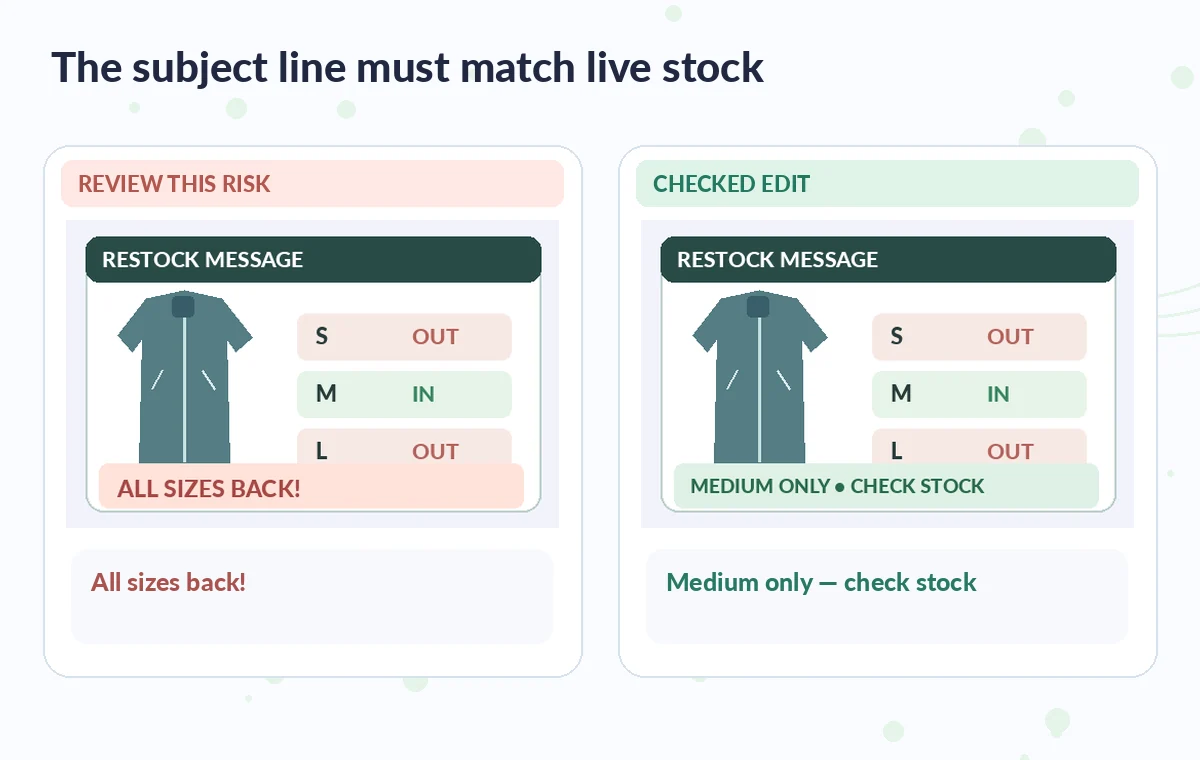
An appropriate instruction would say: “Draft a concise restock email for the navy rain jacket, sizes medium only. Do not say large or small is available. No discount or free shipping is offered. Include a link to view currently available sizes and a clear, friendly subject line.” Attach an approved product name and verified public facts, not private customer notes. Compare the suggested subject to the body: “All sizes back!” is unacceptable even if the paragraph below is carefully qualified.
Inspect the email as a paired subject-and-body claim
Create a simple comparison between a risky campaign and an edited one. The risky variant uses “Every size is back,” and a button labeled “Buy your size”; the checked version says “Medium restock: check availability” with a link to the current listing.
Check that both text and button destination agree, and that the landing page does not switch to a different color or season. Ask another editor to read the preview without the campaign brief and describe what it promises.
Review inventory changes at the moment of scheduling
Before sending, refresh variant counts and inspect whether any stock is reserved or sold out. A message prepared yesterday can become false overnight. Review segmentation: subscribers who asked about a specific size should not receive a personalized “your size” claim if that size has not returned. Test all links, product images, mobile layout and accessibility of buttons. Make the final send a named human action rather than allowing a draft to flow straight from AI text generation into delivery.
See how AI tools work together
Keep marketing imagery and urgency truthful
Check whether the jacket photograph accurately depicts the variant, whether a banner implies a discount that does not exist, and whether a countdown is tied to a real deadline. Avoid inventing customer testimonials or “back by popular demand” unless the store has evidence.
Some inventory states change quickly, so a CTA leading to the live listing is more durable than fixed quantities inside the copy. The campaign should give shoppers honest choices even when a desired size sells out immediately.

Archive what was approved and learn without invented metrics
Save the approved brief, the exact sent version, the last inventory check time and the responsible reviewer. After the campaign, use real reporting data if available to evaluate clicks or unsubscribes; do not create hypothetical lift percentages for the article or attribute sales improvements to AI without an experiment.
If recipients complain that a size was unavailable, trace the timing of the claim against the store record and revise the next campaign. The tool accelerates drafting but never takes responsibility for stock accuracy.
How We Research
This guide was prepared on November 4, 2026 by reviewing the official documentation Shopify Help: Generate email subject lines and body text. We checked the named function, the developer-described entry points, editing choices and relevant limits, then applied those facts to a clearly hypothetical editorial scenario. No live account, subscription plan, customer data, software processing run or performance benchmark was used to claim real-world results. Every illustration is original conceptual teaching art rather than a screenshot, measured before-and-after test, or verified output. The publisher should confirm current menus and entitlements, check the actual output against independent authoritative project records, and obtain the necessary human approval before release.
Frequently Asked Questions
Shopify Help places Sidekick text suggestions inside Apps > Messaging campaign creation, in the subject and rich-text body controls.
No. Verify each variant in the authoritative store inventory before approving a stock or availability claim.
Yes. Shopify describes including campaign type, keywords, tone and other details in the prompt to guide suggestions.
Shopify explicitly says the merchant is responsible for the accuracy of store content, including AI-generated material.
Check when preparing the brief and again immediately before scheduling or sending, since variants can sell out after draft approval.