
A community pantry has a donation worksheet containing textual receipt identifiers, amounts and a few incomplete dates. Someone wants the organization of a named Google Sheets table, but identifiers such as 0042 must never silently become the number 42. Google’s documentation describes Gemini-generated table names after accepting a Convert to table suggestion; users can edit or delete those names and change table formatting and views. This narrow feature is about organizing a range, not asking AI to certify the donations themselves. The example data and three illustrated states are fictional, and no actual Google Sheets file was tested. The practical goal is an auditable table whose name and structure improve navigation without weakening record integrity.
Create a clean copy of the source log
Preserve the original worksheet and document when its data were exported, who owns the record and which fields are identifiers rather than quantities. A donation ID such as 0042 is a label, not a number to add. Copy a small approved range to a working sheet and make the ID column plain text before experimenting. Keep monetary values in their own numeric column with a consistent currency, not in strings mixing labels and symbols. Do not include donor contact information in any AI experiment unless the organization has approved the service and its privacy terms. A backup gives reviewers a ground truth if formatting or typing changes.
Inspect headers and the intended table boundary
Use one header row with unambiguous names such as Receipt ID, Date, Item, Quantity and Value. Remove decorative title rows from the proposed table range, but preserve meaningful blank fields; they may signal incomplete entries. Confirm that summary totals and footnotes are outside the records area so they do not become extra donations. Check for hidden rows, merged cells and stray data outside the selection. A table name is helpful only when it refers to the actual record set. Write down the expected row count and a few known control values before converting anything, so a later visual inspection is evidence-based rather than an impression that the table looks cleaner.
Use the documented Convert to table suggestion
Google says that on a computer, eligible users can click a table range and accept a Convert to table suggestion when it appears. Gemini automatically formats the data as a table and proposes a name such as Project_Status. The feature requires an eligible Google Workspace or Google AI plan, or participation in the applicable experiments program; it may not appear for every account. Do not instruct teammates to search for a button they are not entitled to see. If conversion is unavailable, ordinary Google Sheets tables or manual formatting may support a similar record-management goal. The important action is accepting and reviewing a suggestion, not claiming that Gemini independently reconciles all data.

Review the generated table name
After conversion, Google places the proposed name at the top left of the table and allows users to rename or remove it through the table controls. For the fictional pantry log, a descriptive name such as Pantry_Donations_2026 is clearer than a generic ‘Table1’ and less likely to be confused with the volunteer schedule. Verify that names follow the organization’s naming conventions and do not include sensitive donor identities. If other formulas or views refer to the table, inspect them before renaming. A meaningful name is a navigation aid, not a substitute for validation, authorization or documentation of source provenance.
Check leading zeros and numeric types
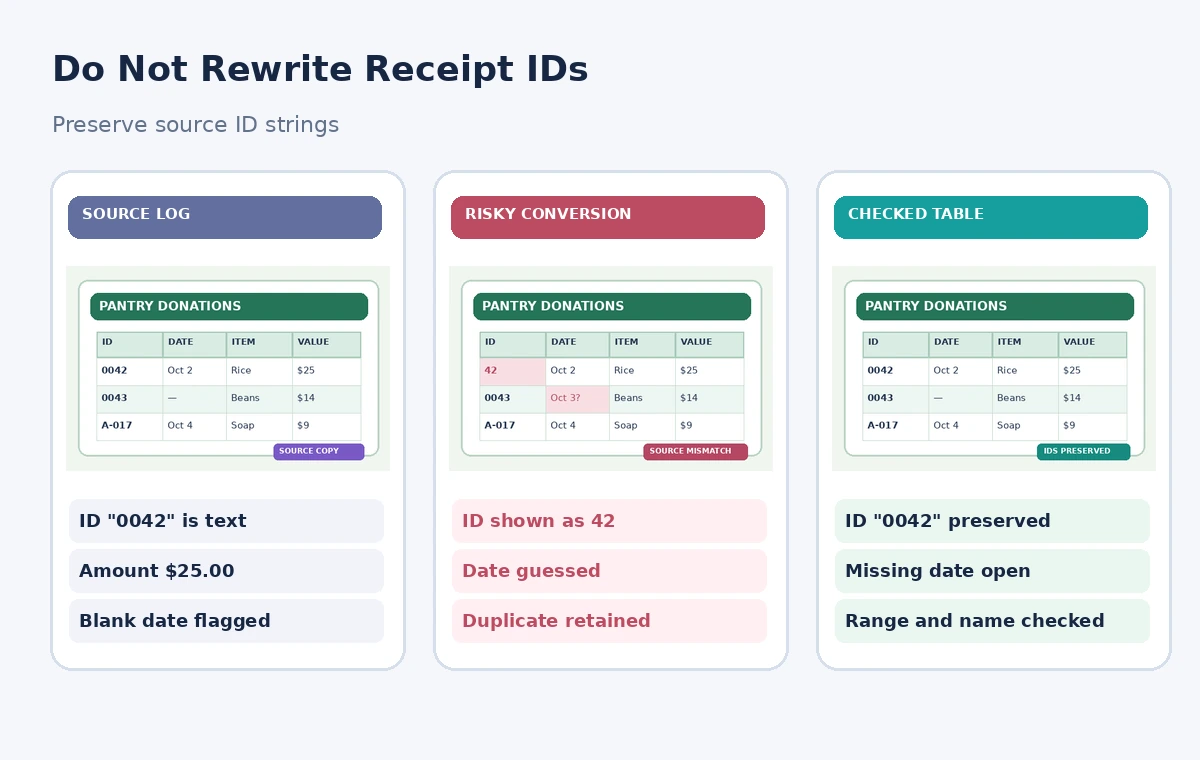
Compare a small control set with the original source: 0042, 0043 and an alphanumeric receipt such as A-017 should remain unchanged. A spreadsheet may display a number differently based on formatting, so inspect the underlying cell type and intended semantics rather than judging appearance alone. If the import had already converted 0042 to 42, changing the display format does not necessarily restore the original data provenance. Correct it from the source system and log the change. Separately verify that amounts remain numeric where arithmetic is intended. The diagram’s shortened ID is an illustrative risk, not evidence that Gemini’s table naming function changes IDs.
Audit blank dates, duplicate rows and totals
Run a straightforward review for missing dates, repeated receipt IDs and inconsistent units before anyone builds charts or reports from the named table. Do not allow a generated summary to invent a date because surrounding entries make one seem likely. A duplicate ID might reflect a legitimate line-item split or an import mistake; ask the record owner to decide. Cross-check a sample of quantities and monetary totals against the source records, remembering that table formatting does not verify arithmetic. If an entry is unresolved, retain a visible status rather than deleting it to make the worksheet look complete. Changes should be reversible and documented.
Review filters, views and table references
Google notes that tables can use structured references and views, which can help staff work with different slices of data. A view that hides unverified entries may be useful for one report but dangerous if someone believes it contains the full log. Label each view with its selection logic and keep a visible unfiltered audit view. Test any formula that refers to the table by comparing its result with an independent manual control total. Check whether a newly added record expands the intended range as expected. Never paste a filtered view into a public report without disclosing the scope and exclusions that shaped it.
Protect access to donor and financial context
Place the working sheet in the correct shared drive and give the minimum required rights to volunteer editors. If the actual workbook contains donor names, addresses or bank data, create a de-identified example before demonstrating the feature. Restrict external sharing and avoid sending confidential records through feedback forms; Google’s guidance explicitly cautions users not to include private or sensitive information in product feedback. Named tables do not create additional privacy controls by themselves. Ask the organization’s data steward to verify access, retention and export rules before the new view becomes the regular reporting source. Respect local financial recordkeeping requirements.

Release a reversible table with a change log
Record the original worksheet reference, selected range, final table name, author, date and validation results. Confirm that identifiers preserve their source string, that numeric columns can be added correctly and that all unresolved rows are visible to reviewers. Maintain a way to revert to the original sheet if a table reference or downstream automation breaks. Document who may add rows and who may approve changes to monetary values. The benefit of Gemini’s naming suggestion is a discoverable, structured workbook; it does not turn an imperfect log into an audited ledger. A reviewer should be able to repeat the checks using known source records.
How We Research
Our research used the following named official vendor documentation: Google Docs Editors Help — Tables in Google Sheets with Gemini; Google Docs Editors Help — Collaborate with Gemini in Sheets. We checked the existence and intended purpose of each named feature, documented availability or configuration requirements, and explicit limitations. The workflows were then written around a fictional example that exposes common editorial risks, not around an account we operated. No hands-on product benchmark, real output file, recorded participant, measured accuracy score or legal/compliance review is claimed. All diagrams are independently drawn explanatory illustrations; they are not screenshots. A real project must verify live settings, permissions, source documents, relevant policy and human approval before release.
Frequently Asked Questions
Google documents an automatically generated table name after an eligible user accepts a Convert to table suggestion.
Yes. Google documents renaming or deleting the suggested name through table controls.
No. Check row counts, duplicate identifiers, dates and arithmetic against source records.
It is a label, not a quantity. Keeping the source string prevents losing meaningful leading zeros.
No. Google specifies eligible Workspace or Google AI plans and certain experiments access.