
A community theater wants three backstage photos for its seasonal newsletter. The organizer remembers costumes and a red curtain but cannot remember the album name. Google Photos Ask Photos can help eligible users find images with natural-language searches; it does not know whether every person in a photo agreed to publication. The practical goal is to use AI to find candidates quickly, then make the release decision using actual consent records. This article uses a fictional theater archive and avoids implying that any real participant gave permission.
Set up a consent-first photo brief
Before searching, specify which performance, approximate date range, subject matter, and output channel you need. A newsletter, a public social post, and an internal archive may have different permission requirements. Write down the release source of truth, such as the theater’s signed participant consent log; do not rely on album names or face labels as proof of permission. The photo brief could say: ‘Two backstage images from the spring production, with costumes visible, suitable for a public newsletter after independent clearance.’ Keep original files untouched so that original dates and context remain available. Even the right event image can be inappropriate if it shows a child, identifying badge, or private document.
Check whether Ask Photos is actually available
Google describes Ask Photos as an experimental Gemini-powered experience available only in eligible regions, accounts, languages, and supported mobile surfaces. Users may need to opt in under Gemini features in Photos; interface text can differ by device. On a supported Android app, for example, search can change to Ask after opting in. If the feature is absent, classic Photos search remains available and is preferable to guessing how to enable a restricted feature. Verify whether personal and face-group settings align with the organization’s privacy policy before using AI-powered recognition. The feature is not a rights-management tool or a searchable legal release database.

Search for visual clues, not inferred identities
Start with a descriptive query such as ‘backstage costume photos near the red curtain from the spring show.’ Broad visual clues reduce the temptation to attach potentially incorrect names to faces. Review the result set and ask a narrower follow-up for ‘group shots with the green costumes’ if needed. The retrieval process may use models to rank images, and Google’s help notes that Ask Photos can be inaccurate. Do not infer that a photo shows a specific person or a particular date merely because the assistant labels it that way. Open each image and verify its folder or album context, timestamp, and surrounding photos before treating it as a candidate.
Avoid treating image relevance as publication permission
The search results are only a collection of plausible assets. Imagine one frame captures the perfect red-curtain scene, but a volunteer at the edge of the photo has opted out of public promotion. That picture may be visually relevant but cannot be used as-is under the theater’s policy. A second, less dramatic frame may have clear signed permissions from everyone identifiable. Record both image IDs and their clearance status instead of letting image quality drive the consent decision. If a release is ambiguous, do not publish while searching for a convenient interpretation. Ask the event coordinator to confirm the actual documents or choose an alternative photo.
Inspect sensitive details beyond faces
Zoom into the full-resolution candidate and look for name badges, schedules, school logos, printed phone numbers, medical notes, or private backstage boards. A person can be identifiable without a face, and a photo can expose sensitive details even if everyone in it consented to appear. Keep crop decisions separate from the search process. An AI-generated edit that blurs or changes background details may improve presentation but can also alter context or hide evidence important to a documentary image. Decide whether editing is allowed by the publication’s policy. For newsletters about real events, preserve the source frame and disclose any substantive image alterations when relevant.

Reconcile release records person by person
Use the consent log to identify the rights and time period for the intended channel. A volunteer’s consent for internal photos is not automatically consent for an external newsletter; a prior year’s consent might not cover a later performance. Ask authorized staff, rather than Ask Photos, to reconcile the people in the frame with the release documents. In the working table, include the original filename or unique identifier, event date, each identifiable participant’s clearance status, intended use, and reviewer. Do not upload private releases into unrelated apps for convenience. If a person is unknown or documentation is missing, mark the image on hold and use a safer candidate.
Export without losing the original trail
Save a copy of the cleared image using a descriptive editorial filename, leaving the backed-up original intact. Record the original photo reference, export size, crop, caption, and specific permission confirmation. Verify that the caption does not turn a rehearsal into a performance or identify people based solely on an automated guess. When an image has been edited, retain a record of what changed. Send only the cleared export to the newsletter layout system; avoid casually granting design collaborators access to the entire personal photo library. This minimizes accidental access and ensures that a later correction can be traced back to its source.
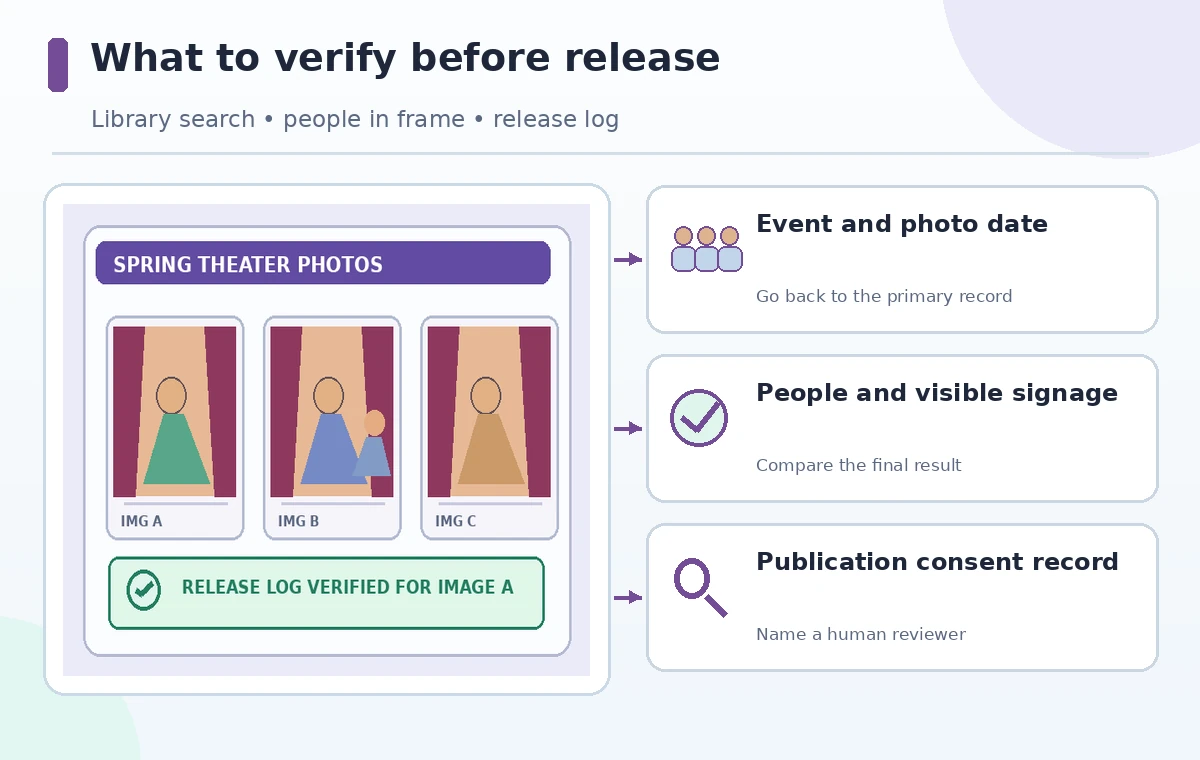
Perform a final editorial release gate
Have a second reviewer check the actual image, not just its thumbnail, against three questions: Is this the correct event? Is everyone identifiable cleared for this channel? Does the caption accurately describe the scene? If any answer is uncertain, stop. Ask Photos helps shorten asset discovery, but the last step is an explicit human authorization. The strongest workflow is one where search results can be wrong without causing an unauthorized publication. A final note should state who approved the export and where the relevant permission record is kept, without reproducing private personal information in the public caption.
How We Research
We checked Google’s Ask Photos support guide and its 2026 Ask Photos product guidance for eligible devices, opt-in, regional rollout, search behavior, and known inaccuracies. The theater, photo candidates, and consent example are hypothetical; we did not inspect anyone’s Google Photos library. Permission requirements depend on local law and the organization’s release policy and are not established by Google Photos search results.
Frequently Asked Questions
No. Google describes rollout, account, region, language and device eligibility; use classic search if the experimental experience is not available.
No. Face labels and search results do not certify consent, age, licensing or approved publication use.
Yes. An identifiable participant may lack clearance, or the frame may contain confidential information.
Do not assume editing solves the rights issue. Check policy and retain the unedited source; choose another frame if uncertain.
Keep the original ID, event context, export details, clearance status, intended channel, and named reviewer.