
A museum adds an AI-assisted search box to its public kiosk. A developer changes the backend so the assistant can query exhibit records, and the security reviewer wants to catch dangerous code paths before release. GitHub CodeQL code scanning can analyze supported repository languages and surface potential vulnerabilities as reviewable alerts. It does not demonstrate that the kiosk is safe, that an AI-generated query is trusted, or that access checks are correct. The useful workflow combines scanning with tests, protected pull requests and human review of every security-relevant change.
Decide which changes deserve a security gate
Start with a diagram of the kiosk’s data flow: public request, application input validation, search endpoint, archive database, and output. Identify paths that receive untrusted user text or model-generated tool arguments. In a hypothetical example, the assistant constructs a search query while the server must still enforce permissions for embargoed exhibit records. Code scanning is one layer of review, not a place to delegate those authorizations to an LLM.
List the languages and frameworks actually in the repository, then check which CodeQL analyses are supported. Record whether the repo contains application code, build scripts, vendor-generated files, and sensitive configuration. The release checklist should include dependency reviews and secret scanning where appropriate, but those mechanisms solve different problems. Avoid assuming a green code-scan status proves that no credentials or unsafe dependencies exist.
Choose default or advanced CodeQL setup
GitHub documents a default code-scanning setup that configures CodeQL for supported languages with less workflow maintenance. Advanced setup allows teams to manage a workflow file and customize analysis behavior. For a small museum project, choose the simplest arrangement that can cover the backend language and required branches, and verify the current eligibility and plan settings in GitHub before enabling it.
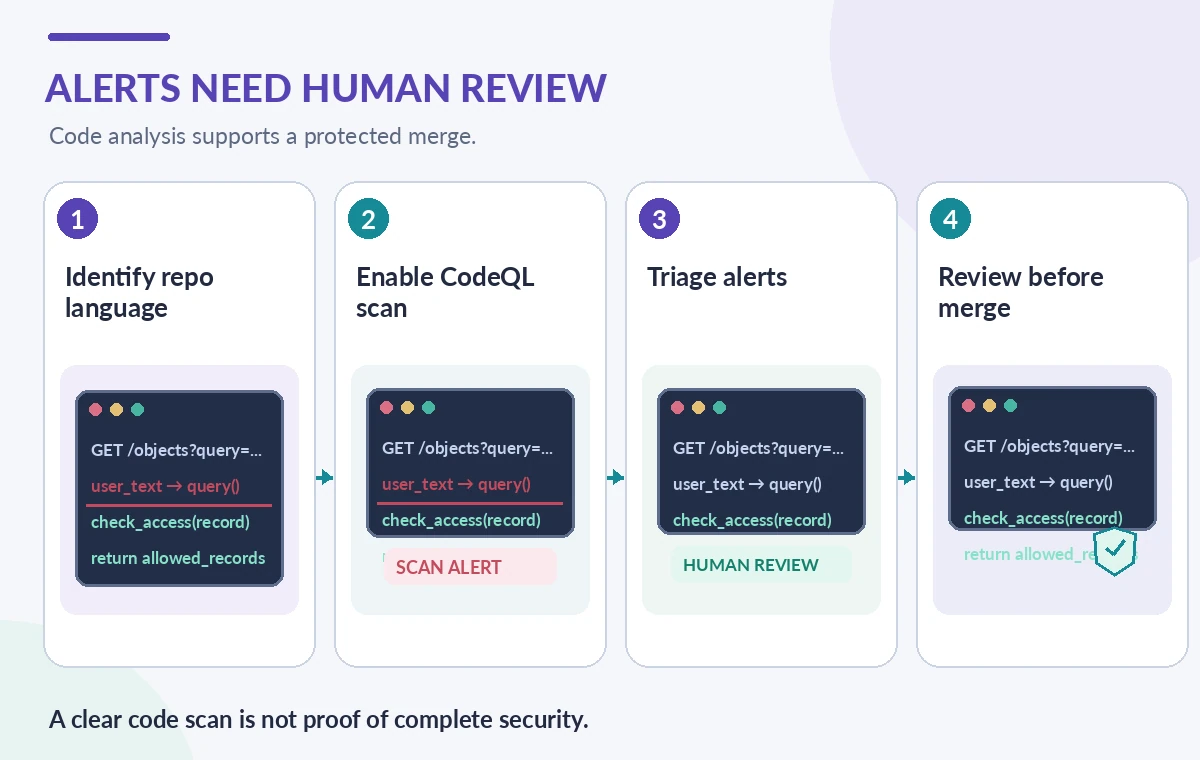
Default setup can scan on enablement and pushes to a default or protected branch, with documented additional triggers depending on configuration. Pull-request behavior and checks must be confirmed for the repository rather than inferred from a general screenshot. If the build uses an unusual compiler or generated code, advanced setup may be necessary. Store configuration choices in the repository’s security documentation for future maintainers.
Make a safe, reviewable change
Use a dedicated pull request introducing a read-only search endpoint or fixing an existing validation path. The demonstration should use synthetic exhibit records and no live donor or visitor data. Run ordinary unit and integration tests in addition to CodeQL. Do not intentionally deploy vulnerable examples to production in order to prove that a scanner is working; test fixtures and local code review can establish the workflow without exposing a real service.
Protect the default branch so security-relevant checks and a human review are required before merge. A model-generated patch deserves at least the same scrutiny as a human-authored patch: inspect the entire diff, how user input reaches the database, and whether authorization checks occur inside the trusted server. Scanning should run under least privilege and produce alerts visible to the responsible engineering reviewer.
Read an alert as a code-path hypothesis
A CodeQL alert can include an affected location, description, and an explanation of the path involved. Trace the finding from entry point toward the sensitive operation. Confirm whether the untrusted value can reach a sink in the actual application and whether the surrounding validation prevents it. Some findings will require remediation; others may be false positives or may not apply in the deployed configuration.
Document a reason when dismissing an alert, including the reviewer and evidence. Never treat dismissal as equivalent to fixing a vulnerability. If CodeQL does not flag a model-generated query, the team still needs manual access-control tests, input validation, output encoding and rate limiting. Static analysis cannot know every runtime policy, data ownership rule, or external tool contract configured by the kiosk administrator.
Compare the same endpoint across review states
In the conceptual diagram, the first state is a code change without a completed security review; the second displays a scanner alert and relevant data flow; the third is a protected merge after the necessary fix and tests. These are instructional states, not screenshots or measurements from GitHub. A green final state must represent both cleared blocking checks and actual human authorization, rather than a scanner’s detection becoming an automatic approval.

Be precise about the severity of findings. A warning about unsafe string handling may require different action from a confirmed exposure of restricted records. Review examples should include an unauthorized catalog request that must be rejected server-side even if the AI assistant asks politely. The final evidence consists of tests, reviewed code and repository controls, not a confidence badge on an AI-generated explanation.
Cover risks static scanning can miss
AI kiosks can fail because of prompt injection, excessive tool permissions, inaccurate source citations, logging of private visitor queries, or a stale access-control rule. Those are not necessarily code patterns CodeQL can detect. Test the assistant’s tool allowlist, enforce read-only data access where intended, and verify that a visitor cannot retrieve embargoed exhibit metadata by switching wording or requesting an alternate endpoint.
Keep a separate incident route for suspicious inputs and unexpected tool calls. Avoid saving sensitive prompts in logs unless a documented purpose and retention policy support it. CodeQL does not decide whether recorded consent exists or whether a catalog record may be made public. Security reviewers should cross-check the system’s actual data policy and run an integration test using deliberately restricted synthetic records.
Keep the gate stable when dependencies change
When a library update, CodeQL configuration change, or language toolchain upgrade alters analysis, rerun the test suite and review differences in alerts. If a scan unexpectedly stops covering a language, treat that as a coverage regression rather than a successful clean bill. Track the analysis revision, changed files and reviewer decision. A passing run on the wrong files or branch is not a useful release signal.

Use branch protections and documented exception handling to avoid quietly bypassing blocked checks during urgent fixes. Time-sensitive patches can be reviewed rapidly, but the person approving an exception should be named and a follow-up review scheduled. Do not conflate an unavailable CodeQL service with absence of vulnerabilities. Fail in a clear and auditable way when required verification cannot run.
Release only after human and runtime checks
A release checklist should confirm supported language coverage, reviewed alerts, functional tests, authorization tests, dependency state and a rollback plan. A staff member must verify that the kiosk’s public search responds correctly without exposing private collection data. In an ongoing project, monitor new scanning alerts and update the security owner when a third-party component or data source changes.
CodeQL’s value is making certain risky code paths visible before they become production incidents. It is not an oracle for AI-generated software or a substitute for application design. The safe endpoint is the one whose permissions are enforced in trusted code and whose changes have a reproducible, human-approved review history.
How We Research
For our November 2026 editorial review, we consulted the named official developer sources: GitHub code scanning setup types; GitHub about CodeQL code scanning; GitHub code scanning pull request alerts. We compared documented feature scope, parameters, supported inputs, workflow boundaries and important failure cases with a hypothetical, nonproduction museum or library scenario. We did not run paid API calls, access personal visitor records, independently benchmark model quality, conduct a real deployment, capture vendor interface screenshots or verify a particular institution’s permissions. All figures are original conceptual instructional drawings, not live results. Readers should verify current documentation, plan limits, regional availability, prices and applicable data policies before a trial.
Frequently Asked Questions
No. It analyzes code for supported classes of security and quality issues, not the truth of model answers.
No. Confirm supported languages, build requirements and needed configuration; advanced setup may be appropriate.
No. Access controls, runtime behavior, privacy and other risks need separate tests.
No. Require code review and the relevant functional and authorization tests.
Investigate the code path, document evidence and an accountable dismissal decision rather than hiding it.