
A museum’s touchscreen kiosk runs a small web app, and its maintainers already use a third-party static analyzer. Results printed only in a CI log are easy to miss during release review. GitHub code scanning can ingest compatible SARIF reports so staff can inspect alerts beside source locations. Uploading a report is not the same as proving a vulnerability exists or enforcing a release policy. This workflow shows the report format, permissions and categories that make the evidence inspectable.
Separate third-party scan output from the release decision
List which repositories, programming languages and rule sets the external analyzer covers. Distinguish its findings from tests, dependency alerts and manually reviewed incidents. The same kiosk may contain a public information interface and an internal administration endpoint; a finding on either deserves contextual review, not an automatic claim that visitors can exploit it. Assign clear owners to security triage and to the final release decision.
A synthetic scenario might flag unsafe HTML handling in an exhibition caption component. The scanner’s result identifies a potential code path; engineers must inspect the actual data flow and output encoding. Record the commit SHA, scanner version and rule-set revision so a reviewer can reproduce the finding. The visual examples here are invented, not a code audit of a real museum.
Export compatible SARIF rather than screen-scraped logs
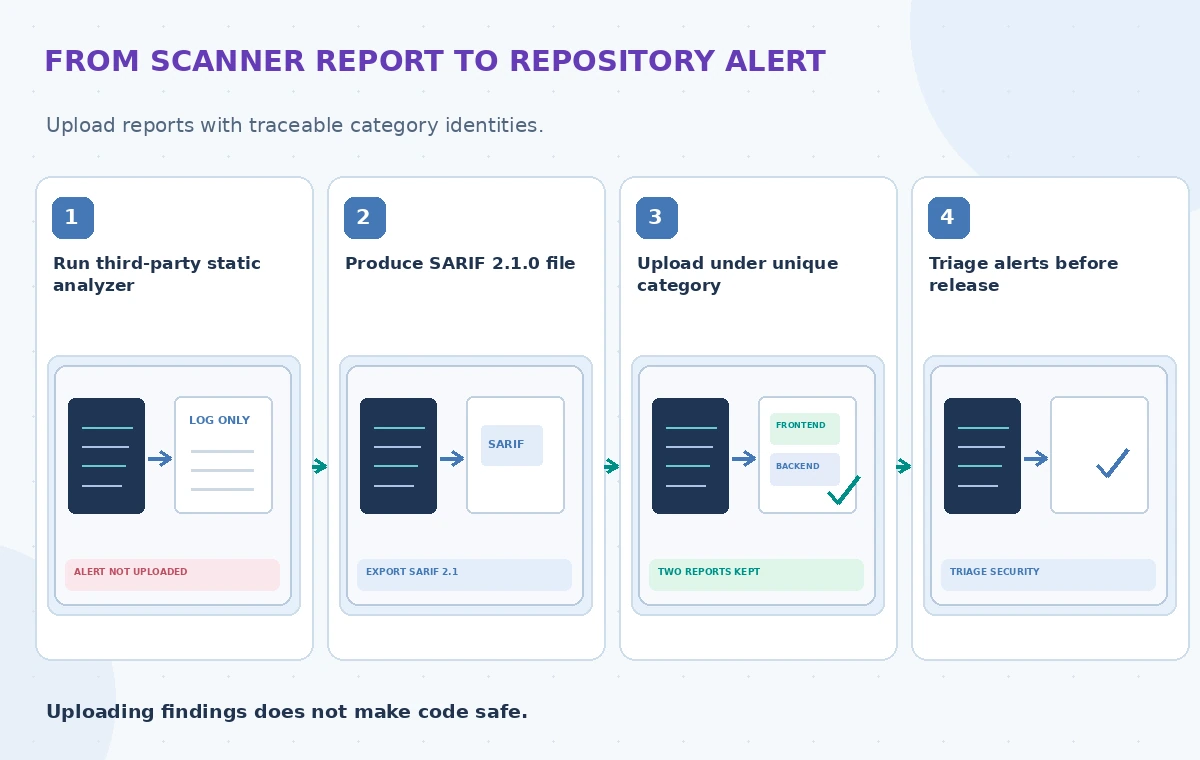
GitHub accepts a supported subset of SARIF 2.1.0, the JSON-based Static Analysis Results Interchange Format. A compatible report carries tool and rule information, result locations and supporting messages. A plain text log cannot simply be renamed with the .sarif extension. Use the scanner’s built-in SARIF exporter when available and validate its structure before uploading.
Check that file paths in reported locations map to source code in the target repository and commit. A path pointing to a temporary build directory can produce confusing or unhelpful annotations. Preserve the original report as a restricted CI artifact only if your retention and privacy policies allow it. Sanitize any file snippets or environment values that the third-party scanner could place in its messages.
Upload with a trusted workflow and minimal permissions
The GitHub guidance describes using github/codeql-action/upload-sarif with the sarif_file input; an optional category distinguishes result sets. A GitHub Actions job generally needs security-events: write for the upload, and some private-repository workflows also need actions: read. Check the repository’s eligibility and Code Security entitlement before designing an automated workflow.
Keep the upload step in a trusted workflow that cannot execute arbitrary changes from an unreviewed pull request with privileged tokens. Pin and review action dependencies under the team’s supply-chain policy. Do not print tokens in CI logs or attach credentials to SARIF output. If an external CI service uploads through the REST API or CLI, apply the corresponding least-privilege authentication and audit requirements.
Use categories to prevent one scan replacing another
GitHub notes that separate analyses of the same commit and tool need unique categories, otherwise later uploads can replace earlier results for a matching analysis identity. A kiosk monorepo may have a frontend JavaScript scan and a backend Python scan. Give them stable, distinct categories derived from trusted workflow configuration, not untrusted input strings.
If a workflow runs several scanner jobs, document their intended category values beside the CI matrix. Keep the scanner tool name, category, commit and branch visible in the review dashboard. Misconfigured categories can look like alerts disappearing, which would create a false impression that the code was fixed. The correct comparison shows both analyses retained, with reviewers able to trace every finding back to its source.
Compare local-only, overwritten and reviewable findings
The first state is a scan that prints warnings but never creates a GitHub alert; its visibility depends on someone reading the raw log. The middle state uploads two reports with a conflicting tool-and-category identity, so the newer analysis can replace the older set. The reviewed state gives each analysis a unique category and shows the relevant file path and rule next to a human triage decision.

An alert is not proof that an exploit has occurred, and absence of an alert is not proof that the kiosk is safe. Code scanning cannot replace functional tests, access control checks, software updates or incident response. The diagrams should display two clearly different report sets, not synthetic counts presented as measured improvement from GitHub.
Triage alerts with operational context
Define severity, reachable component, input trust boundary and exploitability as separate review fields. A potential unsafe string interpolation bug in an archived admin-only script may need attention, but it is different from a vulnerable code path exposed to kiosk visitors. Link each accepted remediation to a commit and verify that the scanner result changes as expected after the fix.
Document false-positive dispositions with the reason and reviewer rather than merely suppressing all warnings from a rule. Confirm that the team’s required status checks and branch protections actually cover the scanner workflow if security review is intended to block a release. Uploading SARIF alone does not configure that protection. Emergency changes need a documented exception process, not a silent bypass.
Test stability across commits and tool upgrades
Prepare a controlled fixture with an intentionally safe example, a known synthetic violation and a renamed source file. Observe whether locations and fingerprints remain stable when the analyzer version changes. GitHub uses supported SARIF fingerprint information to reduce duplicate alerts, but the scanner and repository structure influence how well that tracking works.

Check a failing upload scenario: wrong schema, unsupported file size, missing permissions or a report that references an unrelated commit. Make sure a failed upload is visible in CI instead of appearing as a green scan. Store the validation outcome and report identifier in the build summary. This article provides no observed scan success rate; local tests are required before production adoption.
Release only after the evidence is reviewed
Before deploying the kiosk, confirm the expected scanners ran, categories remain distinct, reports uploaded successfully and all high-priority findings have documented dispositions. Pair these checks with application tests and a rollback plan. If a report is absent or unreadable, treat that as a missing check, not a clean security result. Keep access to sensitive findings aligned with repository policy.
GitHub’s supported SARIF fields, feature availability and action versions can change. Recheck the primary documentation before copying a workflow. The value of SARIF upload lies in stable, auditable findings and clear human review; it is not a security certification and not an assertion that we scanned any live museum software for this article.
How We Research
We researched this November 2026 article from named official documentation: GitHub: Uploading a SARIF file; GitHub: SARIF support for code scanning; GitHub: About SARIF files. We compared documented request parameters and operational limitations with a hypothetical community organization use case, then designed independent human review and regression checks. Images are original fictional educational diagrams, not product screenshots, actual measured benchmark charts or verified customer cases. We did not submit live API requests, upload personal files, process museum assets or measure vendor accuracy. Implementers must verify current endpoint versions, access controls, region support, pricing and retention before deployment. Factual and rights-sensitive results require review of primary sources.
Frequently Asked Questions
SARIF is a JSON-based format for static analysis results. GitHub supports a documented subset of version 2.1.0.
The standard CodeQL action uploads its own analysis; third-party scanners usually need an explicit SARIF upload workflow.
Distinct categories help preserve multiple analyses of a commit instead of allowing one set to replace another.
No. Configure the repository’s required checks and protections separately.
Potentially. Review report contents, paths and CI artifacts before upload or retention.