
A neighborhood seed bank is arranging a small handoff of twelve sealed seed packets. In a fictional email thread, the coordinator offers Tuesday at 9:00 a.m., but the volunteer driver has not confirmed that slot. A quick summary could save time; it could also transform an offer into a false appointment. The difference matters to anyone preparing the collection table.
Gemini in Gmail can summarize threads and suggest responses in eligible accounts. It does not turn an unacknowledged message into evidence of agreement. This guide uses a made-up thread to show how to preserve dates, senders, and conditional language before anyone updates a calendar or tells volunteers to arrive.
Write the decision you actually need
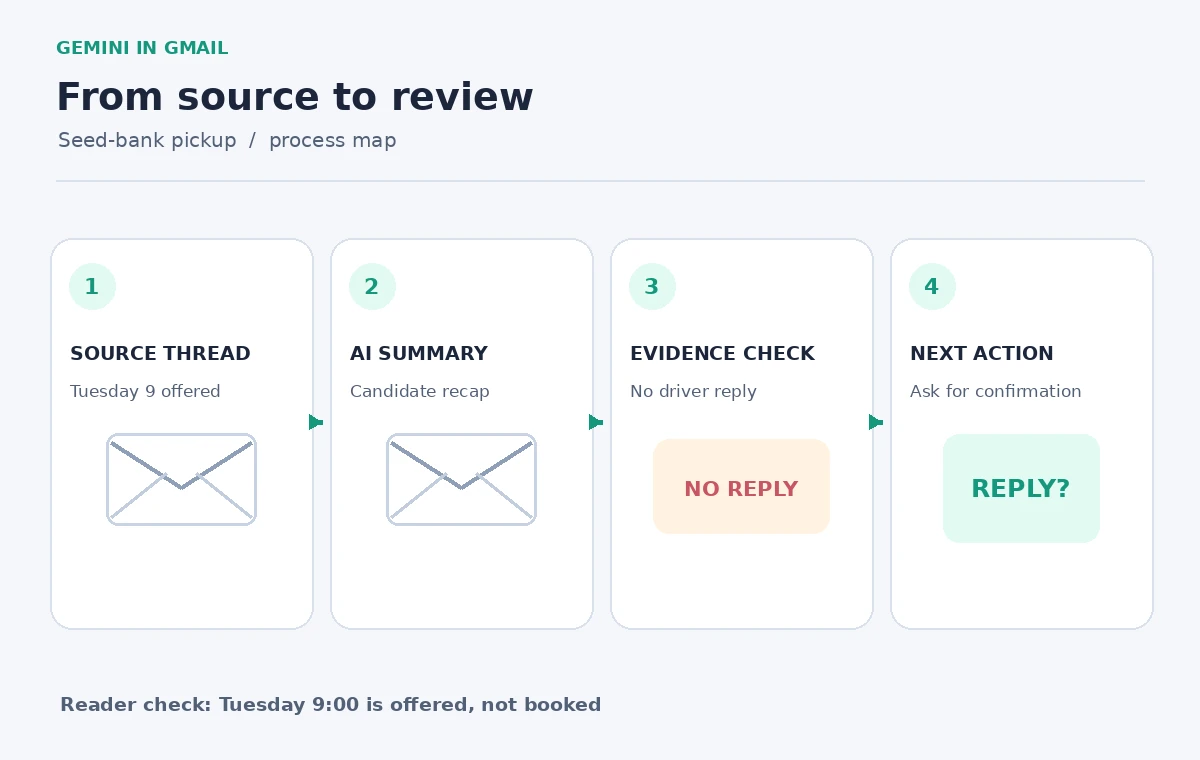
Before opening the assistant, state the narrow question: “Is the seed pickup confirmed, and who has to reply?” The hypothetical thread contains three useful facts: twelve packets are ready, the site can offer Tuesday at 9:00 a.m., and the assigned driver has not accepted. Label the offered slot as tentative in your own notes. That tiny preparation makes the later summary easier to audit.
A second question is whether another date is mentioned elsewhere in the same conversation. Do not assume the latest email has the whole answer; people often quote an old schedule below a new sentence. Search by the exact subject and identify the message with the most recent explicit confirmation, if any. Here, there is no acceptance message, so no pickup time can be called booked.
Open the relevant Gmail thread, not an unrelated search result
From Gmail on the web, open the conversation with the actual seed-bank subject. For an eligible Workspace or Google AI account, Google documents the Ask Gemini side panel and thread summary prompts. If a “Summarize this email” action appears, use that; otherwise ask the side panel to summarize the open conversation. Interfaces and entitlement differ, so follow the controls present in your account.
Keep the original thread visible while reading the answer. A summary may combine several senders into one bullet, which is fine for orientation but dangerous for commitments. For this exercise, jot down three fields beside the summary: who offered the time, who was asked to confirm, and the newest message that answers that request. The answer to the last field is “none yet.”
Prompt for decisions, proposals, and missing replies separately
Ask: “For this thread only, list confirmed facts, proposed arrangements, and unanswered questions in separate groups. Quote no personal contact details. Do not infer acceptance from silence.” This is a user-written verification prompt, not a special Gmail command. If the model returns “Tuesday 9:00 pickup confirmed,” mark that as unsupported until the driver explicitly accepts the appointment.
Request a second, simpler view: “Which sender needs to reply before a calendar event can be treated as final?” The output should point toward the volunteer driver rather than infer that the coordinator can speak for both parties. In real operations, the human organizer still checks the mail and contacts the correct person. Generated action items are suggestions to review, not assignments made by the people mentioned.
Cross-check the wording against individual messages
Reopen the coordinator’s offer and read the verbs. “Could collect,” “we can hold,” and “please confirm” are not equivalents of “confirmed” or “booked.” Verify the day, date, time zone, pickup address, and quantity directly against the actual email rather than the summary. This sample uses an invented Tuesday and an invented packet count, so none of these details should be copied into a real schedule.
Then inspect quoted text and forwarded material. A later reply saying “great, thanks” could refer to the packet preparation rather than the appointment; context determines the meaning. When unclear, ask a human for a single explicit confirmation instead of prompting the assistant to decide. Do not paste full addresses or phone numbers into a public planning document just because the assistant retrieved them.

Use an action-item table with evidence status
A concise internal register can use four columns: item, status, source message, and next owner. Set “Packets packed: stated in coordinator email” and “Tuesday 9:00: offered, awaiting driver response.” Record the exact reply needed: the driver must accept or propose another time. If you share this table, store it in a place with appropriate access permissions rather than leaving it in an unrestricted group channel.
Distinguish a human-assigned action from a generated suggestion. The assistant may suggest “send a reminder,” which is not a request from the coordinator unless the email actually says so. Put “proposed next step” in the status column. This produces a useful checklist without laundering an AI inference into a decision the participants never made.
Draft a clarification reply without sending it automatically
Ask Gemini to propose a short reply that says the packets are ready and requests an explicit yes or no on Tuesday at 9:00 a.m. Read the draft yourself before using it. The message must not include “thanks for confirming” or announce that a driver has already been scheduled. It should offer the recipient an easy way to suggest a different slot.
Keep the addressee, subject, signature, and any sensitive details under manual review. Suggested replies are writing assistance, not authority to communicate. When a time affects travel or safety, a person should choose when to send the message, then wait for a real response. In this example the outcome after drafting is still pending, even if the email is beautifully written.
Combine Tools With Verification
Check access, language, and privacy before using the feature
Google says Gemini features in Gmail require an eligible plan and are subject to language and rollout conditions. The same prompt may appear in a different place across accounts. Verify availability in the live Google help page and the account’s own controls rather than relying on a screenshot from another organization. This article does not promise a free allowance, a specific subscription price, or universal rollout.
Before asking for a summary, determine whether the conversation contains personal addresses, protected client information, or sensitive contact details. Follow your organization’s account and data-sharing rules; if the thread should not be processed by an assistant, use a manual summary instead. Limit the output to logistical facts needed for the task rather than duplicating private material.

Make the final status visibly conditional
A responsible summary might read: “Twelve packets reported ready. The coordinator offered Tuesday at 9:00 a.m. The driver has not confirmed. Next step: request an explicit response.” That is longer than “Pickup Tuesday 9,” but it protects everyone from a false arrival. Only an actual acceptance from the intended participant should change the row from tentative to confirmed.
If the answer changes after the follow-up, update the register with the message date and responsible person. Do not overwrite the earlier offer or erase the chain of events; retain the history needed to understand why the plan changed. This workflow is successful when it creates clarity about uncertainty, not when it makes uncertainty disappear from the narrative.
How We Research
On November 4, 2026, we checked the named official sources Google Gmail Help: Collaborate with Gemini in Gmail and Google Workspace Learning Center: Organize and find email. We reviewed Google’s official Gmail help and Workspace learning instructions on November 4, 2026, checking what thread summarization and reply suggestions actually do. We constructed a hypothetical three-message logistics example and compared the proposed wording with the conditional source statements. We did not access any mailbox, run Gemini, send a message, measure accuracy, or verify a real pickup. Feature visibility, language support, privacy policies, and account entitlements should be checked again before use.
Frequently Asked Questions
No. A summary can describe messages but cannot manufacture acceptance from a recipient who has not replied.
Use “proposed,” “offered,” or “awaiting confirmation,” and name the person whose explicit reply is needed.
No. Availability and interface placement depend on eligible plans, language, account configuration, and rollout.
No. Treat suggested text as a draft and inspect recipients, wording, and source facts before choosing to send.
A clear acceptance from the relevant participant, recorded with its date and source message, rather than an AI interpretation.