
A small theater orders replacement stage lights and must answer a supplier who has suggested a new delivery window. The coordinator wants a courteous message that states the actual inventory need and the agreed arrival date, without authorizing rush fees or promising that the venue can accept a late shipment. Gemini Proofread in Gmail offers grammar, tone, and style suggestions on supported accounts. This walkthrough uses an invented exchange to distinguish a better sentence from a changed commercial commitment.
Freeze the real terms before polishing the reply
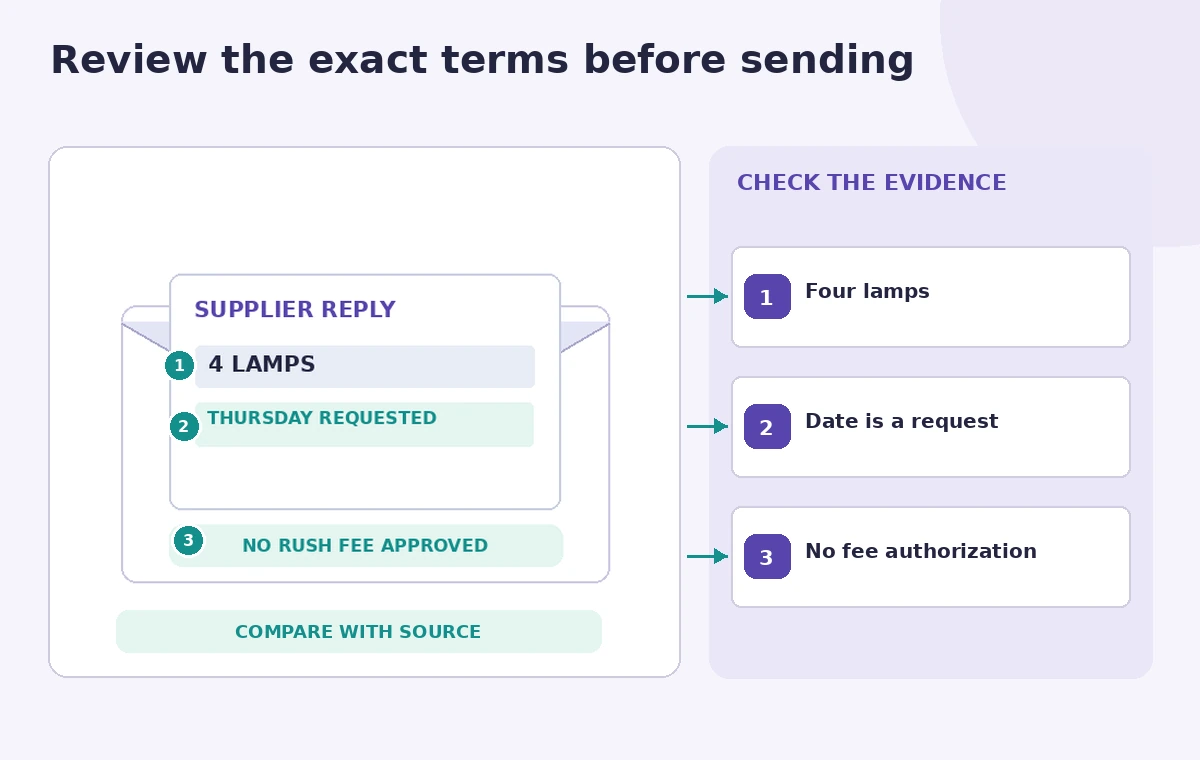
Copy the approved facts into a short reference note before touching the draft: four replacement lamps, a requested delivery by Thursday, and no approval for expedited shipping charges. Keep the thread and any purchase order accessible. A proofreading suggestion may sound smoother while changing “requested” into “confirmed,” a meaningful difference if the supplier has not accepted the date. Treat quantities, names, and obligations as protected fields.
Mark three phrase types differently: factual values that must stay exact, courteous language that can change, and uncertain points that need a direct question. For example, “Can you confirm arrival by Thursday?” is a request, not evidence of a booking. Record which person can approve an extra fee; the editor who checks grammar should not silently assume that authority.
Check eligibility and open the actual Proofread flow
Google documents Proofread in Gmail for eligible Google AI consumer plans and qualifying Workspace accounts. Availability varies by platform, language, experiments, and administrator controls. On supported desktop Gmail, suggestions appear as underlined words or phrases in the draft; selecting one opens a card that can be accepted or ignored. This is a review interface, not a command that should be applied to the whole message without inspection.
Keep the original draft in a separate local note or Gmail draft before reviewing suggestions. Do not paste a private contract into an unrelated external checker just because Proofread is unavailable in the account. If the option is absent, confirm the supported language and plan rather than assuming the tool has changed its terms. Make the workflow useful with ordinary manual proofreading as a fallback.

Ask for clarity while protecting financial wording
The draft should separate “please confirm,” “we understand,” and “we authorize.” They may feel interchangeable in a casual conversation but they have different effects in a supplier exchange. Consider a sentence such as “Please confirm whether the four lamps can arrive by Thursday at the agreed rate.” Suggestions may improve punctuation or reduce repetition, yet the conditional nature of the question must survive.
Review each proposed rewrite against the original thread, not only the sentence beside it. The number four is not merely a stylistic detail, and changing “agreed rate” to “standard rate” could introduce a new ambiguity. Keep unit counts and shipping address unchanged unless someone with access to the order has checked them. A confident tone is not a substitute for documented agreement.
Compare a fluent mistake with a verified edit
The comparison drawing shows an unsafe example that converts a pending date into a guaranteed arrival and a reviewed version that preserves the question. These are illustrative editorial sentences, not screenshots or tested Gemini responses. Read the before and after aloud and identify what a recipient would reasonably believe the sender had promised. A sentence can be grammatically perfect and operationally wrong.
Use a simple two-column comparison for the final review. Put the email draft on one side and the approved order record on the other. Confirm delivery date, quantity, price language, sender authority, and recipient. If a suggestion makes an unknown condition seem settled, decline it or rewrite manually. The default action should be to preserve the original meaning unless the source evidence supports a change.

Protect sensitive information in prompts and feedback
Only include information that is needed to compose and verify the message. Internal budget ceilings, bank details, or unrelated customer records should not be copied into prompts or feedback forms. Google states that users may be informed before sending feedback about restrictions on including personal, sensitive, or confidential material. Read the account settings and organizational data policies before relying on AI in a supplier workflow.
Keep the approval process separate from proofreading. A colleague may review the message for clarity without needing access to banking instructions or the entire contract. If the message mentions a disputed delivery or potential penalty, request an authorized business review instead of asking the writing assistant to decide the obligation. Its role here is phrasing support, not procurement advice.
Inspect tone, names, and reply context
Gmail can suggest shorter, friendlier wording that appears appealing in isolation. Read the complete thread again after accepting any changes. Check that the reply does not omit an earlier caveat, address the wrong person, or imply an agreement in a conversation where the supplier is still negotiating. Preserve the professional relationship without sacrificing precision or using needlessly aggressive language.
For a high-impact email, send a preview to another staff member through the approved internal review process. Ask them one factual question: “What date and price does this message commit us to?” If their answer differs from the authorized terms, revise the email. This test catches subtle changes that ordinary spelling and grammar checks cannot identify.
Keep an audit-friendly send process
Use a final checklist immediately before sending: recipient domain, attachment version, delivery date phrasing, units, fee status, and a clear call to action. For example, the call to action might be “Please reply with availability and any additional charge for review.” That language does not authorize a new cost. Never interpret a proofreading confirmation as evidence that all the facts in the message are correct.
Save an approved copy when the team needs a purchasing trail. The supplier response, rather than a polished draft, establishes what the other party actually agreed to. Avoid rewriting historical email records; maintain the original context. If a correction is needed after sending, send an explicit clarification rather than silently changing a separate project note.
Perform the three-part pre-send check
The final illustration points to the quantity, the conditional delivery date, and the fee-approval phrase. A reviewer should be able to identify each directly in the email and match it to the order evidence. Check at normal zoom and on a phone where wrapping can hide a clause. Keep the commercial terms in plain readable text, not in a decorative attachment.
If the wording suggests a promise the organization has not made, stop and revise. The proper outcome is a concise message whose tone improved while obligations stayed fixed. This hypothetical scenario demonstrates a safe decision process, not a claim that the service was used on a live supplier account or that any delivery was guaranteed.
How We Research
For this article we reviewed named official vendor sources: Google Gmail Help, Proofread your drafts with Gemini; Google Workspace, Gemini features and eligibility. We compared their stated entry points, supported accounts, configuration options and explicit limits with a narrowly defined editorial scenario. The steps identify what can be checked against the original email, meeting record, product photograph, or approved policy and what needs a qualified human decision. Illustrations are original conceptual artwork, not screenshots or recorded tool outputs. We did not log into a live account, pay for generations, transcribe real people, inspect real inventory, or conduct measured product tests. Features, pricing, and release availability may change. Confirm the current documentation and secure permission before using real customer or participant data.
Frequently Asked Questions
No. The documented workflow presents suggestions for you to accept or ignore; sending remains a separate decision.
A suggestion may change phrasing, so compare each edit with the purchase order and original thread.
The core help identifies English, German, and Spanish, with additional early-access languages on some accounts.
Eligibility depends on plan, platform, administrator settings, and rollout status. Check the current help.
Verify the recipient, product count, conditional date, and fee authorization before sending.