
A fictional garden-planning workshop produced many sticky notes about shade, benches, paths, and planting areas. One participant wrote, “Entrance ramp is too steep for my wheelchair.” An automatic grouping may tuck that note under “general paths” or “site appearance,” reducing its visibility just when planners need to prioritize it. Frequency of comments is not a measure of safety or accessibility importance.
Mural documents an AI-powered “Cluster by topic” operation for eligible plans. It can organize selected sticky notes and suggest headings, but reviewers can preview, refine, accept, or discard the proposed clusters. This guide shows a review process using invented notes, not a captured Mural workspace or a tested model grouping.
Preserve the workshop board before reorganizing it
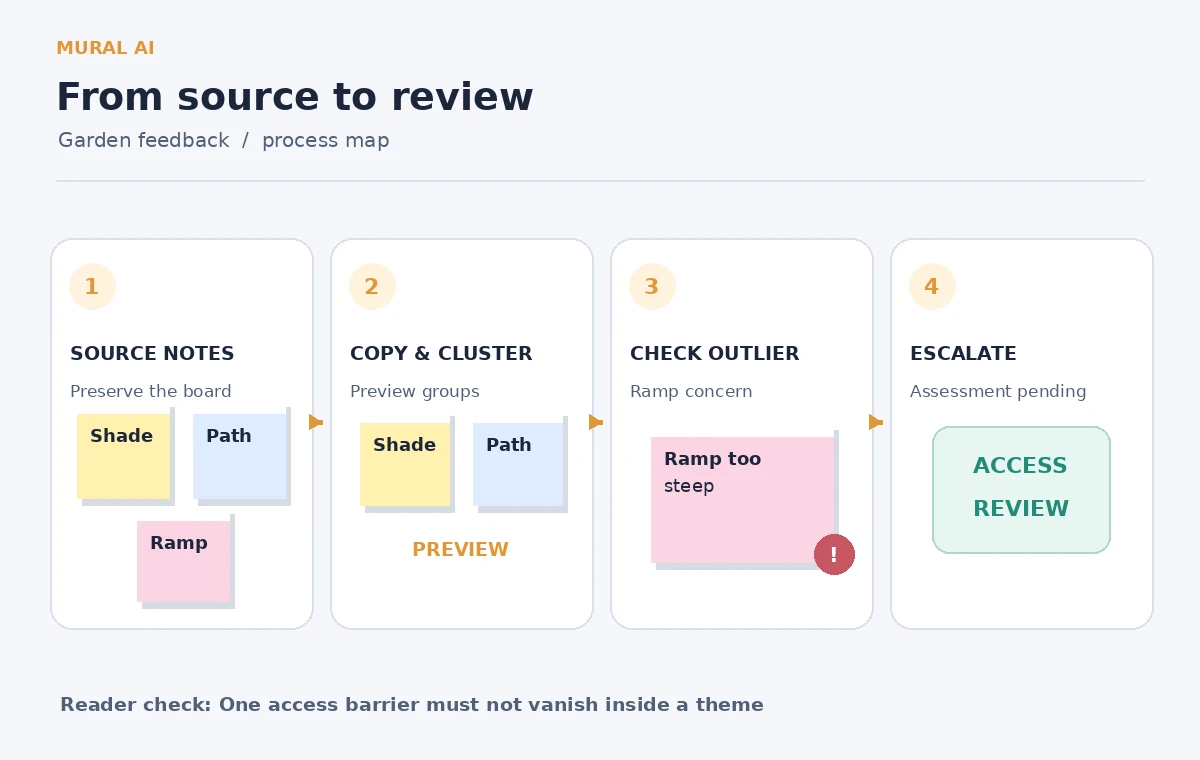
Take an authorized copy of the selected sticky notes, preserving the board used in the actual session. Include nearby annotations or references separately because placement can convey meaning. Mural explicitly recommends copying stickies before clustering, since the operation rearranges them. Save the original board location or a version reference in the handoff notes so reviewers can audit what the participants originally saw.
Do not assume all feedback was written on a sticky note. Spoken comments, sketches, photographs, and tables may need a separate record. Mural’s documented feature currently works on sticky notes placed directly on the canvas, not stickies inside a table. Moving text out of another format can remove provenance, so document any transcription choices before treating the new stickies as a complete record.
Inventory the notes and mark high-stakes signals
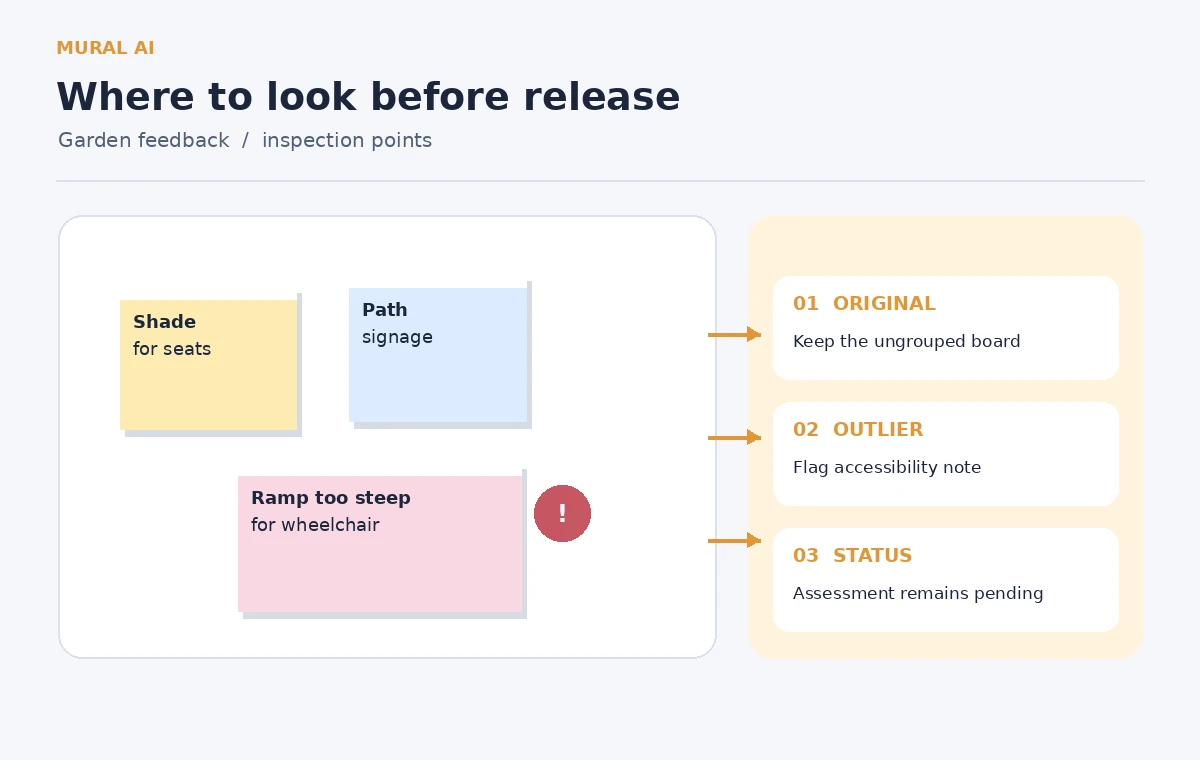
Build a short source register: note wording, original location, participant attribution only if appropriately collected, and whether it concerns access, safety, aesthetics, or maintenance. The example contains several shade requests, two bench requests, and one ramp-access complaint. Do not turn a single complaint into a claim that all wheelchair users reported the same experience; the source supports exactly one comment.
You can flag urgent issues for human review before automated clustering. A tag such as “access barrier — assess” is an editorial marker, not a safety certification. The purpose is to keep the note in view if the AI clusters mainly by lexical similarity and produces a neat but unhelpful topic map. Save the original wording without paraphrasing away the user’s specific difficulty.
Run Cluster by topic on a controlled selection
For an eligible Mural plan, select the relevant sticky notes on the canvas, then use the Explore with AI control and choose Cluster by topic. Mural’s help page says the feature is available to certain paid plan roles, so verify your account before designing a workshop around it. A missing menu does not mean the board contains invalid feedback.
The assistant previews suggested groups before applying changes. Use that review stage. If the headings lump mobility barriers with visual design preferences, do not simply accept because the other clusters look persuasive. Preview and discard are as important to the workflow as generation. The tool offers a starting classification; the facilitator is still responsible for faithful synthesis.
Compare the AI groupings against participant intent
Consider a hypothetical draft cluster called “Path improvements” that contains both “Paint path edges green” and “Entrance ramp too steep for my wheelchair.” These are related by location but not by seriousness, urgency, or who can remedy them. The safer result keeps an explicit “Access barrier requiring assessment” item with its complete wording and a separate “Path appearance” group.
Do not present those example clusters as observed Mural output. They illustrate what to inspect when the real preview appears. Review every sensitive note individually and ask the facilitator whether the topic heading would make sense to the contributor. A cluster label can be grammatically accurate while still failing the decision-making purpose of the meeting.

Refine the number of groups without erasing exceptions
Mural documents options to try fewer or more clusters. Fewer can help when minor wording differences have scattered one theme across multiple headings, but it can also merge urgent issues into broad categories. More can expose distinct concerns, but can create false precision from tiny sample sizes. Judge the options by whether the resulting categories help a human find the source notes, not by how balanced the diagram looks.
If the ramp concern remains misfiled, manually move or annotate it. Note that “access requires separate review” is an organizational choice, not an AI verdict about the physical ramp. Keep the question open until someone checks conditions on site using the appropriate accessibility standards and stakeholder input. Reframing does not substitute for an inspection.
Make an exception register alongside the clusters
Create a small section for notes needing action regardless of theme frequency: access barriers, immediate safety hazards, and unresolved ownership questions. Include a link or identifier back to the unedited sticky where feasible. This secondary register prevents an executive summary from reporting only popular ideas such as shade seating while hiding a specific barrier that could exclude someone from the garden.
State whose observation it was only when that person has agreed to such attribution. Keep contact details off broadly shared murals. If an issue is urgent, route it to the right accountable person through normal channels rather than announcing “the AI marked it critical.” A facilitator can decide to escalate a concern; the model cannot inspect the site or authorize design work.
Combine Tools With Verification
Present both the big themes and the outliers
For a workshop report, show a grouped view for broad patterns and an “Needs assessment” list for the exceptional items. Describe the clusters as a synthesis of selected notes, not a poll of all residents. If fifteen notes discuss shade and only one mentions a steep ramp, report both quantities accurately without implying the ramp issue is less valid because it has fewer mentions.
Share the method: the facilitator copied the board, selected eligible sticky notes, previewed AI clusters, manually reviewed accessibility concerns, and kept a record of changes. Readers should be able to see which labels are editorial interpretations. A visual grouping is useful when it helps a decision-maker retrieve a specific source note rather than replacing the source with a polished abstraction.
Obtain sign-off before changing physical plans
Discuss the groupings with participants or representatives who can challenge missing themes. If the ramp requires survey work, assign a human reviewer and a suitable next step; do not label it fixed. Confirm that photos, maps, and planning files remain subject to their original permissions. This article is an information-organization technique, not engineering advice or a claim of standards compliance.
Finish with a status row: “Ramp access complaint captured; site assessment pending.” It preserves a concrete concern while leaving the outcome open. That is the editorial win in this example. AI makes the broad board easier to navigate; it does not get to vote minority feedback off the page merely because a narrow category looks less tidy.
How We Research
On November 4, 2026, we checked the named official sources Mural Help Center: Cluster with AI and Mural official website: Mural AI. We reviewed Mural’s official Cluster with AI help page, including eligible plans, the direct-on-canvas sticky-note requirement, and the preview/refine/accept controls, on November 4, 2026. A second official Mural AI overview provides background only; the procedural claims here come from the help article. We devised fictional feedback and contrasted a misfiled access complaint with an editorially corrected classification. We did not open a Mural account, process real participant notes, or evaluate a site’s physical accessibility.
Frequently Asked Questions
No. Mural documents the operation for sticky notes directly on the canvas, not notes inside tables.
No. Review the preview and manually preserve any important exception that the proposed grouping obscures.
Keeping an untouched copy is the safest starting point, because clustering rearranges selected notes.
Not necessarily. One credible access or safety concern may warrant action even if it is mentioned only once.
No. A grouping algorithm organizes text; qualified human review and on-site evidence are needed for physical claims.