
A neighborhood library is arranging a delivery of large-print books for a homebound reader. A volunteer has offered to collect the package “sometime Thursday,” but the coordinator has not confirmed a route or a time. A polished email that says “Your books will arrive Thursday at 2 p.m.” would sound reassuring and be wrong. Drafting help should improve wording without quietly upgrading a possibility into a promise.
Gmail’s Help me write feature can draft or refine an email in supported accounts. This guide uses fictional recipients and schedules, and no actual message was sent. The important edit is not stylistic: it is the distinction between a proposed pickup window and one the library is authorized to communicate as confirmed.
Separate facts from open questions
Before composing, make a tiny source note with three sections: confirmed, tentative, and unknown. Confirmed items might include the book title category, the library’s public contact address, and a delivery request received on Tuesday. A volunteer’s “I may be available Thursday” belongs in the tentative section. A delivery time that nobody has entered belongs in unknown.
This discipline prevents the assistant from filling an empty schedule slot with a plausible-sounding hour. If there is an existing library delivery policy, quote its actual conditions rather than asking AI to invent eligibility rules, insurance promises, or a same-day guarantee.
Check account eligibility and open the compose window
Google’s Gmail Help Center describes Help me write as a drafting and refinement feature for eligible accounts, with availability depending on account type, plan, language, and location. For some personal accounts, location restrictions apply. Check the current prompt bar in the actual Gmail compose interface instead of assuming the feature appears for every volunteer.
Open a new draft or reply in the approved library mailbox. Confirm the From address before entering sensitive reader information. Avoid copying private borrowing histories into a personal account simply to access an AI button; use the institution’s established privacy and access policies.
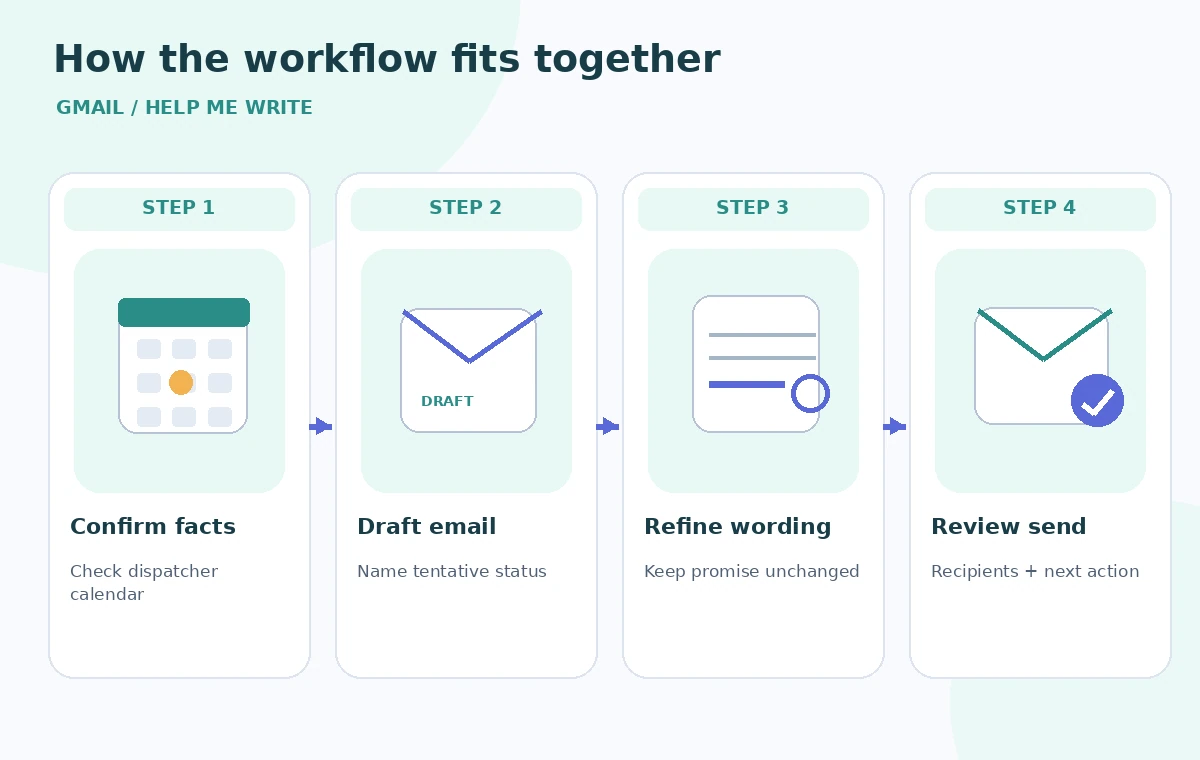
Write a bounded prompt with clear status words
Try: “Draft a warm, concise email confirming receipt of a large-print book delivery request. Thursday is only a proposed volunteer pickup day; no pickup time or delivery date has been confirmed. Ask whether the reader prefers a phone follow-up or email when the schedule is final. Do not promise delivery or mention private borrowing history.”
Give the model the intended audience and tone but do not ask it to “make the plan sound final.” Status words matter: “requested,” “offered,” “tentative,” and “confirmed” describe different operational states. The assistant should preserve that difference even when it rewrites a choppy outline into fluent prose.
Refine tone without rewriting the commitment
Help me write can revise existing text for tone and clarity. That is useful for making a service email readable, especially when volunteers have drafted shorthand notes. The review risk is that a refinement might remove caveats, convert passive possibilities into firm commitments, or change which person is responsible for the next action.
Compare before and after versions sentence by sentence. A safe revision may change “we will get back to you regarding this” to “we’ll follow up once the route is confirmed.” It should not change “a volunteer may collect the books Thursday” to “your delivery is scheduled for Thursday.” Those statements have different meanings.
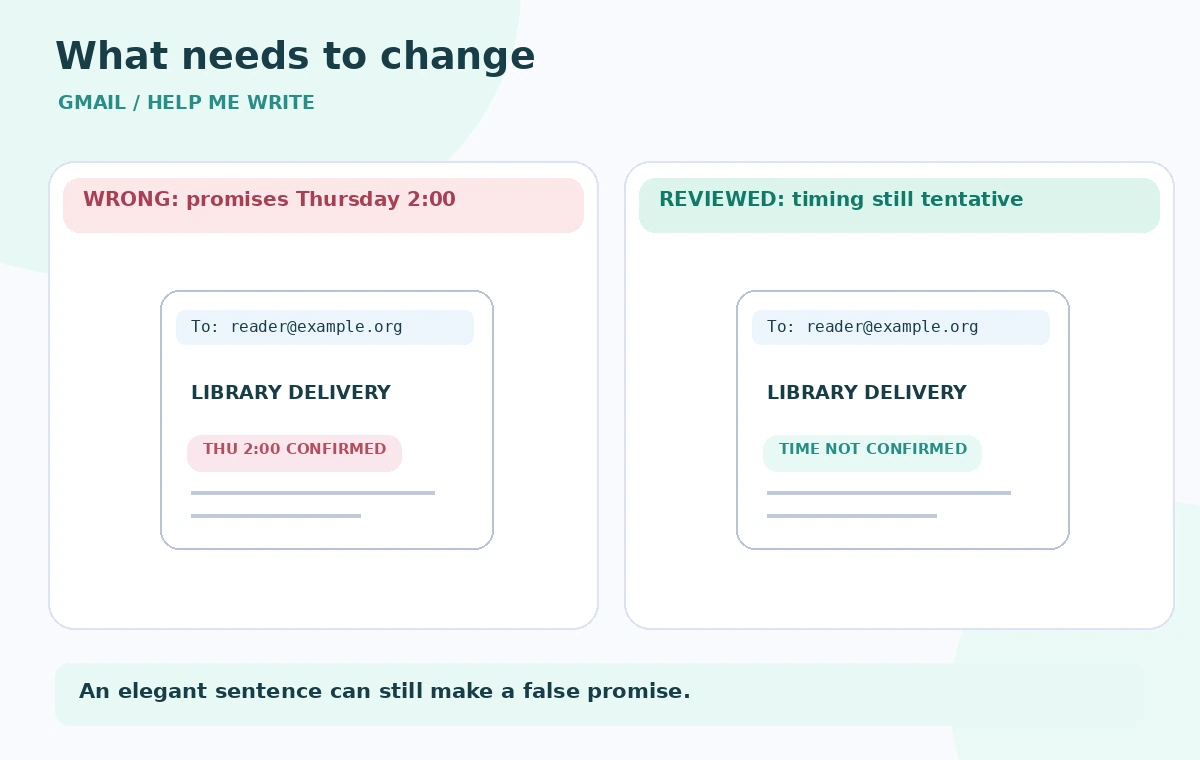
Make the tentative-versus-confirmed difference visible
The comparison image shows an invented bad email promising “Thursday at 2:00” and a reviewed version saying “Pickup timing is not yet confirmed.” These are schematic examples, not Gmail screenshots. The corrected message also includes a clear next step: the coordinator will contact the reader when the route is approved.
A confirmed schedule can be added later from the library calendar or dispatcher note. Do not infer a precise time from an ambiguous phrase such as “after lunch.” When time zones or accessibility arrangements are relevant, check the recipient’s preferences and write the agreed format explicitly.
Protect addresses, recipients, and attachments
AI drafting does not remove the need to check To, Cc, and Bcc. Verify that a private reader’s email is not copied to an unrelated volunteer distribution list. Do not attach notes that reveal health or mobility details beyond what the library is authorized to share. If the reader uses a caregiver as an approved contact, confirm that consent and scope in the library record.
Keep contact information in the authorized system rather than relying on a generated draft to remember it. If the assistant inserts an unrequested address, phone number, link, or pickup location, remove it and verify the intended public contact from the library’s own directory.
Perform a thirty-second send review
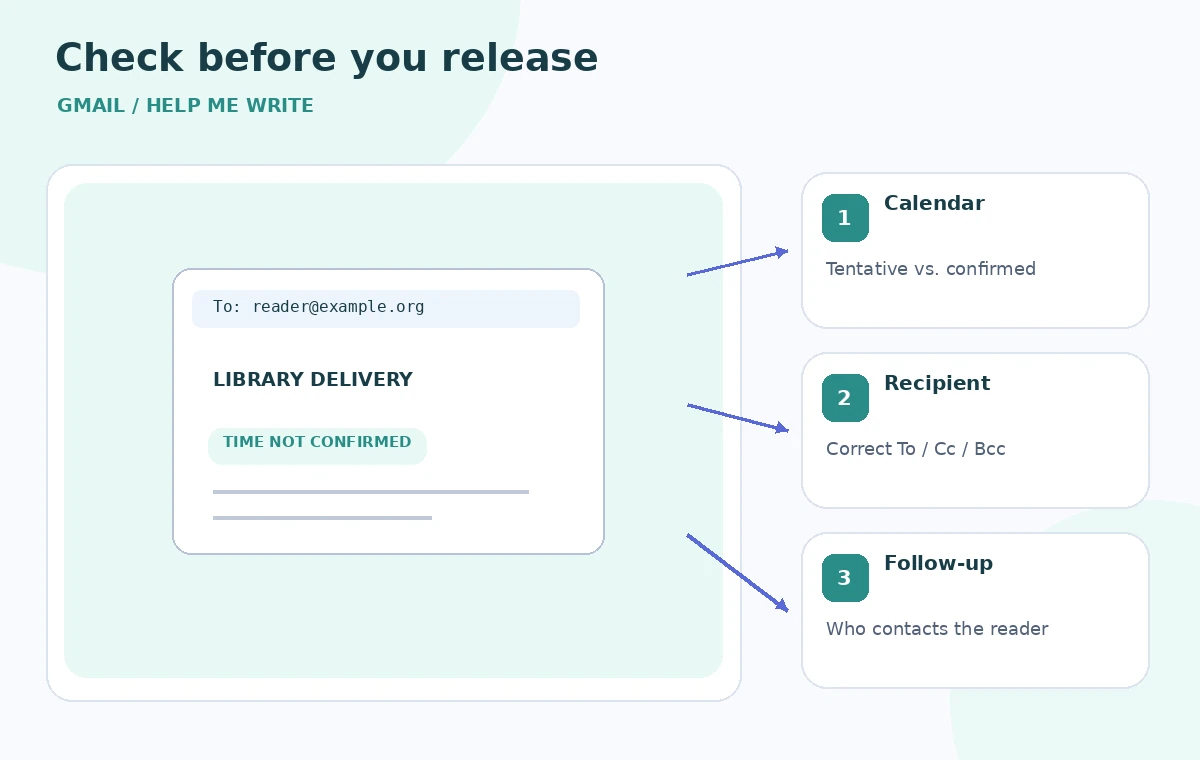
Read the message as its recipient would. Can they distinguish what the library has done, what remains pending, and what will happen next? Check the subject, greeting, delivery date, pickup time, contact method, and sign-off. A short email with one precise uncertainty is better than a cheerful paragraph full of unsupported reassurance.
The checkpoint graphic puts attention on three fields: calendar status, recipient address, and next action. Add a second reviewer for messages involving high-impact access needs or schedule changes. An AI draft is a suggestion in the compose window; sending remains a human decision.
Turn the successful pattern into a reusable template
Save a short approved template that can be filled with actual confirmed values. Leave placeholders visibly unresolved rather than adding made-up dates. A library can standardize phrases such as “we received your request,” “we are arranging a volunteer,” and “we will contact you when the schedule is final.” Reusing those phrases reduces accidental promises.
When Gmail updates its interface, verify the current tool entry point and account rules before training new volunteers. Review any template when delivery procedures change. The success metric is fewer misunderstandings and better handoffs, not the number of words the AI drafted or how smooth the message sounds.
How We Research
For this November 5, 2026 editorial review, we read the following official primary references: Gmail Help: Draft emails with Gemini, Google Workspace: Gemini in Gmail overview. We compared documented entry points, input requirements, privacy or permission boundaries, and stated limitations against the hypothetical workflow above. We did not access a paid account, process real museum or customer data, generate output in the named service, or measure error rates. Diagrams show designed teaching examples, not product screenshots or empirical performance. Availability and UI details should be rechecked in the actual account before operational use.
Frequently Asked Questions
Help me write supports drafting and revising text in Gmail. A human should review recipients, attachments, schedule facts, and the final wording before sending.
State plainly that the date is proposed, not confirmed, and instruct the assistant not to invent a time. Include the next action that staff will actually take.
No. Google documents eligibility requirements that depend on account type, location, plan, and language. Check the current Help Center and the actual account interface.
Keep private reading histories out of the prompt where possible, use the approved library mailbox, and check To, Cc, Bcc, and attachments before sending.
Verify all dates, status words, named contacts, responsibilities, and follow-up commitments against the original approved records.