
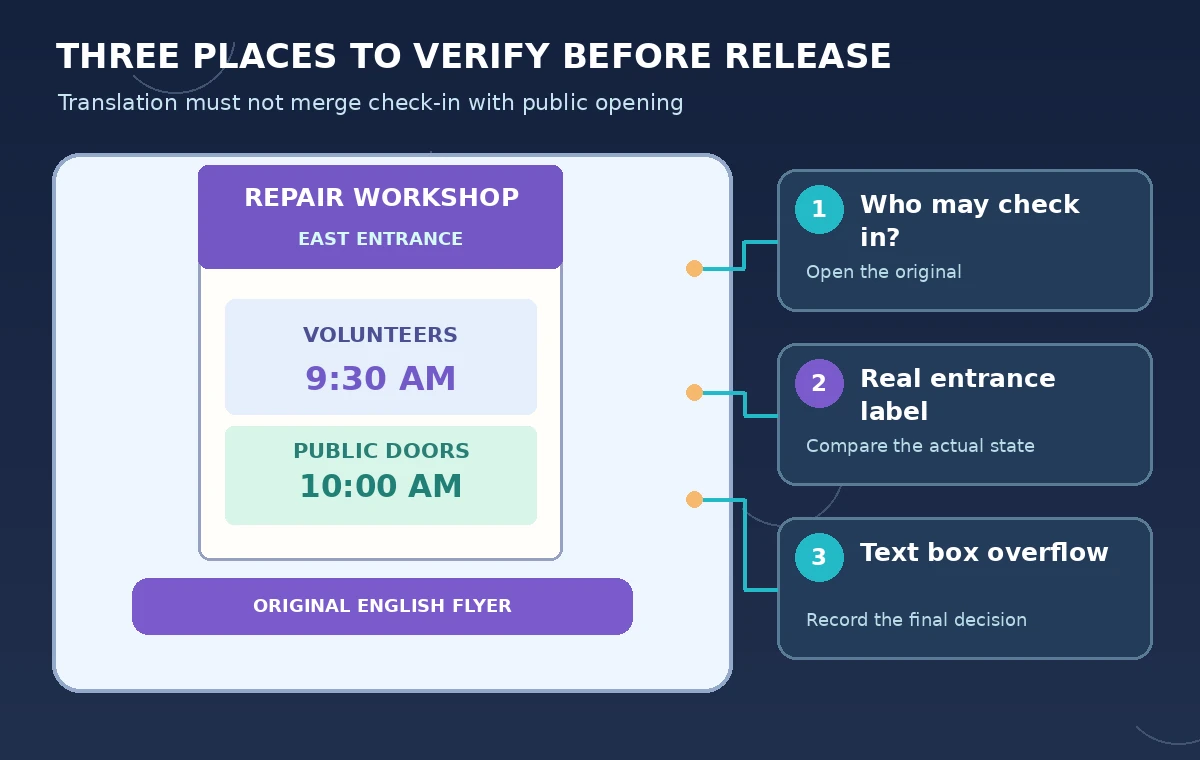
A fictional neighborhood library is creating an English-Spanish flyer for a repair workshop. The English design says “Volunteer check-in: 9:30 AM” and “Public doors: 10:00 AM” at the East Entrance. If a translation or layout pass turns those two lines into a single start time, staff and visitors may arrive at the wrong place or time despite a polished poster.
Canva’s help documents a Translate path from Resize under Magic Switch, along with translation through Apps. The platform can produce a translated copy and offers options that affect pages and typography, but it cannot verify the organizers’ facts. This tutorial uses invented event details, not a tested Canva translation or a real library announcement.
Freeze a fact sheet before translating a design
Write the authoritative event fields as plain text: event name, full date, check-in time, public opening time, location, entrance, contact channel, and accessibility details that the organizers have actually approved. Use the same reference sheet for both languages. Do not let a graphic design determine which facts are correct just because its typography looks finished.
Keep “Volunteer check-in: 9:30 AM” distinct from “Public doors: 10:00 AM.” These are hypothetical examples with different audiences. Ask the organizer to confirm whether each belongs on the same flyer; if the page is public-facing, the volunteer-only detail may need a separate version rather than a misleading universal instruction.
Create a source design with editable text
Start with the approved English layout and editable text boxes for every critical field. Avoid flattening instructions into an image or placing an essential entrance label inside a decorative photo. Keep the source file separately named and versioned so a later translation does not become the only recoverable copy.
For the fictional flyer, use a clear hierarchy: workshop title, date, public opening time, address, then an optional volunteer check-in panel. Separate text and artwork layers so longer translated words can wrap without obscuring a time. If a branded icon resembles an official accessibility seal, do not add a certification claim unless the organizer has authorized it.

Find Translate through Magic Switch or Apps
Canva’s current help shows Resize, then Magic Switch, then Translate as one supported path. It also documents Translate through Apps, with differences in how selected text can be handled. Options and plan entitlements may vary by design and account. Check the live editor for the available entry point instead of promising every user the same menu.
Select Spanish for the target-language copy and choose the intended page or pages. Canva’s documentation discusses a character limit and one language at a time for some Translate actions; review those terms before processing a large booklet. Create a copy when appropriate so proofreading does not overwrite the approved English source.
Proofread meaning before adjusting aesthetics
Have a fluent human reviewer compare the Spanish text against the frozen fact sheet. Focus first on roles, negation, quantities, and qualifiers: volunteer-only check-in is not public admission. The words “East Entrance” may name a specific door in a building; do not invent a Spanish official sign name if the venue uses that English label on-site.
Consider an explanatory translation that preserves the exact physical sign name, such as an instruction pointing to the door labeled “East Entrance.” The correct choice depends on the venue and local audience. The illustration compares a bad merged time with two separate time fields; it is a hand-built example, not a screenshot of Canva output.
Check typography after translation expands the copy
Spanish text can occupy a different width from the English original. Inspect each text box at final output size, especially the check-in time, address, and contact line. Canva notes that Translate may not support every font and may prompt a change. A fallback font can alter line breaks and visual hierarchy even when the words themselves are correct.
Check that a colored date banner does not cover a digit, that AM/PM remains legible, and that the entrance marker still aligns with its actual map arrow. If a long heading crowds the public opening time, shorten the heading rather than shrinking the time below readable size. Never solve overflow by hiding an essential condition.

Compare two finished page exports, not editor thumbnails
Export an English reference proof and a Spanish proof in the size people will see or print. Review them side by side with the fact sheet. A fluent translation can still be functionally wrong when its line breaks make 9:30 look like the public start time or move the entrance label underneath unrelated artwork.
For a practical sign-off table, include each mandatory field, the exact source text, the approved translation, its page position, and a reviewer initial. If a community organizer changes the opening time, update both versions and repeat the check rather than patching only the translated artwork.
Get approval before sharing or exporting for distribution
Ask the event owner to approve names, venue access, time zone assumptions, accessibility claims, and the public contact details. Ask a second reviewer fluent in the target language to check ambiguous wording. These reviews serve different purposes: the translator handles language, while the organizer authorizes real-world instructions.
Distribute only the approved file and archive the versions together. If the entrance is changed at short notice, replace published images and PDFs everywhere the organizer controls, rather than assuming one edited Canva design updates printed copies. A translation tool cannot recall a flyer that has already been shared.
Document limits and avoid invented translation results
We consulted Canva’s current Help article and product pages for Translate and Magic Switch behavior. We did not run an account, compare machine outputs, or conduct a bilingual user test. The event, times, and contrasting poster designs are fictional, and this guide does not establish translation accuracy for any language pair.
A real evaluation would involve authorized source facts, two fluent reviewers, the actual final print size, and a change-control log. Measure whether critical fields survive translation and layout separately. When facts are uncertain, the best result is to pause distribution, not let AI generate a plausible entrance name or schedule.
How We Research
On November 5, 2026, we reviewed Canva Help: Translate your Canva designs; Canva: Online Translator; Canva: The Canva Editor. We compared the described features and access limits with our specific illustrative task and checked each proposed control against vendor guidance. We did not access a paid account, run a model, upload real media, or measure product performance. Product menus, usage limits, data handling and availability may change. The invented scenarios and drawings are clearly editorial illustrations, not screenshots or real-world test evidence.
Frequently Asked Questions
Canva documents a path through Resize and Magic Switch to Translate, as well as a Translate app path.
No. Check all translated facts against the organizer’s approved event sheet.
Yes, Canva warns that some fonts are unsupported and a substitute may be needed.
No. Keep the audience for each time explicit and verify whether both details belong on the same flyer.
No. The designs and timing example are conceptual illustrations, not tested Canva results.