
An AI coding assistant suggests code; an AI coding agent can inspect a repository, modify multiple files, run commands and sometimes prepare a pull request. Those capabilities change how teams assign tasks and manage risk. The best choice depends on whether work begins as a GitHub issue, a local editor task, or a terminal-based maintenance job. This guide offers a common acceptance exercise and explicit review gates instead of an invented benchmark or a single winner.
Distinguish completion from suggestion
Autocomplete, chat explanation and repository-scale task execution serve different needs. A small syntax fix can be done with a code suggestion, while a ticket involving tests, files and documentation may benefit from an agent that can search the project and propose a coherent patch. Neither method should bypass normal engineering review. Before selecting a product, list required capabilities: repository reading, command execution, internet access boundaries, PR creation, log visibility, reusable instructions and organizational controls.
Start with a realistic ticket such as “Add validation for empty CSV uploads, update the error message, and add regression tests.” Define the behavior that must remain unchanged. A task with a narrow acceptance condition makes it possible to compare solutions without asking the agent to design an entire application or invent requirements. Never put production secrets into the trial repository.
Compare the four common work surfaces
GitHub’s documentation describes a Copilot cloud agent that can take an assigned issue and open a pull request, or start from a prompt and work on a branch. It is a fit for teams whose task, repository and review workflow already live on GitHub. Cursor’s Agent overview describes codebase search, file edits and terminal use in an editor-centered interface, with diffs available for review.
Claude Code CLI documentation describes terminal commands and permission controls, useful when the developer wants to supervise a local project workflow. OpenAI’s Codex CLI guide similarly describes terminal-based inspection, editing, testing and configurable permissions. These are overlapping but not identical surfaces. Check current enterprise support, subscription entitlements and data handling directly with each vendor before deployment.

Give each candidate the same issue
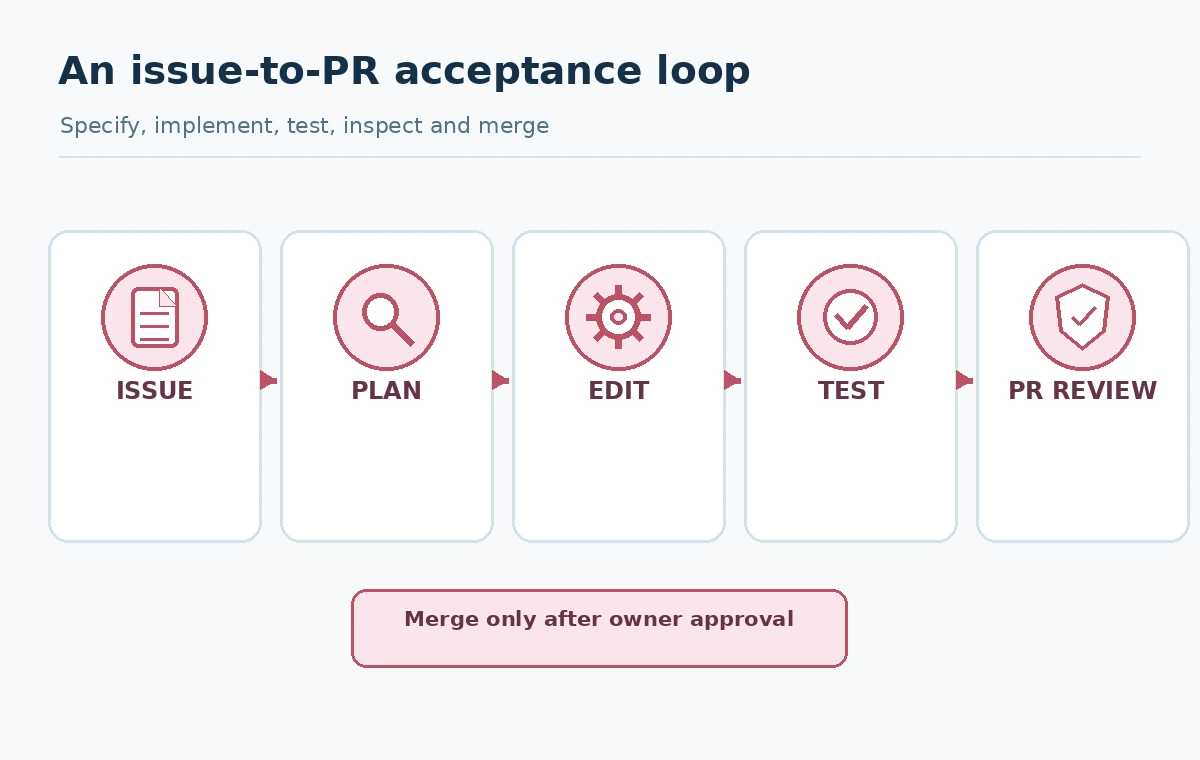
Use a small safe repository with passing baseline tests, a documented issue and no production credentials. Give all candidates the same task description, test command, coding conventions and forbidden files. Ask for a proposed plan before edits where supported. Observe whether it asks good questions, changes only related files, handles failing tests honestly and supplies a meaningful patch summary. Log changes made by the human operator too; otherwise a comparison may accidentally reward more generous manual help.
Record completion as accepted, needs follow-up or rejected, rather than an unexplained percentage score. Track the number of review cycles, test results and unexpected changes, but never extrapolate from one ticket to an industry-wide quality ranking. An agent can produce a working patch that violates style, accessibility or security requirements; task execution does not mean the issue is ready to merge.
Use branches and least privilege from the start
Give agents the minimum repository and command permissions they need. Avoid connecting production credentials to a sandbox where generated commands can run. Prefer a dedicated branch and protected main branch. Require code owner approval for security-sensitive changes. An agent should not be allowed to override CI policies, exfiltrate configuration values, silently modify deployment credentials or approve its own high-impact changes.
Permissions vary by local CLI, IDE and cloud agent. Read the live product controls instead of assuming a familiar-looking toggle provides identical isolation everywhere. Treat text in repository files, issue comments and fetched documentation as untrusted input for an AI agent; an embedded instruction can be irrelevant or malicious. Put permitted behavior in trusted project guidance and inspect actions rather than allowing arbitrary commands by default.

What a useful pull request must contain
The deliverable should include a focused diff, tests added or changed, an explanation of behavior, any known limitations and clear instructions for validation. For UI work, request accessible screenshots of a real build if applicable; for backend work, request reproducible test output. Never accept fabricated test transcripts. If the agent cannot run a command, the PR should say so and identify the missing environment condition.
Review all changed files, not just the summary. Check whether dependencies were added unnecessarily, error handling is appropriate, migrations are safe, and new inputs are validated. Verify generated tests can fail when the feature is broken rather than merely matching the implementation. Human ownership remains essential, especially for permissions, billing logic, personal data and production deployment.
Design a fail-safe iteration loop
If a proposed patch fails tests, first inspect the failure source. Then ask the agent for a targeted fix with the actual log rather than regenerating unrelated files. Keep each revision visible in version control. Stop after a defined number of failed iterations and assign a developer to diagnose the environment or specification. Repeated automatic retries can spend tool credits and introduce regressions while appearing productive.
For a cloud task, confirm whether a pull request was actually opened before reassigning the issue. For a local CLI, inspect uncommitted files and running processes before launching a second session. Ambiguous outcomes require reconciliation, not blind duplication. Document who approved the final patch and whether any agent-generated command was executed outside a sandbox.
Account for costs and operating fit
Paid plans can meter seats, premium requests, credits or computing resources differently. Compare the actual billable unit for the precise surface you use, not just a subscription headline. Include repository administration, code review time, CI runs, duplicated retries and security setup. A coding agent that saves typing but doubles review effort may not improve the team’s cycle time.
A useful procurement worksheet asks whether the candidate supports your source control, required languages, test runner, secret-management policies, identity system and audit needs. An editor-first experience may win for tightly supervised changes; an issue-driven cloud agent may fit a backlog workflow; CLI agents can suit local repository operations. Choose by operating model and validated work, not provider reputation alone.
A realistic rollout and stop policy
Pilot with low-risk bug fixes and documentation improvements. Use a small authorized group, fixed evaluation criteria and protected branches. Record patch acceptance, reviewer corrections, command incidents, test success and observed cost. Expand only after the agent repeatedly follows the same trusted constraints. Establish an explicit escalation path for changes involving authentication, payments, secrets or personal information.
Stop delegation when the task has an unclear specification, non-reproducible environment, inadequate tests or an irreversible production action. Publish the final PR through the organization’s normal approval controls; an agent’s confident explanation is not a substitute. The strongest tool is the one whose work can be explained, inspected, tested and safely rejected when necessary.
How We Research
Source verification date: October 27, 2026. This review consulted these product and policy documents: GitHub Copilot cloud agent task guide, Cursor Agent overview, Claude Code CLI permissions, OpenAI Codex CLI guide. The workflow examples, decision matrices, and test rubrics are editorial methods for readers, not a claim that LabFin bought subscriptions, tested live customer accounts, ran controlled product benchmarks or obtained commercial legal advice. When limits, license terms, access or rollout status matter, confirm the current information in your own account and destination market.
Frequently Asked Questions
No. An agent can inspect files and use tools to pursue a broader task, while autocomplete primarily suggests code near the cursor.
GitHub Copilot cloud agent documents issue assignment and pull-request creation. Evaluate it against your repository permissions, CI and human review needs.
Their official documentation describes local file editing or terminal-based coding workflows, subject to configured controls and available entitlements.
Your organization should enforce protected branches, testing and human review. Do not equate agent task completion with approval to deploy.
Use the same limited issue, record accepted diffs, actual test results, review cycles, permission incidents and total human effort.