
The Meaning of a Check Depends on the Question
A neighborhood tool library scans equipment-loan forms. One checkbox is beside “I received the safety instructions”; another is beside “I authorize publicity photographs.” A scan may show a pen mark in only the first square. If an OCR pipeline reports a selected mark without correctly attaching it to its nearby question, a database could mistakenly claim that the borrower consented to photography. That error is more serious than an ordinary text typo. Microsoft’s Azure Document Intelligence layout model can detect selection marks and provide state and location information. This article explains how to use that output as an aid for human form review. The form and diagrams are fabricated instructional examples; we did not upload a form, test a model, or verify any real person’s consent. A detected selection state is evidence to inspect, not an independently authoritative permission record.
Choose Layout Extraction for the Right Task
The documented layout capability extracts structural items such as text, paragraphs, tables and selection marks. The page-level result includes marks with a `selected` or `unselected` state and a polygon describing where the mark was found. The confidence value can help identify uncertain detections. The purpose of using these fields is to return the reviewer to the relevant area of the original page, not to replace the page with detached true/false values. Confirm that the Azure API version and model ID used by your application match the documentation you read. Microsoft’s current model-selection guidance distinguishes layout extraction from the older general document model and explains when key-value pair extraction may require a feature option. A reliable loan-form workflow may need both recognized text and selection positions; a list of boxes alone cannot tell staff which terms the borrower saw.

Preserve the Scan and Its Page Coordinates
Keep the original scanned document as a restricted source of truth. Associate each extracted page with a stable document ID, its page number, processing version, and orientation information. When staff review a checkbox, show the region from the original page using the returned polygon. This is particularly valuable when the form has multiple columns or a photocopied note close to the selection area. Selection marks can be ambiguous. A cross that extends beyond the box, a pencil correction, a faint mark, or a scribble through the label may confuse automated extraction. Confidence is a model estimate; it is not proof that the borrower intended the selected statement. Treat scanned forms with handwriting or unclear marks as candidates for manual review rather than forcing an automatic Boolean answer.
Keep the Label and the Mark Together
The process illustration follows the actual form, the extraction of a marked region, and the staff verification step. Store the checkbox’s question text alongside its extracted state only after verifying the geometric and reading-order association. If the OCR text is truncated or the page layout is unusual, the state must remain unresolved. A label that says “No photography permission” has different meaning from a nearby affirmative consent statement. Do not match marks to labels by array position alone, particularly in multi-column documents. Check reading order and coordinates. For a form that repeats the same wording on several pages, include page and section identifiers. A reviewer should be able to click the database field and inspect the exact ink mark and associated printed clause; a dashboard with only a colored check icon is insufficient evidence.
Understand Text Spans and Markdown Differences
Microsoft documents selection mark states, polygons, confidence and span references into the top-level document content. Its layout documentation also describes output differences for Markdown, including Unicode checkbox representations in newer API versions while some selection-mark span conventions retain `:selected:` language. This means an integrator should not assume that every output format contains an identical literal checkbox string. Treat the structured selection-mark state as one field, the text span as a pointer, and the source image as the item to review. Test the exact format returned by the configured API version. If the application concatenates extracted Markdown and then searches for a particular checkbox character, it could lose the alignment between a visual mark and its statement. Preserve structural information until the human form-review step is complete.
Compare Three Failure and Recovery States
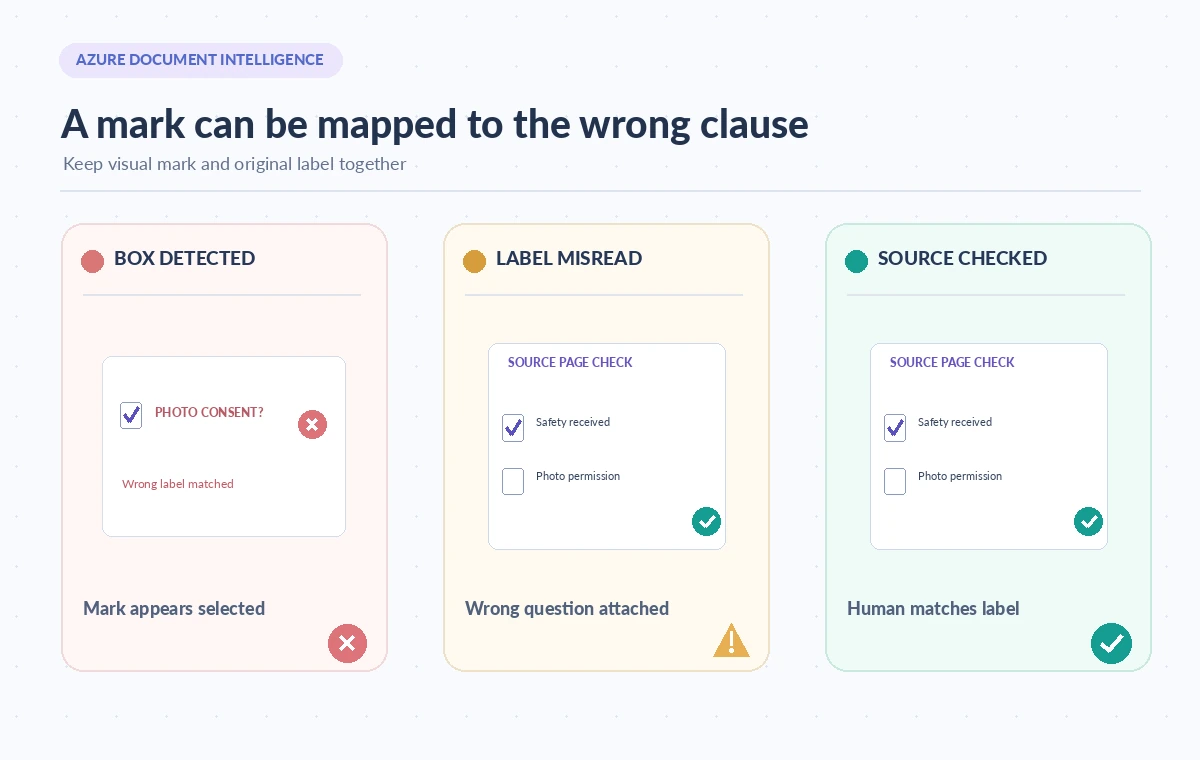
The comparison shows a visible selected box, a middle case where the mark was attached to the wrong label, and a reviewed record that correctly maps the mark to its question. The middle case is not a rare theoretical possibility in messy forms; it is precisely the type of failure the interface should make easy to catch. A correct mark classification paired with the wrong text can still create a false permission assertion. Design records with separate fields for model state, label mapping, reviewer confirmation and legal or operational authorization. A selected safety-acknowledgment box does not automatically prove that safety training occurred. A selected publicity box does not automatically prove valid legal consent under the applicable rules. Use the organization’s actual release and consent procedures for that determination.

Escalate Ambiguous Marks Instead of Guessing
Set review triggers for low-confidence detection, conflicting marks, mismatched labels, missing pages and poor scan quality. Do not invent a universal confidence threshold that Microsoft guarantees to work for all handwritten forms. Use your own representative validation set and determine which error types justify human review. In high-impact consent contexts, even high-confidence results may need a manual check. If the paper scan is incomplete, ask staff to rescan or retrieve the original instead of filling in missing boxes from a related customer record. Keep corrections in an audit trail with the page reference and a staff reason. Never mark an unknown permission as granted to make a database column easier to filter. A null or disputed state communicates something important that an optimistic default would erase.
Audit a Small Form Collection Before Import
Construct a rights-cleared sample with different pen styles, rotated pages, crossed-out checks and multiple question formats. Annotate what the mark appears to show and separately whether the form contains sufficient authorization. Test whether detected polygons align with the right question and whether exceptions are withheld from automatic import. Review false selected states as carefully as missed selected ones. The final acceptance check should let an operator answer: which page shows the mark, which statement does it refer to, what did the person actually authorize, and who verified the interpretation? The layout model can make page review faster by surfacing candidate marks. It should not convert an image-processing prediction into a signed legal commitment.
How We Research
We checked the named primary documentation on November 8, 2026: Microsoft: Document Intelligence layout model, Microsoft: Choose a Document Intelligence model, Microsoft: General document model migration note. Our source review focused on the supported feature, input and result semantics, and the practical failure paths used in this fictional scenario. We also compared the proposed title with the WordPress title inventory supplied by LabFin. We did not connect to a product account, submit a live API request, measure accuracy, test regional availability or verify actual client outcomes. Artwork and example records are original conceptual illustrations. Confirm the current feature and model support, terms, costs, permissions and privacy requirements before implementation.
Frequently Asked Questions
No. It is an extracted visual state. The actual clause, source document and relevant consent procedure must be reviewed.
The detected region on the page, which reviewers can use to inspect the original mark in context.
Only after verifying each mark’s associated label and preserving unknown or conflicting states; direct conversion can misstate the form.
Microsoft documents differences in selection-mark rendering and span references for some newer layout output formats.
Hold that field for human review, consult the original or rescan it, and record the evidence rather than guessing.