
Use the import as a new-table migration, not an update
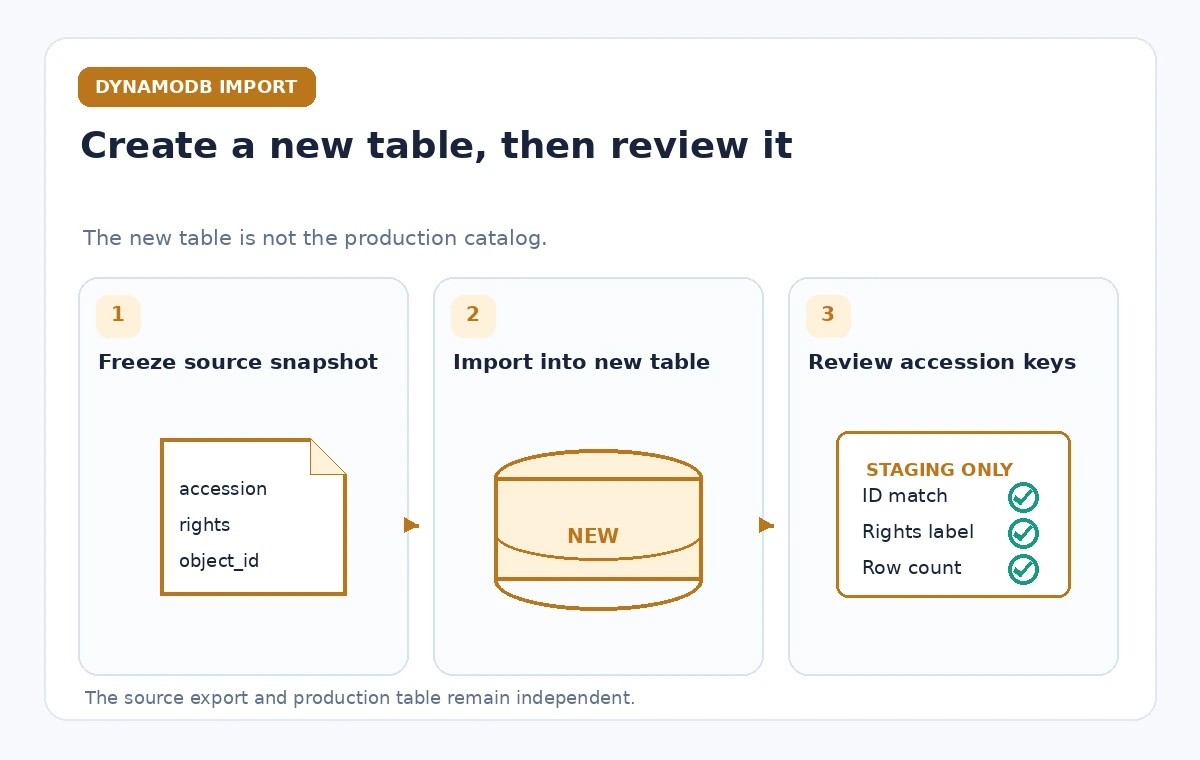
Suppose a museum has a CSV export of accession records, image rights, and storage locations. Staff want to test a revised catalog schema while leaving the current public inventory intact. DynamoDB’s Import from S3 is a suitable staging route because the documented feature creates a new target table. It does not import into an existing table. That distinction should anchor every migration diagram and deployment checklist. The source file may be a CSV, DynamoDB JSON, or Amazon Ion object in S3, but it still requires a planned primary key and a data-quality review. This article describes a proposed workflow, not a performed import or an observed throughput result.
Freeze an approved export before the import begins
Produce a versioned, access-controlled snapshot from the catalog system and record its origin and extraction time. Confirm that the export includes only fields the staging environment is allowed to hold. For CSV, inspect headers and type conventions; for JSON or Ion, validate the expected structure before uploading. AWS warns against modifying S3 source objects while an import is active, because changed objects can cause an import failure. Choose a stable S3 object version or immutable staging location and make the import operator read from it. A filename ending in approved.csv is not evidence of editorial or rights clearance: the export’s source registry should carry that authorization separately.
Define the target primary key and supporting indexes
The target table is created as part of the import, so decide the partition key and optional sort key before starting. An accession number may be a natural identifier, but test whether old paper registers reused numbers across subcollections. Normalize or namespace identifiers in the export rather than silently merging collisions. AWS permits global secondary indexes at creation, while the import documentation says local secondary indexes are not supported for this workflow. Record intended queries and which index fields they require. A technically accepted key schema can still represent museum objects incorrectly if two archival systems assign the same human-readable identifier to different records.
Understand import source formats and costs
AWS documentation lists CSV, DynamoDB JSON, and Amazon Ion as supported source formats, with suitable compression options. It also explains that the import does not consume the new table’s write capacity and that the billed processed amount is based on uncompressed source data. Avoid quoting a fixed price or completion time in an editorial guide: region, item sizes, source structure, and prevailing pricing change the actual cost. Keep a preflight estimate of source bytes and potential error handling, and track costs under an approved cloud budget. Do not mistake the absence of write-capacity charges for an operation that has no cost or resource constraints.
Track failure records instead of looking only at status
An import task can encounter malformed items, inconsistent data, or source-object changes. A task status alone is not a substitute for reviewing failed records, the relevant CloudWatch logging or import diagnostics, and the destination table shape. Prepare an error register that maps each rejected source row to a human-review decision: correct in the next export, quarantine the record, or reject the migration. Never fabricate a missing accession identifier just to raise the import success count. A rejected rights field is especially important because a technically searchable object might later be published under an incorrect license. Keep those records out of public catalog endpoints until their meaning is checked.
Keep the new table isolated from production
Create the import in a staging account or with narrowly scoped roles that cannot swap live API targets. Name the destination as a proposed version and prevent automatic application discovery from treating it as the canonical inventory. Even when the new table becomes queryable, require a separate release step to update application configuration. If a test service uses real image URLs or donor annotations, check access permissions and scrub what it logs. Do not assume that DynamoDB automatically preserves the old table’s IAM policies, backup plan, time-to-live configuration, or monitoring when a new table is created. Those are deployment decisions requiring separate review.

Compare imported records with source accession evidence
Choose a sample covering ordinary entries, missing creation dates, multiple images, restricted donor records, and duplicated legacy IDs. Compare original export rows to destination records by accession ID and meaningful fields, not by item count alone. Check whether CSV values that look numeric are actually catalog identifiers with leading zeros. Review rights labels and provenance links before testing any public search interface. Use a conceptual diagram with three visibly distinct states: the source export, a newly created staging table, and a reviewed candidate dataset. The final state describes an editorial gate, not an automatic conversion by the import service.
Plan around the published operational limits
The official best-practices guide discusses limits on source object counts and size, distribution of sorted partition-key data, and the performance impact of large or skewed imports. Revisit the current regional quotas before scheduling a large job. If a source export is sorted so that one partition key dominates consecutive writes, randomization or another suitable source layout can reduce a hot-partition pattern. Do not generalize an example object count from a tutorial to all production regions without checking. For a museum, the most meaningful schedule may be tied to an accession freeze and editorial staffing, not just the estimated time a cloud import job will take.
Run a staging acceptance test before cutover
Use synthetic or rights-cleared sample items in a separate test environment to examine primary key behavior, missing attributes, query filters, and the way applications treat absent rights metadata. Confirm that imported records match the source ledger and that the application still points to the original table. Write a rollback plan before any switch: retain the former endpoint, identify the exact configuration change, and state who can authorize reverting it. A green import console indicator should not trigger a cutover automatically. Changes to public pages should require a curator or catalog manager to confirm the approved dataset and an operator to verify the application deployment.

Document what was and was not verified
Keep a signed change record with source object version, target table identifier, index definitions, import diagnostics, sampled accession records, and outstanding exceptions. Record whether the review included rights descriptions, not just technical fields. A reconciliation report should distinguish rows imported, rows rejected, records held for manual review, and records approved for a candidate release. Do not advertise successful migration totals based on invented test output. Treat later item updates separately from Import from S3, because the documented import operation creates a new table and does not synchronize future edits from the original source. Reconcile those edits before a real cutover.
How We Research
We reviewed the named official developer references AWS: DynamoDB data import from Amazon S3—how it works, AWS: Best practices for importing from S3. We compared their documented request and delivery behavior, accepted configuration patterns, and explicit limitations with the proposed hypothetical museum workflow. This article is a source-based implementation guide: we did not execute live customer API calls, inspect private cloud accounts, run production tests, or measure latency, cost, or accuracy. Readers should verify current limits and deployment settings with the original documentation and run their own controlled staging tests before changing public systems.
Frequently Asked Questions
No. The documented import feature creates a new DynamoDB table. Plan any production cutover as a separate controlled operation.
AWS documents CSV, DynamoDB JSON, and Amazon Ion, including supported compressed files. Validate the exact format before the job.
AWS says Import from S3 does not consume write capacity for the target table, but data processing and related resources can still incur costs.
No. AWS documentation permits global secondary indexes but not local secondary indexes for the Import from S3 workflow.
Only after source reconciliation, rights and identity reviews, staging tests, and an explicitly approved cutover.