
An AI seamless fabric pattern generator can produce appealing repeat ideas, but a decorative swatch on a screen is not the same as a fabric-ready manufacturing file. A repeat can contain visible seam lines, tiny motifs, or colors that change noticeably when printed on cloth. This guide adapts Adobe Illustrator’s Text to Pattern workflow to a fictional tea-towel project. It focuses on swatch selection, repeated-grid inspection, scale, color constraints, licensing records, and a real printer proof. We are not claiming to have ordered or tested cloth samples. The aim is to translate attractive AI artwork into a design that a textile printer can inspect and reproduce.
Write a physical product specification first
Decide the fabric, intended use, print method, finished dimensions, and acceptable motif scale before generating anything. A tea towel may have a large central motif and a subtle edge print; an all-over quilting cotton may need a denser, even repeat. For the example, specify a two-color botanical print with small leaves and soft stems, no brand marks, and no text that might become unreadable on cloth. Record the desired physical repeat width and whether the pattern should be aligned to a woven stripe. Ask the printer for their template, color mode, resolution expectations, bleed or cut allowances, and preferred file format. Do not assume a pixel dimension or a nominal DPI number alone solves print quality. The design team should know what one repeat means in inches or centimeters, because editing the tile later may change the visual rhythm and how fabric is cut.
Generate a controlled swatch rather than a random image
Adobe describes Text to Pattern as a Firefly-powered feature inside Illustrator that creates editable vector patterns and stores generated variations as swatches. Open the Generate Patterns panel through Object > Pattern > Generate Patterns in supported versions, and enter a prompt describing motif type, density, and color rather than a vague aesthetic label. Adobe documents color presets, a number-of-colors option, specified colors, and density controls, although interfaces can change between updates. For the tea towel, try a restrained prompt such as loose olive branches on a cream field, balanced spacing, two colors, no text. Evaluate several variations without assuming the first generated result is production-ready. Record the prompt, selected swatch, artboard size, application version, and reference inspiration. The documentation does not establish that any automatically generated pattern is unique, legally protectable, or free from accidental similarity to existing prints.
Inspect the edges by repeating the tile, not just opening it
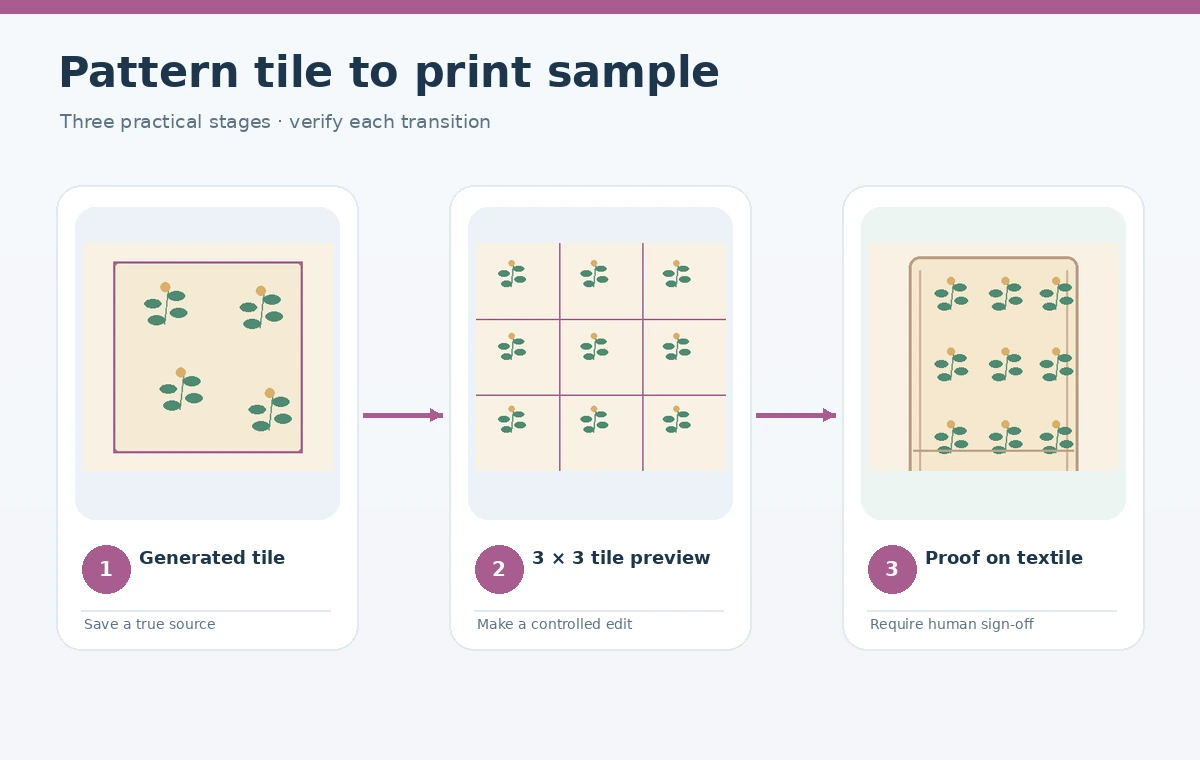
A pattern swatch should be evaluated as a repeated system. Place it in a larger rectangle that shows at least three repeats horizontally and vertically, then look for vertical or horizontal seams, unintended clusters, abrupt stems, and obvious grid rhythm. A repeating pattern can be mathematically seamless while still looking visually wrong where several motifs crowd together. Mark the tile boundary for review and then hide it before judging the design at normal reading distance. Illustrator’s Pattern Options allow editors to inspect the tile dimensions, number of preview copies, tile edge, and overlap behavior. The generated motif may have editable vector pieces, but editability does not make every leaf intersection correct. Check for tiny unclosed shapes or decorative fragments that will be fragile in print. Zoom at normal scale and at a close view rather than relying exclusively on the attractive full-bleed preview.
Measure the finished motif size on a physical mockup
A twelve-inch digital motif does not automatically become a twelve-inch motif on the final tea towel. Apply the swatch to a rectangle drawn at the real product dimensions and label a few reference measures. If the towel is folded in half on a display rack, check what remains visible. Too-dense foliage may turn into muddy patches from a distance; too-large motifs can appear cut off across adjacent sewn panels. Produce an annotated view showing repeat boundary, one reference leaf width, fabric cut line, and any reserved blank region. Test one tighter variation and one more open variation under the same mockup scale. Do not distort a pattern to fill an awkward rectangle without rechecking the repeat, because nonuniform scaling changes leaves into different shapes. Record which scale was approved and save it as a numeric transform or swatch property rather than remembering it by eye.

Constrain color and check contrast on the actual material
Color selected on an RGB monitor does not predict the exact printed shade on linen or cotton. Ask the fabric vendor for a profile or sample process and the number of reproducible colors. Keep the artwork’s color assignments legible in layers or swatches so a production operator can change a color without tracing the image again. For a two-color botanical print, check that the foreground stems still contrast with the substrate after a plausible ink shift. White areas may represent unprinted fabric rather than white ink, depending on the print method. Do not claim identical colors from one printer to another. Request a physical strike-off or equivalent sample when the job matters, and evaluate it under relevant lighting. In your approval log, separate on-screen hue preference from actual proof acceptance, since a production match cannot be certified using only an AI preview.
Manage swatches and originality questions deliberately
Adobe notes that generated pattern variations and document swatches are related but separately managed: editing a generated swatch updates its corresponding swatch while the original variation remains available. Keep the source document and an explicitly named approved swatch. Avoid using real fashion-house trademarks or imitating a living artist’s signature print without appropriate authorization. Text to Pattern may generate many plausible leaves, but plausible is not the same as distinctive or properly licensed. Document the source imagery, prompt, model or application, and revisions. If a client will sell the fabric commercially, make the designer and legal reviewer confirm current service terms and any third-party artwork licensing. Treat AI output as a material requiring curation and provenance, rather than as a shortcut around intellectual-property review. Once approved, lock the artwork version before sending the production file.

Send a reproducible printer package and approve a sample
Package the vector source, production-ready export, intended repeat dimensions, motif orientation, intended substrate, color references, and a small tiled preview. Label the print direction clearly when leaves must point toward one end of the towel. Request that the operator confirm the scale and repeat rather than resizing it to fit automatically. Inspect the strike-off for seams, line breaks, muddy density, inaccurate colors, and any missing fine detail. Photograph the proof next to a ruler if the team cannot inspect it in person. If there is a problem, modify the approved swatch or separation and repeat the proof; do not silently regenerate an unrelated pattern. Final sign-off should cite the sample number, fabric type, date, print facility, and approved artwork revision. This creates a defensible path from an AI design idea to a textile order.
How We Research
We studied Adobe’s official Illustrator Text to Pattern instructions (helpx.adobe.com) and its pattern-editing documentation (helpx.adobe.com), checked October 28, 2026. The tea-towel scale, colors, proof sheet, and printer approval are a fictional production plan. We did not print fabric, use a paid Adobe account, or test any vendor’s color reproduction.
Frequently Asked Questions
No. Repeats may show visual clusters, awkward scaling, or poor color reproduction. Review a multi-tile preview and a physical sample.
Adobe documents scalable, editable vector pattern swatches, subject to the current feature and file settings.
First confirm final physical dimensions and your printer specification. Vector geometry and print proof matter more than metadata alone.
Fill a large rectangle with at least a three-by-three repeat and inspect seams, clustering, stems, and motif rhythm.
No. Review inspiration sources, possible trademark issues, current tool terms, and originality before commercial use.