
A Green Workflow With No Caption Report Is Not a Release
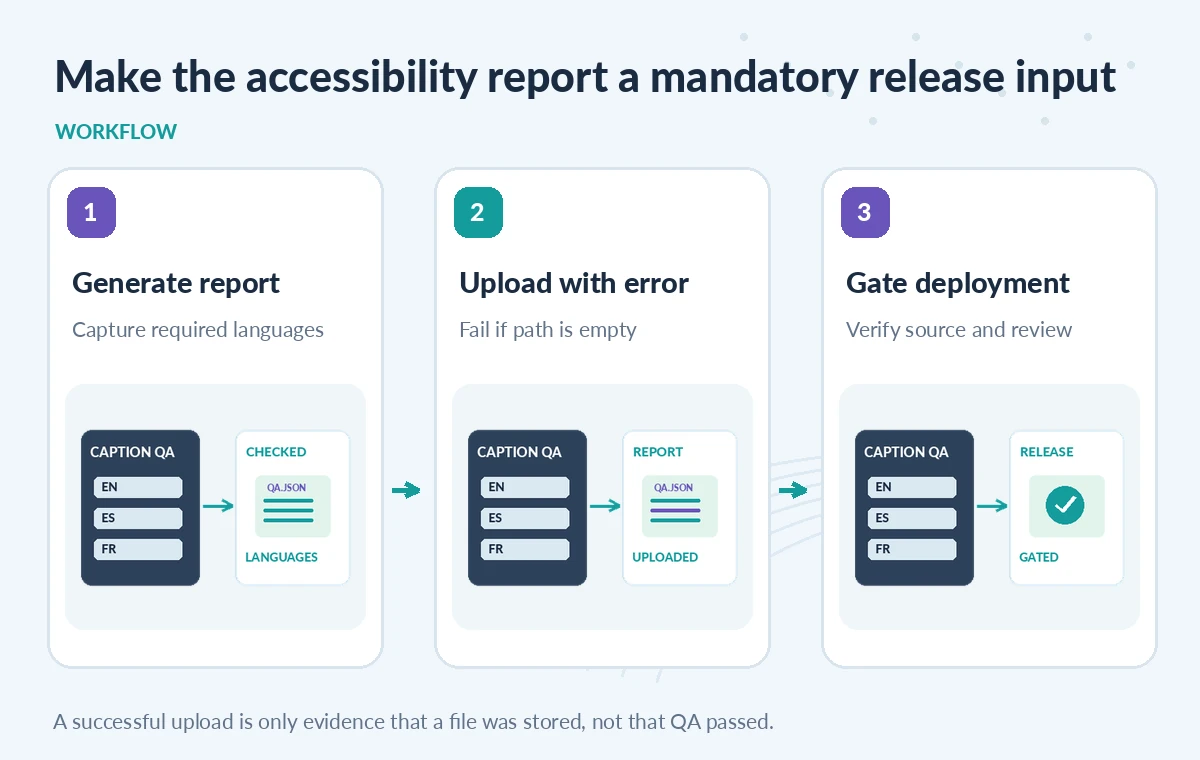
A nonprofit museum automatically generates caption QA reports for exhibit videos. The test command succeeds, and an upload-artifact step executes, but a changed working directory means the report path finds no files. By default, GitHub’s official upload-artifact action documents if-no-files-found as warn, which can leave the step successful after printing a warning. A release that requires caption evidence must treat a missing report as an error, not a harmless observation. The practical change is to set if-no-files-found: error on the mandatory artifact step, check that the report actually contains the expected checks, and keep deployment blocked until a reviewer can inspect the evidence. Examples in this guide are invented; no GitHub workflow was run to produce the diagrams.
Identify Which Artifact Is Mandatory
Not every build artifact is release evidence. A preview thumbnail may be optional, while an accessibility report listing language coverage, timing overlaps, and required captions may be mandatory. Define the difference in your workflow contract before modifying YAML. Give each required report a stable path such as reports/captions/qa.json and a meaningful artifact name tied to the commit or workflow run. Do not upload private interview transcripts merely to prove a caption check happened; the report can contain a redacted summary and source identifiers. A manifest should state which languages, videos and validation stages are expected. The CI job should not infer that a passing command created a report at the expected location unless it checks the file.
Configure if-no-files-found to Error for Required Evidence
The official actions/upload-artifact documentation lists three behaviors when a supplied path matches nothing: warn, error and ignore. Warn is documented as the default; error fails the upload step. A mandatory caption-report upload should choose error. This does not replace a successful underlying test, but prevents a missing file from quietly passing through a green job. Keep optional screenshots on a separate upload step that may use warn, so an absent illustration does not mask a missing compliance report. Use a stable pinned action version appropriate to your workflow and review its own documentation because default behavior and supported runner environments can change. Add a clearly named check that the report file exists before upload, independent of the action’s no-files policy.
Validate File Contents, Not Only Path Existence
A nonempty file called qa.json can still describe the wrong video or an incomplete language suite. After the test runner writes the report, parse its schema and compare identifiers with the expected release manifest. Confirm every required locale is represented, the report’s result is not unknown, and the source commit or build revision matches the deployment candidate. A CI job should fail when a required section is absent or a test was skipped. The artifact step should then upload evidence of the failure through an appropriately guarded diagnostic path, without declaring the release safe. Avoid inserting personally identifying transcript lines in the summary. The presence of an artifact proves that bytes were uploaded; it does not establish that captions are accessible or approved.
Compare Warning, Error and Explicitly Optional Uploads
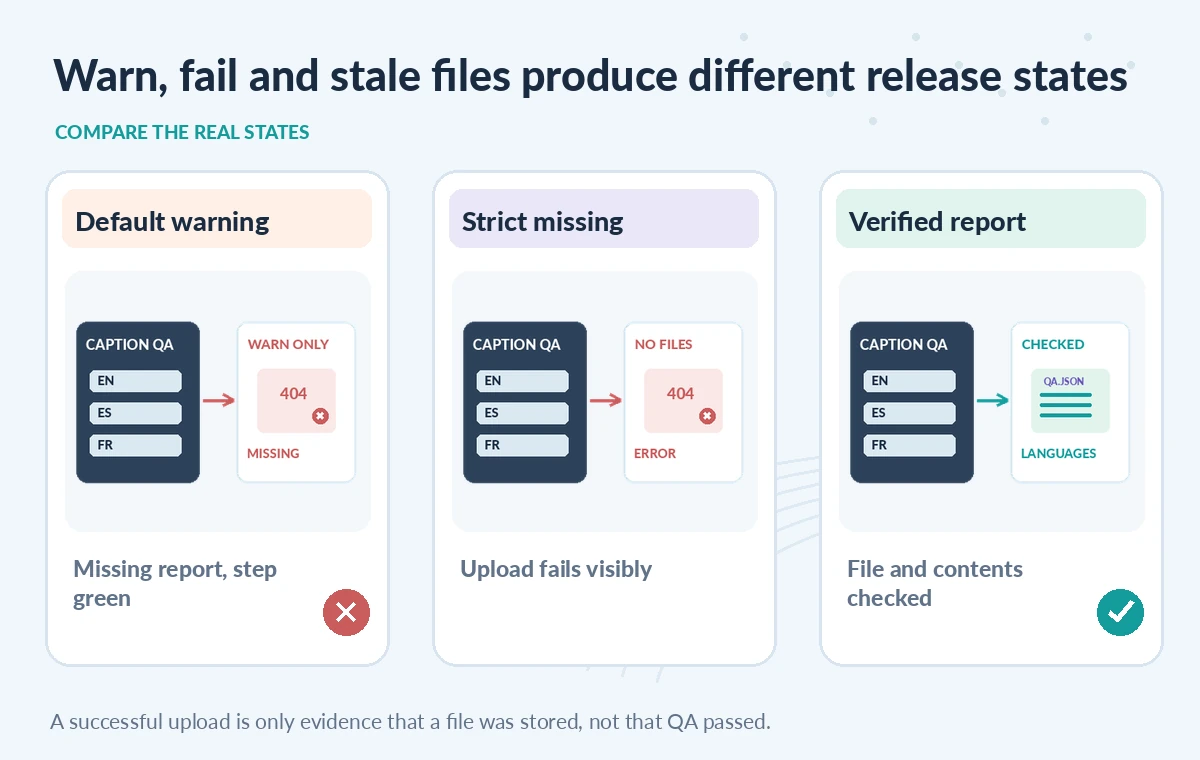
In a hypothetical workflow, the default warn behavior sees an empty reports folder, logs a warning, and may still leave the action step green. With if-no-files-found: error, the same missing mandatory path fails the upload step, making the absence visible to required checks. An optional behind-the-scenes thumbnail can reasonably use warn or ignore with a documented reason, while caption QA evidence should not. The comparison is about declared CI behavior, not a measurement of a real repository. It should show different states, not three identical green ticks. Even the strict error setting cannot find a mislabeled report that exists under the expected name; separate semantic validation remains necessary.
Handle Failures Without Accidental Publication
A release workflow often runs a report generator, tests its output and then uploads artifacts for reviewers. Put deployment behind the mandatory test and report-validation outcomes. If the report generator fails, preserve any safe diagnostic logs with a separate, intentional failure-only path, rather than forcing a required report step to succeed. A job configured to run despite failure can still upload diagnostic evidence; that upload should not become the signal that releases the site. Keep artifact existence, test status and human approval as distinct checks. This protects against a common misunderstanding: a green upload means the action finished, not that captions satisfy accessibility rules. The reviewer must still examine timing, language coverage and any high-risk content.
Mind Artifact Visibility and Retention
GitHub notes that people with repository read access can download workflow artifacts, and that artifacts expire under retention settings. Treat QA bundles as accessible to that audience unless a stronger boundary is implemented. Do not include unpublished audio, raw patron records or private licensing documents in broad artifacts merely for convenience. Keep a minimal release record with checksums, source commit and review decision in a more durable authorized system when long-term proof is required. A repository’s artifact-retention policy is not a rights or records-retention policy. If the evidence later expires, a release manager should still be able to locate the approved audit record without relying on the original upload URL.
Test Missing Files, Wrong Paths and Partial Reports
A useful staging suite removes the report entirely, writes it to the wrong directory, creates an empty file, includes only English when English and Spanish were required, and records an outdated video revision. The missing and wrong-path cases should fail at the upload step with error mode. The empty, incomplete and stale-content cases should fail during report validation before any deployment decision. Include one optional screenshot to demonstrate why its failure policy differs. These are recommendations for tests to run locally and in CI; no benchmark or test execution is claimed here. The useful result is a visible, explainable failure signal, not an artificially high pass rate.
Keep an Explicit Evidence Contract for Every Release
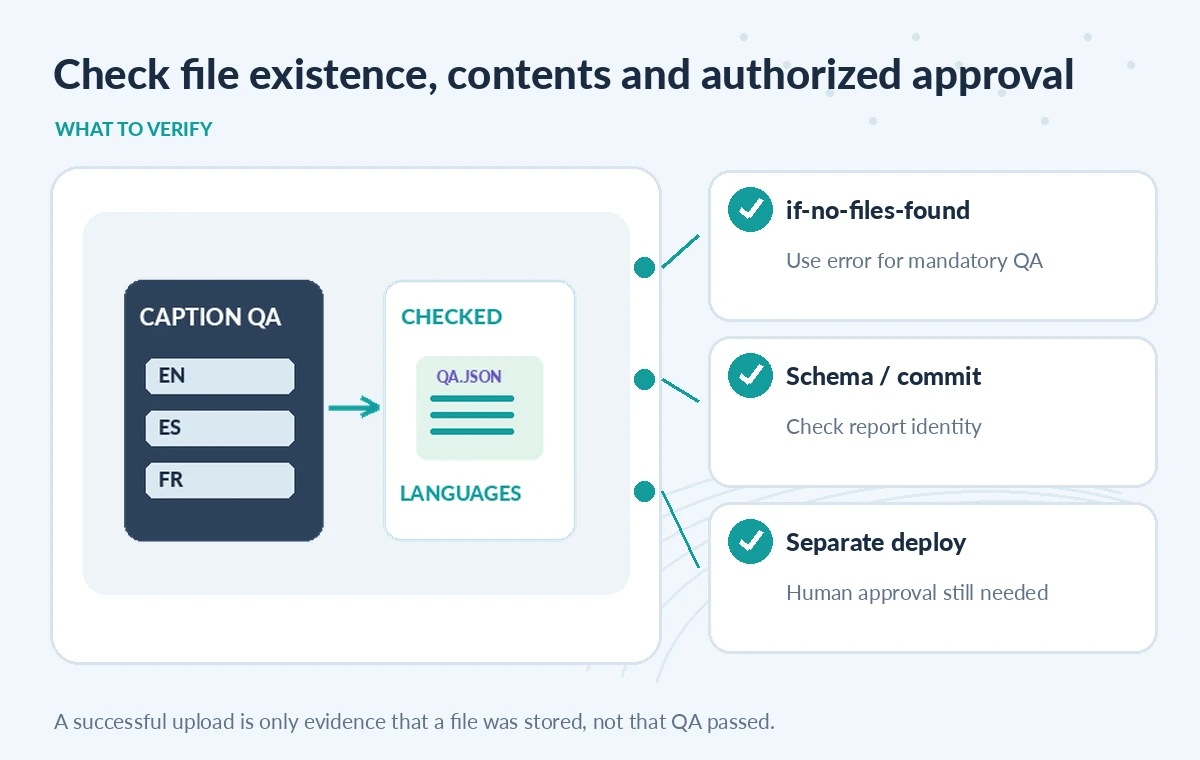
In the workflow documentation, specify who owns the report schema, where it is written, which checks are mandatory, and who authorizes publication. Review the artifact path after changes to the build system or runner working directory. Name artifacts so a reviewer can connect each file to a particular commit, video edition and attempt. Include an automated source-manifest reconciliation and a manual accessibility review for material with sensitive speech or uncertain translation. If a required report is not available, stop the release and state which evidence is missing. GitHub’s if-no-files-found option is a useful local guard, but the release contract is the combined set of tests, file checks and human approval.
How We Research
For this guide, we reviewed the official product documentation on November 8, 2026: GitHub Actions upload-artifact Maintainer Documentation, GitHub Download Workflow Artifacts Guide, GitHub Actions Job Summaries. We checked the named setting or feature against its published behavior, mapped the documented constraints to the specific hypothetical scenario, and reviewed whether the topic duplicated titles in the supplied LabFin WordPress inventory or prior B0267–B0280 ZIPs. No authenticated vendor service was run; we did not perform a benchmark, observe real customer data, verify third-party rights or claim operational outcomes. All illustrated records and comparisons are teaching examples. Confirm product documentation and security requirements again before implementing a workflow in a real organization.
Frequently Asked Questions
The official upload-artifact documentation says warn is the default when the specified path matches no files.
The upload action fails its step if no files match the path, surfacing missing mandatory evidence.
No. Validate the report schema, expected language coverage, source revision and human approval separately.
Not necessarily. They can use a documented warning policy, separate from required compliance evidence.
Do not assume so. Access follows repository permissions and files expire under retention settings; keep approved long-term evidence separately.