
Define what the public museum assistant may do
A museum’s chatbot answers questions about visiting hours and historical exhibition labels. Some objects include archival quotations about difficult events, while visitor questions may contain abusive language. Gemini API safety settings offer configurable probability-based filters for certain categories of content. Those settings do not decide historical accuracy, visitor eligibility, or whether a staff member has approved a quotation. The objective is to keep benign archival context available while escalating unsafe or ambiguous responses, without weakening the application’s own privacy and permissions controls.
Build a fictional testing corpus with three situations: a legitimate question about an exhibition, an authorized historical quotation that may trigger a filter, and a request for an action the assistant has no permission to perform. The last case must be blocked by application policy regardless of how a model classifies its language. Keep all example visitor text invented and non-identifying; do not upload actual museum correspondence as a test without permission and a retention review.
Separate adjustable filters from fixed protections
Google documents adjustable Gemini safety filtering for four categories: harassment, hate speech, sexually explicit material, and dangerous content. Other core protections cannot simply be disabled through those thresholds. The adjustable settings concern the model’s assessed probability of content in a category, not a statement of how severe any real-world harm would be. A high-risk request can still require a human escalation process, even when a numeric safety rating appears unremarkable.
Explain this distinction to staff who configure the assistant. Lowering a threshold may block more legitimate questions; raising it may permit more text that is inappropriate for the intended audience. Neither setting guarantees that a museum’s house policy will be met. For a public kiosk used by children, establish an independent approved-answer inventory, an abuse response policy, and content review. Do not treat a vendor default as an institutional decision about visitor safety.
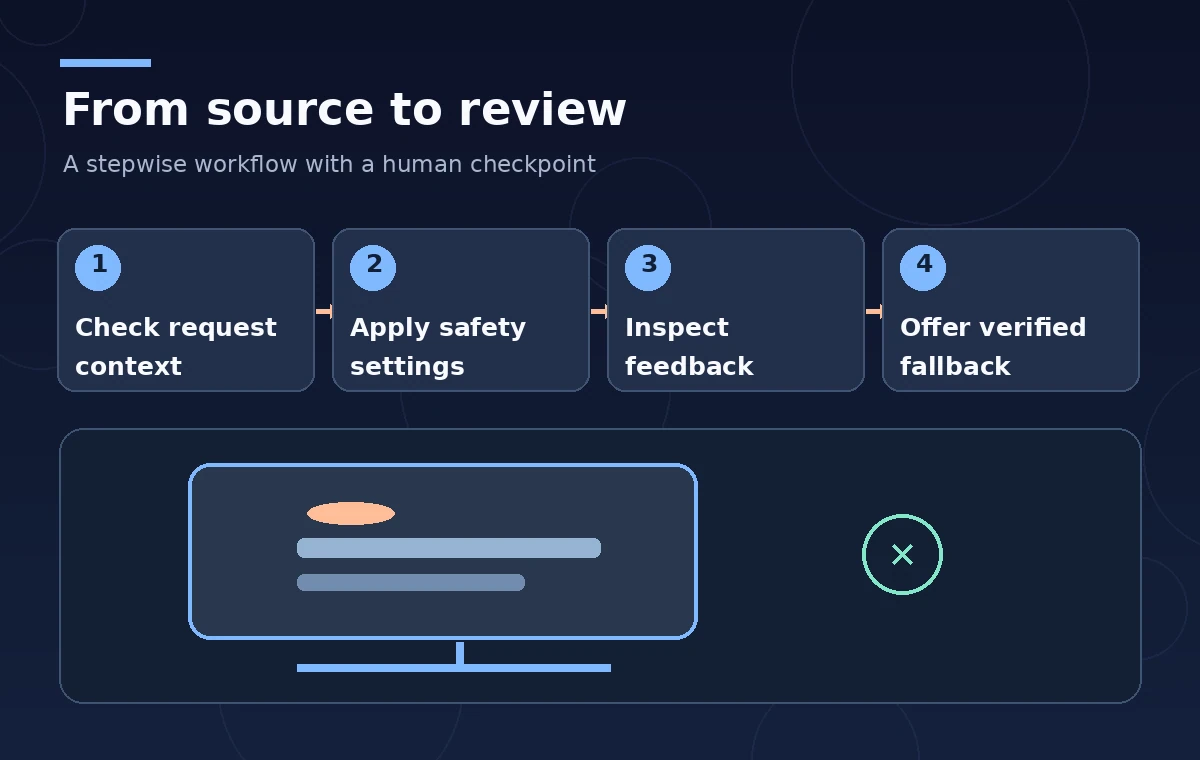
Choose per-request thresholds with care
The API documents settings including `BLOCK_ONLY_HIGH`, `BLOCK_MEDIUM_AND_ABOVE`, and `BLOCK_LOW_AND_ABOVE`, along with values that disable certain adjustable filtering. Actual defaults can depend on the model family and version. Use the specific supported API and model documentation rather than pasting a generic configuration snippet into every deployment. Record which categories are configured, who approved them, and why; test the intended response to realistic but non-identifying museum questions.
Prefer a conservative documented policy appropriate to the audience instead of changing settings until a difficult prompt produces a desired answer. Even when a legitimate historical quotation is blocked, the correct fix may be a staff-authored alternative description or an approved source link, not unrestricted generation. Maintain a separate process to review disputed archival language without exposing harmful material on a public kiosk. Configuration changes should be tested and versioned like any other software release.
Examine response and prompt safety feedback
A blocked request and a blocked generated candidate are different operational states. Google’s documented response fields include `promptFeedback.blockReason` for input-related blocks and `Candidate.finishReason`, including `SAFETY`, plus `Candidate.safetyRatings` where applicable. An empty visible answer may have been filtered; it should not be interpreted as an affirmative finding that the museum lacks information. The application must display a neutral fallback instead of leaking raw error objects or pretending that the assistant completed a search.
Log enough structured information to reproduce a bug safely: model version, configured thresholds, whether the prompt or candidate was blocked, and the approved fallback that was shown. Avoid storing complete visitor messages or sensitive archival text in ordinary analytics logs. Do not show raw ratings to patrons as though they were a judgment of the visitor’s character. The display should make clear that automated filtering prevented an answer and offer a suitable human assistance route.

Compare a difficult quotation with an actual policy violation
For a fictional exhibition description, one candidate answer might quote a historically documented phrase without explaining its context, while another could summarize the same source with neutral framing and a link to the curatorial record. Both require editorial review; the fact that a filter allows either one does not prove it is historically accurate. In contrast, a request to alter an object record or obtain a private donor address is outside a public visitor assistant’s authority even if the wording is polite.
An informative diagram should show three genuinely different paths: answer from approved content, automated safety block with neutral fallback, and application-level access refusal. Do not use a single red shield for every condition. The purpose is to help implementers see that probability-based content filtering and permissions are independent layers. An authorized public label, not unconstrained language generation, remains the source of truth for the visitor.
Add human review and accessible recovery
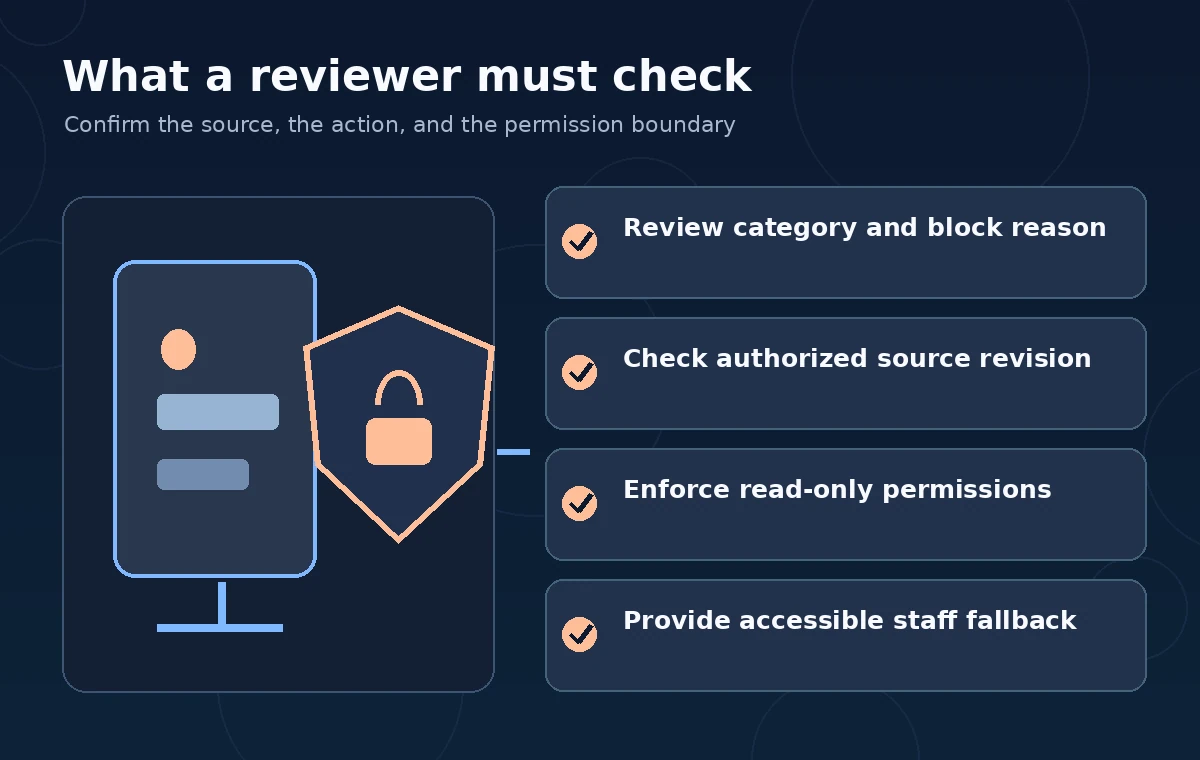
For a public assistant, create an escalation path when a visitor cannot get an answer to a legitimate question. The kiosk can offer a staff desk location, a link to a verified official webpage, or an accessible non-chat alternative. Provide a short explanation without repeating blocked language. People should be able to report a mistake without having to reproduce upsetting text in a crowded gallery or disclose personal details.
Staff should review recurring false blocks and unsafe completions in aggregate, without retaining identifiable visitor content unnecessarily. If a response references a closed gallery, changed hours, or a safety rule, verify it against a current official source. Safety filtering does not update the model’s knowledge or validate web claims. A responsible fallback is sometimes “I cannot verify that here; ask the museum desk,” not a confident but fabricated policy statement.
Create a meaningful regression set before release
Test a representative set of benign location questions, multilingual access requests, difficult historical quotations, abuse patterns, and attempted unauthorized tool actions. For each case, write the desired application outcome before running a model. Track allowed approved answers, safe fallbacks, false positives, and permission failures as separate classes. Do not interpret a change in block count as improvement without checking what was newly permitted or newly refused.
Version the prompt, model, category thresholds, approval rules, and test corpus together. The illustrations here are designed examples, not actual Gemini classifications, measured error rates, or vendor screenshots. Where a wording change alters behavior, document the change and decide whether it is acceptable to curators and accessibility staff. The release gate should be especially strict for any route that returns private records or publishes new museum content.
Maintain clear responsibility for the final answer
After deployment, review unresolved reports, source revision dates, blocked response causes, and the effectiveness of the fallback workflow. Restrict tool credentials independently of content safety settings: a model may be polite yet still request an unauthorized action. Limit data retention and honor the permissions attached to archival content. A public answer should cite an approved institutional source whenever it makes a factual claim about facilities, rights, or exhibits.
Check Google’s latest model-specific defaults, supported categories, pricing, and safety terms before enabling or changing thresholds. The useful goal is not to eliminate every blocked response or to maximize the amount of generated text. It is to create a visitor experience that is accessible, auditable, accurate about its limitations, and capable of referring complicated questions to a person when automated filtering or retrieval is inadequate.
How We Research
For this November 2026 article, we checked named original vendor documentation: Google: Gemini API safety settings; Google: Gemini API errors. We compared current documented request and response fields with a fictional institutional workflow and designed review steps that distinguish API outputs from editorial or security approval. The illustrations are original instructional concept diagrams, not real vendor dashboards or measured tests. We did not submit live API requests, ingest personal files, run an actual deployment, collect real user consent or measure vendor accuracy. Product availability, model support, pricing, security settings, retention and regional eligibility may change; implementers must check current sources and organizational policy before processing sensitive materials. All factual claims and permission-sensitive results require independent primary-source review.
Frequently Asked Questions
No. Filtering evaluates categories of content, not source authenticity. Curators must verify quotations against approved records.
No. Google documents configurable category filters and separate core protections that are not optional through the same thresholds.
No. The documented ratings concern probability of a category match, not overall severity or an institution-specific risk judgment.
Check promptFeedback.blockReason for prompt blocks and candidate finishReason or safetyRatings when relevant, without exposing private prompt content.
No. Application authorization, approved retrieval filters, and staff review remain separate and mandatory for restricted records.