
A fictional museum’s import pipeline saves a test report alongside a sample catalog export. The report is useful to reviewers, but the export can accidentally contain accession notes or contact details. GitHub Actions offers retention settings for workflow artifacts and logs, plus an upload-artifact retention-days option. Retention can reduce how long temporary outputs remain available; it does not retroactively protect content that was already downloaded, printed into logs or shared elsewhere. The goal is to publish less sensitive CI output and keep the proper audit evidence under a separate approved policy.
Separate ephemeral test output from required evidence
Inventory every item a workflow emits: build logs, screenshots, CSV samples, validation reports, dependency inventories and release packages. Decide which outputs should never be uploaded because they contain personal information, and which sanitized reports should be retained briefly. A short retention period is no substitute for removing secrets before the upload. Internal archive review records may need a longer approved retention period in a separate controlled repository.
In a hypothetical catalog-import test, the pipeline can produce a small report containing total checked rows and synthetic error examples. It should not attach an actual donor spreadsheet just to make debugging convenient. Define who can download the artifacts, how request access is granted and how corrections are recorded. Retention should follow data-classification decisions rather than letting every job inherit the same broad default.
Understand repository and organization limits
GitHub documentation describes repository and organization settings governing retention of Actions artifacts and logs, with defaults and maximums depending on repository visibility and higher-level rules. A public repository generally has a shorter configurable maximum than a private repository. Check the exact current limits for the account rather than copy an old screenshot. Organization or enterprise policy can cap values set by individual repositories.
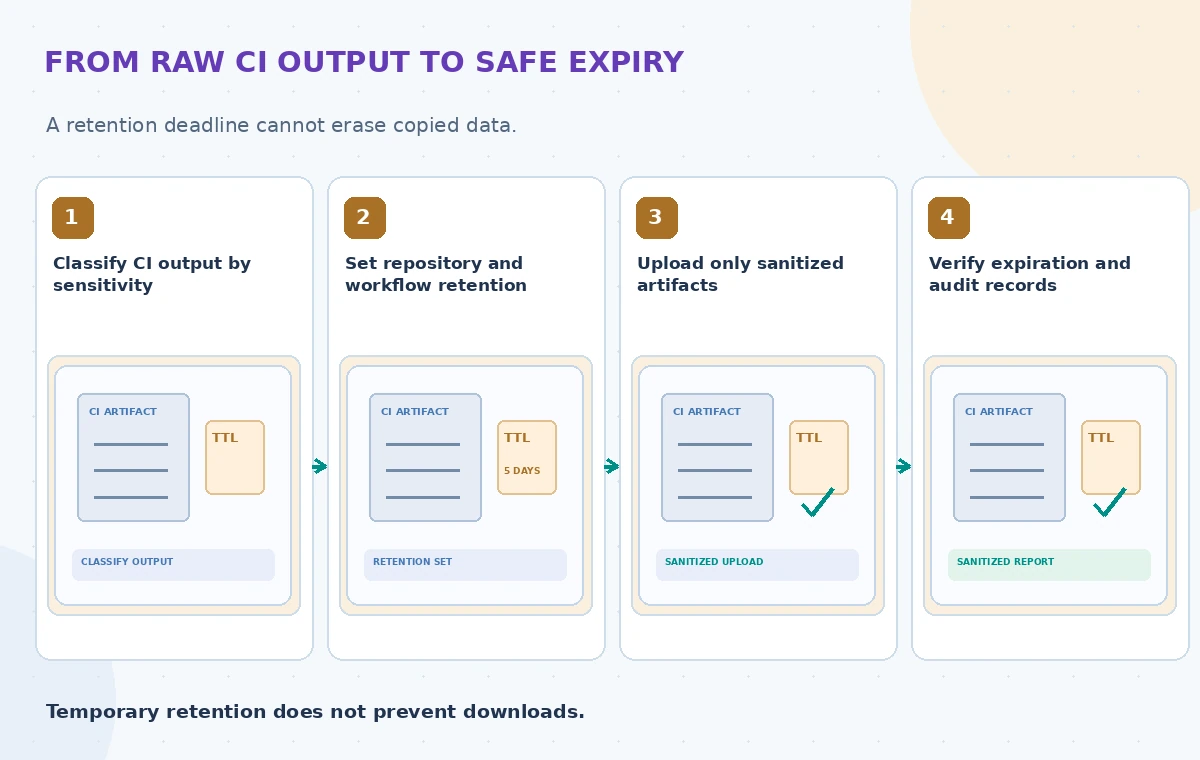
As of October 2026, GitHub also applies retention policy to checks, workflow runs and commit statuses, beyond artifacts and logs. Distinguish those classes because removing one uploaded ZIP will not necessarily erase a corresponding log line, status report or notification. Changing a default retention setting applies to newly created objects; it does not retroactively shorten existing objects. Review older items separately during a privacy remediation.
Set a specific upload-artifact retention-days
For workflow output that truly must be downloadable, actions/upload-artifact supports retention-days in its inputs. GitHub’s documentation shows setting a specific number of days per artifact. That requested value cannot exceed the applicable repository, organization or enterprise limit. Use a small, justified lifespan for transient test outputs and verify that the action version and repository settings support your exact configuration.
A sensible pattern uploads a sanitized JSON report and a redacted test log as separate objects, avoiding a giant archive that mixes public and restricted files. If a full data snapshot is necessary for a secure investigation, store it in an approved controlled location rather than broadly in CI. A successful upload is not proof that the artifact contains no personal information; inspect its contents before allowing wider access.
Trace retention without making it a security wall
An artifact can be downloaded while it exists, and deletion cannot recall copies already held by a developer or outside system. Access control, encryption, credential management and least-privilege workflow permissions remain essential. Do not print secret environment variables, OAuth tokens or raw test payloads into logs. Masking in the UI must not be assumed to detect every custom sensitive value.
Treat workflow_run and other privileged follow-up jobs cautiously when they consume uploaded content from untrusted contributions. A short expiration date does not make an artifact trusted, and a report from an external pull request cannot authorize a deployment. Retention settings and provenance checks solve distinct problems. Keep any approval decisions in a signed or centrally managed process that can be audited after the transient artifact is gone.
Compare long exposure with controlled evidence
The visual example shows a raw CSV and log left in CI, a second state that applies a retention setting but still exposes sensitive rows during the remaining window, and a reviewed state containing only sanitized findings and an approved reference to protected audit evidence. The second state is not described as safe solely because it expires faster. These are illustrative security reviews, not screenshots of actual GitHub jobs.

A truthful before-and-after check asks what information was uploaded, who could read it and whether other copies remain. Do not claim the new retention value erased existing artifacts retroactively. If a customer requests deletion, include downloaded files and downstream backups in the organization’s broader response process rather than assuming the GitHub expiry timestamp meets every legal requirement.
Check the actual expiry and remove exceptional artifacts
GitHub documents an artifacts API that can expose expires_at and an interface for removing workflow artifacts. After setting retention, inspect a newly created benign artifact to confirm its scheduled expiration and verify inherited caps. The team should also have an authorized path for earlier deletion when a test unintentionally uploads restricted content. Record what was removed without copying its confidential contents into an incident ticket.
Be explicit about what cleanup does not cover: a workflow run may have separate log retention, status history and integrations that received a notification. Check whether old artifacts were affected by policy changes; documentation says retention changes are not retroactive. For an error found after an upload, prioritize access containment and incident response over waiting for an automatic expiry date.
Create a privacy-oriented CI review checklist
Use fictional sample exports to test an accidental contact field, a stack trace with a token-like string, an upload from an untrusted pull request and a repository with a stricter organization limit. Confirm that the workflow fails before uploading restricted files, or redacts them according to the approved policy. Check that generated report names do not leak sensitive project identifiers.

A reviewer should inspect both the artifact manifest and a representative log. Audit what an engineer can retrieve using the workflow interface and API, not just the YAML’s intended lifespan. The tests should treat an artifact without an expiration value as a configuration issue rather than declaring compliance. This is a proposed review method, and no live GitHub artifact or deletion action was exercised here.
Keep usable audits when temporary files expire
A small sanitized CI summary can tell staff how many test cases were rejected and which validation rule failed. Store the authoritative approval, release hash and signed decision in the organization’s designated audit system if that evidence must survive artifact expiration. Never keep the entire donor export merely because it is convenient to prove a test ran. Record a stable link or identifier to the approved internal source instead.
Before deploying, recheck GitHub’s up-to-date retention rules, organization settings, action versions and legal records obligations. Treat a chosen number of days as a privacy and operations policy decision, not an arbitrary universal best practice. The important result is that sensitive inputs are not unnecessarily uploaded and that approved evidence is still reviewable when temporary outputs disappear.
How We Research
For this November 2026 guide, we reviewed current official developer sources: GitHub: Managing Actions settings for a repository; GitHub: Store and share workflow artifacts; GitHub: Removing workflow artifacts. We compared documented API behavior, request structures and limitations with a fictional nonprofit scenario, then created original instructional diagrams. We did not run vendor APIs, inspect real donor documents, evaluate live locations, measure latency, or conduct a legal or security audit. The illustrations are conceptual, not product screenshots or benchmark output. A real implementation must confirm available regions, preview status, model or API version, cost, IAM rules, source permissions and applicable privacy policies.
Frequently Asked Questions
No. It governs the artifact stored by GitHub; downloaded or mirrored copies require separate controls.
Yes. The upload-artifact action supports it, within repository and higher-level limits.
GitHub states that new retention settings apply to newly created objects, not retroactively to old ones.
No. Their data and policies must be inspected separately, even if related settings exist.
No. Avoid uploading sensitive data in the first place and enforce access control and incident response.