
A neighborhood organization is preparing a 90-minute workshop about improving a local walking trail. The facilitators want participants to sort concerns and prioritize solutions, but not everyone can or wants to drag sticky notes around a collaborative canvas. Miro Sidekicks can propose board layouts, frames, and related content from a prompt. The editor still has to keep the session inclusive, realistic, and respectful of what participants actually said. This guide shows a hypothetical design and review method; it does not claim that Miro generated the displayed diagrams or that any community meeting took place.
Write the facilitation objective independently of the tool
Begin with an outcome rather than an AI prompt: by the end of the session, participants should identify the trail’s most important barriers and choose which observations need further investigation. Specify the expected number of attendees, length of the meeting, experience levels, and whether participants will join remotely. Plan an audio and text contribution route alongside the board, plus a facilitator who can place ideas on behalf of attendees. Avoid asking for personal health or mobility histories; the workshop is about reported route problems, not collecting private diagnoses. Decide what counts as consensus, what counts as an unresolved disagreement, and how outlier concerns will remain visible after clustering.
Check current Sidekicks entry points and entitlements
Miro’s current help describes opening Sidekicks from the creation toolbar or an AI-mode board and entering a natural-language request. It also documents a distinction between the general Sidekick and more advanced/custom Sidekicks, with availability depending on plan and Enterprise licensing. Some older Miro documentation describes a deprecated AI Sidekicks flow; do not instruct readers to rely on that former context menu. Confirm the actual account’s access and AI-credit policy. For a simple board draft, the general assistant may be sufficient; custom knowledge sources should be used only when the team has permission to provide their contents. Keep an unmodified workshop brief outside Miro as the source of truth.

Ask for a structure with explicit participation alternatives
A suitable prompt describes the desired Format and timings: “Create an editable 90-minute walking-trail workshop board: welcome, individual observations, theme grouping, prioritization, and follow-up. Include a facilitator text-entry lane for participants unable to manipulate stickies.” Miro documents that Sidekicks can help generate a board layout from a described task and can create multiple Formats. Treat the output as a proposal rather than a guaranteed fixed schema or an accessibility-certified design. If the tool inserts extra voting rounds, removes reflection time, or assumes every person owns a laptop, adjust the board manually. Protect the sequence that serves real participants rather than preserving an AI-generated arrangement for appearance.
Test the agenda against clock time and attention
Allocate realistic transition times between five stages, including a break where appropriate. A visually attractive canvas can contain too many steps for ninety minutes, especially when the group includes first-time board users. Sum every activity, instruction, break, and closing task rather than trusting the AI’s total. Use frame numbering and simple instructions in a consistent reading order. Make a separate facilitator script so a person can explain each task without relying on the size or location of visual objects. Allow people to submit comments by chat, spoken contribution, or accessible form, and explain how these inputs will be represented fairly. Do not let board layout determine whose feedback is heard.
Inspect generated sticky notes for fabricated consensus
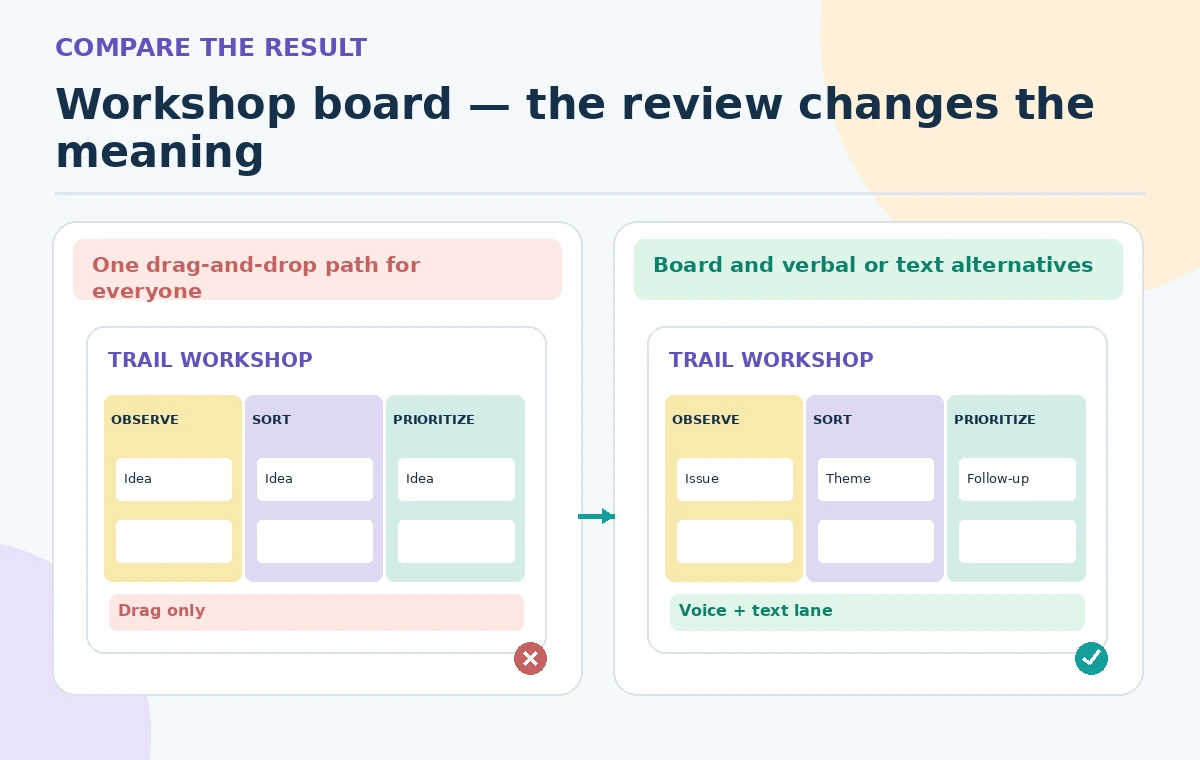
A Sidekick may propose sample problems such as uneven paving, poor lighting, and confusing signs. Mark them as examples until real participants introduce observations. Do not populate the final board with invented citizen statements or convert prompt-suggested themes into “community priorities.” The comparison illustration shows a problematic single-lane board beside a layout with a visible alternative contribution route; it is an editorial schematic, not an export from Miro. During the real session, preserve each participant’s idea before merging duplicates and ask for permission before quoting personal stories. Keep unusual concerns visible even when they do not belong to the largest cluster.
Review board accessibility before inviting attendees
Check frame order, readable text, contrast, instruction length, keyboard alternatives supported by the actual product, and zoom behavior on a smaller device. Do not promise that every canvas interaction is fully accessible to all assistive technologies. Provide the agenda and materials in a usable linear document and make someone responsible for transcribing contributions accurately. Test a guest participant’s permissions and ability to add an idea without moving other content. Explain how anonymous or sensitive comments will be handled. If the session includes a venue map, label the map as informational and avoid inventing accessible routes; ask for a separate verified site accessibility description.
Control permissions, AI context, and privacy
Before selecting entire groups of sticky notes as AI context, remove identifying or confidential participant data. Miro says Sidekicks can use selected board content and may offer advanced knowledge integration in some plans; neither capability means it is appropriate to pass private submissions to a model without authorization. Limit editing rights, establish a separate private facilitator area, and use temporary collaboration settings where available. Check what attendees can see before opening a public invite link. Do not invite the AI to rank named participants or speculate about motivation from short comments. A board permission error can be more damaging than an imperfect layout.
Rehearse the handoff and preserve unresolved items
Run a facilitator rehearsal with a colleague playing a remote attendee and another contributing by voice only. Time the transitions, test how a facilitator adds an idea for someone else, and verify that comments do not disappear during grouping. Write down what happens when the meeting overruns or the board becomes unavailable. At the end, create a separate action register identifying which concerns are verified, which require an on-site check, and who accepted each follow-up. Keep minority and conflicting observations as explicit unresolved records instead of hiding them in a polished AI summary. Approval belongs to the organizing team, not to a generated board.

Save the reusable board and its editorial limitations
Archive the original brief, AI prompt, first layout, edited board, accessibility alternatives, and facilitator script. After the session, store a reviewed summary and avoid forwarding raw participant material beyond its permitted audience. If the team repeats the workshop, revise timings and exercises based on actual feedback rather than assuming the generated layout is universally effective. Miro’s interface and plan entitlements may change, so confirm the help pages before reusing detailed instructions. This walkthrough contains no real participant quotes, board export, time study, or accessibility certification; its visuals explain the planning checkpoints an editor should carry out.
How We Research
This article uses named first-party documentation: Miro Help — Sidekicks and Miro Help — Board layout with Sidekicks and Flows and Miro Help — Sidekicks overview. We checked the described capabilities, availability notes, current feature naming, permissions, and workflow limitations, then built an independent fictional editorial scenario for verification. The example materials, images, outcomes, and approvals are conceptual, not the result of operating a customer account. We did not execute a model run, inspect private records, measure accuracy, or certify the depicted activity. Readers should confirm the latest vendor instructions and organizational permissions before applying the workflow.
Frequently Asked Questions
No. Miro documents a current consolidated Sidekicks experience; some older product help is explicitly marked deprecated.
Miro documents board layout generation through Sidekicks and Flows. Review the actual output and your plan access.
No. Custom and advanced Sidekick capabilities have plan and license restrictions.
No. Provide alternative contribution channels and test the real participant workflow.
No. Keep demonstrations separate from genuine participant input and preserve disagreements.