
Disclosure: LabFin is reader-supported. If you sign up for a tool through links on this page, we may earn a commission at no extra cost to you. Commissions vary between providers and our ratings do not — here’s our full disclosure.
Of the tools on this list, the best AI tools for writers who care about their manuscripts are Claude, ChatGPT, Gemini and Microsoft Copilot, in that order. We rank them by how they treat your work. That means whether you can keep drafts out of training without losing features, whether you see ads, and whether a full manuscript fits. For more, our page on writing with AI without sounding like AI covers the word patterns readers notice and why detectors misfire.
This page is about protecting your writing, not about whose prose is best. For writing quality on independent boards, see our list of the best AI for writing.
Best AI Tools for Writers: The Short Answer
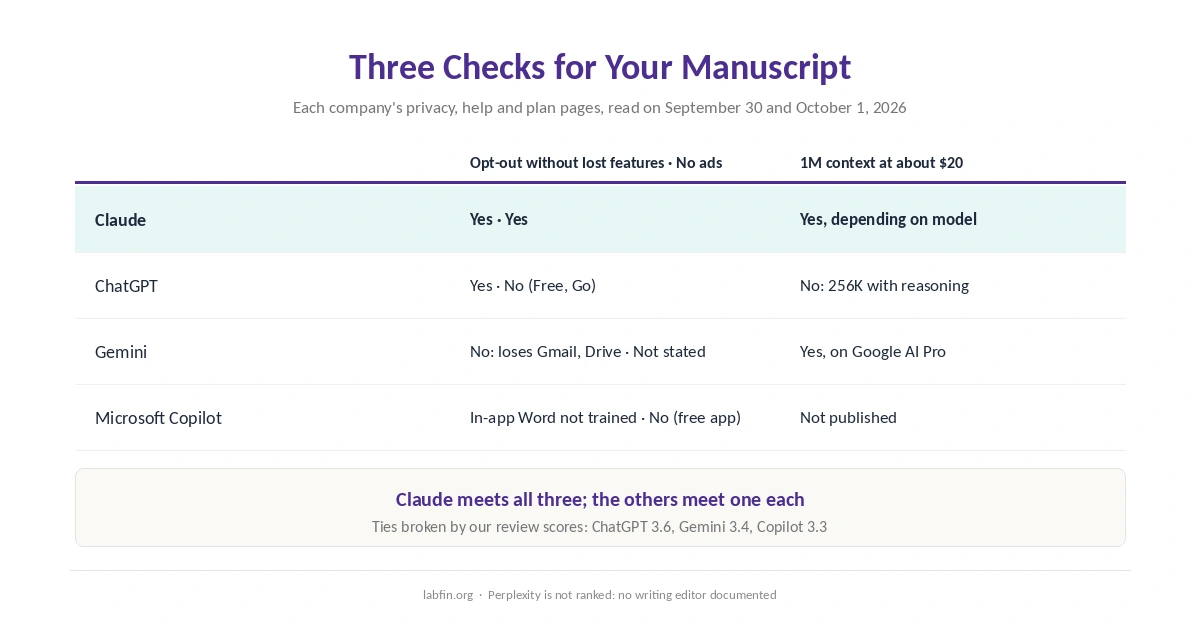
Among the best AI tools for writers on this list, Claude meets all three of our checks. It lets you opt out of training without losing features and shows no ads on any plan. It also offers up to 1M tokens of context, depending on the model. Its catch is retention: with training on, Anthropic keeps chats for five years.
The others each meet one check. ChatGPT’s opt-out costs no features we could find, and Gemini holds 1M tokens on Google AI Pro. Copilot does not train on writing inside Word on Personal and Family plans. Specialist writing apps such as Sudowrite and Jasper are not ranked here, though our Jasper vs Copy.ai comparison covers Jasper and a close rival.
The List at a Glance
| Tool | Checks met: opt-out, no ads, 1M context | Writing environment |
|---|---|---|
| Claude | 3 of 3 | Claude Docs; Projects; Styles |
| ChatGPT | 1: opt-out without lost features | Full-screen writing editor |
| Gemini | 1: 1M context on Google AI Pro | Gemini in Docs on Google AI Pro |
| Microsoft Copilot | 1: no training on in-app Word use | Inside Word and Outlook |
How We Ordered the Best AI Tools for Writers
This list of the best AI tools for writers includes only tools that document a place to write: an editor, a document workspace or writing inside Word. Each earns a point for three checks a working writer cares about, and ties go to the higher review score.
First comes a training opt-out that costs no features. Next comes no ads on any plan. Last comes a context window of 1M tokens on the roughly $20 plan, enough for a full manuscript. Perplexity shows no ads and has an opt-out, but it documents no writing editor, so it is not ranked.
1. Claude: All Three Checks
Claude’s Help improve Claude toggle stops training, and Anthropic says Incognito chats stay out of training even with it on. Claude shows no ads on any plan, and Anthropic lists context of up to 1M tokens, depending on the model. Claude Docs, added on September 16, 2026, gives drafts a document workspace.
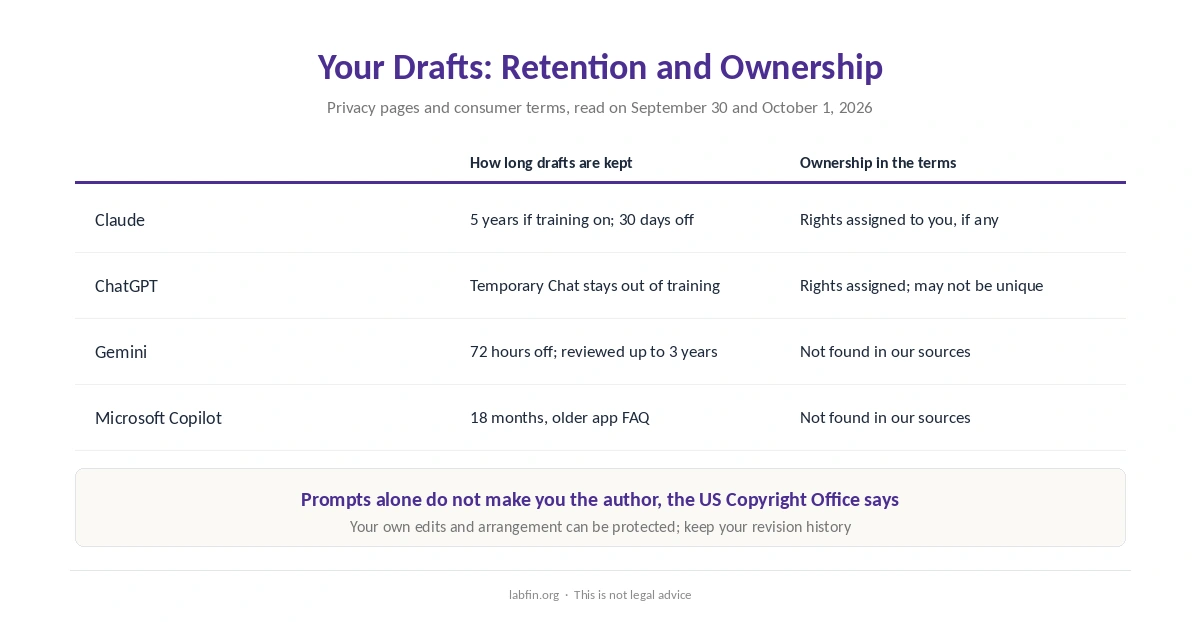
The catch: with training on, Anthropic keeps chats for five years, so switch it off before pasting unpublished work. Usage limits come without published numbers. Our guide to Claude for writing covers the details.
2. ChatGPT: An Editor and an Easy Opt-Out
ChatGPT’s Data controls let you opt out of training, and we found no feature loss tied to it in OpenAI’s documents. Temporary Chat keeps a conversation out of training altogether. Plus, at $20 a month, opens long drafts in a full-screen writing editor.
The catch: Free and Go show ads in OpenAI’s test regions, and Plus holds 256K tokens with reasoning, short of a 1M window. Rating a response can still send the whole chat for training. Our guide to ChatGPT for writing covers the details.
3. Gemini: Room for a Full Manuscript
Google AI Pro, at $19.99 a month, holds 1M tokens of context and brings Gemini into Google Docs. With Keep Activity off, Google keeps chats for 72 hours.
The catch: turning Keep Activity off also disconnects Gmail and Drive in Gemini. With it on, some chats may go to human reviewers for up to three years. Details are in our Gemini review.
4. Microsoft Copilot: Writing Inside Word
Microsoft 365 Personal costs $9.99 a month and puts Copilot inside Word and Outlook. Microsoft’s FAQ says it does not train on Copilot use inside the Microsoft 365 apps on Personal and Family plans.
The catch: the free Copilot app shows ads, and the updated app’s training rules are unclear. For mail, see our list of the best AI for email writing, and for plans, our Microsoft Copilot review.
Who Owns What You Write
OpenAI’s and Anthropic’s consumer terms both assign you their rights in outputs, if any. Anthropic’s terms use that wording, and OpenAI warns that its output may not be unique. We did not find comparable wording for Google or Microsoft in the sources behind our reviews.
The US Copyright Office said in January 2025 that prompts alone do not make you the author of AI output. Your own writing, edits and arrangement can be protected, so keep your drafts and revision history. This is not legal advice; ask a lawyer about publishing contracts.
Before You Paste a Manuscript
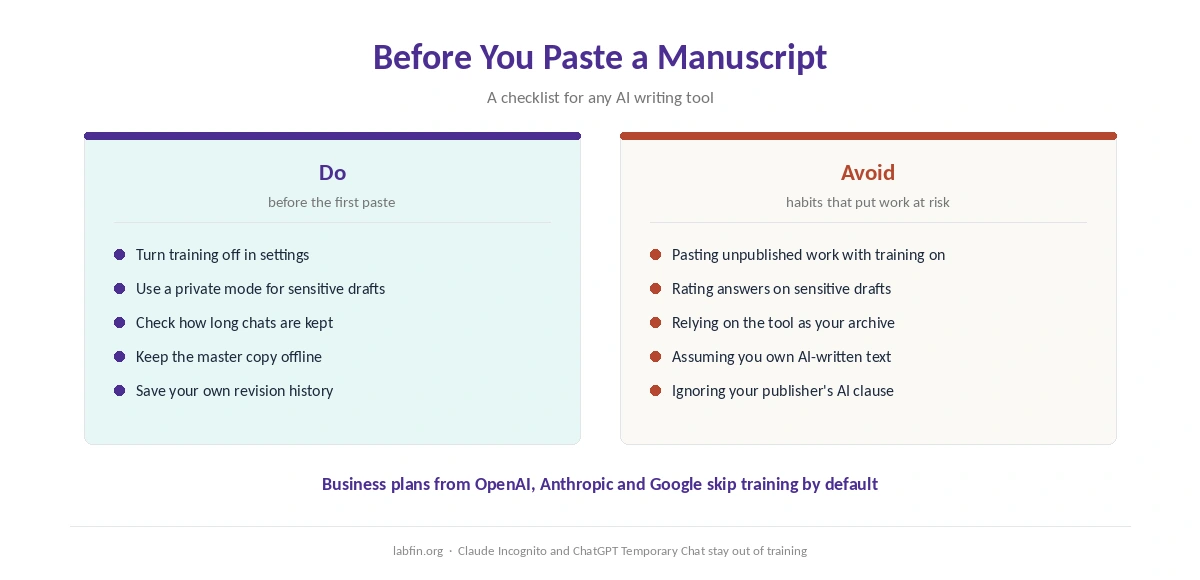
Turn off training first, or use a private mode such as Claude’s Incognito or ChatGPT’s Temporary Chat. Check how long the tool keeps chats with your settings, and keep the master copy of your manuscript outside the AI tool. Business plans from OpenAI, Anthropic and Google skip training by default. Our page on the cheapest useful AI tools covers the lowest documented price for each job.
How We Research
This list draws on each company’s privacy, help and plan pages, read on September 30 and October 1, 2026, and on our individual reviews. Ownership wording comes from the companies’ consumer terms, and the copyright position from the US Copyright Office.
We run no writing tests of our own. Our criteria live on our about page.
Best AI Tools for Writers FAQ
Of the tools on this list, Claude meets all three of our manuscript checks: a training opt-out without lost features, no ads and up to 1M tokens of context. ChatGPT, Gemini and Copilot follow.
None is safe by default on consumer plans. Claude, ChatGPT and Gemini let you turn training off, and Copilot does not train on in-app Word use on Personal and Family plans.
Claude lists up to 1M tokens depending on the model, and Gemini holds 1M on Google AI Pro. ChatGPT Plus holds 256K with reasoning.
OpenAI’s and Anthropic’s terms assign you their rights, if any. The US Copyright Office says prompts alone do not make you the author; your own edits and arrangement can be protected.
ChatGPT’s Free and Go plans and Copilot’s free app show ads. Claude shows none on any plan.
The Verdict
Among the best AI tools for writers on this list, Claude treats a manuscript most carefully on our checks, as long as you turn training off. ChatGPT pairs a simple opt-out with a strong editor, and Gemini fits long manuscripts in Google Docs. Copilot fits writers who work in Word. Our page on the best AI tools for developers covers API prices, scores and data rules for building with AI.
Whichever you choose, switch off training before pasting unpublished work, and keep your own revision history.