
Disclosure: LabFin is reader-supported. If you sign up for a tool through links on this page, we may earn a commission at no extra cost to you. Commissions vary between providers and our ratings do not — here’s our full disclosure.
The best AI design tools on this list, in our order, are Adobe Firefly, Canva AI, Gamma, Ideogram and Beautiful.ai. Each also creates visuals, from images and social posts to slides, but they suit different jobs.
Firefly, for example, leads on commercially safer images, while Canva AI suits everyday templates. Gamma and Beautiful.ai, however, focus on decks, and Ideogram on readable text in images.
Best AI Design Tools: The Short Answer
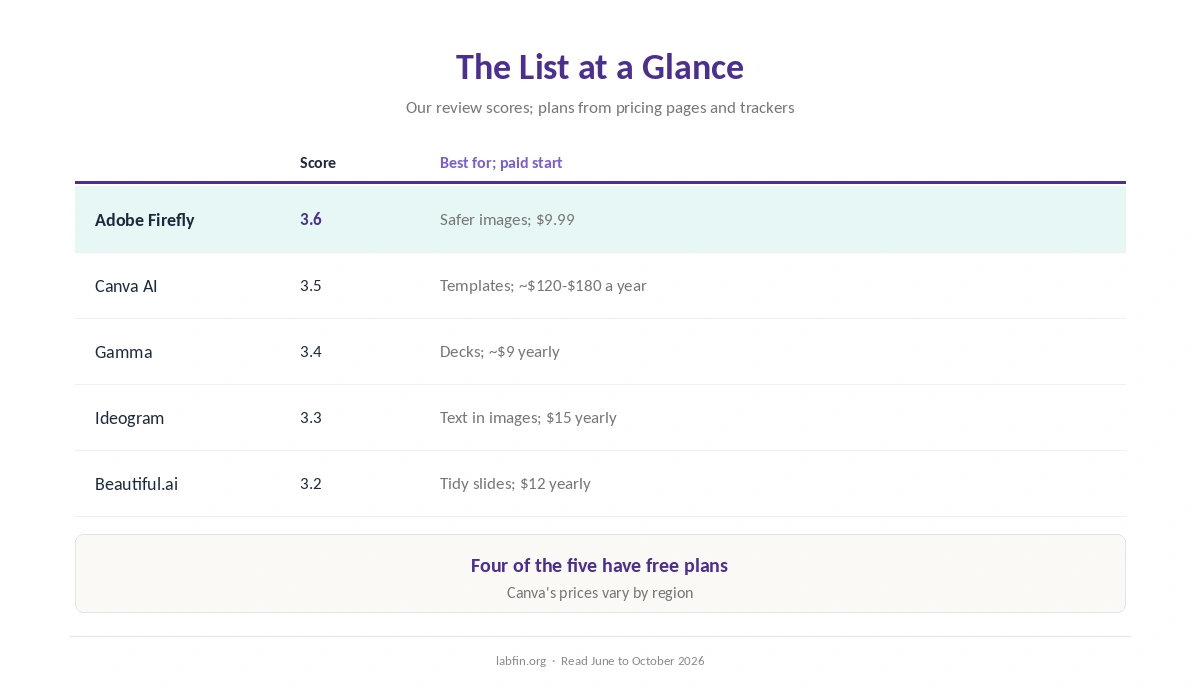
Among the best AI design tools here, Adobe Firefly ranks first, at 3.6: Adobe says its own models train on licensed content and not on customers’ work, and Standard costs $9.99 a month.
Canva AI, at 3.5, also suits marketers who already design in Canva. For decks, however, Gamma and Beautiful.ai fit better, as our list of the best AI for presentations explains.
The List at a Glance
| Tool | Our score | Best for; paid plan to start |
|---|---|---|
| Adobe Firefly | 3.6 | Commercially safer images; Standard $9.99 |
| Canva AI | 3.5 | Templates and social posts; Pro about $120 to $180 a year |
| Gamma | 3.4 | Decks, docs and sites; Plus about $9 a month yearly |
| Ideogram | 3.3 | Readable text in images; Plus $15 a month yearly |
| Beautiful.ai | 3.2 | Tidy slides with guardrails; Pro $12 a month yearly |
How We Ordered This List
This list, for example, ranks the design tools we review that create visuals themselves, by our review scores. Ties would go to the lower paid entry price, as in our list of the best AI tools.
1. Adobe Firefly: Commercially Safer Images
First, Firefly generates images, vectors and short videos, and Generative Fill edits photos by description. Pro, at $19.99, moreover, adds Photoshop on web and mobile.
What to check, however: video uses credits fast, and partner models follow their own terms. Our Adobe Firefly review covers it.
2. Canva AI: Design Inside Your Templates
Canva AI, meanwhile, also adds image generation, copywriting and chat-based design to Canva’s template editor, with a free plan to start. Our list of Canva AI alternatives also covers prices and data terms.
What to check, however: trackers report different Pro prices, and retries use credits. Our Canva AI review explains.
3. Gamma: Decks, Docs and Sites
Gamma, by contrast, builds decks, documents and simple sites from one prompt, and shares them as links or PowerPoint files. Its free plan, however, includes only 400 credits once.
What to check, though: exports may need fixes, and personal plans train by default with an opt-out. Our Gamma review covers it.
4. Ideogram: Readable Text in Images
Ideogram, for example, focuses on one job: posters, thumbnails and logos with readable words. Plus costs $15 a month billed yearly for private generation.
What to check, however: free images are public, and training terms are unconfirmed. Our Ideogram review explains.
5. Beautiful.ai: Tidy Slides
Beautiful.ai, finally, also keeps slides tidy with Smart Slides, and Pro costs $12 a month billed yearly.
What to check, though: there is no free plan, and collaboration needs Team at $40 a user. Our Beautiful.ai review covers it.
Training and Rights
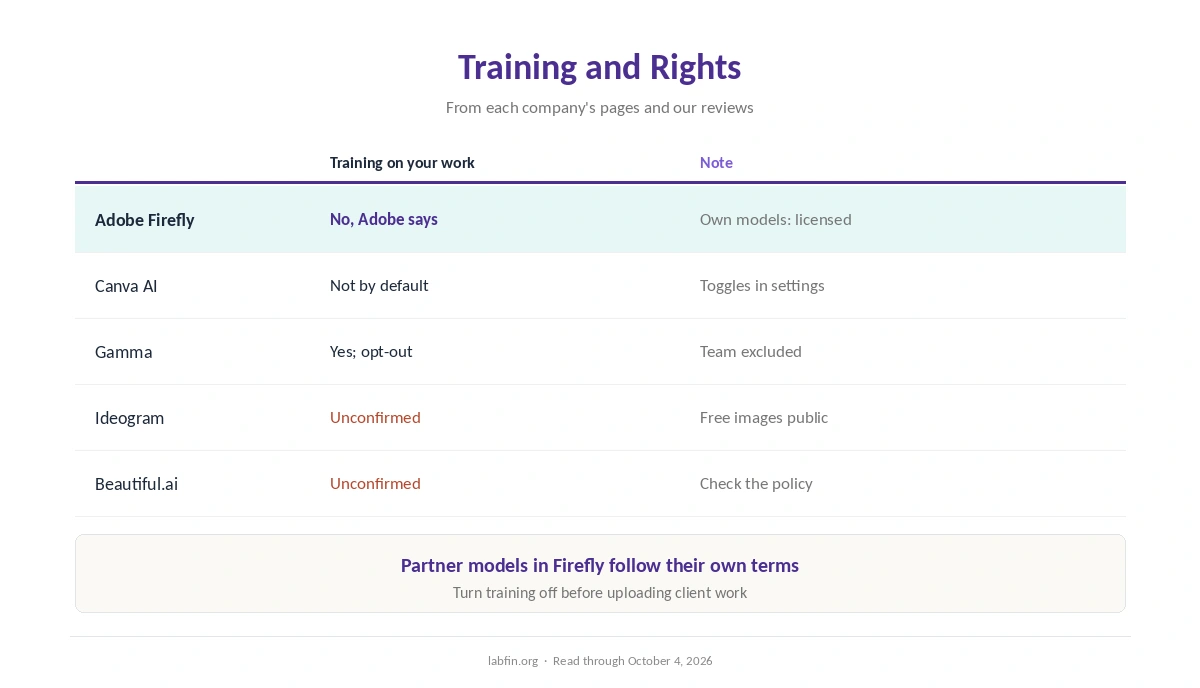
Adobe says it does not train Firefly on customers’ content, and Canva says user content is not used for training by default. Gamma, by contrast, trains personal plans by default with an opt-out, while Ideogram and Beautiful.ai state no rule we could find.
Our guide to which AI tools train on your data compares more tools.
Which Tool for Which Job
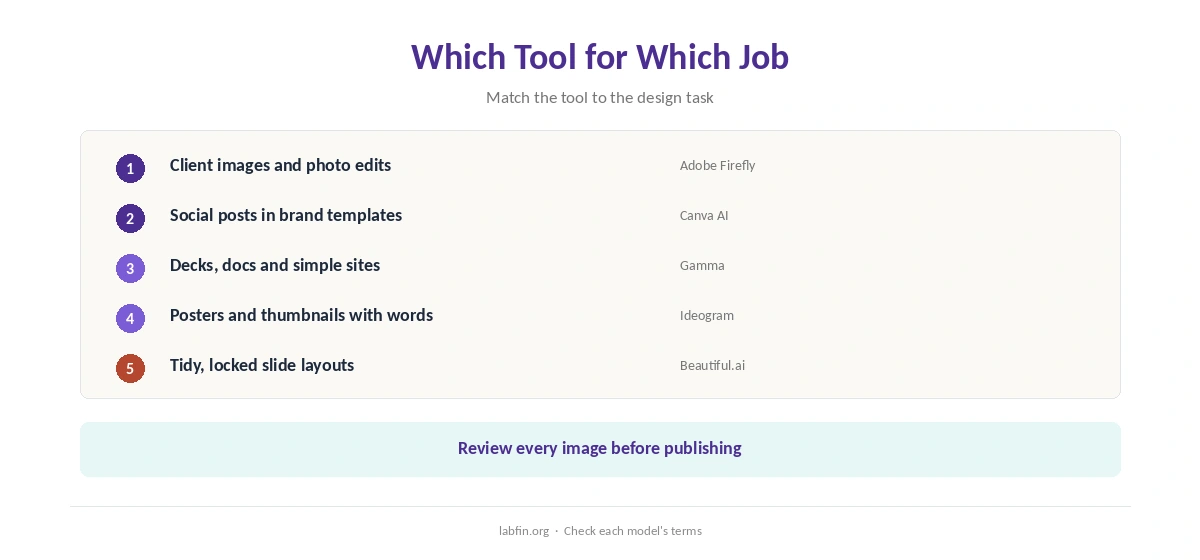
For example, client images point to Firefly, and social posts in brand templates to Canva AI. Decks, however, point to Gamma or Beautiful.ai, and posters with words to Ideogram.
Our guides to using AI for social media and creating brand voice guidelines for AI help keep designs on brand.
Our guide to using AI for repurposing content, moreover, covers reusing designs across formats.
How We Research
This list of the best AI design tools draws on our reviews of each tool, read between June and October 4, 2026, including Adobe’s Firefly plans page.
We run no design tests of our own. Our about page explains the criteria, and our list of the best AI for marketing covers copy tools.
Best AI Design Tools FAQ
On this list, Adobe Firefly, at 3.6: commercially safer images, from $9.99 a month.
Firefly, Canva AI, Gamma and Ideogram have free plans; Beautiful.ai offers a trial.
Ideogram, which reviewers praise for readable words; proofread every word.
Gamma for flexibility and a free start; Beautiful.ai for guardrails.
It depends on the model’s terms; Adobe says its own Firefly models train on licensed content.
The Verdict
The best AI design tools differ by job more than by quality. Firefly leads for commercially safer images, Canva AI for everyday templates, and Gamma for decks.
Therefore, pick by the job, check each model’s terms, and review every image before publishing.