
Disclosure: LabFin is reader-supported. If you sign up for a tool through links on this page, we may earn a commission at no extra cost to you. Commissions vary between providers and our ratings do not — here’s our full disclosure.
This Adobe Firefly review covers Adobe Firefly, Adobe’s AI for images, video and audio, which runs on the web and inside Photoshop, Illustrator and Express.
Adobe says its own Firefly models are trained on licensed content, which matters for commercial work. However, premium outputs such as video draw a monthly credit pool that runs down fast.
Adobe Firefly Review: Is It Worth It in 2026?
For designers and marketers who need commercially safer AI images, yes. Standard costs $9.99 a month, and Pro at $19.99 adds Photoshop on web and mobile.
For heavy video generation, budget carefully. A five-second clip uses about 50 credits on Standard, guides report.
What Adobe Firefly Does
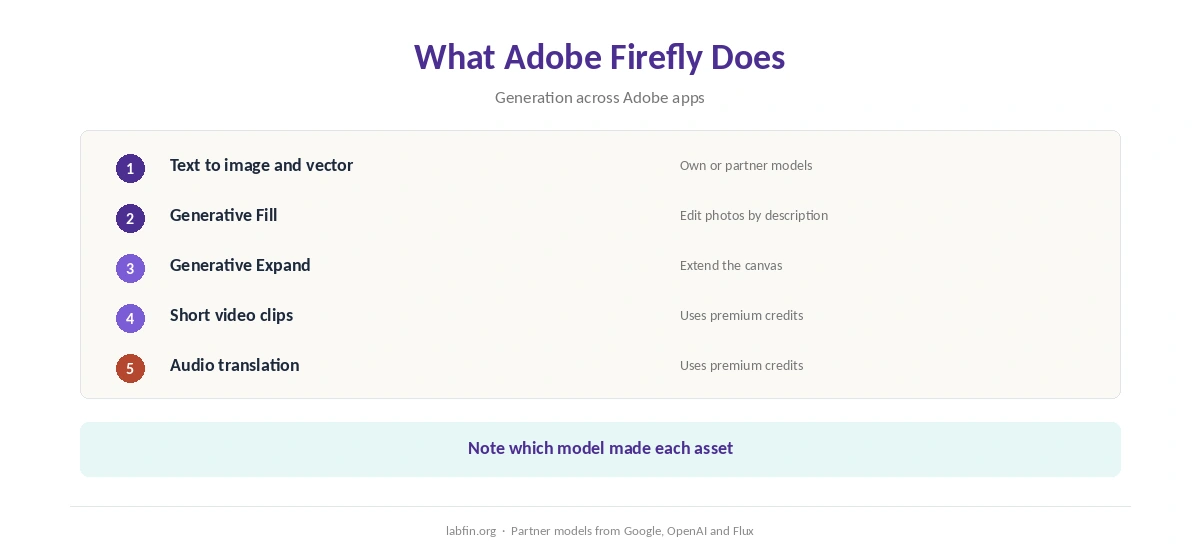
First, Firefly turns text prompts into images and vectors, and Generative Fill edits photos by description. Paid plans make standard image generation unlimited. Our Canva AI vs Adobe Firefly comparison also weighs price and data terms.
It also generates short video clips, translates audio and offers partner models from Google, OpenAI and Flux. Our guide to using AI for repurposing content also shows where it fits.
What Adobe Firefly Costs
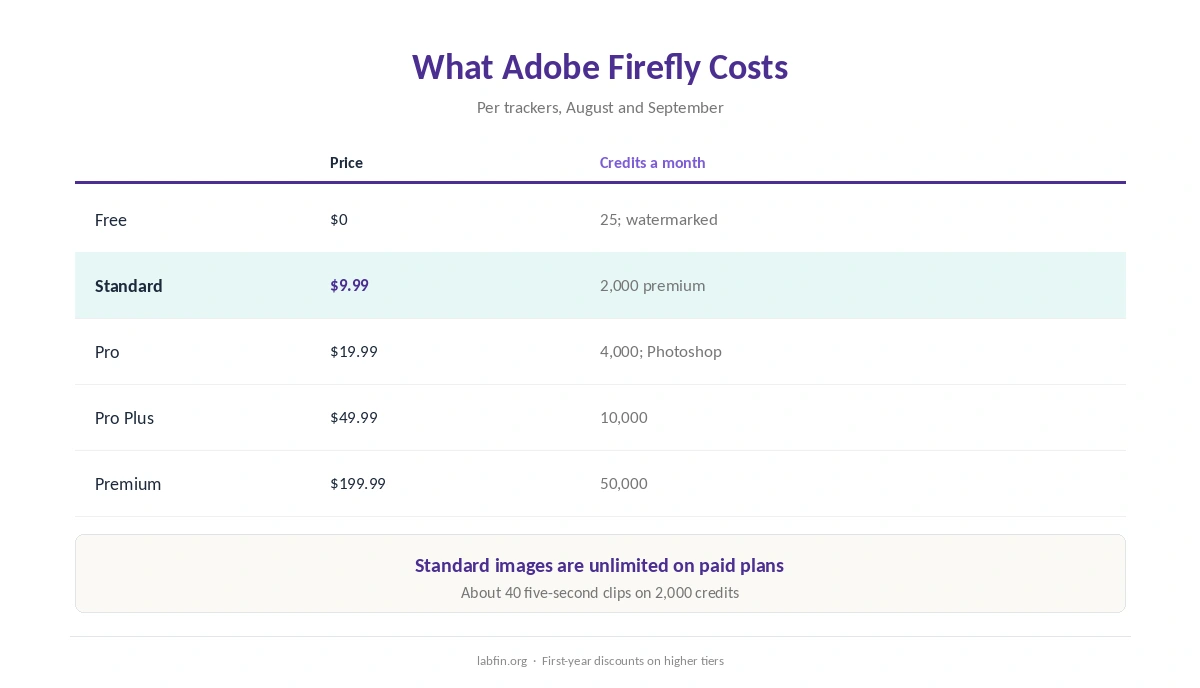
Adobe sells five Firefly tiers, as trackers read its plans page in August and September 2026.
| Plan | Price | Limits |
|---|---|---|
| Free | $0 | 25 credits a month; watermarked outputs |
| Standard | $9.99/mo | 2,000 premium credits; unlimited standard images |
| Pro | $19.99/mo | 4,000 credits; Photoshop web and mobile; Express Premium |
| Pro Plus / Premium | $49.99 / $199.99 a month | 10,000 / 50,000 credits; more video |
Credits do not roll over, and video uses them fast: Standard’s 2,000 credits buy about 40 five-second clips, guides report. Our guide to understanding AI usage limits also explains metered billing, and our guide to reducing AI subscription costs lists savings.
AI Features
Firefly’s own models handle images, vectors and video, while partner models add other styles. Adobe’s licensing claims, however, cover its own models.
So check the terms for each partner model before using its outputs in client work.
Your Data
Adobe says it trains Firefly’s own models on licensed content, such as Adobe Stock, and public-domain material, and not on customers’ content.
Paid plans also carry IP indemnification on some tiers, trackers report. Check your plan’s terms before relying on it. Our guide to avoiding overuse of AI covers disclosure. Our guide to which AI tools train on your data compares more tools.
Rights and Partner Models
Outputs from Adobe’s own models are designed for commercial use, but partner models follow their own terms. Therefore, note which model made each asset.
Also review images for odd details, as our guide to fact-checking AI output recommends for any AI output.
Adobe Firefly vs Other Tools
Canva AI, for example, puts generation inside a template editor, while Ideogram focuses on readable text in images.
Our guide to using AI for social media also covers images for posts.
Our list of the best AI for presentations, moreover, covers decks, and our list of the best AI for marketing ranks copy tools.
In addition, our reviews of Canva AI and Ideogram cover the alternatives.
Who Should Use Adobe Firefly
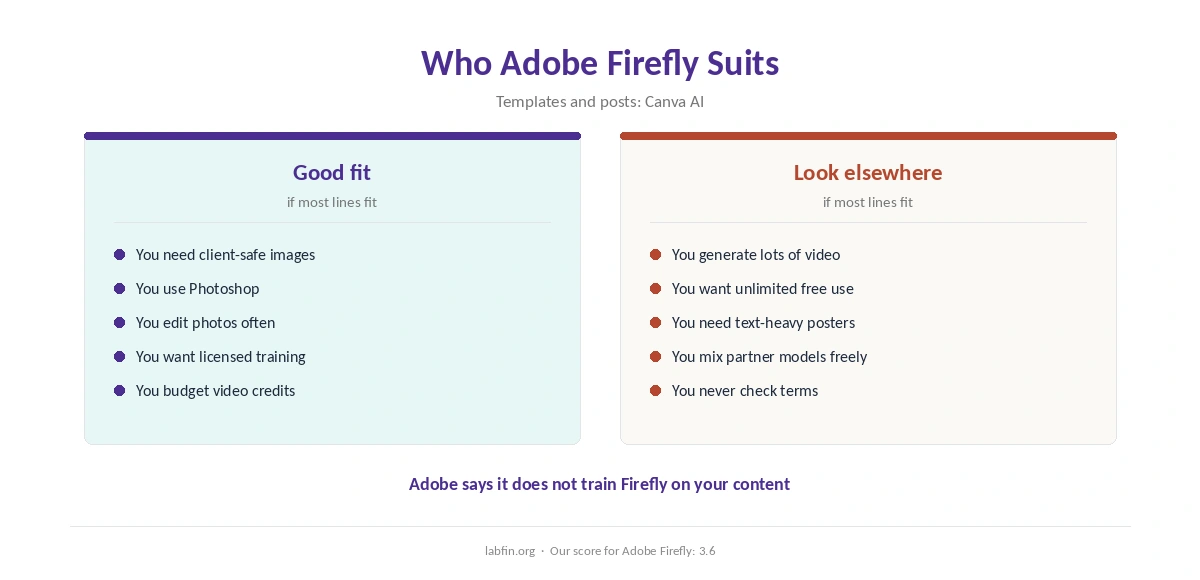
Overall, this Adobe Firefly review finds it suits designers, marketers and agencies that need commercially safer images. It also suits Photoshop users who want Generative Fill. Our Adobe Firefly vs Ideogram comparison also weighs price and data terms.
By contrast, however, it suits heavy video generation on a small budget less. Our list of the best AI design tools compares options.
How We Research
This Adobe Firefly review takes plans from trackers that read its pricing page in 2026, and data terms from Adobe’s Firefly plans page as read by trackers.
However, we ran no tests of our own. Our about page explains the criteria, and our guide to measuring AI tool ROI helps judge the cost.
Adobe Firefly Review FAQ
Free; Standard $9.99 a month; Pro $19.99; Pro Plus $49.99; Premium $199.99.
Yes, with 25 credits a month and watermarked outputs.
Adobe says its own models train on licensed and public-domain content; partner models follow their own terms.
Adobe says it does not train Firefly on customers’ content.
About 40 five-second clips on Standard’s 2,000 credits, guides report.
Adobe Firefly
Commercially safer AI images
Firefly generates images, vectors and video, with Adobe’s own models trained on licensed content and Photoshop on Pro. Against that, premium credits run down fast on video, credits do not roll over, and partner models follow their own terms.
The Verdict
Overall, Adobe Firefly is the clearest choice here for commercially safer AI images, especially for Photoshop users. Video, however, eats credits fast.
The rest of this Adobe Firefly review sets the score at 3.6. So start free, pick Pro if you use Photoshop, and note which model made each asset.