
A local history museum is preparing a traveling exhibit with framed photographs, reproduction labels, and a delicate model bridge. A card named “Pack the exhibit” is too vague to guide three helpers. Trello can suggest checklist items from a card’s title and description, but generated tasks may overlook specialized handling, confuse copies with originals, or imply that a handoff has happened. This hypothetical workflow uses AI to draft the routine work while keeping a conservator-approved packing specification and the receiving venue’s instructions as the controlling sources.
Gather the approved inventory before writing the card
Start with a numbered inventory that identifies each object, its approved container, required support, destination room, and condition-report owner. Separate original artifacts from replicas because the handling requirements may be very different. Verify that the venue has approved the crates and that any transport insurance or specialist handling instructions are available to the person packing. Do not paste private donor information, precise storage security arrangements, or sensitive provenance into a general Trello card. The AI can arrange prose into action items, but cannot independently certify that foam, straps, or a vehicle are suitable. Record the inventory revision on the card so later checklist edits can be traced to the right source.
Create one clearly scoped Trello card
Use a card title such as “Pack traveling exhibit cases for venue transfer,” not a vague “Do the museum.” In the description, give a bounded objective and the approved sequence: check condition reports, match identifiers to the inventory, wrap as directed, pack to the approved diagram, record seals, and hand off custody. Add a reference to the real inventory and the staff member who can authorize deviations. Cards should represent a manageable unit of work. If the transfer includes transport booking, marketing delivery, and object packing, create separate cards to avoid a single checklist with misleading completion percentages.
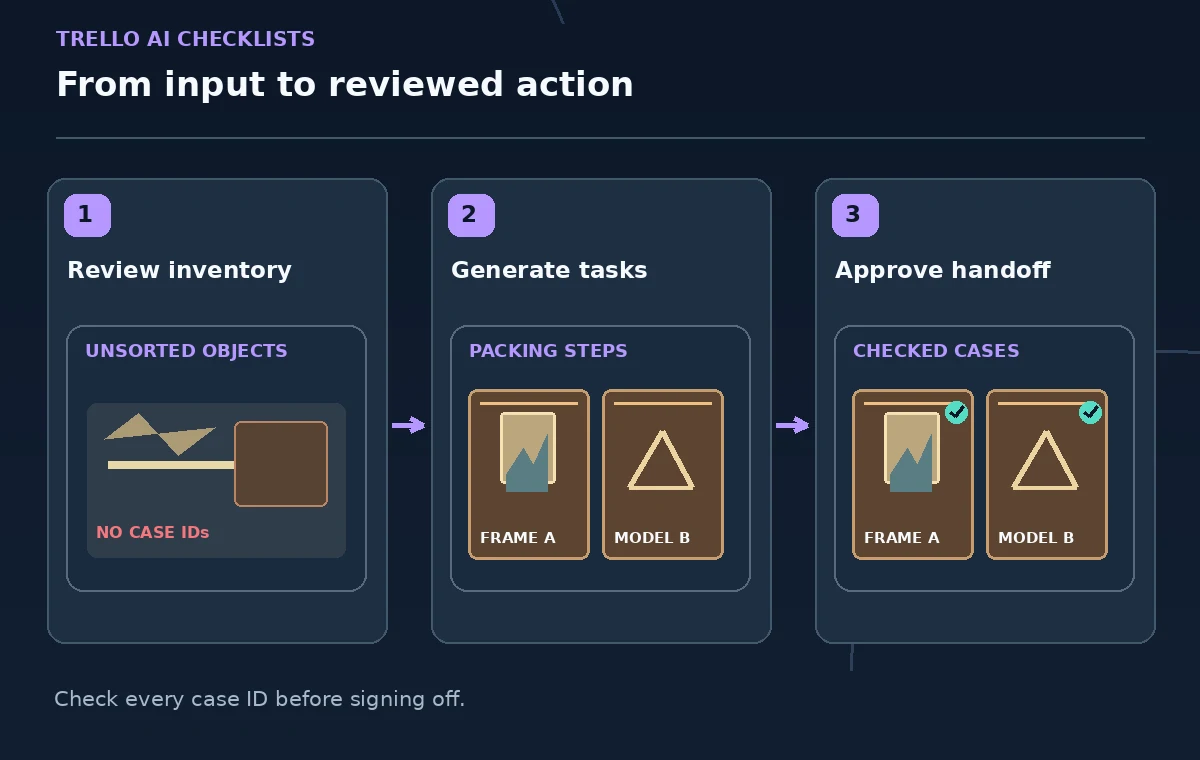
Generate a checklist and understand plan limits
Atlassian documents the AI checklist workflow through the Checklist control on a card: choose Generate checklist items with AI, then review the proposed items. Its current Trello AI feature overview lists web and desktop access for Standard, Premium, and Enterprise plans, subject to administrator settings. If the action is missing, check the workspace AI toggle and the current plan instead of assuming that an older screenshot is still correct. The feature uses the card context, not an independent inventory audit. Give the checklist a specific name such as “Case packing — draft for review” so nobody confuses the result with an approved procedure.
Compare every generated step against the object inventory
Read the suggested steps beside the approved case-by-case sheet. A task that says “wrap all objects” hides important exceptions; replace it with separate steps for the framed originals, reproduction panels, and model bridge, each referring to the appropriate handling document. Cross-check quantities and identifiers rather than trusting generic text. If an item is missing, add it manually. If the AI introduces a temperature requirement, protective material, or handling method absent from the conservation instructions, remove it and ask the responsible specialist. This is particularly important because an attractive checklist can conceal missing special cases.
Turn ambiguous verbs into observable completion criteria
Replace broad commands such as “secure the exhibit” with actions a second person can verify. For example: “Match case A inventory numbers to the approved packing list,” “Attach a condition photograph to the designated record,” and “Record receiving staff signoff after transfer.” These are example process checkpoints, not a tested conservation protocol. Do not mark “insurance confirmed” complete just because a card contains a link to an old policy. Where advanced checklist features are available, assign a responsible person and due date; otherwise identify responsibility clearly in the description or associated task cards.

Treat permissions and attachments as part of the workflow
Before inviting temporary helpers to the board, check whether the card exposes donor details, object valuations, alarm information, or restricted condition photographs. Use a view that provides only the data a helper needs, and keep sensitive records in the museum’s approved system. The AI-generated text inherits the risks of whatever information was placed in the card. A screenshot of a checklist does not establish that every participant had access to the current procedure. Explain where to find the signed packing diagram and identify the contact for unexpected damage or missing inventory.
Use a two-person exception and handoff review
Have one person perform each approved packing step and another compare the completed case against the inventory and condition documentation. A checker should be able to answer what was packed, what remains, which exception was approved, and who now has custody. If the model bridge cannot fit its assigned cradle, stop and consult the specialist rather than improvising from a generated instruction. Preserve any manual edits so the team can see why a proposed item was rejected. Progress checkboxes signal work tracking; they are not substitutes for inspection evidence or signatures.
Close the card without losing the chain of custody
When the transfer is complete, attach or reference the receiving record, inventory revision, exception log, and final signoff location. Verify that the item count on the card matches the official document. Do not attach a public photograph that reveals restricted storage information. If the exhibit is going to another venue next month, duplicate the reviewed card only as a starting template, then reassess the next venue’s specifications. A reusable checklist is useful when it highlights what to confirm again rather than silently carrying a previous location’s assumptions into a new shipment.

Run a release review before anyone treats the list as official
Ask the exhibit lead to test the checklist against one representative case and one unusual object on paper. Check that all actions have owners, evidence locations, and clear exception routes. Mark the checklist as approved only after the museum’s accountable reviewer signs off through its normal process. The final artifact should be a practical coordination tool, with the actual handling and custody requirements still traceable to authoritative documents. AI accelerates drafting; it should never become an undocumented source of conservation instructions.
How We Research
This guide was prepared by reading the named official documentation—Atlassian Support, Add, delete, and manage checklists and Atlassian Support, AI features in Trello—and cross-checking the described feature, its workflow, platform or plan restrictions, and the point at which a person must review the result. The scenario, illustrations, example inputs, approvals, and sample outputs are hypothetical editorial teaching aids; we did not access a customer account, run a live product test, measure model accuracy, or verify an actual organizational policy. Screens, plan rules, and labels can change after this documentation review. Always confirm the currently available feature and the authoritative source documents before acting on any AI-generated wording.
Frequently Asked Questions
No. It generates checklist suggestions from the content available on the Trello card. Compare them with a separately approved inventory and handling plan.
Yes. Atlassian documents removing and editing items after generation, as well as rearranging them. Treat every initial suggestion as a draft.
The current Trello AI feature overview lists Standard, Premium, and Enterprise for its web and desktop AI tools. Verify the live entitlement and workspace administrator settings.
No. Assign people and checkpoints according to the museum’s real roles and policies; AI text cannot grant authority or establish the suitability of packing materials.
Keep the approved inventory revision, completed condition checks, exception approvals, case identifiers, and signed receiving record in the authorized system.