
A fictional neighborhood organization wants a six-slide onboarding presentation for new volunteers. It has a current logo, purple-and-teal palette and a written attendance policy. Copilot in PowerPoint can use an organization’s Brand Kit when creating a deck, which may help with visual consistency. However, a slide that looks on-brand can still misstate an eligibility rule, require attendance that is actually optional, or conceal essential contact details. This guide is an editorial simulation with drawings, not a live Copilot trial or a claim about any organization.
Identify what the Brand Kit can and cannot decide
Collect the approved logo file, color values, typography guidance and slide template separately from the volunteer handbook. Brand rules control presentation appearance and voice; the handbook controls obligations and program facts. Ask a program owner to mark immutable items such as training requirement, registration method, safeguarding policy, emergency escalation route and accessibility contacts. Do not rely on a model to derive policy from a logo or past deck. A consistent palette may make a false statement more persuasive, so visual approval and factual sign-off must be distinct stages.
Check access and the current presentation workflow
Microsoft’s October 2026 help describes starting a new PowerPoint presentation, opening Copilot Chat near the lower right, and optionally using Select brand to attach an organizational Brand Kit. If the organization has no Brand Kit, that step can be skipped; some accounts may have no Copilot at all depending on license and admin settings. The documented workflow can ask follow-up questions about audience, slide count, template or design direction. A team should not build a hard-coded training manual around a screenshot of one tenant. Verify the account’s menu and which brand assets are approved before authoring.

Establish a controlled source document
Prepare a concise Word file with clear heading styles: orientation purpose, dates, optional events, required checks, contact routes and accessibility notes. Microsoft specifically recommends organized Word styles when using a document to guide presentation creation, and notes that source images can inform the deck. Keep the document small and current, and restrict the sharing scope. Exclude unnecessary participant details and internal personnel notes. Provide a revision date and a document owner. If a copied template includes an old policy, update the source before generating slides; a newer brand template will not fix stale content.
Prompt for the audience and the exact claims
Ask for a short introductory deck for first-time volunteers, with one slide per key topic and plain language. Specify that program obligations must come only from the approved document, unknowns should remain placeholders, and brand colors and logos should follow the attached kit. Do not ask for a fictional success metric or ‘compelling’ guarantee. Use the model’s questions about duration or audience to refine design, not to invent facts. Keep any automatically added photographs clearly illustrative and confirm that people pictured have appropriate rights or releases for distribution.
Inspect the polished false statement
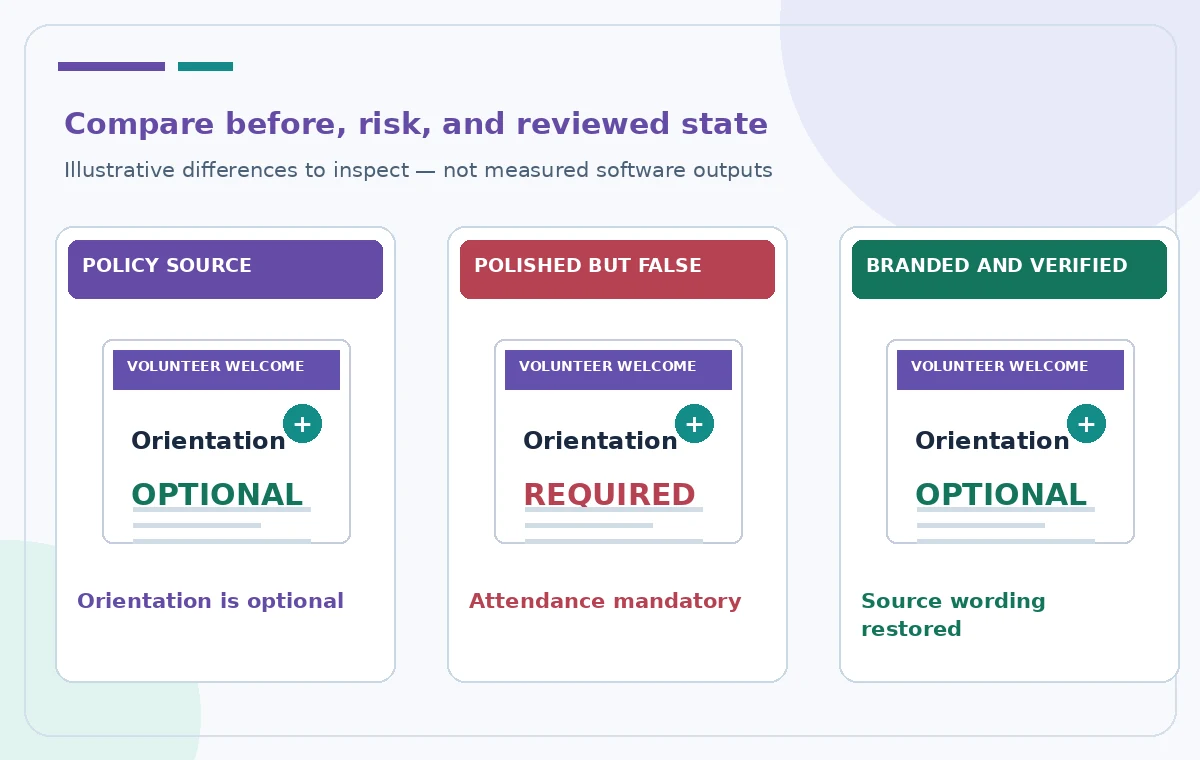
The conceptual comparison illustration presents an incorrect draft that turns an optional orientation into a mandatory one. This example is a warning about human review, not evidence of a specific error in Copilot. Check all modal verbs—must, may, can, optional—and compare them to the handbook. Read dates, times, contact information, costs, volunteer eligibility and safety statements word for word. If the model provides a persuasive sentence that conflicts with policy, remove it rather than merely softening the tone. Ask the program owner to approve the final language independently of the design.
Proof branding at realistic slide sizes
Check that the current logo is correct, never stretched, and not placed over dense photography. Verify that brand color pairings preserve contrast and that headings remain legible from the back of a room. Animated transitions and decorative pictures should not obscure the training sequence. Avoid placing the only essential instruction in a background image. Use editable text, descriptive link labels and an accessible reading order. If the deck will be distributed as a PDF, inspect the resulting PDF as well as the live presentation, including any notes and speaker instructions that will become visible.
Avoid accidental corporate or personal disclosures
Brand Kit assets may include internal templates and design instructions. Check whether the tenant allows sending documents or logos through Copilot under the organization’s data governance rules. A volunteer introduction should not disclose personnel records, incident logs, internal phone lists or unannounced programs. When building the source document, include only what new volunteers are authorized to see. Do not use a deck-generation request as a shortcut to summarize restricted repositories. Keep the original source, generated draft and approved export in an access-controlled workspace.
Separate revisions from approvals
Copilot may regenerate a deck after the reviewer asks to shorten or restyle it. Treat that output as a new candidate, not a continuation of an earlier approval. Use a side-by-side checklist showing what changed in each slide and whether policy language survived. Mark owner approval outside the public slides, not with production labels on the deck. If a colleague edits a sentence in the PowerPoint file, the current official Word source should still be authoritative. When a policy changes, fix the source document and perform another complete factual check of the resulting presentation.

Publish an accessible, versioned handoff
Before sharing, verify every slide against the approved handbook and test the deck with someone who has not seen the prompt. Ask them to find the registration link, optional-or-required status, support contact and first-day steps. If they cannot, restructure the presentation. Save a dated master file, an accessible distribution copy and a brief approval record. A Brand Kit solves only part of the visual consistency problem; it does not prove legal compliance, policy accuracy or audience comprehension. This article’s example is hypothetical and includes no live tenant, personal records or performance measurements.
How We Research
We consulted these named official vendor resources: Microsoft Support — Create a new presentation with Copilot in PowerPoint. Our editorial research compared documented feature entry points, plan and permission conditions, expected output, and risks that could change the practical decision. The instructions are based on published help material and a hypothetical workflow, not a logged-in test or evidence of measured AI accuracy. We have not processed real visitor records, product safety tests, confidential feedback or approvals. All four accompanying images are original instructional drawings, not service screenshots or sampled outputs. Recheck the interface, access rights, policy owner, and official sources before production use.
Frequently Asked Questions
No. Microsoft describes it as an optional step when an organization has made an approved kit available.
Microsoft documents a Select brand option in the Copilot creation workflow, subject to plan and admin configuration.
No. Brand assets influence visual style; policy statements require separate approval against the source document.
A structured Word document can guide the deck; Microsoft recommends appropriate heading styles and a current template.
No. Inspect branding, facts, accessibility and distribution permissions before sharing the deck.