
A neighborhood preservation group wants an inviting flyer for a historic railway station. The building was photographed on an overcast day, and the designer considers adding a blue sky to make the event image more appealing. Photoshop Sky Replacement can blend a replacement sky with an existing foreground, but it cannot make the picture evidence of the weather that day. This tutorial uses a hypothetical, permission-cleared station image and treats the new sky as a transparent design decision, with careful attention to roof tiles, wires, and realistic lighting.
Decide whether a composite is appropriate
First identify where the image will appear. An event poster with an acknowledged illustrative composite has different truthfulness requirements from a museum archive, historical exhibit label, or reporting on current weather. The original capture is evidence of a place at a moment; the adjusted image is not evidence of that moment. Secure permission to use both the building photograph and any third-party sky source.
For a local history newsletter, a corrected tonal adjustment may be preferable to replacement. If the story concerns a storm, storm damage, or an official inspection, never swap the sky to imply different conditions. Keep the original untouched and name the edited image accordingly. Ask the publication editor to approve the purpose before beginning technical work.
Prepare the station photograph
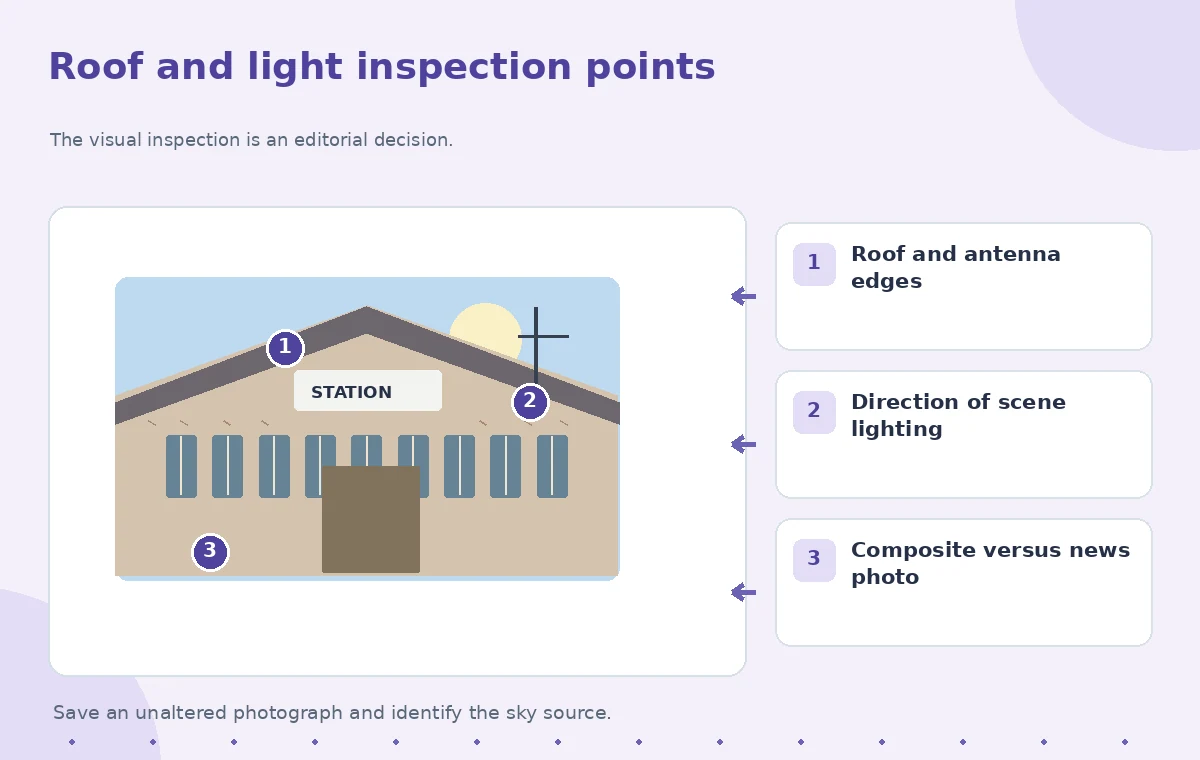
Inspect the source at full size before adding layers. Identify roof ridge lines, chimneys, trees, overhead cables, flagpoles, and any thin radio antenna. These are exactly where automatic masks may leak the new sky or create bright fringes. Also inspect shadows on brickwork and the station clock; their direction provides clues about the existing light.
Create a duplicate working document, retain embedded metadata where appropriate, and establish a neutral baseline crop. If the horizon includes a sign, preserve all lettering from the source. Neither sky replacement nor atmospheric enhancement should rewrite the station name or year plaque. Save a layered file early so every later edge correction can be reversed without re-exporting a damaged photograph.

Use the documented Sky Replacement controls
Adobe documents Edit > Sky Replacement in Photoshop. Choose a supplied sky preset or add a sky image you are entitled to use. Set its positioning and overall visual relationship to the original photograph. The dialog provides Shift Edge and Fade Edge for the boundary, Brightness and Temperature for the sky, and foreground lighting and color adjustments for the scene. Your version may show additional refinements.
Start with subtle settings. A blue sky over a uniformly gray, wet building can become less credible if bright sunlight suddenly appears only in the background. Use the preview to inspect the whole composition, but make the actual approval judgment with a closer view of the roof edges. Do not describe the preview as a real-world result or claim a universal slider value; photographs require different edge and lighting adjustments.
Protect rooflines and thin structures
Zoom to the ridge tiles and the antenna against the brightest new cloud. Look for light-colored outlines, missing cable segments, and new sky leaking into gaps that should remain solid. Adobe also documents Edge Lighting and a Sky Brush for refining the interface. Work locally when the automatic boundary makes a mistake instead of hiding the defect with heavy blur.
Examine the same roof on both light and dark sky candidates. A mask that looks clean against pale clouds can expose a ghost edge over navy blue. If the replacement makes a cable vanish, restore it from the untouched foreground layer. A convincing scene with missing physical details is still a poor preservation image. Record particularly difficult edges in a small proof sheet for the second reviewer.
Compare the incorrect and reviewed versions
An instructional before-and-after comparison should demonstrate a specific edge defect rather than a fictional claim that Photoshop always produces that defect. In the flawed conceptual frame, a pale stripe traces the roof and the sky cuts through a metal aerial. In the reviewed frame, the aerial remains continuous and the roof is bounded cleanly. Both are schematic examples, not measurements of one tested file.
At the same time, compare the brick lighting. If replacement warmth turns the sky orange while windows and pavement remain cool gray, reduce the color shift or select another sky. For a simple event poster, modest light balance is more believable than a cinematic sunset. The quality decision is whether the place remains recognizable and the nature of the editing is clear.

Keep the announcement text independent
Put opening hours, ticketing details, addresses, and dates into real editable typography. The AI-assisted photo is not the right place to generate or verify an event schedule. Compare every operational statement with the preservation group’s approved announcement. If a station clock happens to show a visible time, do not digitally alter it to suggest a different historical record.
Leave generous space outside the new sky for readable headline text, rather than forcing letters into cloud textures. Check contrast on mobile and print. A visual that looks detailed at the designer’s monitor may show unreadable letters over the sky after downscaling. Keep the caption plain: an edited promotional composite, not an unmodified image taken on the event day.
Combine AI Tools with Human Review
Export without losing the provenance
Review the full-resolution layered composite, then export the format required by the poster workflow. Preserve a separate original file and layered working copy. Record the sky’s source and usage permission, the author of the base photo, and the intended publication context. If a publication specifically requests documentary photographs, supply the unaltered version instead.
Have one editor inspect the wires and roofline, and another check the visual claim made by the caption. Compare the final export against the original at the same crop and size. Compression can introduce fresh halos along fine edges; if those appear only after export, revise the export settings or simplify the design before distributing it.
Stop when realism conflicts with accuracy
Sky Replacement is a compositing tool, not an evidence-correction tool. If the photo cannot be made credible without inventing reflections, removing actual cables, or repainting the scene, the safer choice is a different original photograph. A slight overcast sky can also support the story of a real local building; attractive does not require changing the weather.
The examples in this article are hypothetical and the accompanying graphics are teaching diagrams. We did not perform a live Photoshop test or measure halo reduction. The reliable outcome is a documented editorial workflow: authorized images, reversible layers, inspectable boundaries, and a final caption that distinguishes a designed scene from historical documentation.
How We Research
We reviewed primary documentation for the current feature scope and implementation: Adobe Photoshop: Replace sky in images; Adobe Photoshop: Select skies in images. The article analyzes a hypothetical, editor-led scenario against those sources and highlights failure points that can be independently checked. We did not use a paid product account, run a controlled accuracy study, or claim measurements from actual source footage, calls, photographs, or translations. The included diagrams are conceptual instructional artwork rather than screenshots or empirically measured before-and-after results. Product capabilities, pricing, languages, availability, and user interface labels can change; confirm current product and account documentation before deploying the workflow.
Frequently Asked Questions
No. It creates a composite. For documentary records or historical claims, use and label the original photograph.
There is no universal setting. Review roof tiles, wires, and trees at full resolution and adjust to that image.
Yes. Keep an untouched original and use a layered Photoshop workflow with reversible corrections.
Restore the original wire or abandon the replacement; do not accept an attractive but physically incorrect scene.
Yes when an edited scene could be confused with documentary evidence, especially for heritage or historical imagery.