
At a community garden design workshop, thirty sticky notes cover tool storage, a seed table, lighting and paths. Only one attendee writes that the proposed west entrance may be unusable for wheelchair users. A convenient AI summary might spend most of its space on the many seed-table notes and overlook that isolated access concern. The organizers need a readable planning document that records uncertainty, not a vote or an imaginary commitment.
Miro’s help center documents selecting sticky notes and choosing Miro AI > Document > Summary. Miro AI can also generate notes and cluster selections by keyword or sentiment; these are distinct operations. None verifies whether a planned entrance meets an accessibility standard or whether a committee approved a change. The board, wording and outputs below are hypothetical examples, not results from a Miro account or a real workshop.
Agree on the scope and keep a faithful board snapshot
First decide exactly which workshop the summary represents. Save a dated copy or export of the board before restructuring it, preserving the wording and position of the access note. Identify attendees’ consent and whether comments may be redistributed. The source set is not a survey with a representative sample; several notes could be written by the same person, and visible clusters may reflect facilitation choices.
Assign a temporary source identifier to each sticky, such as G-01 through G-30, in a separate review log. This numbering is for tracing editorial changes, not a claim that Miro supplies stable reference IDs in the AI output. The west-gate observation gets its own record even though it is numerically rare. Keep personally identifying remarks out of any publicly shared summary.
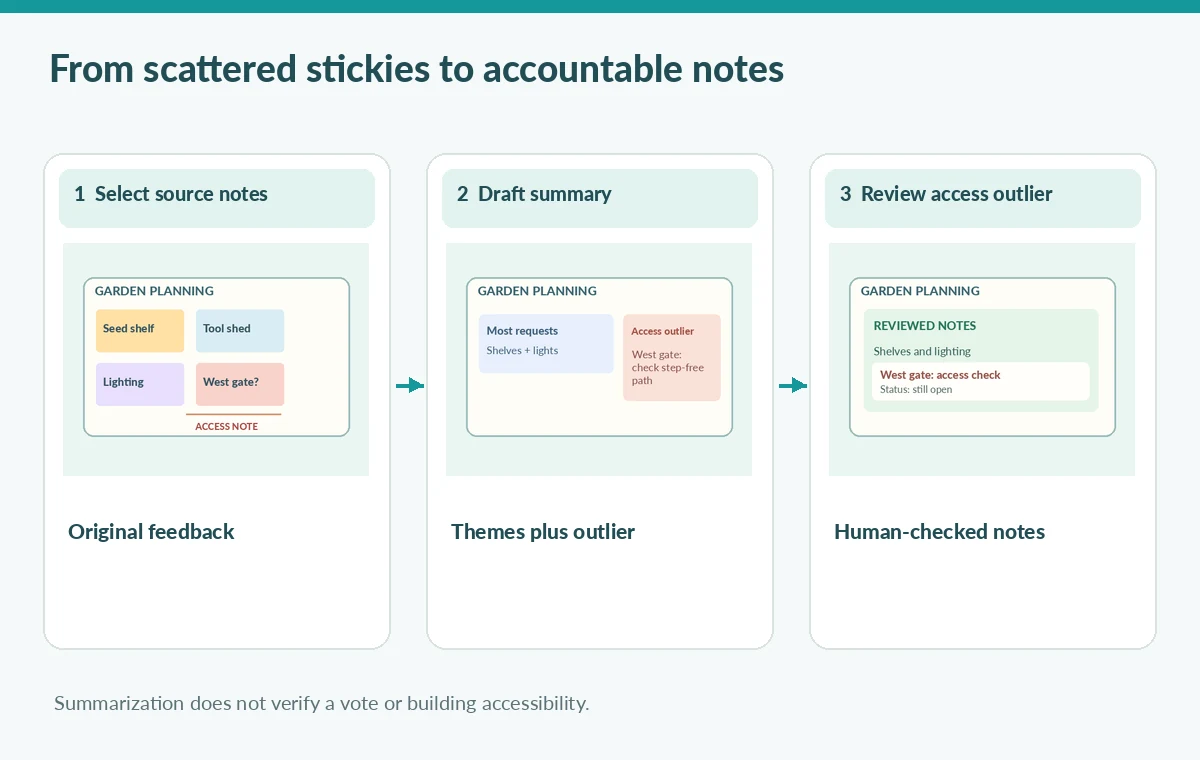
Separate repeated preferences from important outliers
Read the notes once as a human before selecting an AI feature. Mark statements as requests, observations, ideas or decisions only when the board actually supports those categories. A note saying ‘Could the west gate be step-free?’ is a question. It should not become ‘the west gate is accessible’ or ‘the committee voted to rebuild the gate’ in a polished document.
Miro offers keyword and sentiment clustering, but a cluster label is not a decision record. If organizers cluster notes before summarizing, compare every original note with its assigned group and inspect unclustered items. A critical access concern can deserve a visible section without being the largest theme. The summary should be organized by editorial importance and provenance, not simply the frequency of similar words.
Use Miro Document Summary with a bounded selection
Select the workshop’s relevant sticky notes on the board. The official help directs users to Miro AI, then Document, then Summary from the selection menu. Inspect the generated Miro Doc before sharing it. Avoid assuming the service automatically includes comments outside the selection, archived frames, or images with text. Those sources require their own review and may not be processed by the same command.
Use a neutral instruction in surrounding facilitator notes: describe themes, quote uncertainties accurately, distinguish action proposals from approved decisions, and flag items that appear only once. Do not ask the model to invent owners, budgets or dates. Capture the summary revision, source board and editor’s corrections. Available tools and usage allowances may vary by account or product update, so verify the interface rather than hardcoding click sequences into a training handout.
Audit the access concern against the original sticky
Compare the generated summary with the annotated source board. A rejected hypothetical summary might say only ‘Participants favored seed shelves and lighting.’ That wording hides the single wheelchair-route concern. A responsible draft says that an attendee questioned step-free access at the west entrance and that the design team must investigate it. The latter does not claim that an inspection has happened.
Check other low-frequency items as well: narrow turning space, temporary ramps, irrigation hoses across paths, and the need for accessible seating. These are examples of matters to verify, not findings attributed to the fictional meeting. Highlight anything that needs site measurements or consultation with access specialists. AI can assist with grouping words, but it cannot replace those observations or stakeholders’ authority.

Mark proposal, decision, owner and deadline separately
Add a small decision ledger alongside the narrative summary. For each proposed action, record source sticky, exact requested change, decision state, named approver if documented, and deadline only if explicitly assigned. Use ‘Not yet decided’ when the workshop did not resolve the question. A visually polished AI document can otherwise create false confidence that someone has accepted responsibility for the west gate.
Send the ledger to the workshop facilitator and the people responsible for the garden’s access review. Ask them to confirm the meaning of the sticky, not merely whether the summary sounds plausible. If a disputed note cannot be resolved, keep it identified as an open question and link to its source. Do not backfill a vote after the fact to make the plan appear complete.
Turn the summary into accessible participant communication
Draft a short participant update that distinguishes what was heard from what will happen next. Include plain-language headings, a readable text version of any diagram and a route for correcting misquoted notes. Avoid exposing participants’ names or health details when only the design concern is needed. An accessible summary should not require readers to understand Miro’s board layout or rely on color labels alone.
For an actionable next step, state that staff will examine the west entrance with the relevant users and document the findings before a route is advertised. That sentence is a proposed process, not evidence that access is confirmed. Keep the garden’s existing public route guidance unchanged until a responsible person approves a factual revision.
Archive a review trail before circulating the document
Keep the untouched board snapshot, selected-note list, draft Miro Doc, revision history and sign-off in a shared project folder with appropriate permissions. Record what the AI omitted or overstated, since those edits will help reviewers spot recurring failures. If new workshop notes arrive, generate a separate revision and compare it with the earlier one instead of silently replacing a participant-facing record.
Before release, perform a final three-part check: locate the access sticky, verify every statement about approvals and confirm a responsible human reviewer. The illustrative diagrams accompanying this article show possible summary states, not screenshots or measured model behavior. The outcome sought is faithful communication, not an unqualified claim that an AI system has solved the garden’s accessibility questions.

How We Research
This guide was researched on November 4, 2026 using these named official product sources: Miro Help Center: Miro AI with Sticky notes; Miro Help Center: Miro AI overview; Miro Help Center: content analysis starter prompts. We inspected the vendors’ published workflows and limitations, and designed a hypothetical editorial scenario with checks appropriate to the source material. No vendor account was accessed, no media was uploaded or generated in the service, and we did not measure sound quality, image restoration, accessibility, rights clearance, or factual performance. All illustrations are original educational diagrams, not product screenshots or records of real tests. Features, interfaces, account access and usage limits may change. Editors must independently confirm the original facts, permissions, platform conditions, accessibility, export behavior and human approval before public release.
Frequently Asked Questions
The documented workflow acts on selected notes. Verify the selection and compare the result with the complete workshop source before treating it as comprehensive.
Only after a designated reviewer confirms what was actually said, agreed, and assigned. A summary alone cannot establish a vote or approval.
No. Frequent ideas matter, but a single access or safety concern may warrant a separate section and follow-up.
No. It can summarize notes about access, while route specifications and on-site conditions require independent qualified verification.
Review participant consent and sensitive details first. A de-identified summary may be suitable even when the full board is not.