
A team planning a fictional neighborhood makerspace interviews four visitors about the new entrance. Three say that the signage is confusing; one wheelchair user says the temporary ramp becomes slippery after rain. An AI-generated project roadmap could cluster most comments under “wayfinding” and quietly omit the unique ramp concern because it appears only once. That would make a tidy board but a dangerously incomplete brief.
Miro documents Flows as connected AI-powered formats that can turn canvas content into editable documents, tables, timelines, and other outputs. It also documents plan-specific run and credit limits. The team and interviews here are invented. The useful lesson is how to build a review gate between qualitative observations and a proposed plan, not how to claim that AI discovered a safe entrance design.
Preserve each source quote before asking for themes
Create one source card per fictional participant with an anonymized identifier, exact observation, setting, and whether the statement was directly observed or inferred. Keep the ramp statement as a separate record even if a broader category also contains signage comments. Store the source notes outside the generated summary as an audit baseline.
For real participants, obtain appropriate permission to use recordings or notes, minimize personal details, and separate accessibility needs from identities where possible. A software tool should not be asked to deduce a diagnosis from how someone navigated a space. The purpose of synthesis is to preserve reported barriers, not to label people.
Set up supported Formats and explicit instructions
Miro’s current Flows documentation describes adding supported Formats or an AI Instruction block to the canvas, connecting them with diamond connectors, and writing an instruction in each TASK bar. A chain might include source stickies, a themed table, and a draft roadmap. Which formats and model choices are available can vary in the account.
In the first instruction, specify “Group similar observations, but retain every unique safety or accessibility concern as its own row.” Request a source identifier beside each generated claim. Avoid instructions like “remove duplicates and low-frequency complaints” without a clear exception policy, because rare observations may carry the largest practical impact.
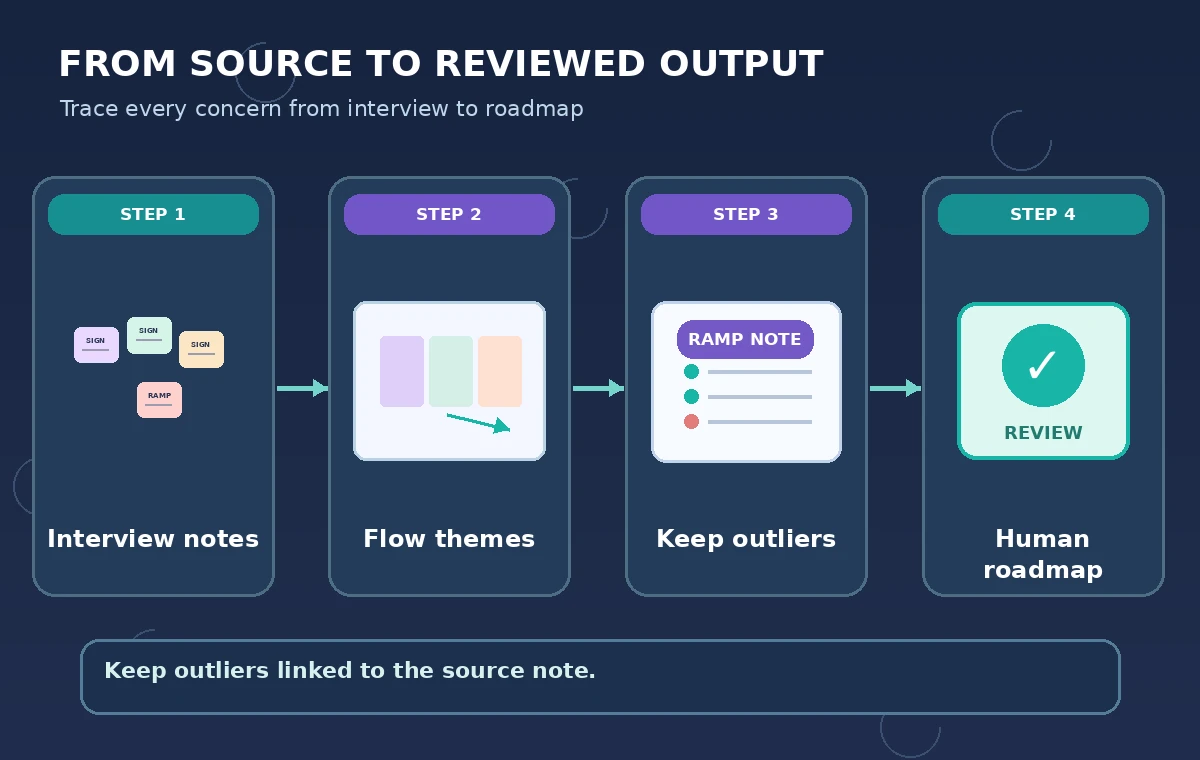
Draw a visible source-to-theme-to-plan path
Connect source stickies to a table of themes, then connect that table to a roadmap Format. Miro describes each linked Format as using preceding content as input and producing editable output on the board. Keep the original notes visible to reviewers rather than replacing them with one polished roadmap slide.
For the fictional interviews, the correct intermediate table could include “Entrance signage: three reports” and “Wet ramp traction: one report, unresolved.” The number of mentions should be visibly distinct from the severity or priority of a problem. Neither item is a verified engineering assessment; the roadmap calls for an inspection.
Place a human decision gate before priorities
An AI step can draft work items but should not authorize an accessibility claim, budget, or implementation schedule. Add a board column for evidence owner, required verification, and approval status. The ramp item needs inspection by an appropriate facilities specialist before anyone can call it compliant or safe.
Ask reviewers to check whether each output can be traced to a specific note and whether any claim has been promoted from “reported” to “confirmed.” If a Flow suggests “ramp replacement approved,” replace that with “evaluate traction on wet days; decision pending.” This is a distinction between a task and an authorization.
Compare a polished but incomplete board with a faithful one
The unsafe diagram merges all four fictional comments into a single “Improve signs” initiative and gives the impression that the issue list is complete. The guarded diagram retains a separate unresolved ramp traction item linked to its source note. Both views are hand-drawn conceptual examples rather than Miro output.
An elegant roadmap can obscure dissent by making every note look equally resolved. Review not only the count of cards but also their status, provenance, and required follow-up. Distinguish evidence of a reported hazard from evidence that a repair is necessary or approved; the latter needs further assessment.

Watch Flow access limits, credits, and version recovery
Miro’s help describes AI-credit use and plan-specific Flow run conditions, including finite runs on some plans. Check current terms in the workspace rather than assigning a fixed monthly price. It also documents restoring earlier Format output versions from the last 24 hours under the described recovery control.
Before rerunning a Flow, preserve a reviewed snapshot and record whether the source board changed. A new generation may rearrange or remove an important note. Do not count on version recovery as a long-term archive or as a replacement for a controlled decision log maintained by the project team.
Review the roadmap with affected people
Bring the unresolved-item list to an accessibility reviewer and, where appropriate, to participants who described the barriers. Let them correct any wording that misrepresents their observations. When a participant reported a risk, the roadmap should include a way to follow up without publicizing identifying information.
Keep three separate statuses: reported, technically assessed, and approved for action. A facilities manager’s eventual assessment may contradict a proposed intervention; update the roadmap without rewriting the historical note. The strongest synthesis preserves disagreement and uncertainty so a human team can respond.

Define a measurable pilot before making quality claims
We reviewed the official Miro Flows setup and overview documentation but did not create or run an actual board, observe AI output, or interview real makerspace visitors. The four notes, counts, and before/after diagrams are fictional. No safety conclusion follows from them.
A real pilot would use consented, anonymized notes with a pre-agreed list of important issues, and ask reviewers to score whether all source claims survived each Flow stage. This is a proposed evaluation design, not a reported study. Do not present AI-credit usage or output fidelity as measured values without conducting that evaluation.
How We Research
On November 5, 2026, we consulted Miro Help: Flows and Miro Help: Flows overview. We matched named functionality, settings, and restrictions to this narrow hypothetical scenario, compared factual claims with vendor text, and reviewed each diagram for misleading certainty. We did not access a paid vendor account, test accuracy, collect real interviews or records, or independently measure outcomes. Interface, pricing and availability can change; verify the current documentation before following these steps.
Frequently Asked Questions
Yes. Miro describes connecting supported formats and instruction blocks into multi-step workflows.
No. Require source identifiers and manual review, particularly for single-reporter risks and dissent.
No. Frequency and severity are different questions; specialist review may be needed for safety or accessibility claims.
No. Miro documents plan-specific run allowances and AI-credit consumption. Check current workspace terms.
No. The source notes and resulting roadmaps are fictional diagrams used to explain review safeguards.