
A small music workshop recorded its own three-piece rehearsal: guitar, bass and drums. The instructor wants a guitar-focused practice track for a student to review a muted strumming pattern. The recording starts with two stick clicks before the first measure. If a separated stem drops a click or creates a ghost strum, the student may practice the wrong entrance and never notice the source mix was different.
Apple’s Logic Pro Stem Splitter can separate vocals, drums, bass, guitar, piano and other instrumental categories or combine parts into a submix. On Mac it requires Apple silicon; Apple also documents that the feature is unavailable when Logic runs under Rosetta. This procedure is a planned review for an original, permitted recording—not a claim that an audio file was processed or listened to in Logic Pro.
Get permission and preserve the full rehearsal
Confirm that the ensemble owns the composition and has authorized use of the recorded performances for student practice. Even a casual rehearsal may include material controlled by another songwriter, so a teacher should not equate access to a recording with permission to distribute a derivative. Identify who may receive the final practice track and how it will be stored.
Make a lossless copy of the full mix and mark the stick-click count-in, first downbeat, guitar entrance and ending. Keep the original recording unprocessed for later reference. If the instructor already has individual multitrack recordings, prefer those genuine isolated recordings over reconstructed stems. Stem Splitter is most useful when only a mix remains.
Verify the Mac and current Logic Pro environment
Apple documents Stem Splitter for Logic Pro on Macs with an M1 or later Apple silicon processor and warns that some features are unavailable in Rosetta mode. Check the machine and current application version before assuming the command appears. The iPad workflow is separate, and mixing instructions from different platforms can confuse readers.
Open a new practice project at the original sample rate and import the full mix without trimming its lead-in. Put the unprocessed track at the top, clearly named. Disable automatic tempo assumptions unless the instructor has verified the meter and the two-click count-in. A software-generated grid is an aid, not independent evidence that the musicians began at a particular moment.
Apply Stem Splitter and inspect the resulting tracks
On the Mac, Apple documents Control-clicking the audio region, choosing Processing, then Stem Splitter, selecting a preset or individual stems, and clicking Apply. A summing stack containing extracted parts appears while the original region is muted. Solo the guitar candidate and inspect how it aligns with the retained full mix.
Select only the components needed for the lesson. The instructor may want a guitar-only reference and a separate backing submix, but not a public claim that every frequency has been perfectly disentangled. Name files as AI-derived stems and retain the source mix because the separation is inferred from a combined recording.
Listen specifically for ghost strums and missing clicks
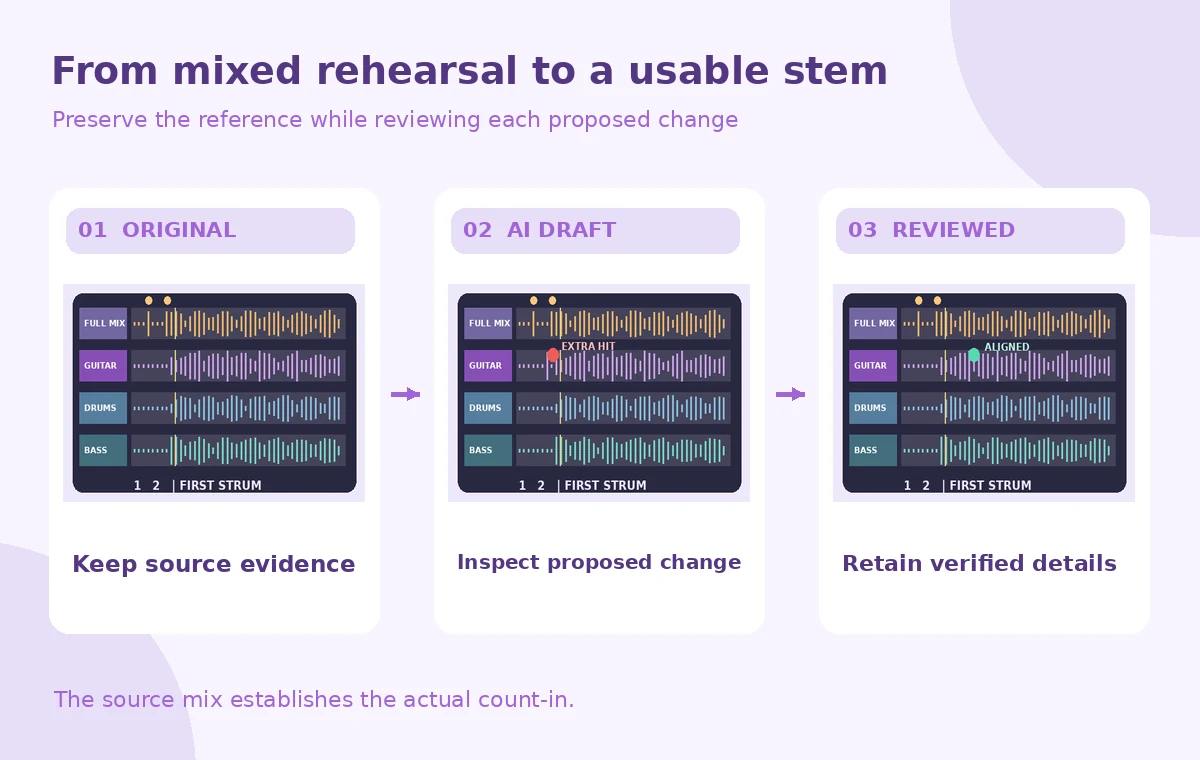
Set matching starting positions and compare the guitar stem with the original at the count-in and first chord. In a conceptual rejected example, an extra attack appears before the first real guitar strum; in the checked arrangement, the instructor confirms the count-in from the source and the student receives a clearly marked entrance. These drawings are not measured spectral plots or real Logic output.
Pay attention to cymbal splash, reverb tails and snare attacks that may leak into the guitar track. A high-frequency click can resemble part of a picked chord in isolation. If an apparent strum is not audible in the original mix or cannot be confirmed, do not transcribe it as a note for the student.

Create a clear practice version without rewriting timing
Keep the original lead-in intact or provide a separate verified count-in supplied by the instructor. Do not create an extra beat silently while editing the stem. If a click must be restored for teaching clarity, add it as an explicitly labeled metronome or teaching cue, not as a reconstructed performance by the musicians.
Build a backing track from the remaining stems or the original mix at an appropriate level. Compare phase and overall alignment before rendering. When separation leaves audible artifacts, choose a lower-volume guide part or point students back to the full rehearsal rather than masking uncertainty with aggressive equalization.
Check the musical phrase with the teacher
Ask the guitarist or instructor to mark the actual first entrance, muted strokes and rhythmic rests while listening to the original. Compare those annotations to the stem, paying special attention to quiet strums whose transients may be lost. A cleaner guitar track is not necessarily a more accurate one if it erases a weak pickup or adds synthetic attack noise.
Avoid claiming that a separated stem reveals exactly what was played when the combined source remains ambiguous. Use a short spoken instructor note or a simple score annotation to address difficult passages. The AI extract should support learning, not become the sole documentary record of the session.
Inspect the four handoff points
The quality-control scheme highlights the two-click count-in, first guitar strum, separation leakage and permissions label. A reviewer should check the alignment of all deliverables from the very first sample onward. If the stems have different beginnings or trailing silence, export again with common start and end points.
Compare the student practice file on headphones and ordinary speakers. If the guitar is technically isolated but buried at the target playback volume, adjust the mix while preserving the verified entrance. Record which passages remained uncertain rather than claiming complete and artifact-free separation.

Archive sources and share a truthful practice mix
Export the guitar guide and backing version with clear names identifying them as Stem Splitter derivatives. Keep the original mix, Logic project, selected extraction settings, teacher notes and permission record. Share through the approved workshop channel instead of uploading an unrestricted file when rights cover only participant access.
The student should receive an audible, usable practice aid with the original timing preserved and any editorial count-in distinguished from recorded performance. The workflow succeeds when it helps practice without converting uncertain AI artifacts into false musical facts.
How We Research
This article was prepared on November 4, 2026 from these named official vendor references: Apple: Extract vocal and instrumental stems with Stem Splitter in Logic Pro for Mac; Apple: If Logic Pro Stem Splitter is missing on Mac; Apple: Logic Pro for Mac release notes. We reviewed documented controls, availability caveats and stated workflow boundaries, and designed an independent hypothetical editorial check for the particular task described. We did not access a vendor account, upload live media or private records, generate candidate results, measure output quality, or claim that any illustrated failure occurred in a real tool. The WebP graphics are original teaching diagrams, not product screenshots. Plan restrictions, labels and capabilities can change. A responsible editor must still verify the underlying source, permissions, source data, accessibility, final exported artifact and sign-offs before public release.
Frequently Asked Questions
Apple documents guitar as one of the stem categories available for extraction.
No. Apple specifies Apple silicon support and notes limitations when Logic Pro is running under Rosetta.
Not necessarily. Separation can leave leakage or artifacts; review against the source and have a musician verify difficult passages.
No. Add any teaching metronome as a separate, disclosed cue rather than pretending it was in the original take.
No. They are illustrative track drawings designed to explain a proposed review process.