
A local library is recording a short original welcome jingle. The melody moves from F major to C major halfway through the phrase, and the first note arrives after a small pickup. A generated bass line might sound pleasant while following the wrong chord for a beat, leaving the transition awkward and making volunteers rehearse a rhythm that was never approved.
Logic Pro’s Session Players include a Bass Player, along with Drummer and Keyboard Player. Apple explains that Bass Player can follow chords from the global Chord track or chords assigned to a region; if no chords are defined at a position, it can use the tonic of the project key. This article uses a fictional original tune to show a chord-aware workflow and a separate human listening check, not a claim of tested music output.
Record an owned melody and mark the real harmony
Start with a melody the library commissioned, composed, or otherwise has permission to use. Save the melody as a separate audio or MIDI region, and write down the approved four-bar chord plan: F major for the opening half and C major for the ending half. Mark the pickup and the exact bar-line of the chord switch on the timeline, rather than trusting a vague musical description.
Make a reference guide that a volunteer musician can follow without the software: bar numbers, chord names, tempo, time signature, and where the phrase resolves. The generated bass part should support those choices, not define them. If rights to a sampled theme or reference track are unclear, replace it with an original source before using any AI arrangement aid.
Create Bass Player deliberately instead of by accident
Apple documents adding a Session Player by creating a new track and choosing Drummer, Bass Player, or Keyboard Player, then selecting a style in the New Tracks dialog. Open the details before accepting a default progression. The application can create an initial region and may insert a default chord progression if the project does not have one, depending on settings.
That default is a convenience, not evidence of the intended tune. If the library’s harmonic plan is already written, configure Bass Player to follow the approved chords. Confirm the track is an editable Session Player region, not a frozen export, so you can change chord timing without replacing the entire arrangement.
Set the Chord track and check the switch
Enter F and C at the correct boundaries on the Chord track or use region chords where appropriate. Apple states that Bass Player can follow either source, so check which one is active for the region. Look at the displayed chords while the playhead travels across the handoff; a single copied region may preserve an old progression unexpectedly.
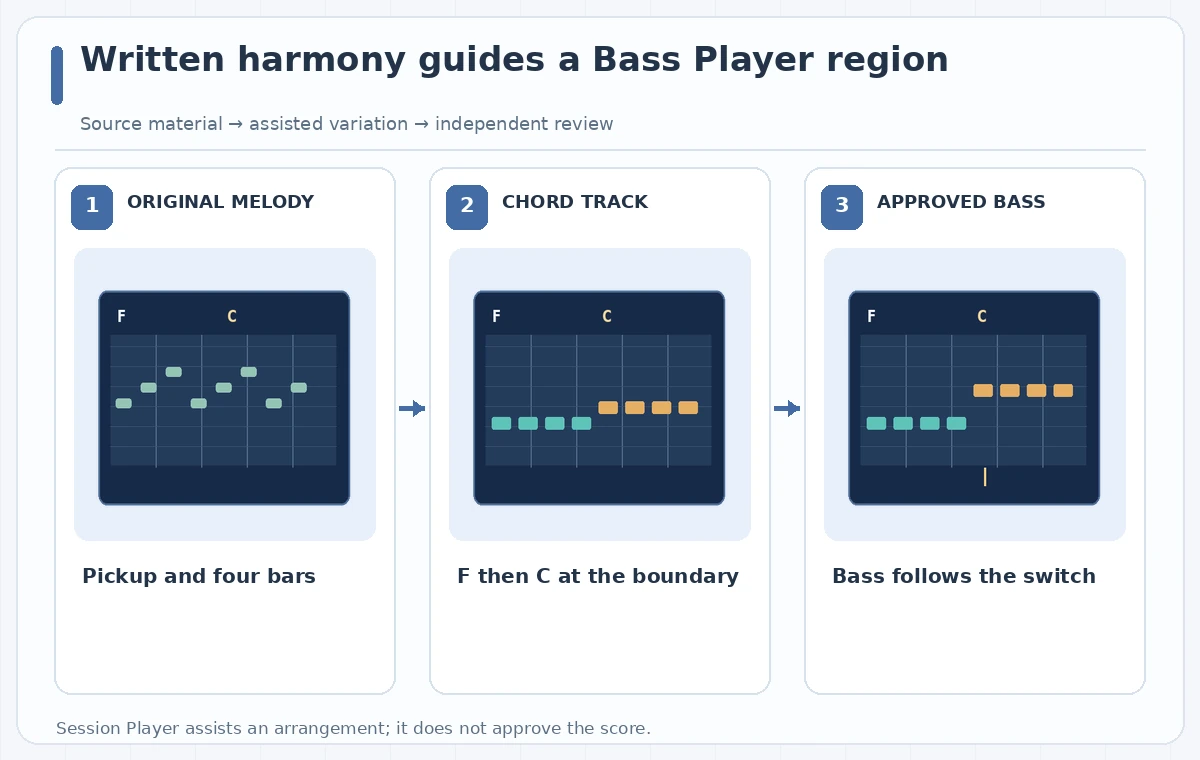
Do not use the tonic default as a substitute for entering the music. Apple warns that if no chord is defined where a Session Player region is active, the player can follow the project key’s tonic chord. An apparently stable bass line can therefore hide a missing C-major event. The diagram contrasts this wrong sustained-F case with the intended F-to-C handoff.
Control rhythm around the pickup and downbeat
Use the Session Player controls to explore a supportive performance without changing the melody’s meter. Compare a conservative bass pulse against the written pickup; the accompaniment should not imply a full extra count before the first sung syllable. Mute the generated track and rehearse the melody alone, then unmute it to identify where a bass attack shifts the perceived entrance.
Listen at the exact chord change, but also one beat before and after it. A harmonically plausible note can create an unhelpful accent even when the displayed chord symbol is correct. Move or simplify a region and rehearse again. The objective is a bass arrangement that the volunteers can reliably enter and follow, not the busiest possible output.

Inspect generated notes instead of trusting a smooth demo
Use the timeline and available region-editing tools to review where low notes land relative to the chord markers. A generated line may feature anticipations or passing notes that are musically reasonable but too complex for a short training jingle. Check the lowest notes on ordinary playback speakers, where bass can disappear, and verify the melody remains more prominent.
The illustrations show conceptual MIDI blocks and chord labels rather than recordings of Logic Pro. Their wrong case holds the opening bass root beyond the approved change. The checked case follows the bar-line. In an actual project, use your ears and musical judgment; the diagrams are not measurements of the Session Player model.
Make the song editable for the next volunteer
Keep the original melody, chord sheet, Session Player settings, and any edited arrangement in the same Logic project. Note the software version and the chosen player style because a future editor may use different defaults. Bounce a rehearsal mix only after the musical lead approves the melody, timing, and tonal balance.
Provide the volunteers with a simple count-in recording or notation that agrees with the accompaniment. If you adjust the tempo for accessibility or clarity, confirm that both the chord events and pickup shift as expected. Keep one version without generated bass so the group can rehearse acoustically if playback equipment fails.
Approve the harmony and rights before release
A musical reviewer should verify the F-to-C change, the pickup, the ending, and the balance with the sung welcome. A project owner should confirm that the melody and all source sounds are authorized for publication. Neither a harmonious output nor an AI tool’s feature description resolves sample clearance or performance licensing.
If the bass part repeatedly contradicts the written chord chart, simplify it or record a human performer. The automation is useful only when it follows the composition. This hypothetical example does not claim to have generated, auditioned, or commercially cleared a Logic Pro track; it demonstrates an approval method for an original jingle.

How We Research
We reviewed official product documentation on November 4, 2026: Apple Logic Pro — Session Players overview; Apple Logic Pro — Chords and Session Players. We compared the supported workflow, permissions, constraints, and ways an editor can separately verify the output. The scenario of four-bar original library jingle with a two-chord bass pattern is fictional. We did not log into a subscription, run a live tool experiment, measure visual or audio accuracy, establish image rights, or verify any real venue, performer, or object record. The diagrams are original explanatory illustrations of possible problems and desired checks—not application screenshots or measured software results. Recheck feature availability, account terms, and source facts before publication.
Frequently Asked Questions
It can follow the Chord track or region chords when configured correctly. Check which source the region is using.
Apple says the Session Player can use the tonic of the project key where chord information is absent.
No. Treat it as a supporting arrangement tool; the melody, harmony, and release decisions belong to the creators.
Yes. Verify the bass entrance and the perceived count-in against the approved melody, not just the chord labels.
No. They are illustrative examples of a wrong chord handoff and an editor-reviewed target.