
An adult-education studio has hours of pottery workshop footage and wants a searchable catalog of segments featuring wheels, clay, glazing and tool demonstrations. Google Cloud Video Intelligence offers `LABEL_DETECTION`, which can return candidate labels associated with segments, shots or sampled frames. A label is not proof that the instructor completed a particular step correctly, and it does not establish whether a recording can be published. This hypothetical workflow turns labels into review pointers rather than invented descriptions of what an instructor did.
Define a catalog that preserves clip identity
Give each recording a stable clip ID, source date, camera position, version, consent status and known instructional topic. Write down the search task: locating possible glazing sections differs from certifying that a safety demonstration was shown. The index should link every derived label back to its original file and time position, not to a generic still image with no provenance.
Keep raw footage protected and preserve a digest or other integrity marker according to the organization’s policy. If a video combines several sessions, record edit boundaries and distinct permission scopes. A tag such as “pottery wheel” could help find a segment, but it cannot identify the lesson stage or the identity of anyone appearing in it.
Understand label granularity before requesting it
The Video Intelligence API describes segment-, shot- and frame-level label annotations. Frame labeling uses sampling rather than analyzing every individual frame; documentation describes one frame per second for frame-level results. Shot boundaries group visual scenes, while a broader video segment can contain several activities. Configure the desired mode rather than assuming every annotation is a precise action interval.

Google distinguishes `LABEL_DETECTION` from object tracking: labels do not supply moving-object bounding boxes. For a stationary clip, a wheel may appear through many frames; a label by itself cannot say when the instructor turned it on, which hand touched the clay or which safety instruction was spoken. Do not illustrate label detection with fake tracking boxes.
Choose controlled inputs and permitted storage
Create a processing copy with an approved retention plan, especially when participants or minors could be visible. Use the supported `videos:annotate` request and specify `LABEL_DETECTION`, then retain operation identity and configuration with the output. Check current project permissions, storage region and size constraints before initiating paid processing.
Avoid uploading private instructional recordings to a third-party service without appropriate organizational authority. A sample made expressly for training can help verify the pipeline before processing real event footage. Keep raw files, derived thumbnails, annotations and public catalog records under separate access policies so a model-generated tag never silently makes a restricted video discoverable.
Inspect segment, shot and frame evidence
Store the detected label, the level of annotation, its associated time offsets and the source clip ID. A reviewer can then open the correct moment and the adjacent context. If the model proposes “glaze” for a shot of shelves, verify whether glazing was actually demonstrated or the camera merely showed finished pieces.
Use visual samples to establish whether a candidate label is present, absent or too ambiguous. Segment labels may be broad; frame observations can be narrow; neither supplies a verified narration transcript. If a reviewer cannot locate the claimed action within the source, mark the tag as rejected or unverified rather than backfilling a plausible timestamp.
Compare proposed tags with actual workshop stages
An unindexed clip may have only a filename; a preliminary annotation might show “ceramic,” “pottery wheel” and “tools” across a timeline; a reviewed catalog adds specific clip excerpts and verified notes. The comparison should display the different stages distinctly while labeling all of them as illustrative rather than measured service output.
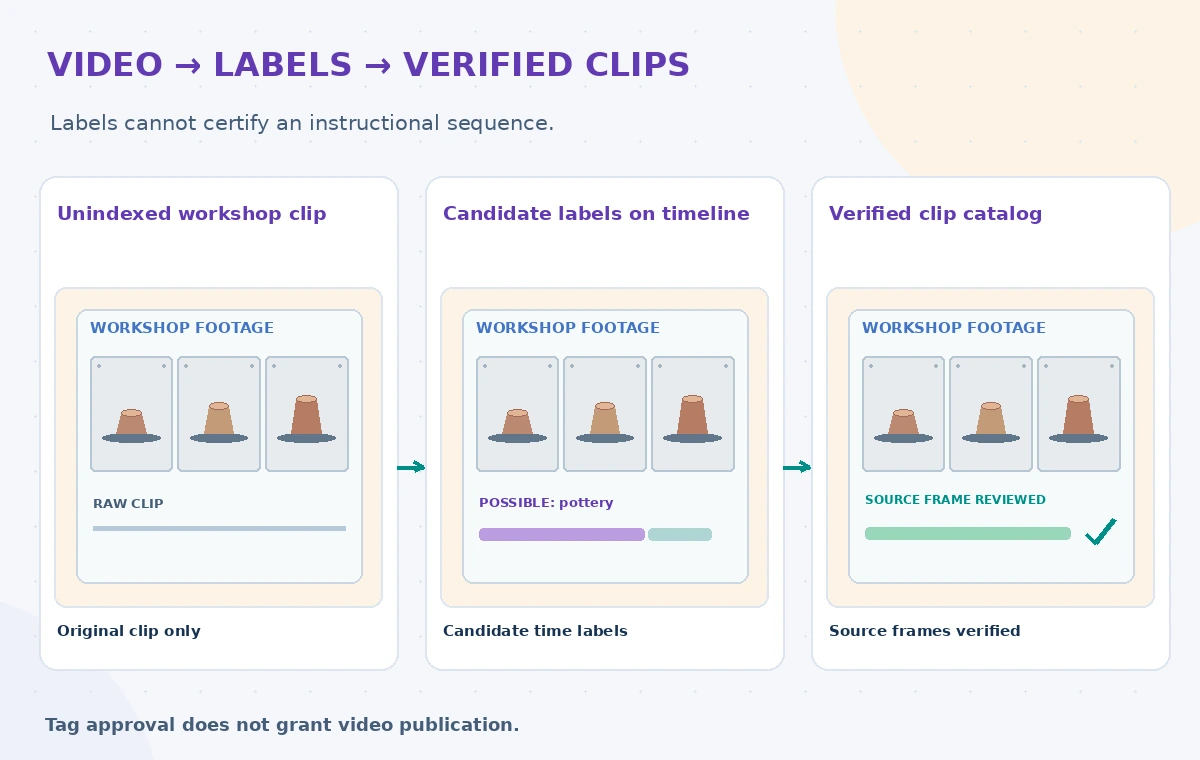
Keep the difference between object appearance and instructional completion explicit. A clip containing a bowl, a wheel and a brush does not prove that the workshop covered trimming, throwing and glazing in that order. Review sequence using original frames and narration where permission allows. Add editorial chapter markers only when a person has checked them.
Handle ambiguous labels and missed warnings
Prepare examples with occluded objects, fast pans, similar-looking tools, close-ups and scenes that contain a warning poster outside the frame sample. Examine whether automatic labels omit less common objects or invent an activity based on background context. Do not claim a confidence threshold guarantees accuracy; choose thresholds based on a documented permitted test set.
If a kiln warning appears briefly, the tagger might not return a useful warning-related label at all. Important safety text requires a dedicated source review, and any instructional release must preserve the warning in the video and accompanying captions. Review the original audio or caption track separately; image labels cannot audit spoken cautions.
Apply privacy, rights and discoverability checks
Separate label relevance from permission to publish. A tagged workshop can include faces, donor materials, proprietary demonstrations or a location someone asked to keep private. Maintain an approval state for the entire video and for excerpts; the catalog should not expose a label or thumbnail that reveals restricted footage.

Make review tools show permissions next to the time-coded label so editors can approve a segment without approving everything in the recording. Store redactions and cropping decisions as derivatives, and preserve links to the authorized source. A label that is factually right can still be inappropriate to share publicly.
Publish a traceable human-reviewed index
Release only tags that reviewers confirm, linked to the clip version and time offsets. Provide clear language that catalog tags aid discovery and are not exhaustive transcripts or certifications of lesson steps. Reevaluate labels after a video is re-edited; time codes from an older cut may point to the wrong content.
Measure catalog quality with named examples and reviewer judgments rather than invented hit-rate statistics. Ask whether users can actually find the needed moment and whether warnings remain understandable. All filmstrip images and proposed labels here are synthetic teaching illustrations; no real workshop videos or Google API results were used.
How We Research
For this November 2026 article, we reviewed official vendor sources: Google Cloud: Analyze videos for labels; Google Cloud: Analyzing videos for labels; Google Cloud: Video Intelligence annotate reference. We checked documented feature scope, parameters, examples, and limitations against a clearly hypothetical nonprofit workflow. No private records were processed, live vendor tests were claimed, measured performance reported, or publication authorization granted. All accompanying illustrations are original conceptual teaching graphics, not product screenshots or experimental results. Before deployment, recheck the current API documentation, eligibility, availability, security requirements, data rights, and site-specific policies.
Frequently Asked Questions
No. Label detection identifies candidate entities and intervals, while object tracking is a different feature.
No. Frame-level labeling relies on sampled frames, so review the source moment and context.
No. It can suggest where to look, but instructional claims require footage and subject-matter review.
No. Publication permissions and privacy must be checked separately from label quality.
Recheck annotations and timestamps against the new source version before publishing catalog links.