
A regional archive has scanned several decades of handwritten equipment-loan ledgers into PDF files. Readers would benefit from searchable text, but a misplaced page could attach a borrower’s name to the wrong year or inventory number. Google Cloud Vision supports asynchronous text detection on PDF and TIFF files stored in Cloud Storage, returning page-associated JSON results. This makes large-file extraction feasible, not historically authoritative. The ledger and all displayed records here are imaginary training material; we have not run OCR on any original archive.
Record provenance before you extract a character
Begin with the original scan identifier, physical volume reference, ordered pages, scan date and the permission status of the material. A ledger may contain blank pages, handwritten inserts and later annotations; these cannot be reconstructed reliably from an unqualified string of recognized words. Keep a content hash of the original PDF and an inventory of its pages so every extracted token can be traced to the source image and not merely to a filename that might be reused.
Separate the public searchable fields from names, addresses or other material that may require restricted access. Uploading a document to cloud storage is an explicit data-handling decision, not a neutral formatting operation. Review data protection, regional requirements and the archive’s access agreements first. Record when a page is missing from the source; do not fill the gap with text from neighboring pages or AI predictions.
Understand the asynchronous PDF request
The Google Vision PDF/TIFF guide documents the files:asyncBatchAnnotate workflow. InputConfig identifies a Cloud Storage URI and a MIME type such as application/pdf or image/tiff. For large offline PDF/TIFF jobs, the documented feature types are DOCUMENT_TEXT_DETECTION and TEXT_DETECTION. This is not a general-purpose method for every annotation feature; choose the service based on the archival task and check the current API reference.
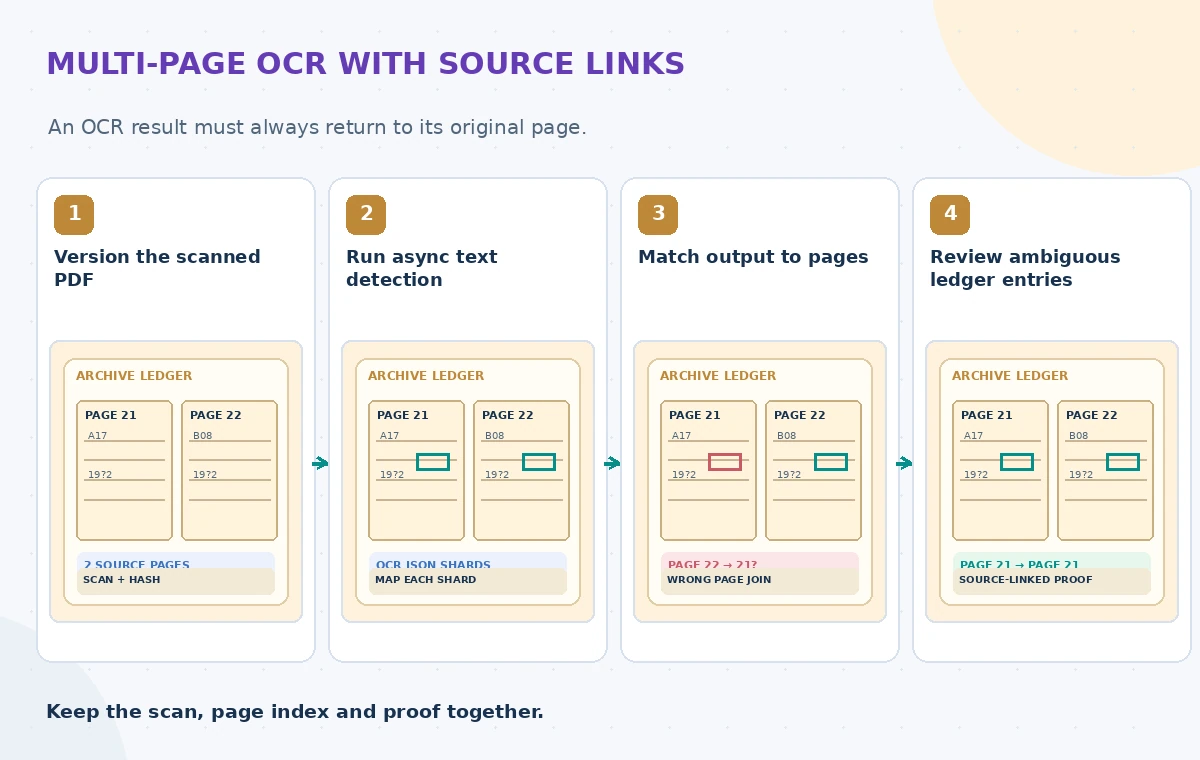
The call returns a long-running operation. Its completion and the existence of result files are separate checks. Do not label a newly submitted operation complete or download guessed output filenames before the operation finishes. PDF/TIFF inputs and the generated JSON outputs use Cloud Storage locations with appropriate service-account access. The official guide documents a 2,000-page limit per accepted file; split oversized volumes without breaking the page-to-volume mapping.
Design unambiguous output shards
OutputConfig specifies gcsDestination and batchSize, controlling how many page results are placed into each JSON output. Google documents filenames in the form output-x-to-y for page ranges. A safe ingestion process should treat each shard as part of one versioned source PDF and map every contained page to an explicit page number. A folder containing output-1-to-20 and output-21-to-40 is not proof that all 40 pages exist or were reviewed.
Use a unique, non-overlapping output prefix per job and scan revision. Google warns that an existing output filename can be overwritten, so writing a re-run into a reused prefix risks obscuring the previous evidence. Track the long-running operation ID, intended input URI, output prefix, requested feature and expected page count. Do not infer completeness from the size of a bucket or the order in which objects appear in listings.
Rejoin page data without reordering the ledger
An OCR ingestion stage should read the response context and page associations and build a page-indexed manifest. The simplest failure is a concatenation routine that sorts filename strings incorrectly or forgets an empty page. A page marked 12 must remain page 12 even if the OCR produces no visible words. The archive should be able to display that scanned image directly from a search result and explain which transcription line it supports.
Google notes that the JSON may contain normalized coordinates rather than real pixel coordinates in its PDF/TIFF context. Interpret them consistently when drawing review boxes: multiplying a normalized x value by the correct page width is a display operation, not new OCR evidence. Do not invent a bounding box for a word not recognized. Preserve separate zones for marginal notes, tables and handwritten corrections when the source structure requires them.
Make uncertainty visible in a side-by-side proof
A useful three-state illustration starts with two numbered ledger pages, shows an intermediate join where one entry has been attached to the wrong page, and ends with a proof view that links the uncertain word back to the correct page image. No fabricated recognition confidence should appear as a measured result. This illustrates a failure class, not an observed Google response. Reviewers need the ability to mark ‘illegible’ without turning a guess into a definite inventory number.
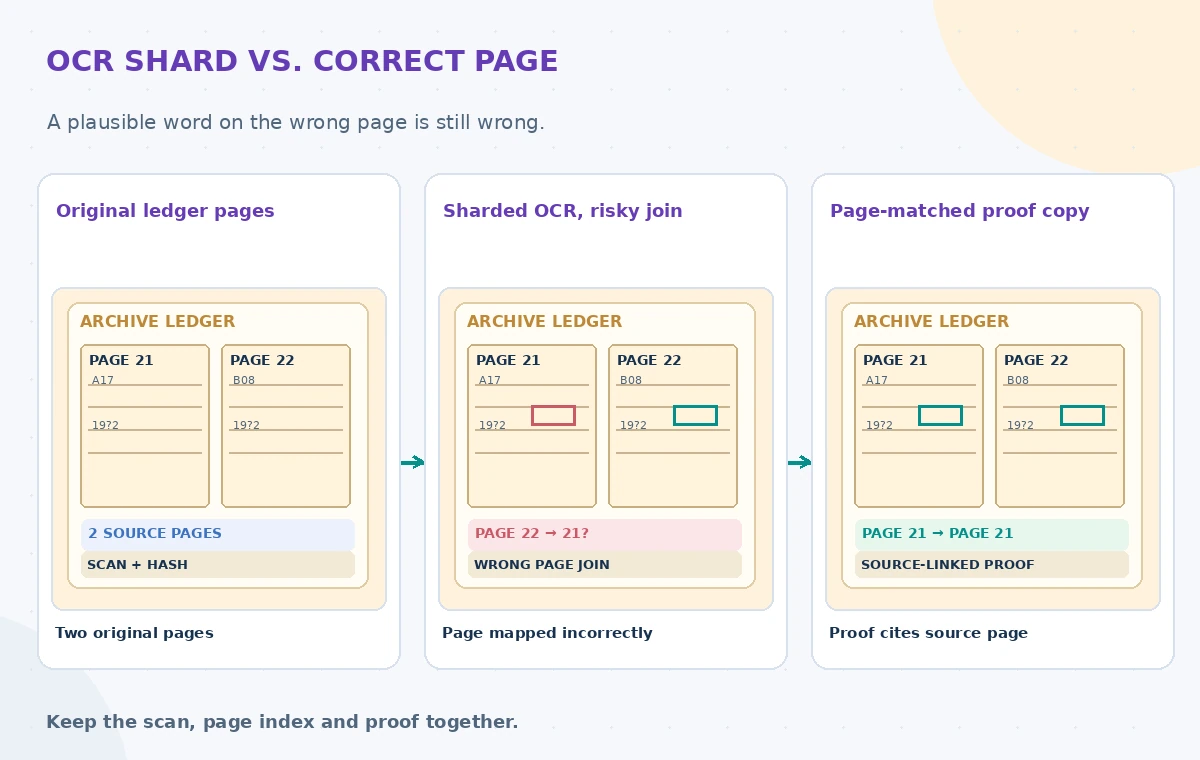
Check similar handwritten digits, overwritten years and abbreviations against the page scan. If a name is historically significant, consult an independent catalog record rather than relying on a second automatic guess. A human correction should preserve the raw OCR text, corrected reading, reason and reviewer; that keeps future researchers from mistaking a normalized search field for verbatim transcription.
Apply least privilege to source and output buckets
The API documentation explains that this asynchronous operation uses service-account authentication rather than an API key for submitting OCR work. Configure read rights for source objects and only the required write rights at the destination. Protect operation logs and output JSON: those files may contain the same private details as the original ledger, even when the final public index is filtered. Never use a permissive public bucket as a temporary staging convenience.
Enforce explicit retention and deletion rules for failed jobs and duplicate outputs. Keep an audit of who submitted an operation and which revision it processed, with private content omitted from dashboards. If rights holders permit only internal indexing, a searchable public snippet still needs separate review. Your own application must enforce access filters; OCR does not decide what may be published.
Run a page-based QA sample, not a magic accuracy score
Prepare permission-cleared fixtures with blank pages, handwriting, page numbers, stamps, marginal edits and repeated inventory codes. Compare the intended page list with the returned page associations and flag omissions, duplicates and broken ordering. Sample difficult entries at the image level. For production measurement, define an independently corrected reference transcript and document the sampling method before claiming any error percentage.
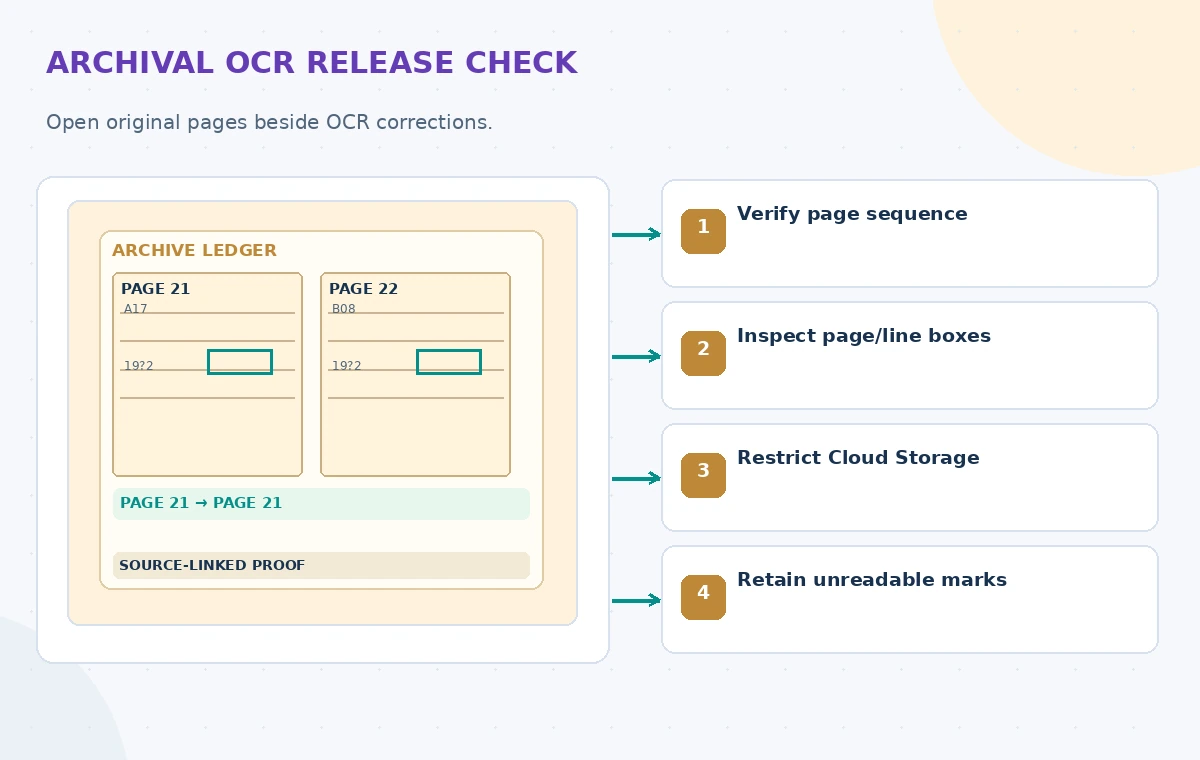
If the long-running operation fails or a shard cannot be parsed, hold the affected volume in a review state rather than silently treating missing OCR as empty content. A retry should use a new output prefix and preserve the prior failure history. Check for the case in which only some pages can be read, because a partial result must not become an official complete volume.
Publish page-linked search rather than orphaned text
A trustworthy archive index presents a record reference, scan version, page number and the original page image beside an OCR excerpt. Users should be able to navigate to that page and see editorial corrections or uncertainty annotations. Keep table rows and marginal additions attached to their source page. If a scan is replaced, the OCR and its review status need a new revision rather than silently inheriting an old approval.
The diagrams are original page-provenance illustrations, not screenshots of a real Google Cloud console or empirical OCR output. Before use, confirm the current service limits, regional availability, costs and archival privacy rules. The aim is reversible discovery: every searchable word remains accountable to an identifiable place in a versioned original document.
How We Research
For this November 2026 article, we compared named official references: Google Cloud Vision: Detect text in files (PDF/TIFF); Google Cloud Vision: Async batch API reference; Google Cloud Vision: Detect text in images. We checked the documented request shape, output behavior, and important limits; then we developed an original hypothetical nonprofit workflow with source checking and explicit human authorization. This is documentation-based editorial research, not a laboratory test: we did not upload real files, run the vendors, measure accuracy or claim real customer outcomes. The illustrations are educational schematics, not platform screenshots or measured results. Before implementation, verify current API access, regional features, security, costs, consent and publication policies.
Frequently Asked Questions
Yes. The documented PDF/TIFF workflow uses files:asyncBatchAnnotate with Cloud Storage input and output.
Google documents DOCUMENT_TEXT_DETECTION and TEXT_DETECTION for this workflow.
outputConfig.batchSize sets how many page responses are grouped into an output JSON file; verify page associations.
No. The PDF/TIFF guide specifies service-account authentication for the asynchronous request.
No. Check questionable characters and page provenance against the original scan before publication.