
A small history museum is reconciling a collection of hand-labeled textiles. One accession form states “date unknown,” a later exhibition checklist says “possibly late nineteenth century,” and a donor letter describes when the object arrived, not when it was made. A tidy spreadsheet could make these fragments look more certain than they are. The useful result is a table that distinguishes each kind of evidence instead of collapsing them into one date.
NotebookLM Data Tables can synthesize selected notebook sources into a structured table that can be exported to Google Sheets. This guide develops a fictional museum workflow; no collection database was processed or independently tested here. The central rule is simple: a readable table is a research aid, not an accession register approved for publication.
Start with an evidence ledger, not an AI prompt
Identify the authority of every document before uploading it. The accession register establishes the object number and recorded fields; a donor letter may establish provenance; an exhibition label may be an interpretation drafted years later. Record scan dates, authors, page numbers, and known transcription issues in a separate source log. A beautifully structured output will not repair a source with the wrong inventory number.
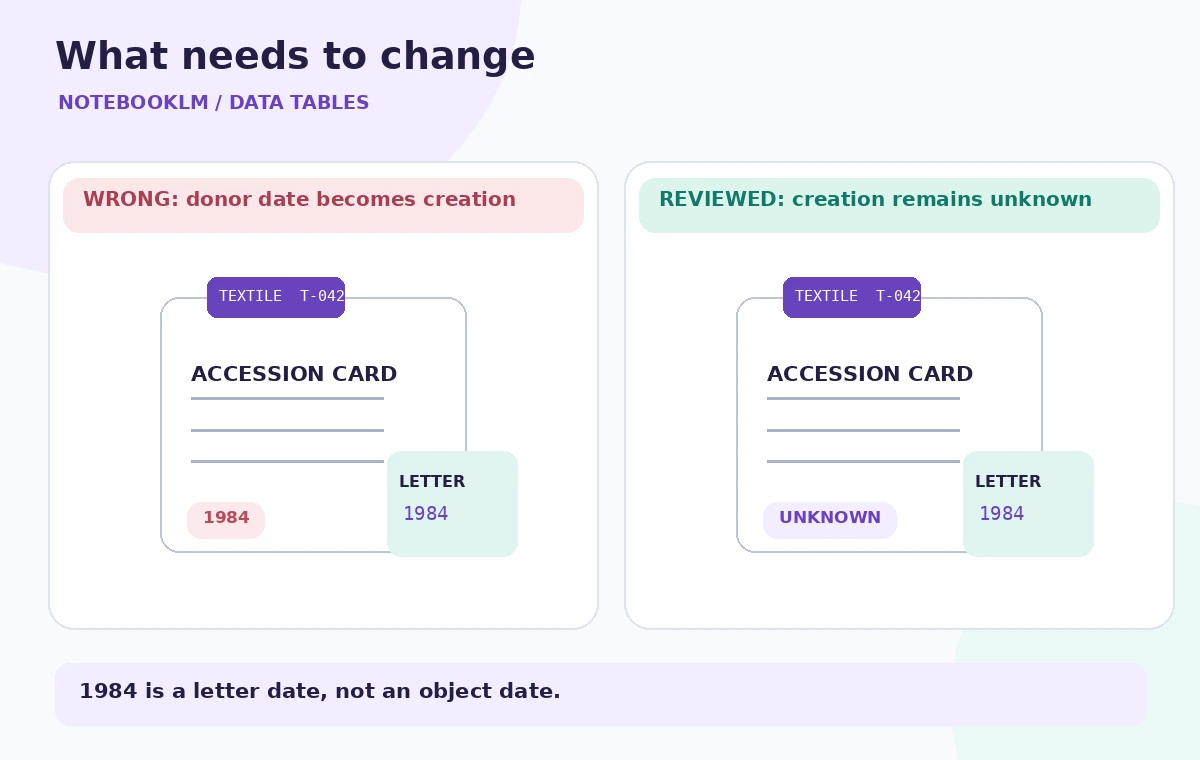
For the running example, imagine three records about textile T-042: the accession card says “year not recorded,” the donor letter is dated 1984, and an unsigned worksheet proposes “c. 1890.” Those dates represent different facts. They should never be fused into “made in 1984” or “made in 1890” without independent evidence and curator approval.
Build a deliberately narrow notebook
Create a notebook for this one catalog-cleanup exercise rather than mixing it with unrelated newsletters and general web articles. Add the authorized PDFs, scanned transcriptions, and catalog notes only after checking sharing permissions. A scan containing visitor addresses or private donor contact information may need to be excluded, masked, or handled in a restricted workspace under institutional policy.
For every upload, keep the filename and source version outside NotebookLM as well. When an older label is replaced by a corrected record, staff must be able to explain which version produced the table. NotebookLM summarizes the sources it is given; it cannot certify that the archive contains every relevant document or that a transcription is error-free.
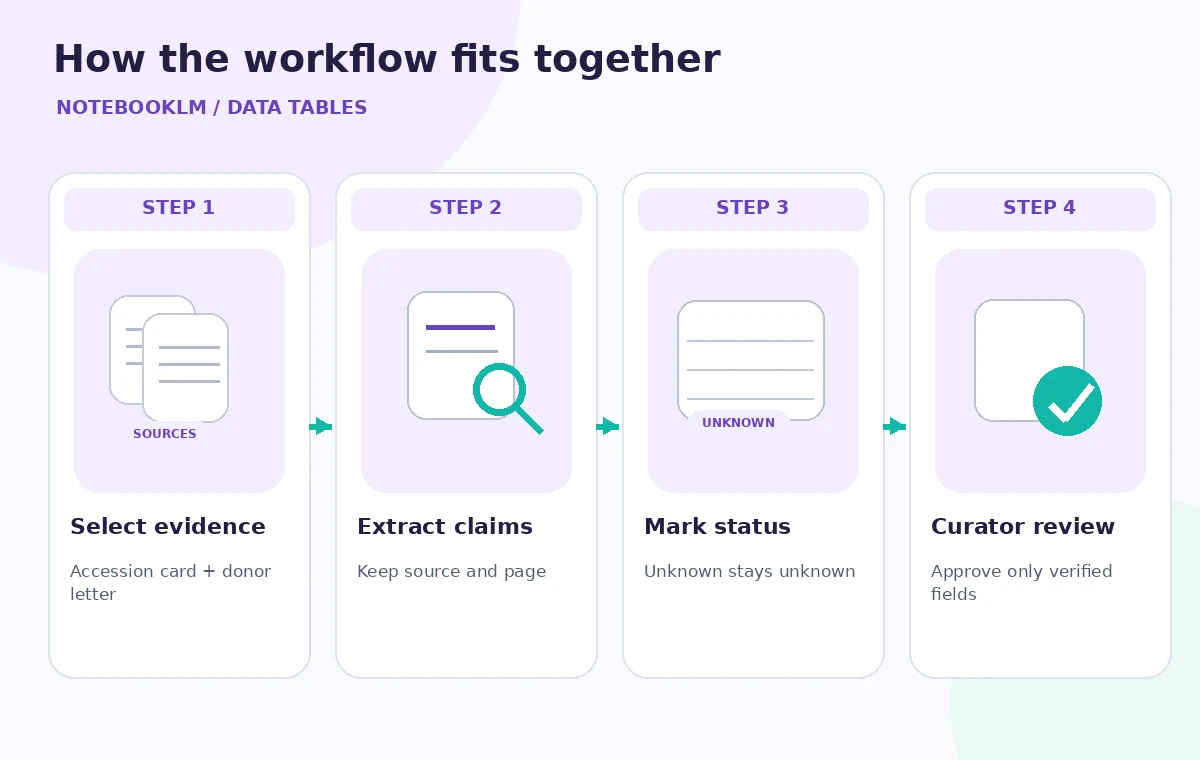
Specify the table fields before generating
Ask for columns that preserve uncertainty: accession ID, object description, creation date as documented, date confidence, source and page, interpretation note, and follow-up owner. Explicitly instruct the system to leave unknown creation dates blank or mark them “not documented.” Request that donation dates and dates printed on later display labels appear in separate fields, never in the creation-date column.
A practical instruction is: “For each textile, extract only dates directly supported by the selected sources. If evidence disagrees, write ‘conflict—review’ and list both sources. Do not infer a creation year from donor correspondence. Include the accession identifier exactly as written.” That specification makes the output easier to audit than a broad prompt such as “fill out the missing records.”
Distinguish four kinds of missing information
There is a major difference between a blank source field, an illegible scan, a proposed estimate, and an actual contradiction. Create separate status values for “not recorded,” “unreadable,” “tentative estimate,” and “conflicting sources.” The category matters because each calls for a different action: catalog review, rescanning, expert evaluation, or source reconciliation.
A date range can also look precise while concealing uncertainty. If a worksheet says “perhaps 1880–1900,” preserve the qualifier and cite the worksheet. Do not silently turn it into an exact manufacturing date of 1890 merely to populate a chart. Treat any apparently plausible filled-in dates as especially high-risk during manual review.
Compare each generated row with its source
The comparison diagram contrasts a misleading catalog row with an evidence-based one. In the wrong version, “1984” is used as the object’s creation year because it appears prominently in a donor letter. In the reviewed version, creation year remains unknown while the acquisition correspondence is dated separately. These are teaching examples, not results from running NotebookLM.
Choose a representative sample of entries: one clearly dated object, one undated item, one with conflicting estimates, and one with a faded accession number. Open the underlying documents at the cited pages and compare the characters, dates, and qualifiers. If the table omits evidence links, add an explicit source-reference column before anyone relies on it.
Export to Sheets without promoting guesses to facts
Google describes Data Tables as exportable to Google Sheets. Treat the exported workbook as a working copy, and label the tab accordingly. The export is not a live authoritative link to the original notebook. Freeze the column headings, protect ID fields where practical, and add a verification-status column maintained by a human reviewer rather than by a guess-generating step.
A museum may wish to sort by year for a timeline. Sort confirmed creation dates only, or use a separate “approximate period” field with a caution label. A simple numeric chart of all displayed years can incorrectly mix confirmed, estimated, accession, and publication dates. That is a data-model problem, not a formatting problem.
Build a focused visual quality check
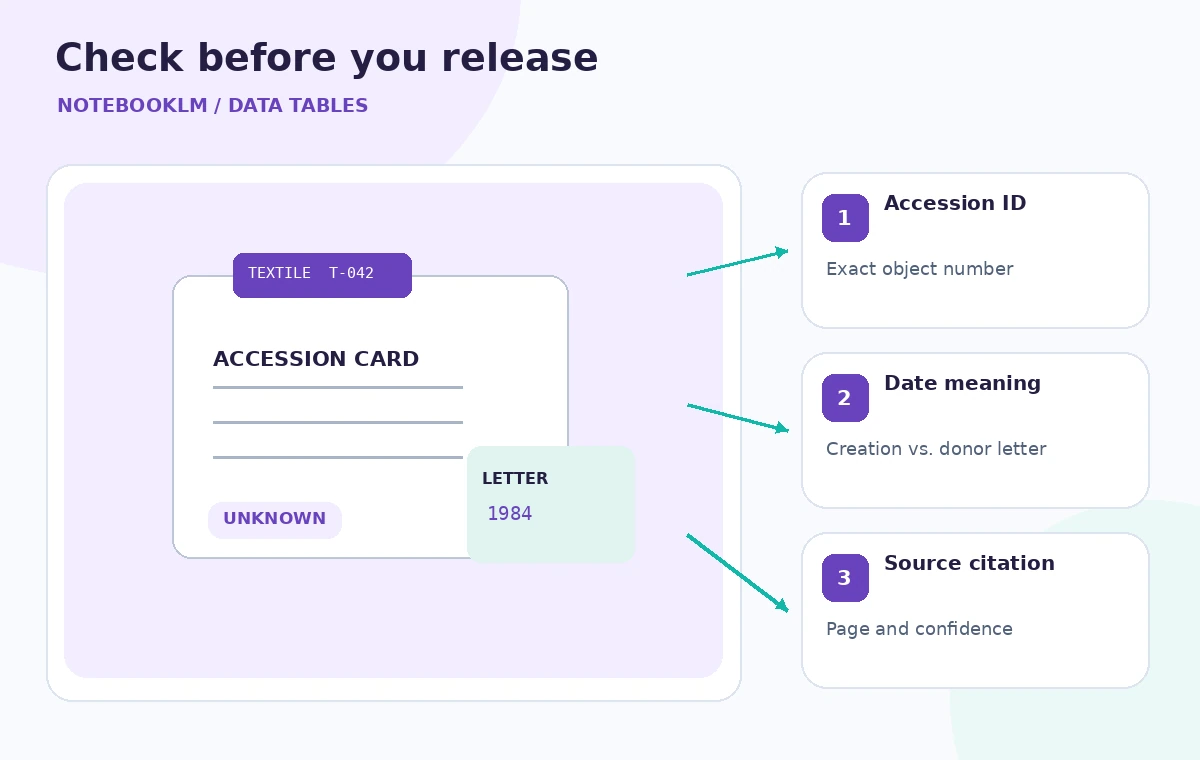
The inspection graphic marks three points: accession ID, date meaning, and citation. For the example, T-042 must remain T-042; 1984 belongs only to the donor letter; and “c. 1890” must remain tentative. Assign a reviewer to each flagged row and write a short reason for approving or rejecting the extracted value.
Look for source omissions as well as bad values. A table with twenty spotless rows may have skipped five hard-to-read cards entirely. Compare the count and ID set against the authorized source index. Missing rows, duplicated object IDs, and contradictory citations should block import into the collection management system.
Know what the feature does and does not prove
Google announced Data Tables as a way to structure notebook sources, with export to Sheets; availability and limits depend on account and product surfaces. The mobile experience does not necessarily provide all creation controls. Confirm the Data Tables control appears in the actual account rather than promising a particular entitlement or unlimited generations to staff.
Update the table when new catalog evidence arrives, and rerun the review rather than overwriting previously verified fields. Keep the human-approved catalog and the AI-assisted research workbook visibly separate. The strongest outcome is a traceable list of unresolved questions, not a sheet in which every cell appears filled.
How We Research
For this November 5, 2026 editorial review, we read the following official primary references: Google: Organize your insights with Data Tables, Google Workspace Updates: structured Data Tables, Google: Notebook mobile limitations. We compared documented entry points, input requirements, privacy or permission boundaries, and stated limitations against the hypothetical workflow above. We did not access a paid account, process real museum or customer data, generate output in the named service, or measure error rates. Diagrams show designed teaching examples, not product screenshots or empirical performance. Availability and UI details should be rechecked in the actual account before operational use.
Frequently Asked Questions
No. It structures claims from supplied sources. A year still needs to be checked against the correct field, source document, and institution’s evidence standard before it becomes a catalog fact.
Keep the creation date as not documented. A donation date or exhibition date belongs in a separate field and should not be substituted for the missing creation year.
Yes. Google describes exporting Data Tables to Sheets. Treat the exported workbook as an independently reviewable working copy, not an automatic update to the approved collection database.
Review institutional privacy requirements first. Share only authorized records; restrict, mask, or exclude personal contact details that are not needed for the catalog question.
An authorized reviewer should verify the accession ID, cited source, date meaning, uncertainty label, and completeness against the source index, then record approval outside the generated table.