
A neighborhood library wants a one-page briefing for a possible reading-room grant. The committee has a current application guide, a funding FAQ, and last year’s award announcement in its files. Gemini Notebook Reports can draft a structured document from notebook sources, but a polished report is not proof that a condition applies to this year’s grant. This illustrative workflow starts with versioned evidence and ends with a staff-approved source ledger, not an automatically submitted application.
Separate the funding cycles before upload
Make a small inventory before creating a notebook: document title, organization, published or effective date, web location, and the year to which each requirement applies. Label the previous award announcement as historical context rather than a source of current eligibility. If the library holds a local PDF with no visible revision date, verify its origin with the funder before putting it into the authoritative group.
For the hypothetical case, the 2025 announcement states that a technology purchase was funded, while a 2026 guide restricts funding to certain programming activities. The fact that one earlier applicant received equipment money does not establish that the same expense is eligible now. Store these as separate propositions. Preserve the exact wording of exclusions, matching-fund conditions, and deadlines rather than compressing everything into a generic summary.
Start a controlled notebook and choose a document report
Use notebook.google.com and open a notebook you can edit, or create one with approved source files. Google documents a Studio > Reports > Document workflow, along with templates or suggested formats; its interface may show other interactive-report choices. Choose the document route for a text briefing and check which controls appear in your account. Do not assume every user has the same report templates or sharing permissions.
Give the output a narrow request: an overview of the current cycle’s eligibility, allowable costs, exceptions, deadline, and open questions. Specify that the prior-year announcement is context only. A report can organize the discussion, but it may still blend similar conditions across documents. Keep the source list visible and avoid asking the system to decide whether the library qualifies; that determination belongs to the organization and, when needed, the funder.
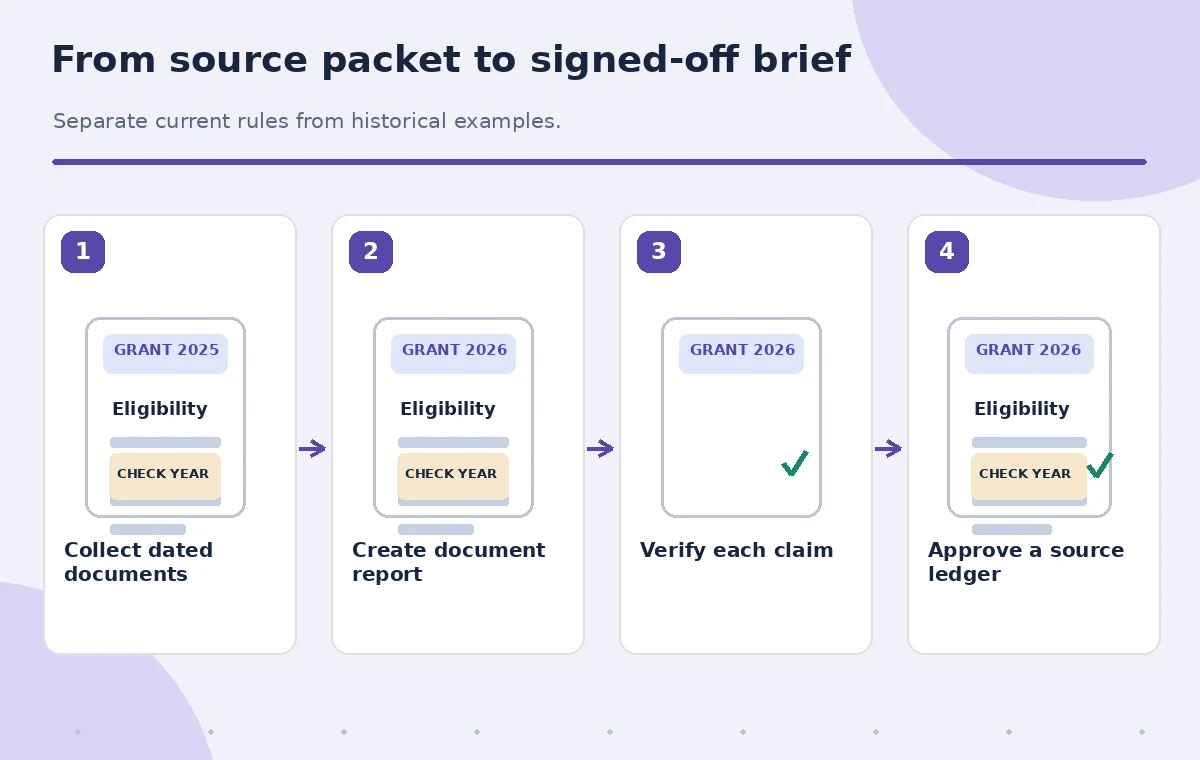
Build a claim-by-claim review sheet
Once the document report appears, turn each consequential sentence into a checkable claim. Copy a short phrase into an independent review sheet and add the original document, section heading, page or passage, and applicable year. Mark the claim as supported, contradicted, unclear, or outside the source material. A clean narrative without reliable anchors is less useful than an unfinished report with explicit questions.
As an example, the generated sentence ‘All public libraries can apply’ might be too broad if the current guide specifies jurisdictions or applicant types. Do not repair that sentence by guessing a limitation from memory. Reopen the funder’s source, check the exact definition, and rewrite only what it supports. If the source lacks a clear answer, label the eligibility question unresolved and ask the granting organization.
Keep old examples from becoming new rules
Compare the current guide with the earlier FAQ and award announcement side by side. Highlight numbers, percentages, date ranges, geographic requirements, and exceptions. Generated text can look convincing even when it carries a rule from another funding round. Use a dated comparison table that identifies the current authoritative wording and the earlier wording, without silently merging them.
If a 2025 example describes a grant size of $8,000, treat that as a historical example, not a current award ceiling. If the 2026 guide does not specify a maximum in the sections available, say the ceiling is unconfirmed. The same principle applies to procurement rules and reporting duties: a statement about what a previous grantee did is not necessarily what every new applicant is required to do.
Compare draft, evidence, and approved wording
Create two views: the AI-authored passage and the staff-checked passage. In an illustrative incorrect state, the report says the deadline is ‘June 15’ because that date appeared in an old document. The reviewed state instead quotes the current instructions or flags the deadline for confirmation. The difference must be visible in the source ledger, not merely in a rewritten paragraph.
Have an editor inspect any table exported or copied from the report for missing footnotes, transposed dates, and labels that disappear in a narrow layout. Keep links to original documents close to the corresponding claims. Do not assign a numerical accuracy rating without a defined and reproducible test; the output is a working briefing, not an independently audited assessment of the funder.

Use safe sharing rather than defaulting to a public link
Google’s guidance notes that sharing a report depends on access to its notebook. Before sending a link, check the notebook audience, file permissions, and whether grant documents contain donor, staff, or applicant information. Produce a stripped-down briefing for the broader committee if detailed attachments are restricted. Generating a report does not confer permission to republish confidential material.
Record who can edit source documents, who can view the report, and who approves the final board brief. In this case, a grants coordinator verifies wording and a committee chair signs off on public-facing claims. A report link should not become the source of truth after the funder revises a guideline; share the original guideline link and a clear review date with the committee.
Write open questions explicitly
Reserve a section for unresolved issues: whether eligible expenses include furniture, whether indirect costs count, and whether a branch may apply separately. For each item, note which source was checked and exactly what was missing. This is more useful than filling every blank with a plausible answer or copying a rule from a neighboring program.
Draft a neutral inquiry to the funder if the gap affects the application. The request should quote the relevant rule and ask for clarification, not propose an invented interpretation as a settled fact. Keep replies with their dates, because informal guidance may be superseded. If a new official answer changes the brief, update the source ledger and indicate what changed rather than silently overwriting history.
Approve and archive the briefing
Before distribution, read the final report against the latest source documents line by line for deadlines, eligibility, awards, expense restrictions, and required attachments. Remove claims without support; preserve unresolved questions as such. Confirm that all source links can be opened by the intended reviewers and that the report title states the funding cycle it covers.
The images here are diagrams of a fictional library scenario, not screenshots from an actual notebook or proof of a tested grant application. Success means that the committee can trace every material statement back to a dated source and identify which decisions still need human confirmation. Store the reviewed brief with its source inventory so a later funding cycle can begin with evidence rather than inherited assumptions.

How We Research
We reviewed named primary product documentation for the described feature, current interface, and limitations: Google Gemini Notebook Help: Generate reports. Our method compares official functionality with a fictional editorial task, defines specific failure states and independent checks, and keeps source records separate from AI-generated content. We did not access a live account, run an API test, measure model accuracy, or examine real participant data for this article. Interface labels, usage limits, credits, and eligibility can change; confirm the current product documentation and account terms before work. Every illustration is instructional art rather than a screenshot or measured before-and-after result.
Frequently Asked Questions
No. Google explicitly warns that reports can contain mistakes. Verify each condition in a dated primary source.
No. It provides historical context, not necessarily the current rules or permitted expenses.
No. Review the notebook and report access settings; recipients need appropriate access.
Mark the cap unconfirmed and obtain clarification from the funder instead of carrying forward an old number.
It can help organize source passages, but staff and the funding organization must confirm eligibility.