
An onboarding checklist already approved by a customer-success team does not need a fresh AI-written policy. It needs a readable set of slides with the same steps, order, support link, and wording. Gamma can turn existing text into a presentation, but a polished layout can conceal altered or omitted details. This guide uses a hypothetical four-step onboarding sheet as the content source. It shows how to constrain rewriting, map each step to a card, and audit the final deck. No Gamma deck was generated or exported for this article.
Lock the approved source before design work
Start with a short approved document containing four illustrative steps: create a workspace, verify the email address, invite a teammate, and open the help center. Place a version date and document owner at the top. Keep exact URLs, security instructions, and any contractual language in the source document rather than relying on a designer’s recollection. Mark optional advice separately from mandatory steps so the deck cannot accidentally turn a suggestion into a requirement. If the source contains real customer names or confidential settings, confirm whether company policy permits uploading it to an external service. Use sanitized examples when permission is uncertain.
Choose a source-first creation path
Gamma’s current help describes AI creation from conversations and offers the classic generator with Generate, Paste and Import modes. For approved wording, begin from supplied text rather than an open-ended topic prompt. If using the classic generator, Paste is a way to bring in already written material, and the classic import flow documents a Preserve choice for text handling. In Gamma 5’s agent workflow, state the same constraint plainly: ‘Keep the supplied steps in this order. Do not add, remove, or reword instructions.’ Review any outline before generation. Interface details can change, so treat menu labels as a guide to confirm, not a universal screenshot.

Divide source content into four specific cards
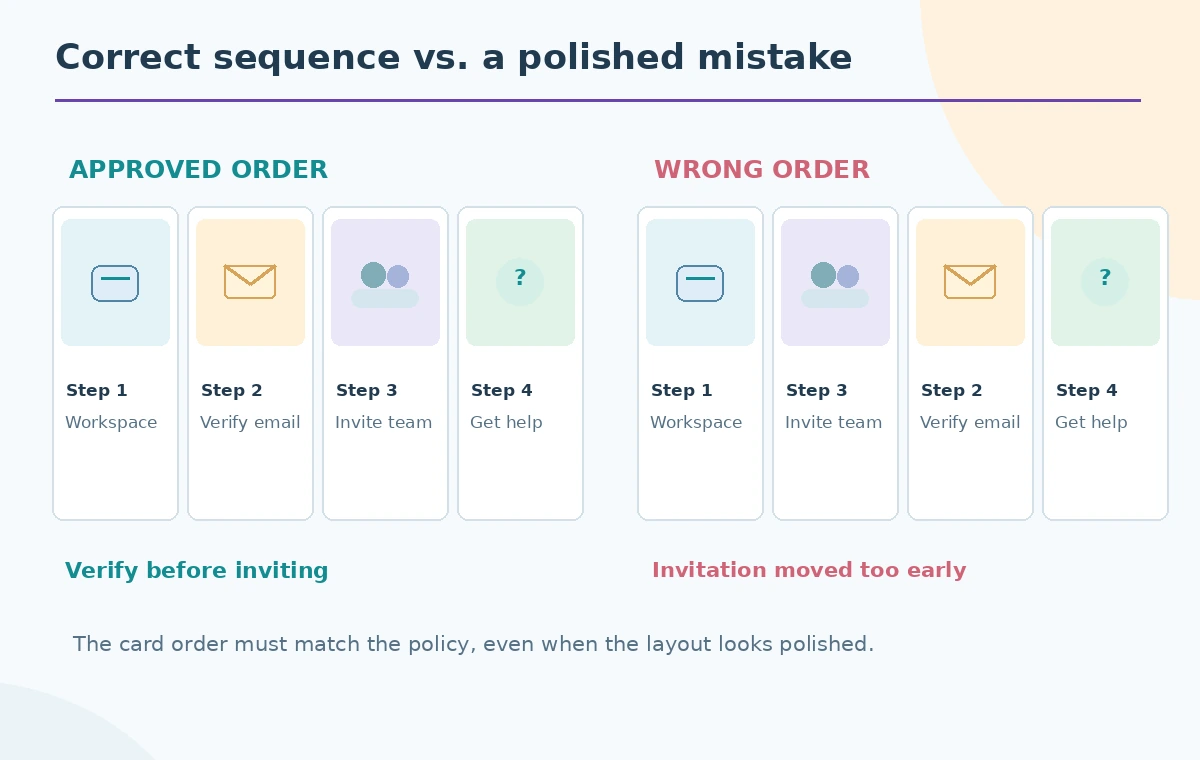
Give each card one job. Card one shows a workspace icon and the original workspace-creation instruction. Card two depicts a message arriving in an inbox and retains the exact verification action. Card three uses two simple person icons and preserves the teammate invitation condition. Card four points to the official help destination without inventing a new support URL. Add a title card only if it does not disrupt the numbered flow. The illustration uses pictograms as visual anchors, but the instruction text remains the authority. Avoid asking Gamma to fill missing process details from general knowledge; the policy owner must supply those.
Keep details stable through visual changes
Use a theme, spacing and consistent heading sizes to improve readability, but compare any refined text against the source after applying a layout. Gamma’s help center describes AI editing per slide and broader refinements in some paid workflows, so review what was changed by any chosen action. A rewrite may replace ‘verify your email before inviting teammates’ with a vaguer phrase and alter the sequence. Highlight verbs, dependencies, links and required nouns in the source document so they are easy to check. An attractive deck that silently changes onboarding requirements is a content defect, not a design success.
Inspect the actual reading order
Follow the deck as a new customer would. Can they see that email verification comes before the invitation? Are card numbers and arrows consistent with the approved list? Does each illustration depict the same step named by its headline? On a small laptop screen, a compact icon and a line of text may be clearer than three decorative charts. If a layout splits a required sentence across cards, verify it still reads as one instruction. The comparison diagram deliberately shows a visually appealing but incorrect sequence next to the approved one so reviewers know what kind of error to reject.
Audit links, dates and screen-reader text
Open each link and compare its destination with the source. Check whether the deck contains an old support address, a placeholder, or a made-up button label. Preserve the source revision date in a note or footer when that information helps users identify current guidance. Add descriptive alternative text to meaningful images if the export and publishing environment allow it, and check that text contrast is sufficient for projection. Decorative arrows should never be the only way to understand step order. These checks reflect general editorial accessibility practice, not a claim that Gamma automatically certifies compliance.
Export carefully and compare the artifact
Gamma describes several ways to create, edit and export visual projects, but exported files may display differently from an editable card-based original. Inspect the actual file you plan to distribute—especially page breaks, fonts, visible links and the placement of numbered steps. If you need a PowerPoint handoff, check that its content and layout survive export before sending it to the training team. Keep the approved checklist alongside the exported slides. Do not state that an export happened in this guide; it is a recommended checkpoint for the reader’s own workflow.

Set a review and update owner
Ask the customer-success owner, not just the slide designer, to sign off on the four instructions. Capture exceptions in a short change log and return any missing information to the source document first. When the onboarding process changes, update the document, then rebuild or revise the corresponding card so two sources of truth do not drift apart. Provide a low-design text version for recipients who cannot access a slide deck. The figure’s magnified checks focus on step numbers, order arrows, URLs, and the verification dependency—the parts that matter if the deck will be used repeatedly.
How We Research
We reviewed Gamma’s creation-mode help for Generate, Paste, Import and classic workflows, plus its Gamma 5 import guidance for preserve-text instructions and the distinction between classic and new import behavior. This is a fictional four-step onboarding scenario. We did not sign into Gamma, purchase a plan, generate slides or check an actual export. The figures are original layouts for editorial explanation, not Gamma screenshots.
Frequently Asked Questions
No. Paste starts from existing copy; constrain changes and verify the result against your approved source.
Its import guidance describes explicit instructions to keep content unchanged, while the classic generator provides a Preserve text option.
No. Use only the organization-approved destinations and open every link before distribution.
No. Compare slide order, conditions, verbs and step numbers with the version-controlled source.
No. The slides are conceptual illustrations of a source-first review workflow.