
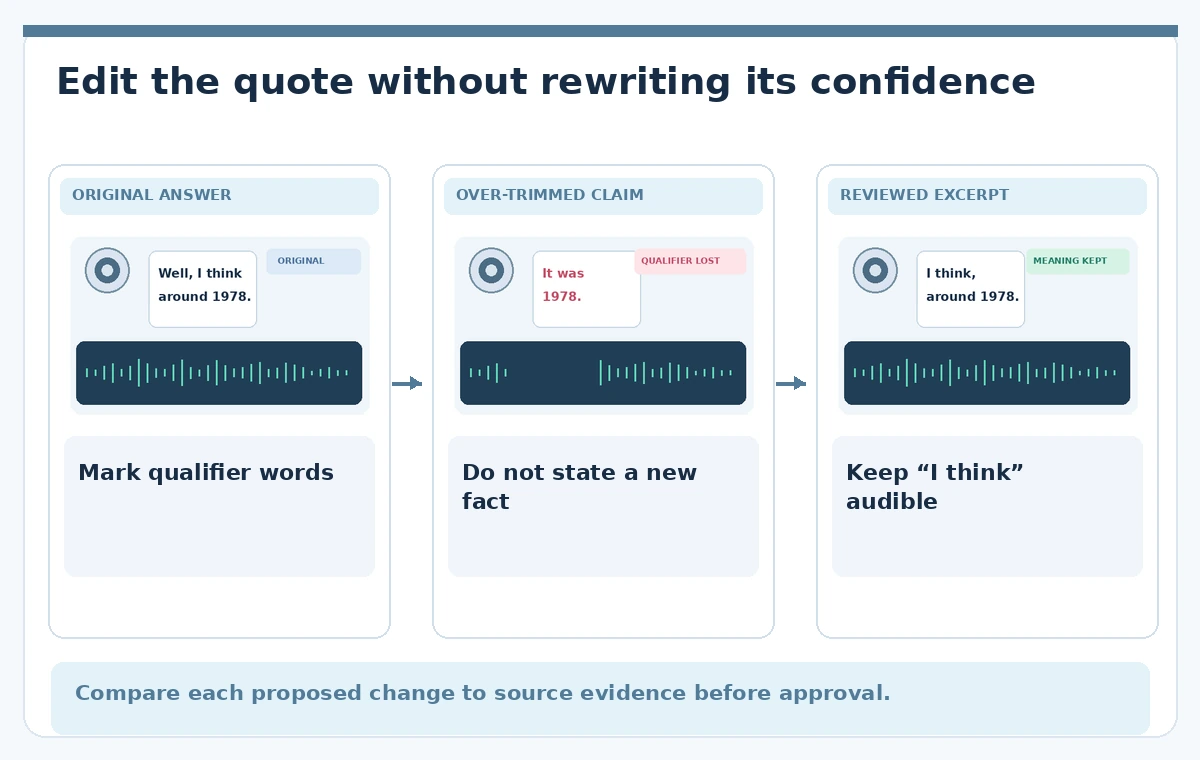
An oral-history interviewer asks a retired train dispatcher when a rural station closed. The speaker replies, “Well, I think it was around 1978, but I might be mixing up two winters.” Some of those words may look like verbal clutter in a transcript. Removing them indiscriminately could turn a qualified memory into an apparently firm historical claim. The editing goal is easier listening without changing the speaker’s level of confidence or suggesting evidence that the recording does not contain.
Descript offers transcript-guided filler-word identification and removal. Its published instructions discuss reviewing detected words and choosing how edits affect the audio and transcript. This example has been invented to explain editorial decisions; we did not upload an actual interview, run a batch cleanup, measure edit accuracy or obtain consent from a real speaker. Follow local archival consent rules and preserve the original audio before trying any automatic changes.
Make a source transcript and uncertainty ledger
Import a copy of the permitted recording and allow it to be transcribed. Before deleting anything, compare the segment about the station closure against the sound of the original answer. Highlight time references, names, negations, pauses that indicate a search for memory and direct corrections.
A transcript is navigation help, not a substitute for listening. Write a simple ledger with the exact spoken phrase, source timestamp, intended meaning and reason for retaining or editing it. Here, “I think,” “around” and “might” carry evidentiary value; they must not be treated like interchangeable breaths or vocal tics.
Inspect Descript suggestions instead of removing all
Descript documentation describes detected filler items in the script and a tool for reviewing them. Depending on the interface version and editing context, options can include deleting audio, affecting only the transcript or leaving a trace of a removal. Locate the current tool in the installed version rather than assuming a screenshot is identical.
Work from one short paragraph as a pilot. Check a few common fillers such as “um,” “you know” and “well” in context, because the same word may be meaningless in one sentence and a conversational transition in another. Save a project version before any bulk operation.
Differentiate hesitation from a factual qualifier
The question is not whether a word appears on a filler list but whether removing it changes what the speaker claims. “Um, we boarded at six” may survive a careful cut; “well, I think we boarded at six” is a different assertion. In a historical interview, uncertainty deserves preservation, particularly when the answer is about dates, eyewitness recollection, attribution or a contested sequence. If an editor chooses to shorten a truly empty pause, that decision should leave nearby intonation intact. If the speaker self-corrects, both the mistaken start and correction may be relevant to an archive even if a public excerpt becomes shorter.
Compare three versions at the same source timestamp
For the teaching diagram, imagine an original answer with a marked hesitation, a risky over-trimmed version that states “It was 1978,” and a reviewed excerpt that retains “I think” and “around.” These are conceptual examples and not tested Descript outputs. Audition all three from the same starting point and at matched listening level.
The reviewed version may be longer, but it preserves the distinction between recollection and documentation. When the edit removes a middle phrase, play through the new join several times. Transcript text can read smoothly while the acoustic transition sounds abrupt or unnatural.

Protect the natural rhythm and room continuity
Filler cleanup frequently changes the spacing of speech. An unnaturally tight succession of words can make an older speaker sound rushed or too certain. Use the waveform and word alignment to check that the last consonant before a cut has not vanished, and that a breath needed for punctuation remains audible.
Descript also documents a separate Shorten word gaps feature; it should not be confused with deciding which semantic fillers to remove. If a pause is part of a difficult recollection, preserve it even if an automatic gap-shortening tool highlights it. Never hide an uncomfortable but authentic uncertainty merely to fit a target duration.
Check quotation and transcript exports independently
Export a fresh transcript from the edited project, then compare all quoted sentences to the audio. Search for changed words around negations, numbers, personal names and source dates. If the public exhibit will display a subtitle or caption, proofread it as a distinct deliverable, not an automatic consequence of the audio edit. A video or transcript can be accurately synced but still omit a meaningful qualifier because the editor deleted it. Maintain an unedited archival transcript if the institution requires one, and label the public listening excerpt as edited rather than presenting it as a complete interview.
Ask an archival reviewer to approve the high-risk lines
A second listener should assess the passage without being told the edit is supposed to sound cleaner. Provide the original and candidate excerpt, the source timestamp and the uncertainty ledger. Ask whether the edited wording now sounds more confident or chronological than the source.
It is reasonable to reject a technically seamless cut on editorial grounds. The review diagram identifies four high-risk zones: timeline wording, hesitation before a claim, natural voice joins and comparison to the original. Automated transcription confidence does not certify faithful oral history; the ultimate approval should rest with a trained editor and the project’s consent policy.

Deliver an intelligible excerpt with documented omissions
Retain the source audio, revised project, edited file, transcript, decision log and any consent restrictions in the archive. For a public exhibit, describe the audio as shortened for clarity while keeping the meaning of the speaker’s recollection. If a phrase cannot be cleaned without altering its sense, leave the filler in place or use a longer quote.
Check the export from start to finish on ordinary speakers and headphones. An honest “I think” may be the most important two words in the entire answer. A useful editing tool removes mechanical busywork; it does not decide what a witness knew.
How We Research
This article was prepared on November 4, 2026 using named official vendor references: Descript: How to stop saying um and which fillers to keep; Descript: Remove filler from audio; Descript Help: Shorten word gaps. We read the feature documentation for supported controls, boundaries and workflow restrictions, then designed a hypothetical editorial test with distinct risks. We did not access a paid workspace, process live media, record participants, compare outputs empirically, or measure quality. All images are original conceptual teaching drawings, not product screenshots or evidence of a tool failure. Feature labels, account eligibility and limits can change, so check the current vendor help page. The responsible editor must verify source facts, permissions, delivery artifacts and any formal approval before public use.
Frequently Asked Questions
No. Review context and acoustic joins; some pauses or qualifiers are part of the historical record.
It can be a meaningful marker of uncertainty and should usually be retained when qualifying a factual memory.
No. Listen to each audio join and surrounding cadence; a smooth transcript does not prove a natural recording.
It targets pause duration, while filler-word cleanup concerns spoken items and their associated audio or transcript edits.
No. They are illustrative editorial examples, not live tool outputs or evidence of a specific failure.