
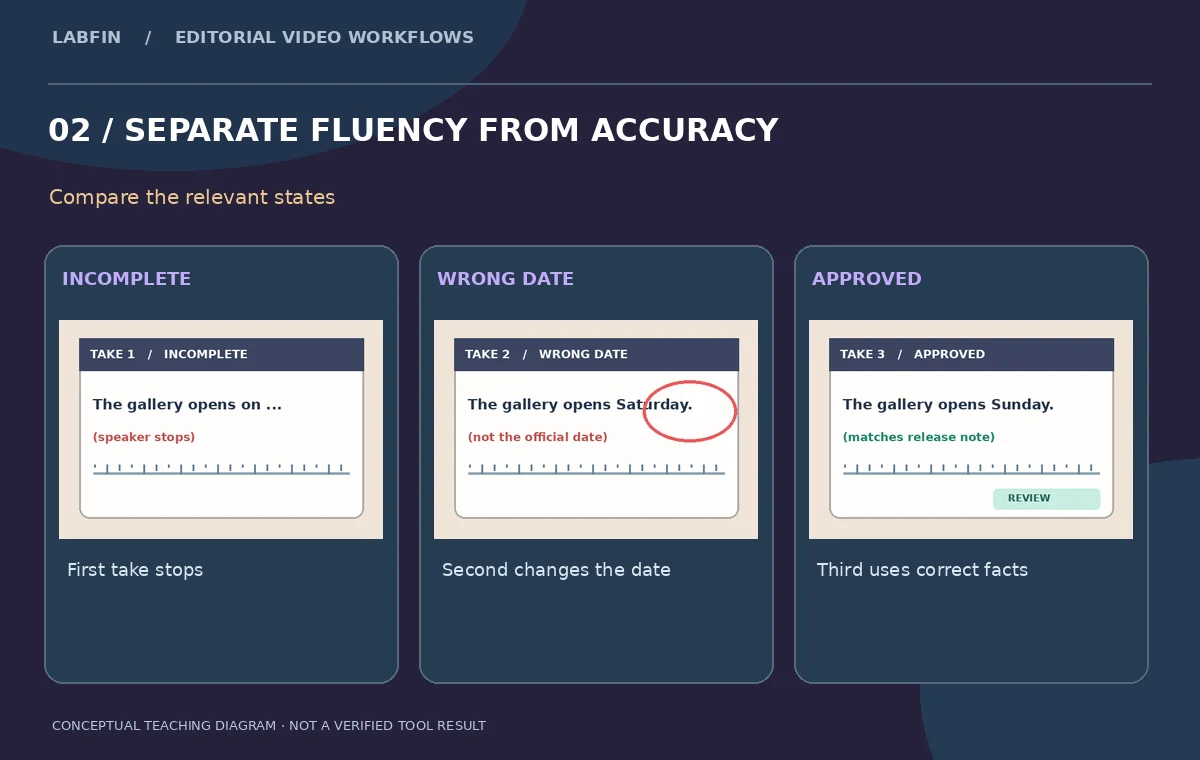
A curator records three takes of a short announcement: the first stops mid-sentence, the second says the wrong opening date, and the third is accurate but begins with a breath. Descript’s Underlord Remove Retakes action can identify repeated attempts in a transcript and propose cuts. The human editor must decide which take is factually correct and whether an automated cut removes useful context. This is a take-selection workflow rather than a tool for rewriting the speaker’s claims. Our three transcript cards are fictional teaching examples, not an export or an accuracy test of Descript’s current models.
Write a source-of-truth answer before editing
Before uploading the interview, confirm the gallery opening date, time zone and spelling of the exhibition title against a signed release or event schedule. Write those values in a small reference note beside the media. Your goal is not merely the smoothest sentence; the chosen take must be accurate and authorized for publication. Store the original audio and video, consent information, and the approved wording in a private project. A model’s confidence or a polished-sounding delivery is not evidence that a date is correct. The speaker may have deliberately corrected an earlier mistake, so all repeat takes need to be examined in order.
Transcribe the interview and mark each attempt
Descript’s editor works from transcribed recordings, and its Underlord tools can identify repeated takes. Review the transcript for speech-recognition errors before asking AI to remove sections. Label the first attempt as interrupted, the second as factually wrong, and the third as complete with the approved opening date. Keep the surrounding question and the curator’s correction available; removing both may make an answer sound unsupported or change its scope. Check the waveform and a video frame around each start and stop. A missing sentence fragment can be an ordinary retake, but it can also be the qualifier that makes the next claim truthful.

Use Underlord Remove Retakes as a proposal
Descript’s own descriptions say Remove Retakes can find repeated attempts and propose script edits. A recent Underlord primer also describes sequencing tasks such as removing retakes, cutting filler words, and applying Studio Sound. Start by requesting removal of repeated takes, not by asking the assistant to rewrite the interview’s content. Keep the proposal in a reversible draft or duplicate project. Do not assume that the program will always choose the final take or that the most fluent version is the correct one. In this example, the approved date lives in the third attempt, so a proposal that preserves the second attempt must be rejected even if its delivery sounds better.
Audit every ignored region before applying edits
Read the edit proposal sentence by sentence. Check the highlighted or ignored spans, their time ranges, and whether the correct answer remains intact. Watch for missing linking words such as “not,” “except,” or “until,” because they can reverse meaning after a cut. Preserve a short pause when it allows the speaker to transition naturally without sounding artificially robotic. If a segment contains the interviewer’s question, keep it unless the final answer is still fully understandable. Do not batch-approve all cut suggestions simply because they are repeated. An AI proposal is a shortlist of potential edits; the editor remains responsible for statements that viewers will hear.
Rebuild natural sound at the cut points
After approving only the right selections, listen at the boundaries on headphones. A cut from one take to another can change room ambience, mouth position, and breathing. If music, appliance noise, or a cough continues underneath the transition, a hard edit may be obvious even when the transcript looks clean. Use ordinary audio editing techniques such as fades or room-tone continuity when necessary; do not rely on a separate generative speech feature to fabricate words or voice performance. If the curator starts the correct answer with a short inhale, retaining it may sound more natural than forcing an instant start. Validate the complete sentence in real-time playback.
Compare edited claims with the signed event schedule
For a public event, audit proper nouns, addresses and dates after retakes have been removed. Show the transcript and event note side by side. Does the chosen clip name the right venue? Is a numerical date spoken consistently with the captions? Does the sentence remain true when separated from the original question? Compare your transcript to the raw recording for any place where automatic speech recognition could have swapped a word. Avoid paraphrasing quotes through AI without the speaker’s specific approval. Good take selection preserves what was actually recorded; it does not claim that a fictional reconstruction is a direct quotation.
Protect consent and the origin of the recording
Keep the recording accessible only to approved collaborators. A subject may have agreed to a particular interview but not to having discarded mistakes published or used as comedic outtakes. Remove Retakes should help honor the approved message, not expose sensitive off-camera conversation. If you need to identify exactly how a final statement was assembled, maintain a clip-to-source timecode log. Descript’s AI editing features are distinct from its voice-recreation tools; this procedure does not require cloning, replacing, or regenerating anyone’s voice. Retain an unchanged source so the speaker or legal reviewer can inspect the edits if a dispute arises.

Handoff a compact verification log
Deliver the edited interview, caption transcript, source media reference, consent status, and a three-row take decision table. Write why take one was excluded, why take two contained a factual error, and why take three was used. Mark whether any audio transition still needs polishing, rather than applying a green check to an untested export. Descript’s documentation supports the existence of the Remove Retakes feature; our diagrams do not establish a selection success rate or prove that a live account processed this hypothetical interview. The final editorial pass must use the actual output on the actual device and confirm every quoted statement before release.
How We Research
This Descript Remove Retakes guide is independent editorial guidance grounded in the primary sources Descript: Underlord AI editing assistant; Descript: Underlord workflow primer; Descript changelog: Remove Retakes. Our illustrated scenario is a fictional interview with three attempts at explaining a studio opening date, including one incomplete take and one corrected complete answer. We reviewed the documented features and their limits, proposed observable checks, and identified places where human fact checking, privacy decisions, source rights, consent, accessibility and motion continuity matter. The WebP figures are original instructional diagrams, not interface screenshots, measured benchmarks, generated exports, or evidence of completed vendor-account testing. No private footage was uploaded, paid product trial was performed, or performance score measured for this article. Readers should check current account access and UI details, retain their original media, and review exported results on the intended viewing devices before approval.
Frequently Asked Questions
No. Review the suggested cuts and choose the take with the right content and approved performance.
No. Check factual claims against an independent approved schedule or source document.
Remove Retakes is a take-editing action. Voice regeneration is a separate capability and is not needed here.
The original recording, take-by-take decision log, edited transcript and approval record.
Replay the full answer, inspect qualifiers and compare the final transcript with the original question and recording.