
A fictional volunteer instructor records a short training video about using a library book cart. She reads a prepared opening line from notes below the camera and then looks down to demonstrate a wheel brake. The editor wants the opening to feel more direct, but must not make the instructor appear to watch the camera while checking the brake. This guide describes a careful Descript Eye Contact edit; it does not claim to show a processed recording.
Mark the portions where gaze is meaningful
Watch the unedited training video and divide it into three parts: introductory explanation, physical demonstration and closing reminder. In the introduction, looking briefly toward the lens may improve connection. During the brake demonstration, looking down is functional: it shows that the instructor is inspecting the hardware. That downward glance should remain visible rather than being cosmetically erased.
Write an edit brief that explicitly protects gestures, hands, wheel position and the moment the brake is engaged. Avoid suggesting to viewers that a gaze-correction effect verifies safe equipment handling. A synthetic visual adjustment can change apparent attention; it does not confirm that the instructor checked the brake or that the physical demonstration is accurate.
Understand the feature’s actual scope
Descript describes Eye Contact as an AI video effect that redirects the gaze of a person reading notes or looking slightly off-camera. It works best with one speaker whose face and both eyes are clearly visible. Descript says it does not change the original footage destructively; the editor can toggle the effect off during review.
The feature is not a multi-person gaze tracker or a guarantee of natural behavior throughout a clip. Strong side turns, eyes leaving the frame or reflections from glasses may prevent reliable correction. Check the current Descript plan and credit terms before editing a long library of videos, and keep a way to revert to the unmodified picture.
Prepare a short representative test segment
Choose an excerpt where the instructor first reads from notes, looks toward the lens and then glances down at the cart. Keep the source frame rate and orientation consistent. Descript advises a well-lit, front-facing single speaker with visible eyes; adjust reflections and poor framing in the original take where possible rather than expecting software to fix every occlusion.
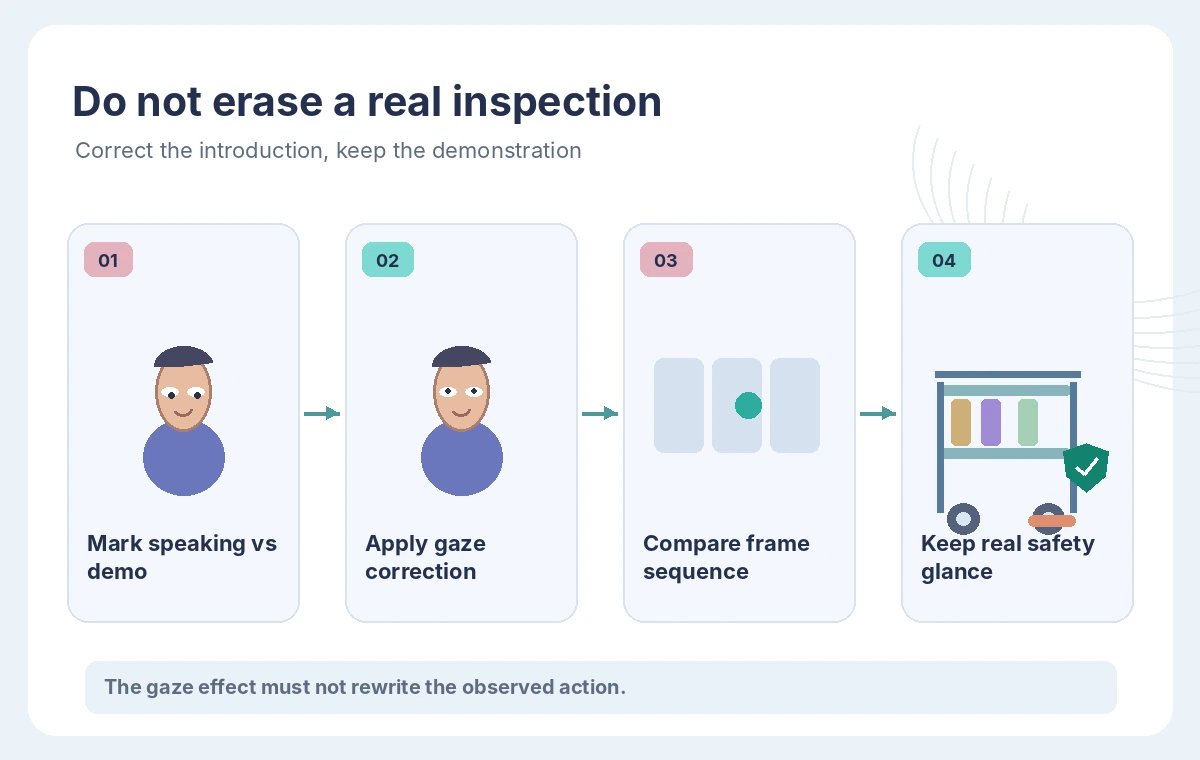
Make a copy of the sequence for editorial comparison and document the original timestamps. If the effect makes the speaker’s face look unnatural, the editor should be able to switch back without losing audio edits, captions or cuts. Do not represent the example’s before-and-after drawing as a real export or as evidence of the effect’s success rate.
Apply Eye Contact only to appropriate video layers
In the Descript editor, select the relevant video layer and apply the Eye Contact effect using the current effects controls. Limit the corrected region to the talking-head introduction if the workflow allows an isolated scene or clip. Leave the demonstration segment without gaze correction. An effect applied indiscriminately to the full video might change the apparent intent of the instructor’s actions.
Descript’s public guidance recommends previewing and exporting only after inspecting the edited video. Start with a short segment so the reviewer can check transitions between corrected and natural gaze. If editing multiple shots, review the boundary of each shot individually; the face may be smaller, more obscured or partially out of frame after a cut.
Compare authentic attention with a misleading stare
The illustrative comparison shows an incorrect target in which both the spoken introduction and the brake-inspection moment appear to look straight at the lens. The reviewed target corrects only the reading glance and preserves the downward inspection of the wheel. It is a deliberate difference in narrative truth, not merely a difference in aesthetic polish.

A viewer should still understand when the instructor is watching a mechanism and when she is addressing the audience. Look for frozen-looking eyes, abrupt jumps at effect boundaries, mismatched blinks or gaze that ignores head movement. A frame that looks good when paused may still be distracting at playback speed.
Protect captions, gestures and safety language
Compare the speech transcript and the edited audio to the approved script. Eye Contact edits the picture, not the factual correctness of captions or a safety instruction. Do not allow a helpful-looking face to mask the loss of the word “not,” a clipped hand gesture or a shot where the wheel brake is no longer visible.
Include the hands and the cart in the review, not only a tight face crop. If the effect is available through a broader editor workflow that changes layout, check whether the crop hides the equipment at the critical moment. Good eye contact cannot compensate for a missing demonstration step or inaccessible captions.
Test the difficult moments before deciding to keep it
Include a segment with glasses reflections, a brief head turn, a downward glance and a return to camera. If there are two faces in a shot, Descript’s documentation says Eye Contact is optimized for a single subject and is not intended to correct multiple faces simultaneously. Favor the original picture when the treatment creates strange or misleading visual signals.
Review the result at normal speed and in the intended phone-size frame. A subtle artifact may become more noticeable in a vertical social clip. Keep notes on which segments were adjusted, why, and whether the approved version preserves the instructor’s genuine actions. Do not publish speculative accuracy percentages or universal claims about naturalness.
Export with an honest editorial record
For publication, store the unedited original, approved script, corrected sequence and a brief note describing the applied effect. If audience expectations or the organization’s policy call for disclosure of synthetic alterations, label the visual correction appropriately. Do not make the instructor appear to have witnessed an event or checked equipment she did not actually examine.

Before reuse in a safety context, have the instructor or responsible reviewer confirm that gestures and verbal instructions remain accurate. The hypothetical video here is an editorial planning exercise. Descript Eye Contact can change apparent gaze, but no software effect proves a real inspection was performed.
How We Research
For this November 2026 article we reviewed the current official developer and support documentation: Descript: AI Eye Contact tool, Descript: Maintain eye contact in videos, Descript: Features overview. We compared documented feature scope, setup prerequisites, data flows, approval boundaries, and limitations that affect the proposed workflow. We did not execute an API request, connect an actual design file, reconcile business receipts, or edit real video. The examples, names, transaction amounts, approvals and outcomes are fictional; the drawings are original conceptual explanations, not product screenshots or benchmark results. Editorial checks and approval stages are recommended procedures, not guarantees supplied by the service. Review current provider documentation, billing, regional availability, privacy terms and the organization’s own policies before applying the process to sensitive records or live users.
Frequently Asked Questions
Yes. Descript recommends a single front-facing speaker with both eyes visible and suitable lighting.
Descript says the effect is optimized for one visible subject; multi-person scenes are not a reliable use case.
Descript describes Eye Contact as non-destructive, so an editor can toggle it on or off.
Strong head turns, eyes leaving the frame or glare from glasses can prevent natural correction.
No. A downward glance can be essential to show attention to tools, safety equipment or a demonstration step.