
A regional museum has dozens of internal tools for finding collections, checking room schedules, reading exhibition notes and editing inventory records. A staff member asks an assistant, “Which label belongs to this artifact?” The assistant needs a search tool, not a write tool, even if both have similar names. Claude Tool Search helps models discover relevant tools without front-loading every definition. This fictional museum example focuses on an often-overlooked distinction: discovering a capability does not grant the human authorization to use it.
Define the request as a read operation
Write the desired result before designing tools: return the approved label text, its accession identifier, source revision and location in the collection system. The assistant should not edit the record, draft a publication or contact a registrar to resolve uncertainty. Explicitly state which kinds of changes need a separate staff approval.
Classify the tool catalog into read-only, proposal-producing and effectful actions. A proposal tool may create a pending change request, while a write tool can alter a system of record. Keep these categories visible to the application controller even when their human-readable descriptions overlap.
Understand deferred tool loading
Anthropic documents regex and BM25 variants of Tool Search, with deferred tools marked through the defer_loading flag. The API receives all declared tool definitions, but most do not occupy the initial model context. Tool Search returns references to relevant definitions so the assistant can select an appropriate tool after discovery.
The feature can reduce context clutter in a large integration catalog. It does not automatically establish tool quality, permission or source reliability. Choose a model and platform that actually support the tool variant; Anthropic’s documentation lists compatibility and has platform-specific restrictions.
Write precise descriptions and stable schemas
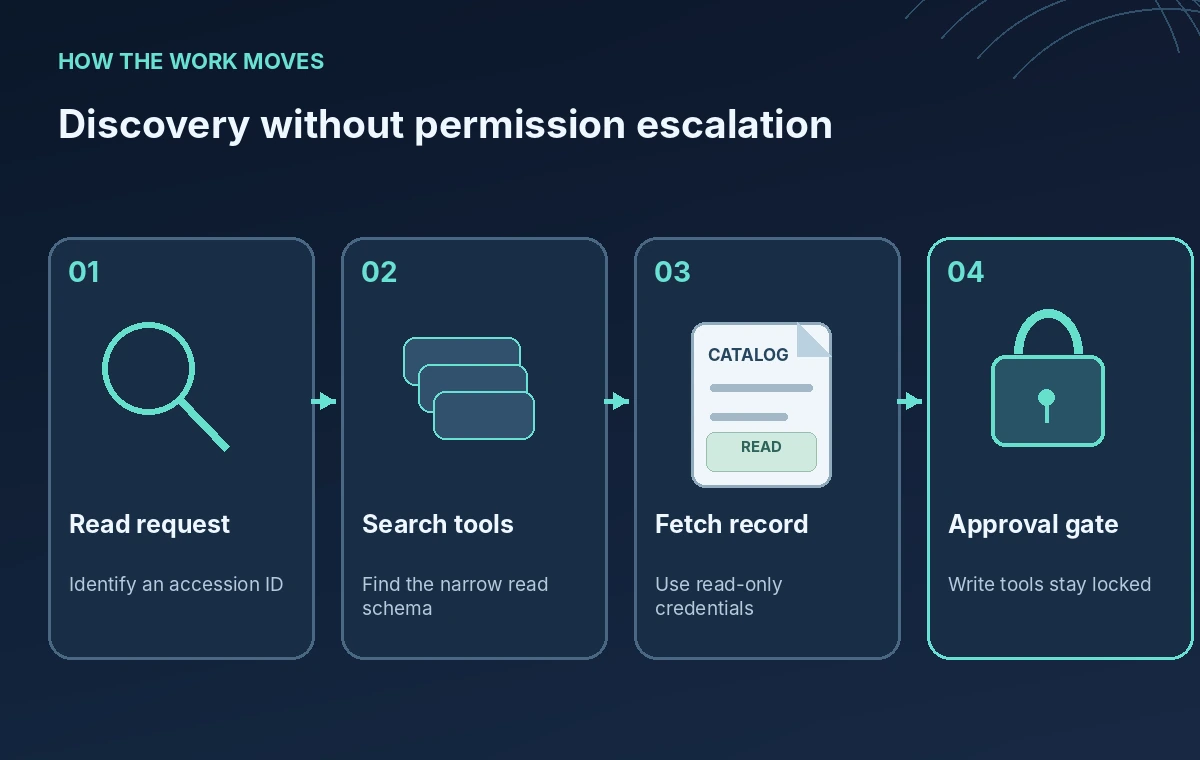
Give read_catalog_label an unambiguous description, including required accession ID and allowed output fields. Give update_catalog_label an equally explicit warning that it changes authoritative data and requires a separate approval token. Names like catalog_helper or manage_all_records are too broad to support safe discovery.
Use clear JSON schema descriptions for arguments: an accession ID is not a free-form instruction, and an exhibition code is not a personal account name. Validate identifiers on the server before database access. Discovery search should never be treated as permission to bypass those schema checks.
Keep critical safety controls non-deferred
Anthropic recommends leaving a few frequently used tools immediately available, with the Tool Search tool itself non-deferred. For a museum app, keep the permission-checking gateway and current-user policy logic outside model-controlled selection. Tool Search helps discover names and schemas; the host application should enforce authorization.
Do not create a permissive fallback that uses the first discovered match when the read-only tool fails. Instead, return a clear error and ask for human intervention. Log the tool reference, arguments and policy decision so staff can reconstruct what actually happened.
Compare an ambiguous match with a safe choice

In a conceptual side-by-side comparison, the unsafe path maps a label lookup to update_catalog_label because both contain ‘catalog’ and ‘label.’ The controlled path discovers read_catalog_label and returns an approved source record without any write call. The key distinction is visible tool scope, not the conversational confidence of the assistant.
Make the response include source revision and approval state. If a draft is newer but unapproved, display it separately rather than substituting it for the approved label. A tool search response does not independently verify the semantics of fields returned by the target system.
Design a confirmation gate for effectful tools
When a staff member genuinely requests a correction, first produce a diff showing the old value, proposed value, reason and source reference. Route that proposal to an authenticated approval workflow. Only a server-side component with an explicit authorization grant should execute the final write; the model should not approve its own change.
Use distinct permissions for searching, proposing and committing. Test the gate with mistaken accession IDs, duplicate actions, conflicting revisions and a rejected approval. Keep a human-readable audit record of what changed and which source justified it.
Evaluate tool selection with realistic fixtures

A small offline evaluation set can include identical object titles with different accession IDs, archived labels with later draft text, ambiguous search queries and a malicious description in a retrieved document. Measure whether the chosen tool was read-only and whether the answer named the correct source version.
Avoid judging success only by whether the model returned any answer. An intentionally declined action may be the safest correct outcome. This guide describes a hypothetical test plan; it does not claim access to a Claude account or live museum tooling.
Publish the workflow, not unreviewed records
Before deployment, confirm model support, tool-search availability and pricing against the current Anthropic platform documentation. Ensure the catalog connection uses least-privilege credentials, logs avoid unnecessary personal data and a human can disable the integration quickly.
For public museum descriptions, an editorial reviewer still needs to verify rights, attribution, dates and wording. Tool discovery is infrastructure for finding a capability, not a shortcut around source review. Keep catalog data and app permissions independent of any prompt that the assistant can rewrite.
How We Research
For this November 2026 guide, we reviewed these named primary sources: Claude Platform Tool Search Tool, Anthropic Advanced Tool Use. We compared the documented feature names, input and output behavior, supported workflows, platform restrictions and the product documentation about permissions or uncertainty. The seed bank, museum, library and volunteer examples are fictional. We did not run the vendors’ APIs, convert a real voice, inspect a real mailbox or measure performance or quality. All twenty original diagrams across the batch are conceptual, not screenshots or proof of tested results. Check current availability, plans, pricing and regional policies on the official sites before deployment, and have the relevant human expert verify any facts before publication.
Frequently Asked Questions
It lets a declared tool stay outside the initial model context until the tool search mechanism finds and loads its definition.
No. Your application must still enforce authentication, scoped permissions and a separate approval gate for writes.
No. Anthropic documents a regex-pattern variant and a natural-language BM25 variant; choose based on the supported model and catalog.
Not without an explicit editorial and system-of-record approval step, regardless of the tool the assistant finds.
No. Tool names, records and approval fixtures in this guide are illustrative.