
A museum has recorded a short audio guide in a room that made the narrator difficult to hear. The producer considers DaVinci Resolve Studio’s Voice Convert feature using a voice model for which the museum has explicit permission. The script includes the sentence “Do not touch the rotating mechanism.” A fluent new voice is not acceptable if it removes “not,” changes the identity of the speaker without authorization or implies that an archival recording is original. This fictional production plan draws on Blackmagic Design’s official feature guide and does not claim that any voice conversion was performed.
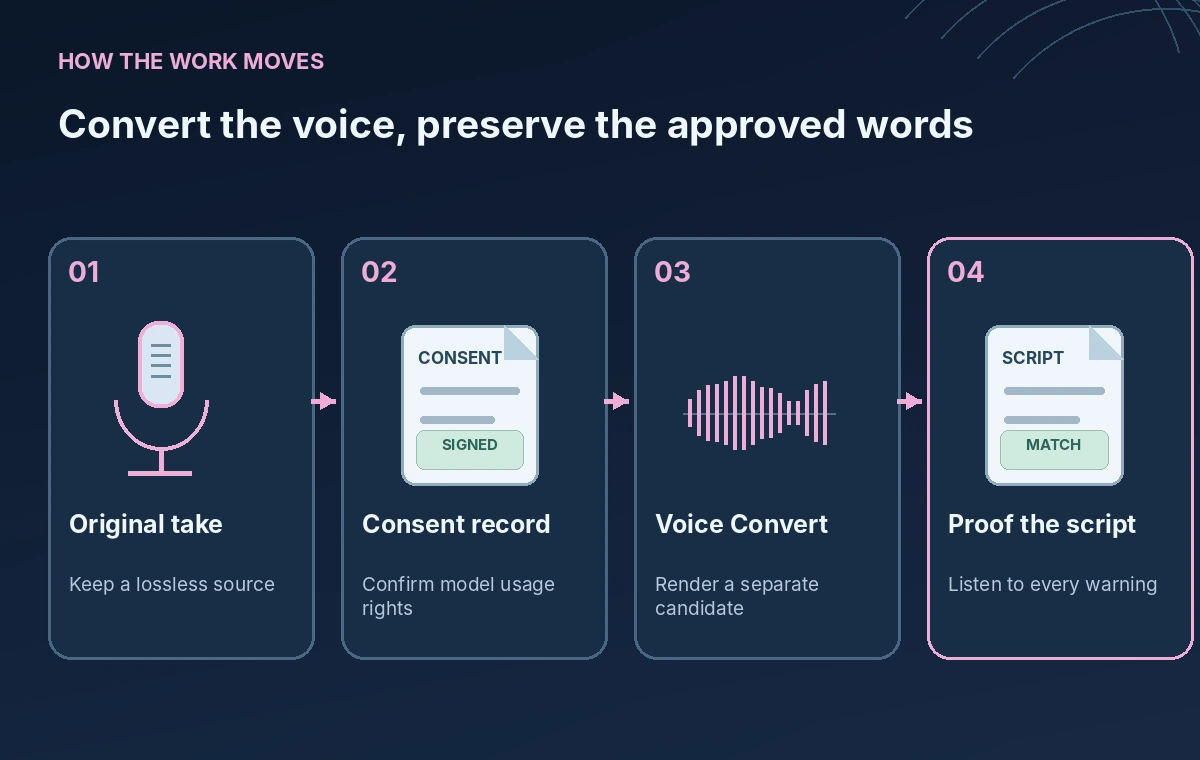
Confirm authority to use the voice model
Begin with a rights sheet naming the performer, the permitted voice model, approved purposes, usage duration and the person who can revoke or update consent. Ownership of a recording does not necessarily grant permission to train or impersonate a speaker. Verify applicable labor, privacy and licensing rules with the relevant people before any conversion.
If the original guide is an archival interview, do not silently revoice the person as if it were an authentic historical recording. For a modern instructional narration, disclose synthetic voice conversion where appropriate. Keep the unmodified source available for audit and correction.
Use the documented Studio workflow
Blackmagic’s DaVinci Resolve 20 guide describes Voice Convert as a Studio-only feature. The documented workflow selects a clip, opens Voice Convert, chooses an output track, filename, voice model and settings, then renders the result. Do not describe it as a universal feature of every free edition or claim it replaces all microphone cleanup.
Use a duplicate track or an otherwise reversible editing setup when available. Record the application version, model source and original clip identifier. Be careful with any render-in-place option that could replace the immediately visible source; a separate retained original makes editorial comparison much easier.
Understand which voice qualities carry over
The Blackmagic guide describes settings including tight matching to the source, pitch variance and pitch change. It also warns that Voice Convert does not necessarily recreate a different accent: source pronunciation can influence the output. Treat that as an editorial constraint, especially for place names and unfamiliar exhibit terminology.
Prepare a short glossary of object names, emergency terms and pronunciation notes. If a model makes the warning difficult to understand, revise the source performance or choose another authorized production method rather than chasing a more dramatic synthetic sound.
Build an exact-words reference before rendering
Transcribe the approved narration with a reviewer and highlight safety-critical words, particularly negations, numerical limits, direction names and access instructions. Number the lines and keep their source audio time ranges. The approved script is the reference, not an AI-generated subtitle that may repeat an earlier transcription error.
In the hypothetical script, ‘Do not touch the rotating mechanism’ must remain negative, while ‘Ask staff for assistance’ should remain an instruction rather than a suggestion to operate equipment. A voice filter that sounds smooth can still distort a consonant or swallow a quiet phrase.
Compare original and converted warning segments

Place the same source passage on two aligned timeline lanes, with the original retained for comparison and the converted version labeled as processed audio. Listen to the entire phrase in context, not just the word ‘not’ in isolation. Surrounding room sound and music can mask a consonant even when the voice itself seems clearer.
A conceptual diagram can show a full negative instruction on the original lane and a flagged shortened version on the other. It does not claim the feature actually deleted a word. If an error is heard during a real edit, revert, rerecord or repair it, then compare again before export.
Keep provenance and performance separate
Use filenames and project metadata that distinguish the original performance, processed candidate and approved master. Avoid naming synthetic audio ‘original narrator recording’ after conversion. For accessibility, supply a human-checked transcript and, where appropriate, a note that the voice was transformed with permission.
The feature’s ability to mimic a particular voice is not evidence of the performer’s endorsement of new wording. Never add endorsements, fabricated museum statements or claims about the artifact. An approval must cover the words as well as the vocal identity used.
Review output on multiple listening paths

Listen on studio monitors, ordinary headphones and a small device speaker. Pay attention to sibilants, consonant loss, unexpected pitch movement, onset timing and intelligibility over music. The main acceptance measure is whether people can understand the approved message, not whether the output seems impressive in a demo.
Use actual listening tests when producing a guide, and document who listened and which revision passed. The graphics in this article are educational waveforms, not recorded signals, loudness readings or proof of a particular model’s acoustic performance.
Approve and archive the final master
Before delivery, check every warning against the signed-off script, confirm speaker permissions and ensure the approved audio file has a matching transcript. Retain the original recording and processing notes securely, along with any attribution or disclosure requirements agreed with the performer.
Check current DaVinci Resolve Studio licensing, operating-system support and voice-model policies in Blackmagic documentation before starting. The hypothetical guide contains no real person’s voice, and this article does not report a live tool test. The release decision belongs to the producer and responsible museum staff.
How We Research
For this November 2026 guide, we reviewed these named primary sources: Blackmagic DaVinci Resolve 20 New Features Guide, DaVinci Resolve overview. We compared the documented feature names, input and output behavior, supported workflows, platform restrictions and the product documentation about permissions or uncertainty. The seed bank, museum, library and volunteer examples are fictional. We did not run the vendors’ APIs, convert a real voice, inspect a real mailbox or measure performance or quality. All twenty original diagrams across the batch are conceptual, not screenshots or proof of tested results. Check current availability, plans, pricing and regional policies on the official sites before deployment, and have the relevant human expert verify any facts before publication.
Frequently Asked Questions
Blackmagic documents AI Voice Convert in the Studio version for Resolve 20; check the current edition and hardware requirements.
Not reliably. Blackmagic warns that source accent and pronunciation can influence the converted performance.
No. Obtain explicit permission and check contractual, privacy and labor obligations for the intended voice use.
A smooth synthetic voice can still obscure a negation or alter intelligibility, so editorial verification must use an approved script.
No. The example is fictional and all waveform visuals are conceptual illustrations.