
It is easy to ask an image generator to “fix the background” and discover that the subject, crop and lettering also changed. ChatGPT Images includes conversational image editing and a selection workflow, but an edit instruction is not a pixel-lock. This guide uses a fictional illustrated bicycle-shop poster and a practical review method for changing a background lamp while protecting the bicycle, headline space and margins.
Freeze the parts that must not move
Write an image change request as two lists: what may change and what must remain. For our poster, the background lamp may be removed. The bicycle’s frame geometry, wheel count, illustration style, foreground shadow and blank header area should stay. If a precise retail price or product specification must appear, create that as editable text after image generation.
Save the approved starting image and record its aspect ratio and intended crop. A designer who changes both the subject and the background in one attempt cannot reliably explain which instruction caused a problem. Establishing a baseline turns editing into a reviewable sequence.
Choose selective editing or a text-only instruction
OpenAI’s Images in ChatGPT guide explains that users can select a region with the editor and describe a change, or describe a change directly in conversation. The same guide warns that highlighted selections are not always precise and edits can extend beyond the selected region.
Use a selection around the lamp if the issue is geographically narrow. Use a conversational prompt for broad color treatment or other global changes. Do not tell collaborators that the selection is a guaranteed mask boundary; describe it as a way to communicate intent.

Write edits as bounded instructions
A useful request says, “Remove only the background lamp above the rear wheel. Fill that area with the same wall texture. Keep the bicycle frame, wheels, floor shadow, canvas ratio and blank upper-left headline space unchanged.” This is easier to review than “make the poster cleaner,” which leaves dozens of design decisions to the model.
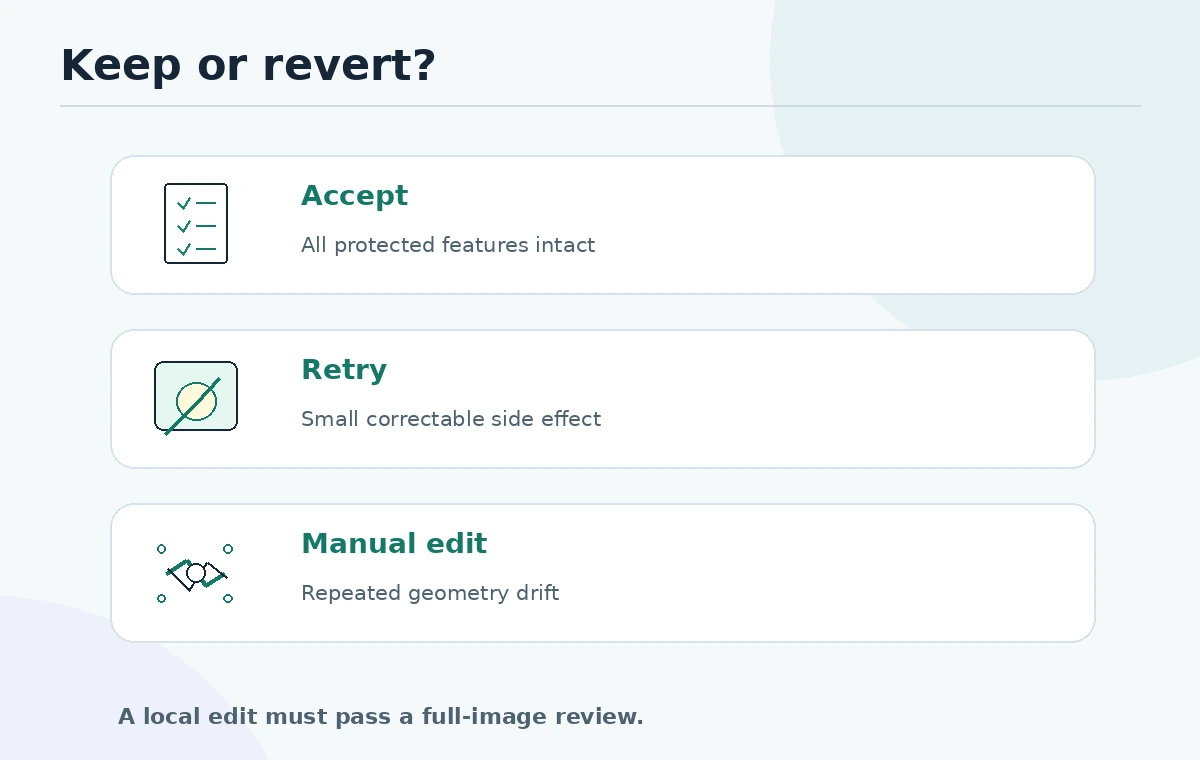
When there are two unrelated defects, handle them in separate passes. If the lamp removal succeeds but the chain guard becomes distorted, compare to the original and revert rather than stacking an unbounded string of edits. Save the prompt associated with each accepted revision.
Review a change map, not just the altered patch
A local edit still requires a full-image review. Compare a before-and-after pair at the same zoom. Check the selected region, then scan the nearby edges, subject anatomy, background continuity and margins. For the bicycle poster, count both wheels, examine spokes and test the frame triangles. At thumbnail size, verify the subject remains recognizable and the headline space is still empty.
A simple difference overlay can help locate unintended motion, although it cannot by itself prove semantic accuracy. Some desired changes affect neighboring pixels legitimately. The decision is editorial: did the request improve the asset while respecting its important constraints?

Do not trust generated letters and numbers without proof
ChatGPT Images can add text, but exact punctuation, prices, product specifications and attribution must still be proofread. When a poster has legal text, a coupon deadline or precise discount, use conventional editable typography rather than accepting rasterized lettering as final. Ask a second reviewer to compare the approved copy with the visual.
If an image contains a real-looking person, storefront or brand sign, consider whether readers could interpret it as documentary proof. For a fictional campaign, captions and the surrounding page should make the illustrative status obvious when it matters.
Check access and organize versions
OpenAI documents creating, editing, saving and sharing images in ChatGPT across supported platforms. Interfaces and quotas differ across plans and can change, so avoid promising that a specific user can perform unlimited edits. Keep an unedited original, each candidate, and one approved export in a folder with human-readable names.
Record the person who approved the final output, the intended distribution channel and the reason for the edit. For sensitive personal data or unpublished client designs, review organizational policy and provider settings before uploading anything.
Use a stop rule when generative editing is wrong
After two unsuccessful bounded attempts, decide whether a manual retouch, vector edit or layered compositing tool is more reliable. Generative editing is useful for concept cleanup and some background changes, but it is a poor substitute for exact placement when measurements, safety instructions or product geometry are required.
The final handoff should include the unchanged master, approved image, editable headline layer, aspect ratio and the QA checklist. That small package lets the next editor understand which details are non-negotiable and prevents accidental reproduction of earlier mistakes.
For an efficient review, create a small issue log before the first image edit. Example entry: “Issue: lamp distracts from bike; allowed change: wall area above rear wheel; protected items: entire bike, ground shadow, header space; acceptance: no lamp and no other relevant visual difference.” After each version, mark that same entry pass, fail or needs manual work. If the revision introduces an extra spoke or alters the bicycle frame, describe it as a failed output instead of a new design direction. This explicit record prevents repeated attempts from drifting away from the original approved campaign brief.
How We Research
We read the official OpenAI Images in ChatGPT help article on October 27, 2026 for the selection workflow, editing methods, availability and the warning that edits may extend outside highlighted regions. The bicycle poster, change-map procedure and two-attempt stop rule are editorial methods, not empirical performance measurements. No hands-on account tests are claimed.
Frequently Asked Questions
No. OpenAI warns that selections may be imprecise and changes can extend beyond the highlighted area.
No. Select a region for localized intent; broader color or composition changes can be described directly in conversation.
Reserve blank copy space in the generated visual and add the approved headline as editable typography afterward.
Return to the original and use a traditional retouching or layered workflow when precise object geometry matters.
Keep the original, each accepted revision, the final export, approved copy and a reviewer checklist for identity and layout changes.