
A cooking instructor recorded a short English introduction to a dessert lesson and wants to welcome Spanish-speaking viewers. The instructor says the demonstration uses ground almonds and is not suitable for people with tree-nut allergies. An accurate translation is essential: a polished mouth movement cannot compensate for a missing ingredient or reversed warning. The more natural the dub sounds, the more easily an error can pass as the instructor’s own advice.
Captions describes Lipdub as translated speech with synchronized lip and face movement and a voice based on the original. Documentation covers selecting source and target languages, producing an export, and plan- or device-dependent access. This is a hypothetical editorial workflow; no voice was cloned, no real instructor supplied consent and the diagrams are not screenshots of a Captions result.
Secure voice rights and prepare a fact-checked source script
Obtain explicit permission from the instructor to translate their voice and adjust the visual performance. Keep a transcript of the exact original speech, including the almond ingredient, allergy caution and any age or temperature instructions.
Set aside a second approved script showing the intended translation. If the original audio is ambiguous, resolve it with the instructor before generating a synthetic-language version. Do not improvise medical safety language or let a dubbing model replace precise ingredient names with broad categories such as “nuts.” Translation approval should come from a competent reviewer, not only from the person who designed the social post.
Check the product surface and eligibility first
Captions’ documentation presents Lipdub through video import, language selection and export, while current product materials describe advanced dubbing availability by plan. Older help pages and a developer API describe particular device or duration constraints; access can differ by product tier and workflow.
Check the actual account and current product page before promising a deliverable. Do a short internal sample only with content the organization has permission to process. For a video with multiple overlapping speakers or a long monologue, do not assume every language and format will have identical support.

Mark safety-critical words before translation
Create a term sheet for “ground almonds,” “tree-nut allergy,” “contains,” and any negative constructions. Give the reviewer a timestamped checklist, not just an instruction to make the result fluent. Keep ingredient quantities and temperature values in a separate verified reference document.
A hypothetical bad example changes “contains almonds” into “almond-free,” which would reverse the warning; the corrected comparison preserves the meaning without pretending to show tested Captions output. Flag any word that the on-screen caption and translated audio express differently. A safety sentence must survive both channels.
Review audio content separately from lip movement
Captions markets lip synchronization as aligning the visible mouth with target-language speech, but a convincing visual does not guarantee accurate translation. Listen without looking at the screen and compare each sentence with the approved target-language text.
Then mute the audio and look for mouth warping, drifting jaw contours, frozen teeth, or lip motion that continues after the utterance ends. An edit may be acceptable for an illustrative promotional intro while inappropriate for an evidentiary or documentary clip. Keep the source visible to reviewers during this comparison.

Preserve identity without suggesting unapproved speech
Because Lipdub can make a translated voice appear to come naturally from the original speaker, the instructor needs to approve the particular wording, not just a general use of their likeness. Add context so viewers understand they are hearing an AI-generated translation rather than another live recording.
Do not use this function to fabricate endorsements, invent statements or impersonate a person who did not consent. If the instructor does not approve the target-language narration, use human-recorded subtitles or a clearly separate translated voiceover instead. Consent is about the final meaning as well as the processing of voice and face.
Compare spoken language with readable on-screen text
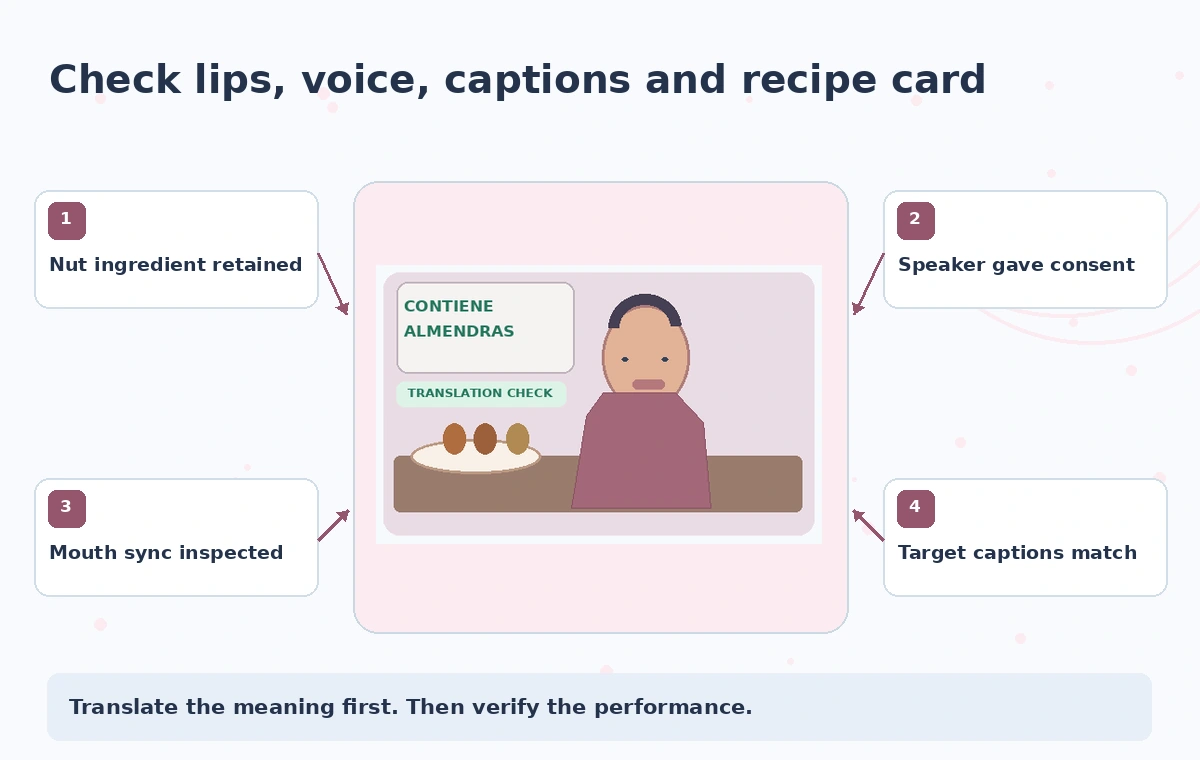
If the original English video includes recipe cards or ingredient labels, Lipdub does not establish that those visuals become accurate target-language captions. Review the on-screen list independently, and prepare accessible closed captions in the target language where the publishing platform supports them.
A listener might hear “almonds” while reading a different ingredient on a title card. Test the sequence on a phone screen with captions turned on and off. If viewers rely on captions for allergen information, do not let visuals, voice and text disagree at any point.
Inspect short clips frame by frame where it matters
Choose a handful of representative frames: the moment the instructor says “almonds,” the negative phrase in the warning and a pause immediately after it. Review the whole clip at normal speed, then slow playback to catch abrupt mouth changes and misaligned syllable timing.
Our diagram points to the mouth outline, audio phrase, translated subtitle and ingredient label as independent checks. These are conceptual visual aids only. A reviewer should prioritize the accuracy of the message and the right to use the face and voice over the goal of making every phoneme visually seamless.
Export with disclosure and a withdrawal path
Listen to the exported dub, not only to the editing preview. Verify the destination platform has preserved audio tracks, readable captions, intended language metadata and any required disclosure of synthetic alteration.
Retain the source, approved scripts, recording permission, candidate version and final approval notes. If a translation error is discovered after distribution, the team needs a rapid way to remove or replace the dub and correct the accompanying written instructions. For an allergen warning, it is preferable to delay a release than to post a plausible but unchecked synthetic performance.
How We Research
This guide was prepared on November 4, 2026 from official vendor documentation: Captions: AI Video Dubbing; Captions Help: Lipdub; Captions developer documentation: AI Translate API. We reviewed documented controls, availability caveats, workflow boundaries and the ways the described task could mislead readers. We did not log into an account, test a real output, interview actual participants, or measure feature performance. Each diagram is purpose-made explanatory artwork; risky candidates are fictional teaching examples, not evidence of a particular vendor failure. Interface labels, quotas, subscriptions and permissions can change. Before acting, recheck the current documentation and seek approval from the people responsible for any factual content, rights or sensitive source material.
Frequently Asked Questions
No. It generates dubbing and visual synchronization; a knowledgeable reviewer must approve ingredient names and critical negations.
Captions describes voice-based dubbing; always obtain authorization from the speaker and check the current product terms.
Access differs across Captions product documentation and subscription tiers. Check the current account, supported platforms and limits.
No. Captions and on-screen ingredient text require separate accessibility and factual review.
No. The script, warning change and illustrations are hypothetical editorial examples, not a live product test.