
An insurance renewal packet may mention an effective date, a coverage end date, a cancellation notice deadline, and a broker follow-up date on different pages. An AI extractor that returns one plausible-looking date is not sufficient for a calendar import. Azure Document Intelligence offers query fields to request specific values from compatible document analyses. This guide uses a fictional small nonprofit policy packet to show how to keep fields, clauses, and human approval distinct. No insurer document was processed or verified.
Write the question before choosing a field name
Suppose a volunteer workshop keeps insurance coverage for its repair events. The administrator wants to know which date ends coverage and which date starts the renewal process. These may not be the same. Inspect the approved policy template and identify distinct concepts: PolicyEffectiveDate, CoverageEndDate, CancellationNoticeDeadline, and BrokerReviewDate. A single RenewalDate field would be too ambiguous to review safely.
Define each value in ordinary language, including what evidence counts. CoverageEndDate should refer to the actual covered period and its relevant endorsements. BrokerReviewDate might be a staff reminder rather than a legal deadline. If a document does not state a requested value, leave it missing. Never fill a blank field from assumptions about annual policies or the current date.
Choose the current supported analysis configuration
Microsoft documents query fields as an add-on capability to the Document Intelligence API. For the 2024-11-30 general-availability version, it is enabled through features=queryFields and a queryFields parameter containing names for the requested fields. The feature can extend certain prebuilt or layout extraction outputs without training a new custom model. Confirm the chosen API version and model compatibility before implementing.

The documentation currently sets a maximum of 20 query fields per request and recommends camelCase or PascalCase multiword names. Query fields are a separately priced add-on, so estimate costs from the current Azure price schedule instead of assuming they are included with ordinary OCR. The presence of a field in the output should not be interpreted as a final legal determination.
Prepare legible input and preserve page identity
Keep the original PDF or scan with a stable file hash and access-controlled document ID. Check for missing pages, unreadable scans, rotated text, overlapping endorsements, and attached schedules before analysis. A scanner that omits the final rider can make a perfectly formatted extraction wrong. Remove irrelevant personal information only when permitted by the record retention and audit requirements.
Microsoft’s layout documentation describes detected text, paragraphs, tables, and geometry. Retain the source page and surrounding wording for each candidate date rather than sending only the extracted value to a spreadsheet. For a multi-page document, the reviewer needs to see whether a date comes from a declarations page, a prior-year attachment, or a change notice.
Request separately named values in the analysis
A conceptual request for prebuilt-layout can include features=queryFields with names such as PolicyEffectiveDate, CoverageEndDate, and CancellationNoticeDeadline. The service may return recognized candidates in structured output when it finds evidence in the document. Use the official client or REST interface for the selected release and keep credentials server-side. Do not paste real policyholder details into an unaudited demo.
Store raw results immutably and create a separate reviewer column for accepted dates. A returned field name does not reveal whether the candidate is from the controlling clause. A field may be absent, duplicated in competing versions, or confused with a notice period such as “30 days before renewal.” Capture those distinctions instead of converting the first number into a deadline.
Compare the candidates with the actual clause
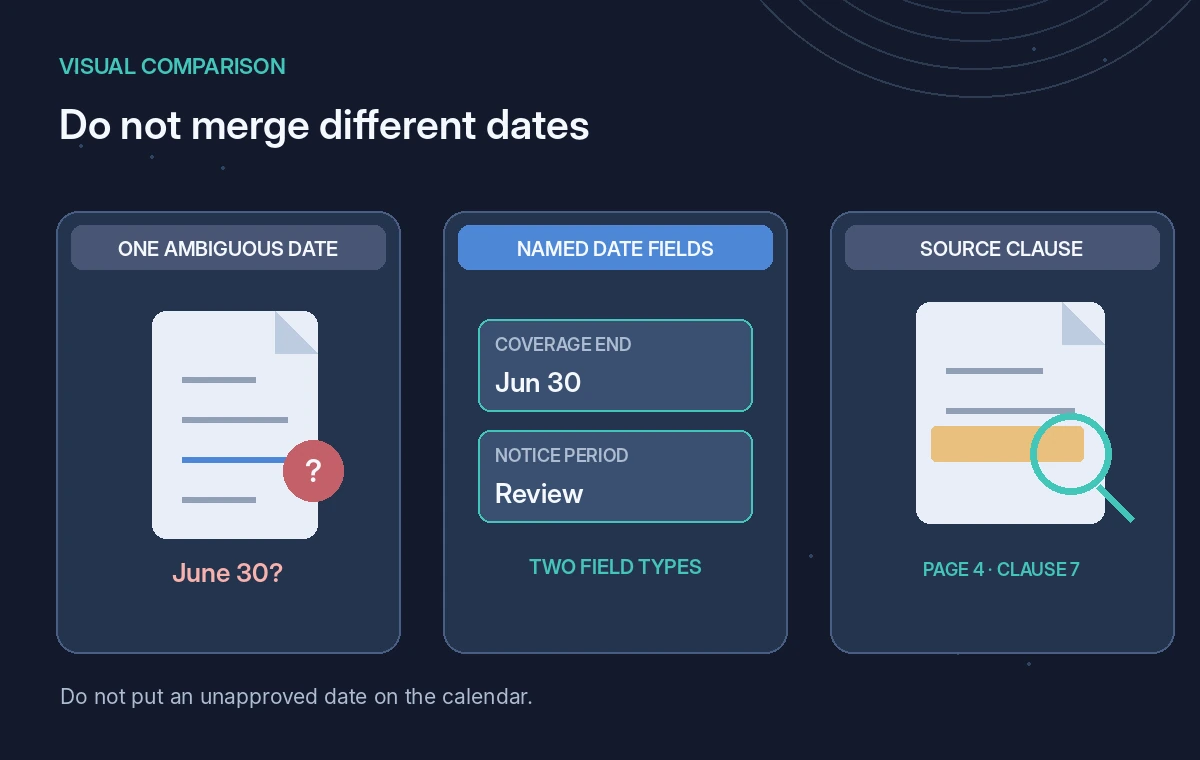
Consider a fictional declarations page stating coverage ends June 30, while a rider asks for 30 days’ written notice before a cancellation. The staff calendar should not automatically translate that statement into a verified cancellation deadline. Applicable dates can depend on contract language, receipt rules, time zones, weekends, and the particular event being noticed. Only an authorized reviewer can decide which date matters.
Our diagram contrasts a plausible single-date output with a multi-field review that preserves the clause and page. It does not show results from Azure. Treat OCR character errors, ambiguous month/day formats, and partial sentence extraction as explicit risks. Keep an exception state when a candidate does not agree with a signed endorsement or current broker confirmation.
Gate calendar updates behind review
For each proposed calendar entry, require policy ID, document version, extracted candidate, page evidence, business meaning, reviewer, and approval timestamp. Keep a copy of the source wording so a second person can independently confirm the decision. Calendar creation is a separate action from document analysis; permission to read an insurance file does not authorize changing policy records or notifying external parties.
If the renewal packet is still being negotiated, mark calendar items as provisional and label their source. A system should never write “coverage confirmed” merely because it extracted a date. When ambiguity remains, route the packet to the broker or qualified risk officer, and hold any automated notices that might misstate insurance status.
Test the failure cases, not only clean forms
An evaluation set should include a clean policy page, a scan with smudged digits, an endorsement changing the end date, a missing page, two policies in one packet, and a clause that has no explicit calendar date. Check whether the extractor abstains or returns a plausible but incorrect value, and whether your application preserves the uncertainty state. Do not manufacture a pass percentage without a labeled dataset.
An error ledger should distinguish OCR error, source conflict, extraction mapping error, and human interpretation issue. The system must let staff correct the accepted field without editing the stored raw result. That audit trail matters more than whether a visual dashboard shows every field as completed on the first pass.

Release a defensible date register
For the final handoff, export accepted values alongside policy identifier, governing page, quoted clause fragment, and named reviewer. Set a separate review date for each provisional or disputed item. Never merge an effective date and a notice deadline into one column. The same principle applies to insurance limits, named insureds, and covered locations: extraction assists comparison, not binding interpretation.
This was a documentation-based workflow design, not an Azure accuracy test or insurance opinion. Recheck model availability, query field pricing, geographic data handling, and the current API parameters when implementing. Insurance advice and coverage confirmation remain with authorized professionals who can read the full contract and later endorsements.
How We Research
For this November 2026 guide, we reviewed named vendor-maintained documentation: Microsoft Learn: Document Intelligence add-on capabilities, Microsoft Learn: Document layout model. We extracted the documented feature controls, compatibility boundaries, and relevant limitations, then designed a narrowly scoped fictional workflow and evidence-based failure checks for the specific scenario above. This was a source review, not hands-on testing: no account or API credentials were used, no live data was sent, no outcomes or quality measurements were observed, and no vendor-generated screenshots were taken. The diagrams are conceptual. Before deploying, recheck current availability, privacy terms, region and plan access, prices, and the latest official documentation. An authorized human, not an extraction or language model, remains responsible for any legal, safety, access-control, or release decision.
Frequently Asked Questions
No. Query fields are an add-on that can request extra fields from compatible existing analyses without training a custom model.
Microsoft currently documents up to 20 query fields per request for the supported feature.
No. Extraction is evidence to review; it cannot establish whether insurance is valid or authorize a renewal.
Hold the calendar update and review the relevant signed version and governing clause with an authorized person.
Microsoft lists query fields as a separately priced add-on. Check the current Azure pricing page before estimating production cost.