
A Slow Repair Ticket Is Not a Second Repair Ticket
A community workshop receives a request for assistance with a damaged exhibition stand. One worker downloads the photos, checks that the request has enough information and prepares a staff notification. Before it finishes, its queue visibility timeout expires. Another worker can now receive the same message and may send a second notification for one underlying request. Amazon SQS visibility timeout controls how long a received message is temporarily hidden from other consumers. It is not the message retention period, and receiving does not automatically delete the message. Build the repair workflow around durable request IDs, realistic processing time and explicit completion. The examples in this guide use imaginary tickets, not a live queue trace or measured AWS service timings.
Separate Receiving, Hiding, Completing and Deleting
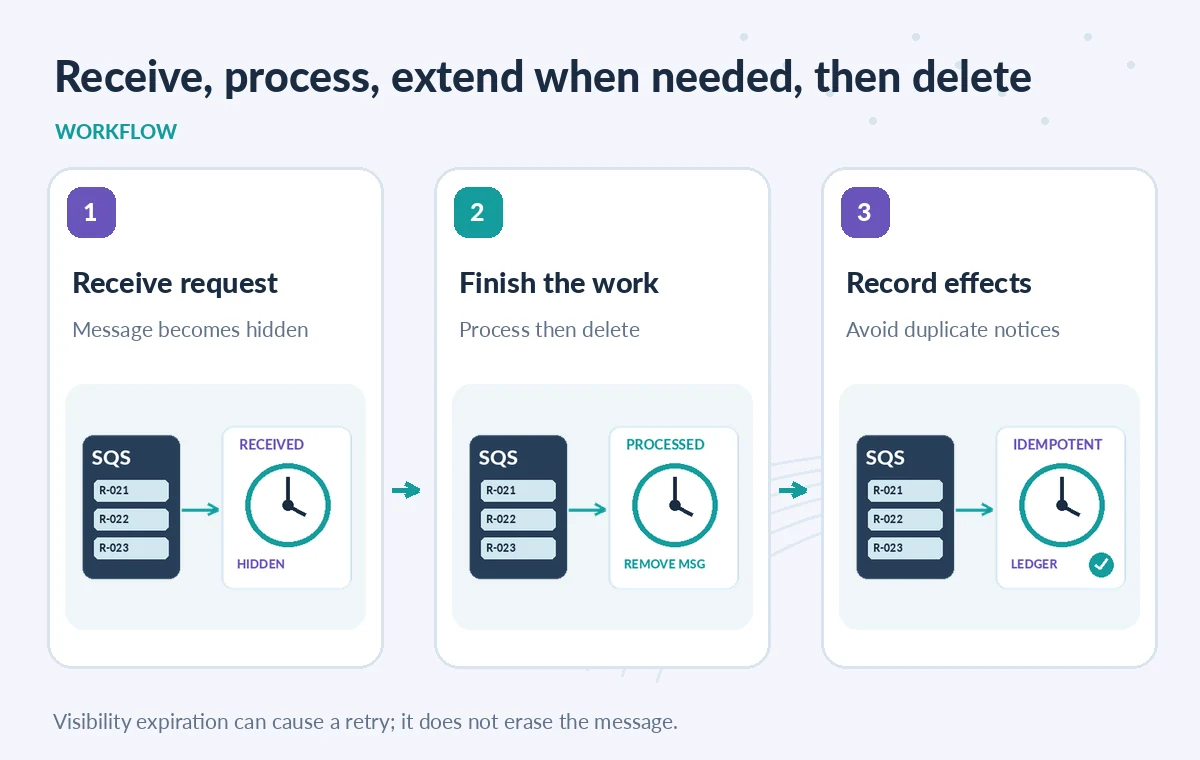
When a consumer calls ReceiveMessage, SQS makes the message invisible for the applicable visibility timeout while processing continues. The message remains in the queue. After successfully committing the business operation, the consumer calls DeleteMessage using the current receipt handle to remove it. If processing fails or the worker crashes without deleting, the message can become available for another attempt. A delete response, a repaired object and an approved work order are different facts. The handler needs to record what was done before declaring success and must tolerate redelivery. For standard queues, AWS warns that at-least-once delivery can yield duplicate processing even during a timeout period; the timeout should never be described as a strict exactly-once delivery guarantee.
Choose a Realistic Timeout, Not the Longest Number
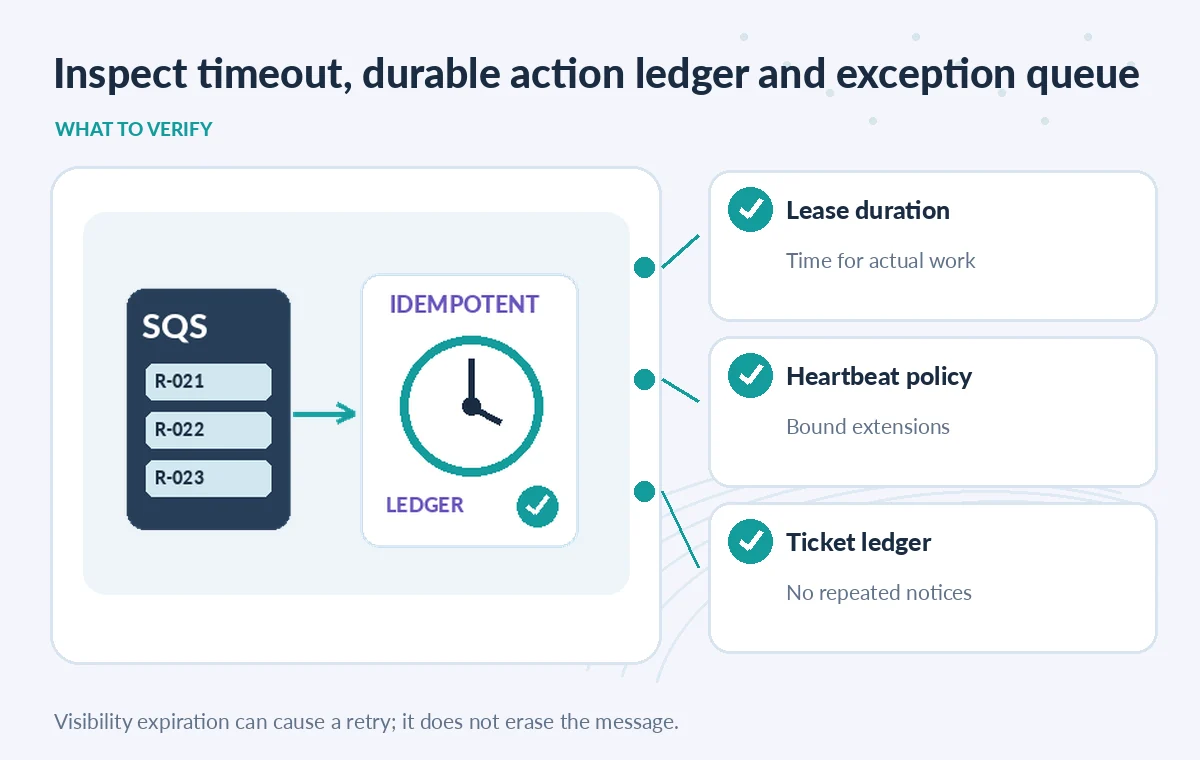
A timeout shorter than typical work allows concurrent retries while the first worker is still active. A timeout far longer than necessary delays recovery after a crash. AWS advises choosing a timeout based on actual processing duration, or extending it for long-running work. In a repair intake system, schema validation may take seconds while extracting many photo attachments may take longer. Measure these operations in your own environment before choosing the queue setting. This article does not supply a universal safe number. Keep track of how close a worker is to its visibility deadline and avoid starting a non-idempotent side effect that cannot finish safely. If an attachment process stalls, make the stuck request visible to operators rather than hiding it indefinitely.
Extend Visibility Only for Work That Still Has an Owner
SQS supports ChangeMessageVisibility, allowing the current consumer to adjust the visibility timeout of a message that is already in flight. Use it when a healthy worker can demonstrate that it is still progressing and has a valid receipt handle. An extension is not a substitute for health checking or for a processing deadline in the application. If the worker has lost its lock or is unable to finish, prolonging invisibility may conceal the failure. Track extension attempts and elapsed time, then hand the ticket to a retry or dead-letter policy when appropriate. The worker should not renew its lease forever. An operator needs to know whether the attachment scan failed, the notification provider was unavailable or the task was simply slower than expected.
Compare a Completed Job, an Expired Lease and a Crash
Consider three synthetic timelines. Ticket R-021 is received, processed, committed and deleted before its visibility timeout; no retry is required. Ticket R-022 takes longer than the timeout, and another consumer receives it while the original worker is still running. Ticket R-023 commits the intake record but crashes before deleting its queue message, so a later worker gets it again. These are different recovery conditions. Only the first is unambiguously complete at the queue level. The latter two should consult a durable application ledger before sending notices or allocating volunteers again. In a diagram, an expired visibility window must not be drawn as if the message itself disappeared; it becomes eligible for another receive.

Make Notification Delivery Idempotent Independently
A single incoming message may trigger multiple effects: record a ticket, schedule a staff review, upload a file and send a notification. A consumer can crash between any two steps. Give each intended effect an idempotency key derived from the ticket and action version. Check the persistent record before redoing it; where the external service is not transactional with your database, reconcile uncertain outcomes before retrying. Do not infer that an email definitely failed merely because SQS deletion did not happen. Store a minimal event trail with status, attempt ID and external reference, and keep requester personal data out of general worker logs. A queue visibility timeout controls delivery opportunity, not the semantics of repair eligibility or contact consent.
Treat FIFO and Standard Queues as Different Cases
Standard SQS queues support at-least-once delivery without strict ordering guarantees. FIFO queues provide ordering by message group and deduplication features, but a message can still be retried after failures or expired visibility. Setting a visibility timeout affects which messages may be delivered while others are in flight, and FIFO messages in the same group can be delayed by an uncompleted message. Decide whether the workshop truly needs ordered processing for successive amendments to one ticket. Avoid using one message group for all workshops if it needlessly serializes independent work. Do not conflate FIFO’s send-side deduplication window with the consumer visibility timeout. They address different stages of the system and require separate tests.
Test Recovery Before It Becomes an Emergency
Use synthetic tickets to verify a normal commit-and-delete, a long-running task with visibility extension, a forced worker crash, an expired timeout and a repeated notification call. Inspect whether the same logical request ends with one authorized ticket and no duplicate notice despite multiple queue deliveries. Include a case where the external email provider succeeds but the database acknowledgement is delayed, because that is a common ambiguity. Document queue visibility settings, dead-letter policy, receipt-handle usage, worker maximum processing time and a human exception path. This is a proposed QA plan, not the result of experiments conducted for this article. For sensitive repairs, a trained staff member must still approve action, safety instructions and public communications.
How We Research
For this guide, we reviewed the official product documentation on November 8, 2026: AWS SQS Visibility Timeout, AWS Timely Message Processing, AWS Receive and Delete Messages. We checked the named setting or feature against its published behavior, mapped the documented constraints to the specific hypothetical scenario, and reviewed whether the topic duplicated titles in the supplied LabFin WordPress inventory or prior B0267–B0277 ZIPs. No authenticated vendor service was run; we did not perform a benchmark, observe real customer data, verify third-party rights or claim operational outcomes. All illustrated records and comparisons are teaching examples. Confirm product documentation and security requirements again before implementing a workflow in a real organization.
Frequently Asked Questions
No. It remains in the queue, hidden temporarily, until a successful DeleteMessage or retention expiry.
The message can become available to another consumer; processing may therefore be attempted again.
Yes. ChangeMessageVisibility can adjust an in-flight message’s timeout, subject to the applicable limits.
No. The application and notification service need durable idempotency and reconciliation.
No. Overly long timeouts delay recovery after failure; use realistic durations and bounded extensions.