
The ingest alert that never appeared
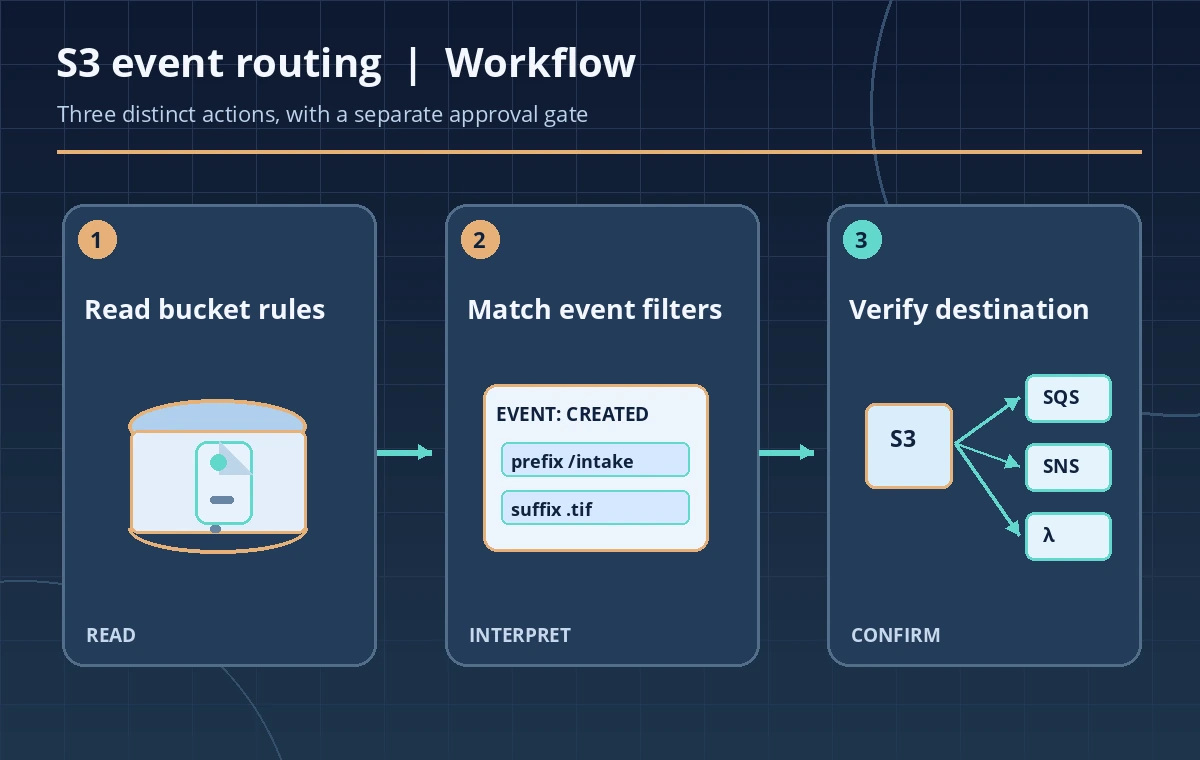
A hypothetical museum uploads newly digitized glass-plate photographs into an S3 bucket. A collections assistant expects a processing alert for every upload, but the alert never arrives for one image. The assistant finds a diagram that shows an S3 bucket connected to a Lambda function and assumes routing is active. The drawing is not evidence of the bucket’s actual configuration. Amazon S3 exposes GetBucketNotificationConfiguration to retrieve the event notification rules on a bucket. Reading those rules is a safer first step than changing policies or replaying uploads. The audit question is whether the expected object event and prefix are configured to reach the intended destination, not whether a message was conclusively delivered.
What the API returns—and what an empty result means
The API returns the notification configuration associated with a general purpose bucket, including configured destination entries for applicable event types. AWS says that if notifications are not enabled, the response contains an empty NotificationConfiguration element. That is materially different from an error, a zero event count or a confirmation that the bucket has no objects. The operation is not supported for directory buckets, so bucket type belongs in the preflight. Record the account, bucket and permitted reader identity without publishing private bucket names in screenshots. Bucket owners ordinarily read the configuration; delegated access requires the documented s3:GetBucketNotification permission and an appropriate policy.
Inspect event names before destination names
A notification rule is useful only if it covers the operation that matters. An ObjectCreated notification is not interchangeable with an ObjectRemoved, Restore or Lifecycle event. For a museum image workflow, decide whether new-object creation, restoration of an archival object or a metadata-related event is the actual business trigger. Then compare the configured Events entries with that requirement. Do not infer that every object operation produces every event type, or that a single all-purpose notification is always desirable. A specific and documented event contract helps consumers reject unrelated messages and allows an operator to diagnose why a particular upload did not cause the expected action.
Check prefix and suffix filters with actual object keys
S3 notification rules may apply object key filters such as a prefix or suffix. A rule intended for incoming TIFF scans might cover a path like intake/scans/ and a file extension but not a different folder or an alternate case. Build a small synthetic table of keys expected to match and keys intentionally excluded. The condition is based on the object key, not a label a person sees in a content management system. Do not claim that a filter enforces object read permissions; it controls whether a notification rule applies. Also review conflicts and overlaps when maintaining configurations, using the current AWS restrictions before modifying a rule.
Identify the actual destination and service boundary
S3 event notifications can target supported SNS topics, SQS queues and Lambda functions, with EventBridge integration also available through its configuration. Each destination has separate permissions, delivery behavior, logging and downstream processing logic. A matching ARN in the notification configuration does not by itself prove the destination still exists, accepts messages or has an active consumer. Compare it with an approved resource inventory and verify destination permissions through read-only controls where possible. Do not substitute a successful configuration GET for a test event. If a destination is outside the expected account or region architecture, escalate to the owner instead of rewriting it during inspection.

Understand the delivery and ordering contract
AWS documents S3 notifications as at-least-once and notes that delivery is usually prompt but may be delayed. Consumers therefore need deduplication and tolerance for repeated or out-of-order messages when business logic depends on object changes. Treat an event as a signal to inspect the indicated object version or state rather than as proof that a master image is preserved. For versioned objects, include the relevant version identity where provided and reconcile it with the ingest ledger. A handler that writes into the same triggering bucket can create a processing loop unless its output location and filter design prevent it. These are application safeguards beyond the notification configuration itself.
Compare a rule audit with end-to-end verification
Use three states in a test plan: no matching rule, a rule whose filters and destination match, and confirmed downstream processing. The first two can often be distinguished from a configuration read; the third requires approved consumer logs or a synthetic test event. A notification acknowledgement still does not confirm the quality of an OCR transcript or completeness of an image conversion. The preservation system should compare the object’s authoritative checksum and expected manifest independently. Avoid publishing invented delivery rates, latency numbers or examples that look like real S3 console captures. The diagrams in this article are conceptual teaching illustrations only.
Keep inspection read-only and operationally scoped
GetBucketNotificationConfiguration is a read operation. Do not automatically invoke PutBucketNotificationConfiguration in response to a perceived mismatch: an update can replace or interfere with existing event routing and trigger unwanted downstream actions. Record the configuration’s important event types, filters and destination identifiers in a restricted review note, along with the reader role and time. Avoid copying sensitive ARNs into a public issue tracker. If a rule is missing, ask the infrastructure owner to confirm the intended architecture and change procedure. A stable notification design needs configuration review, destination permission checks, monitoring and explicit consumer idempotency.

Describe the outcome without promising delivery
A defensible conclusion might say that, at the time of review, the bucket exposed an ObjectCreated subscription matching the designated intake prefix and pointing to an approved queue. That statement is narrower than saying that every photograph triggers processing. The next operational check would verify that the destination accepted an authorized synthetic event and that the consumer matched it to the correct object. If anything is missing, log an actionable discrepancy without silently expanding event coverage. For real collections, combine this inspection with preservation checks, access policy review and media rights clearance. Consult current AWS references for supported destinations and bucket types before maintaining the integration.
How We Research
Our November 11, 2026 source review used these named official references: Amazon S3 GetBucketNotificationConfiguration API; Amazon S3 Event Notifications guide; S3 event notification configuration guide. We checked the documented operation or parameter, supported scenarios, error conditions and limitations against an explicitly hypothetical museum workflow. The diagrams depict synthetic examples; we did not send real collection records to an API, inspect private infrastructure, run production benchmarks, measure accuracy or capture authentic vendor UI screens. Where a setting is model-, account-, service- or policy-dependent, confirm the current vendor reference and the actual deployment before acting. Content and compliance approval remain with the authorized operator or editor.
Frequently Asked Questions
No. It means no notifications are configured for that bucket, not that the bucket is empty.
No. It reads configuration; consumer or destination evidence is needed for delivery.
No. AWS documents at-least-once delivery, so consumers should tolerate duplicates.
No. The API reference states this operation is not supported for directory buckets.
No. Notification filters select events, not IAM or object access permissions.