
A fictional community workshop photographs temporary exit signs before an open-house event. Staff want searchable sign text so an accessibility coordinator can check arrows, wording, and the location of emergency instructions. Amazon Rekognition DetectText can identify words and lines within an image and return their geometry and confidence. It cannot establish that a sign is installed at the right door, still current, or compliant with local rules. Treat the extraction as a review aid, not a safety authorization.
Define the sign and the safety question
Start by identifying exactly which fact needs checking: the written destination, directional arrow, warning phrase, or accessibility instruction. A cropped photo of ‘EXIT’ does not reveal whether the arrow points toward the accessible route. Make a simple photo log with the entrance name, camera orientation, date, and person responsible for the building walk-through. Keep the original unmodified picture available to authorized reviewers because a text transcript loses crucial spatial context.
Use a hypothetical example with a blue door marked ‘KEEP CLEAR’ and a nearby temporary sign reading ‘EXIT THROUGH LOBBY.’ The goal is to catch a transcription error such as ‘KEEP CLEAN’ or to notice that the caption has omitted the lobby phrase. This is not an assertion that any real facility is safe or that the API was run. If instructions conflict with the approved fire plan, staff should consult the authorized facilities team before presenting any AI-derived guidance.
Capture a usable source photograph
Photograph the entire door and adjoining wall before taking a close-up. Avoid glare, steep perspective, and fingers covering letters. A second picture taken straight on can make review easier, but never replace the full-context photograph with the close crop. If someone edits brightness or rotates the image, keep a link to the source version. A readable image is a prerequisite for useful detection, not proof the wording is operationally correct.

Record the location separately from OCR text. A large ‘EXIT’ sign in a photograph may belong to the room behind the camera or appear in a reflection. Explicitly note which sign is being reviewed and which parts of the frame are background posters. Crop only for analysis when the larger scene has been preserved. A person should also read any symbols and arrows that ordinary word detection will not interpret as instructions.
Call DetectText and preserve LINE versus WORD
AWS documents supplying an image as bytes or an Amazon S3 object to the DetectText operation. Its response includes TextDetections with DetectedText, Type, Confidence, and Geometry. Type distinguishes a LINE from a WORD. Id and ParentId help relate a word to the line that contains it. Save these fields with the image reference so a reviewer can locate a questionable token rather than accepting a flat string as authoritative.
The documentation notes that DetectText identifies up to 100 words in an image; that is one reason not to assume a crowded noticeboard was completely transcribed. Don’t double-count a phrase because both its LINE and constituent WORD detections are present. For public copy, assemble coherent lines, then verify the order against the pictured layout. A high confidence number is a detection estimate, not a certification that the arrow or route is correct.
Use geometry to detect missing context
Every detected line and word can have an axis-aligned BoundingBox and a finer polygon of points. These are relative image coordinates, not room coordinates. Draw the polygons over a working copy so the facilities reviewer can see whether ‘NOT’ was missed beside ‘OPEN,’ whether two unrelated signs were joined, or whether a directional label came from the wrong area of the image. Preserve the original pixels underneath the overlay.
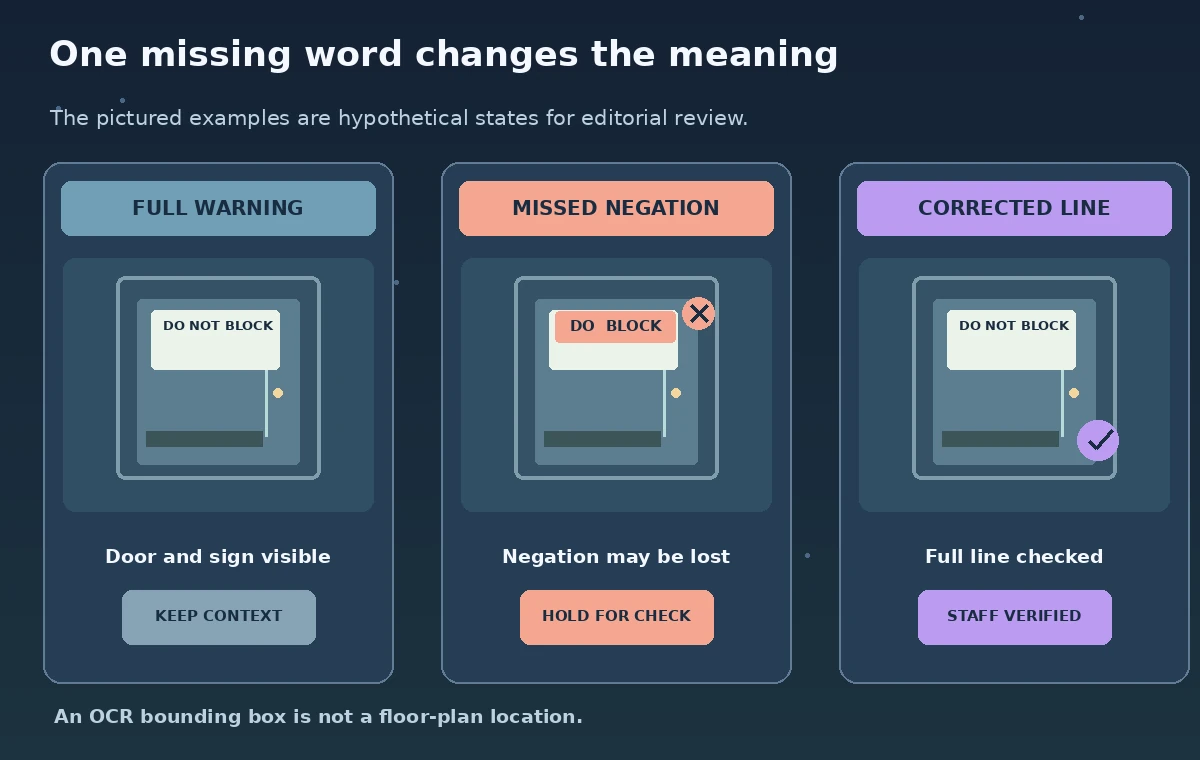
For a fictional sign reading ‘DO NOT BLOCK DOOR,’ compare a proposed extract of ‘BLOCK DOOR’ with the complete line. That single omitted word reverses the practical meaning. If the text boxes skip ‘NOT,’ the safest output is ‘manual check required,’ not a confidently rephrased instruction. The overlay should make the uncertainty visible to staff and must never be presented as a live screenshot or a measured Rekognition result.
Configure filters without hiding warnings
AWS supports filters such as MinConfidence, minimum relative bounding-box width or height, and RegionsOfInterest. These settings can suppress tiny background text or focus on a known corner. They can also remove a small but important ‘NO’ or exclude a warning partly outside the selected region. Start with broad detection and examine what a narrower filter would remove before making it the default. Log the chosen values with each review build.
A region of interest is not a permission boundary and is not a replacement for masking a private location. If the sign photo contains people or private workshop schedules, use a governed image-retention path and review whether the image may be uploaded. AWS notes undefined behavior for text only partially within a region. A team should never build a safety workflow that treats missing detections as evidence that no warning exists.
Compare decisions with a human reference
Build a small review set using fictional images of a straight sign, a tilted sign, an obscured word, a glare patch, and a door with multiple signs. Have staff transcribe the complete line and annotate the arrows before using model output. Score separate questions: was the text copied faithfully, was the correct sign selected, and does the copied text correspond to an approved route? These are not interchangeable measures, and no accuracy percentage is claimed here.
When a reviewer spots a disagreement, let them view the whole image, the line polygon, and the raw detected tokens. Record a correction separately from the OCR output so subsequent staff can tell a human decision from a machine guess. Do not silently substitute an expected safety phrase just because it appears in a building manual; that could hide an incorrectly installed sign requiring urgent attention.
Release a checked description, not an OCR guess
Before any visitor-facing update, the authorized facilities contact should verify the sign is still installed, correctly oriented, and consistent with the active emergency plan. The communications editor can then use a short checked description or readable image with proper alt text. Keep internal extraction tokens and geometry out of public metadata when they reveal restricted operational details. Set a date for rechecking temporary signs because physical conditions change without a model notification.
After publication, inspect the actual site and mobile view: a caption can be accurate while the accessible map or route button still points the wrong way. If the physical sign is replaced, expire the previous description rather than merely adding a correction underneath it. The technology reduces transcription work but leaves the safety decision with building staff. That distinction should remain explicit in the published editorial process.

How We Research
For this November 2026 editorial review, we consulted the named official product documentation: AWS Rekognition: Detecting text in an image; AWS Rekognition: DetectText API. We compared the described input and output fields, documented workflow limitations, access and permission controls, and human verification steps to the article scenario. All people, source records, images, schematic states, labels, tool outcomes, and example identifiers are original hypothetical teaching materials, not captured vendor screenshots or measured experimental results. We did not run a live provider API, inspect real museum or volunteer data, establish legal permissions, or measure recognition, translation, classification, retrieval, or evaluation accuracy. Before implementing the workflow, confirm the latest documentation, plan eligibility, pricing, availability, quotas, supported regions and languages, and your organization’s data protection requirements. A qualified human must check source correctness, publication permissions, accessibility, and the implications of any automated operation.
Frequently Asked Questions
It detects text and geometry; it does not independently certify the meaning of a directional arrow or the safety of a route.
LINE and WORD detections provide different levels of detail. Use their types and parent relationships rather than counting them as separate written instructions.
No. Confidence concerns text detection and its location, not current installation, accessibility, or safety-plan compliance.
A close crop may help review, but retain the wider photo that shows the sign, door, arrow, and surrounding context.
Stop automated publishing, compare the source image, and refer ambiguous safety wording to the authorized facilities reviewer.