
An AI app builder can help turn a spreadsheet process into a usable internal tool, but the team’s real problem is often data access rather than screen design. A request tracker that is pretty but lets every employee edit every request creates more risk than the spreadsheet it replaced.
This guide focuses on one practical scenario: an internal purchasing request app with employees, reviewers and administrators. It explains what to define before selecting a platform, how to run a synthetic-data pilot, and which checks must pass before anyone stores real business records.
Map the existing workflow before choosing a builder
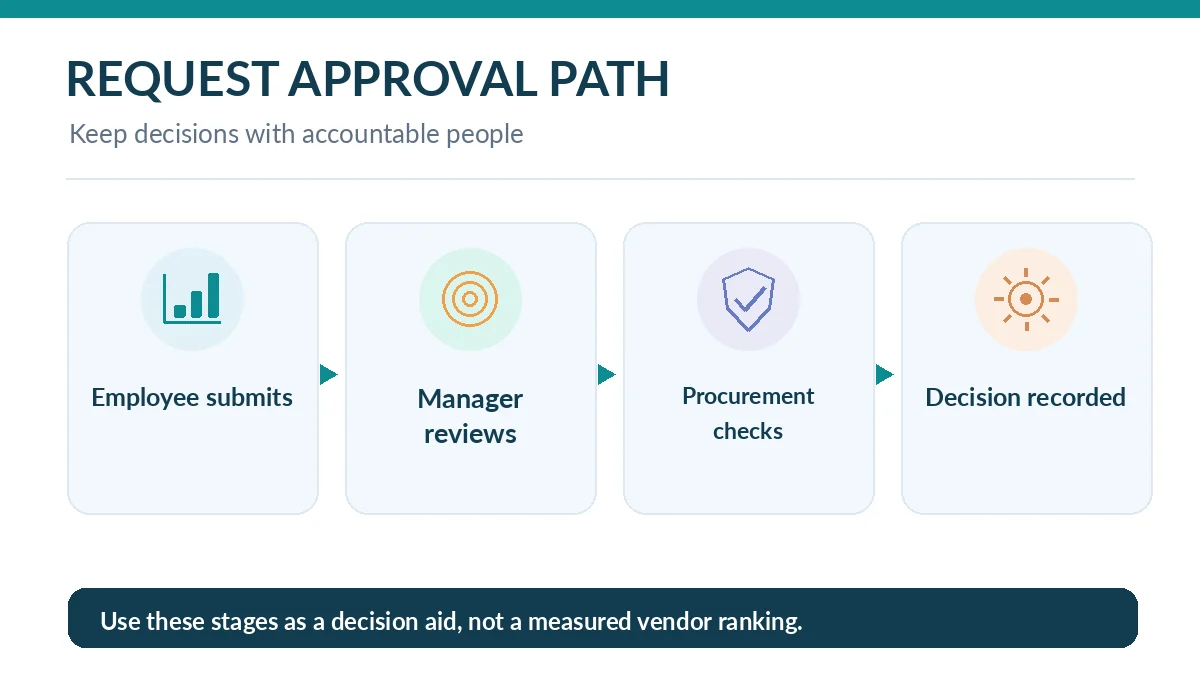
Draw the current sequence: employee submits a purchase request, manager reviews the budget, procurement checks vendor details, and an authorized person records the decision. Include actual exceptions: rejected purchases, urgent requests, staff leaving the company and duplicated submissions.
The useful AI-built tool should remove a measurable bottleneck, such as missing approval status, while keeping the existing decision authority. Do not automatically create payment or purchasing actions until the company has approved the relevant controls and audit trail.
Define employee, reviewer and admin permissions
Create a permission matrix: employees create and view their own requests; reviewers access only the requests assigned to them; administrators configure workflows but cannot silently override financial approvals without a recorded reason. Decide who can export all records and who can remove a record.
An interface that hides an Edit button is not enough. Test backend enforcement with two dummy users. Request another user’s record directly and make sure the server rejects it. OWASP’s broken-access-control guidance explains why access rules must live in trusted server-side code or equivalent backend enforcement.
Identify data that must never enter a trial
Start with fictional amounts, invented vendor names and fake email addresses. Keep employee salaries, real supplier contracts, personal information and authentication secrets out of the prototype. If the builder connects external models or services, review their data handling terms before sharing confidential operational details.
Maintain a data inventory stating what each field contains, who can see it, where it is stored, the retention period and how it is removed. Plan a manual fallback if your app becomes unavailable. Internal use does not make an application exempt from ordinary security or privacy responsibilities.
Choose capabilities that support controlled operations
Replit documents publishing options, protected deployment access and production resources. Lovable documents publishing permissions, security scans and code/deployment ownership tradeoffs. Base44 documents roles and data-permission tools. Treat these as features to verify in a pilot, not assurances that every configuration will meet your organization’s policy.
Ask vendors specifically about single sign-on, organization administration, role granularity, audit logs, backups, deployment region and exit options. These capabilities vary by plan and may evolve. A platform can be excellent at generating screens yet unsuitable for a company that requires identity-provider integration or formally controlled retention.

Build a decision log and audit-ready approval state
Every purchase request should show the submitter, current owner, decision date and reason for approval or rejection. An audit trail should distinguish a staff edit from a system-generated suggestion. Avoid allowing a language model to authorize spending based on ambiguous text.
For an example $500 request, test that the employee can draft but not approve; the assigned reviewer can approve within a defined limit; a later status change retains the original decision history. These values are illustrative policy placeholders, not a recommended corporate spending threshold.
Run a staged pilot with measurable stop rules
Pilot with a small team and synthetic or approved low-sensitivity data. Measure successful submissions, missed approvals, support tickets and time to correct a rejected request. Compare against the original workflow without inventing productivity gains. Ask users whether labels and ownership are clear.
Declare stop conditions before launch: unauthorized access, inconsistent totals, missing audit history or inability to restore from backup. If any occurs, pause the pilot and return to the original process. A well-defined rollback is more valuable than a rapid rollout that nobody can unwind.

Document ownership after the generator has finished
Assign one human to the application, one to data stewardship and one to security review. Record repository access, deployment credentials, vendor billing account, database backups and incident contacts. Rotate temporary integration keys after a trial and remove test users before broad access.
Choose a tool only after those responsibilities are feasible with your staff. If all changes require the original prompt writer to remember undocumented decisions, the application is not yet maintainable. Internal tools succeed when ordinary colleagues can operate and recover them safely.
Estimate real operating cost and the cost of failure
The budget for an internal tool is not just a builder subscription. Include employee onboarding, identity integration, connected APIs, usage-based compute, backup storage, reviewer time and the cost of a support handoff. Assign each cost line to a named owner and a monthly spending cap.
For the purchasing example, compare the time spent chasing approvals before and after the pilot without claiming an improvement until measured. Track the number of misrouted requests and manual corrections. If the new process introduces security exceptions or unclear ownership, lower the rollout scope regardless of apparent time savings.
Document the retention rule for each business field before inviting employees. Decide whether deleted records must remain in an audit log, who may recover them and how to respond to a mistaken disclosure. A pilot that cannot answer these questions should remain synthetic-data-only until policy owners review the design.
How We Research
Our control checklist draws on the OWASP Top 10:2025, OWASP’s server-side access-control guidance, Lovable security documentation, Replit’s private deployment options, and the Base44 help center. The purchasing request and sample amount are invented teaching examples, not a tested vendor integration or legal compliance determination. Checked October 26, 2026.
Frequently Asked Questions
Only if the vendor terms, data-processing controls, identity requirements, access enforcement, backup and retention policies satisfy your organization’s review.
No. Access to the URL is one layer; an app can still contain broken authorization rules, exposed secrets or unsafe integrations.
A model can help summarize or route requests, but financial authorization should follow explicit company policy and accountable human approval.
Verify that employees cannot access other employees’ requests, reviewers see only assigned work and administrative actions leave an audit trail.
Keep it small enough for manual oversight, use non-sensitive data, define stop conditions and measure actual workflow outcomes rather than promised time savings.