
A generated app may feel ready when the preview looks good and the Publish button appears. That is only a visual milestone. A release also needs correct behavior under bad input, working access control, a plan for data changes and someone who can recover service if a deploy fails.
Use this checklist for a web application made with Lovable, Replit, Bolt or a similar builder. It is platform-agnostic where possible and identifies vendor-specific facts only where official documentation supports them. The goal is a defensible go/no-go decision, not a blanket claim that a particular AI tool produces secure software.
Define the launch boundary and the accountable owner
Decide exactly which audience is included: just the team, an invited beta group or the public. List which operations the app permits, what data it stores and what it must never do. The first release should be narrower than the eventual product because every new integration expands the failure surface.
Assign an owner for technical incidents, another for business decisions and one contact who can suspend access. A tool may offer public, password or workspace-only sharing, but the product owner must choose the appropriate scope. Do not conflate a hidden URL with a robust authentication model.
Write a release test table before pressing Publish
Test normal and failure paths for your two most important tasks. For an appointment app: book a valid appointment, prevent a double booking, reject a missing date and confirm cancellations update availability. Check both mobile and desktop views, keyboard navigation, form labels and broken links.
Retest previously working behaviors after every last-minute AI edit. Keep a compact evidence log: test case, expected result, actual result and responsible reviewer. A screenshot of the main dashboard cannot establish that server-side logic is correct. Record blockers plainly and postpone launch when critical cases fail.

Audit authentication, authorization and secrets
Use separate dummy identities to challenge authorization. Does a user see someone else’s record by changing a URL, request body or query parameter? Does a logged-out visitor reach an endpoint that should require login? Fix the backend rules and retest rather than hiding the corresponding UI control.
Inspect environment variables and deployed bundles for exposed keys. Replit documents a dedicated production secrets area; Lovable offers quick and deep scans that support but do not replace independent review. The OWASP Top 10:2025 provides a useful risk list for access control, misconfiguration and software supply chain questions.
Check production data, migration and restore procedures
Identify where production data will live and whether the deployment creates or updates schemas. Replit documents separate development and production databases and warns that publishing schema changes can require careful planning. Other builders may use third-party databases, so inspect the specific deployment design.
Before a destructive migration, take a verified backup and rehearse restoring a harmless test dataset. Do not assume clicking Rollback restores deleted database rows. Keep a human-readable mapping of fields and a manual data-export procedure. State who authorizes migrations and who can pause writes during recovery.

Deploy deliberately and verify the real URL
Confirm whether publishing deploys a snapshot, what custom domain resolves, whether HTTPS works and whether a newly published version is actually serving users. Lovable’s documentation distinguishes published snapshots and subsequent Publish changes; Replit distinguishes the editable project from its running deployment.
After deployment, perform a smoke test from an ordinary browser session with no developer access. Test the primary path, an error path and a restricted path. Verify emails, webhooks and third-party callbacks only if those integrations were approved for release. Never paste production API keys into an AI chat to diagnose a configuration issue.
Prepare monitoring, recovery and communication
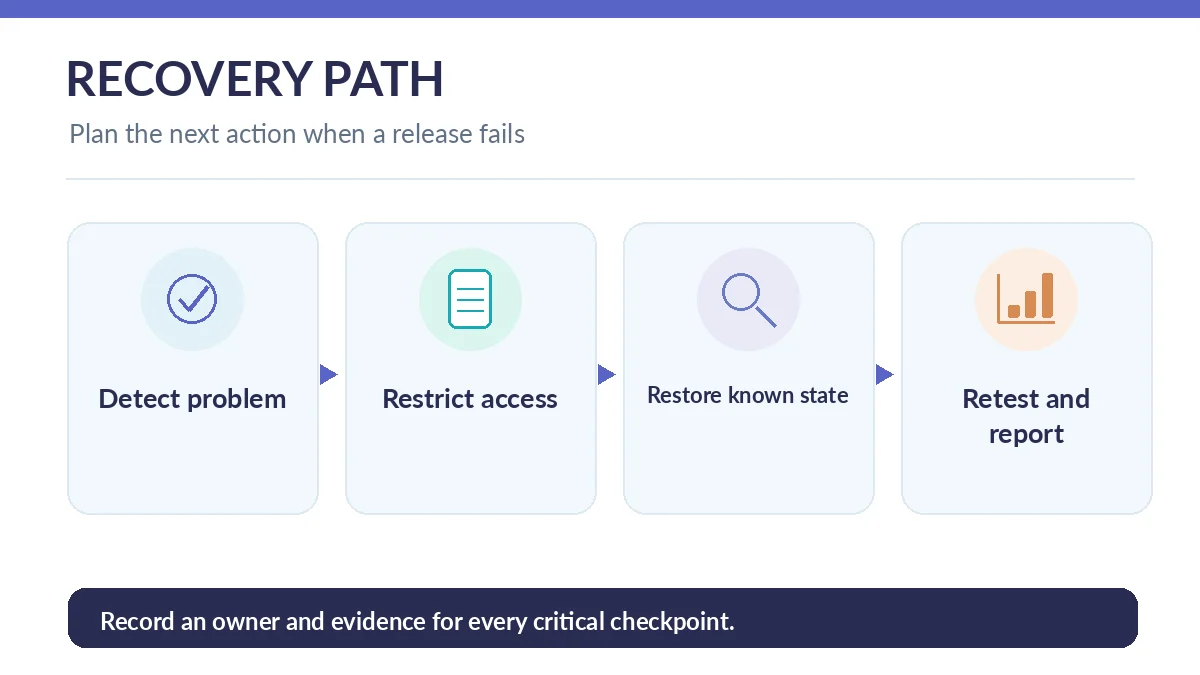
Specify how to identify a failed release: health checks, error logs, support reports or unusual request volume. Replit documents monitoring production requests and resource use; other hosting platforms have different observability controls. Capture the previous working version and steps needed to redeploy it.
A rollback plan should name the trigger, the person empowered to stop access, the known-good build and the treatment of data written after the deployment. Create a customer-facing incident message template without preclaiming a cause. If the platform offers no practical rollback path, lower the scope of your first launch.
Make a go/no-go decision and schedule a review
Launch only when all critical checks have explicit evidence, not because the deadline arrived. A sensible policy is “no-go” for privilege escalation, leaked secrets, corrupted records, untested database migration or missing restore ownership. Cosmetic copy adjustments can often remain tracked follow-ups.
Schedule a short post-launch review to examine real errors and user feedback. Maintain the prompts, repository reference, deployment settings and support runbook together. The AI builder may accelerate drafting, but the organization remains responsible for the behavior of the running application.
Create a release evidence packet for the next maintainer
Store the tested version identifier, key configuration changes, approval date, deployment URL, known defects and emergency contacts in a shared release note. Protect credentials separately rather than copying secrets into that note. Include the minimum steps needed to restart a service and restore its data.
A reviewer who did not build the app should be able to follow the packet, run the smoke test and identify the rollback owner. If essential knowledge exists only inside one author’s chat with the AI generator, it is too fragile for a business-critical launch.
How We Research
We checked Lovable’s publishing process, Lovable’s security scans, Replit’s deployment guide, Replit’s development/production database boundary, Replit monitoring, and the OWASP Top 10:2025. This is an editorial release checklist, not a certification or a claim that LabFin tested specific live deployments. Checked October 26, 2026.
Frequently Asked Questions
No. It confirms a deployment action, not correct authorization, tested workflows, data integrity or recovery procedures.
No. Vendor scans can find certain problems, but neither scans nor generated tests guarantee that business logic and permissions are secure.
Not necessarily. Database changes and user writes require a separate backup and restoration strategy.
Use an ordinary user session to verify a critical success path and an authorization failure path on the live deployment.
A named owner should apply documented release criteria and have authority to stop launch when critical checks fail.