
A small museum is revising a conservation handling memo. The archivist has an older handling guide, a current material-specific procedure, and a recent internal amendment. Adobe Acrobat PDF Spaces can bring multiple documents and links into one research area and answer questions across them. The danger is not that a summary sounds strange; it is that a perfectly fluent paragraph may blend an obsolete humidity limit with a new exception. This hypothetical workflow treats each AI answer as an index to sources, not as an approved conservation instruction. All document names and figures used in the illustrations are fictional.
Separate authoritative and historical editions first
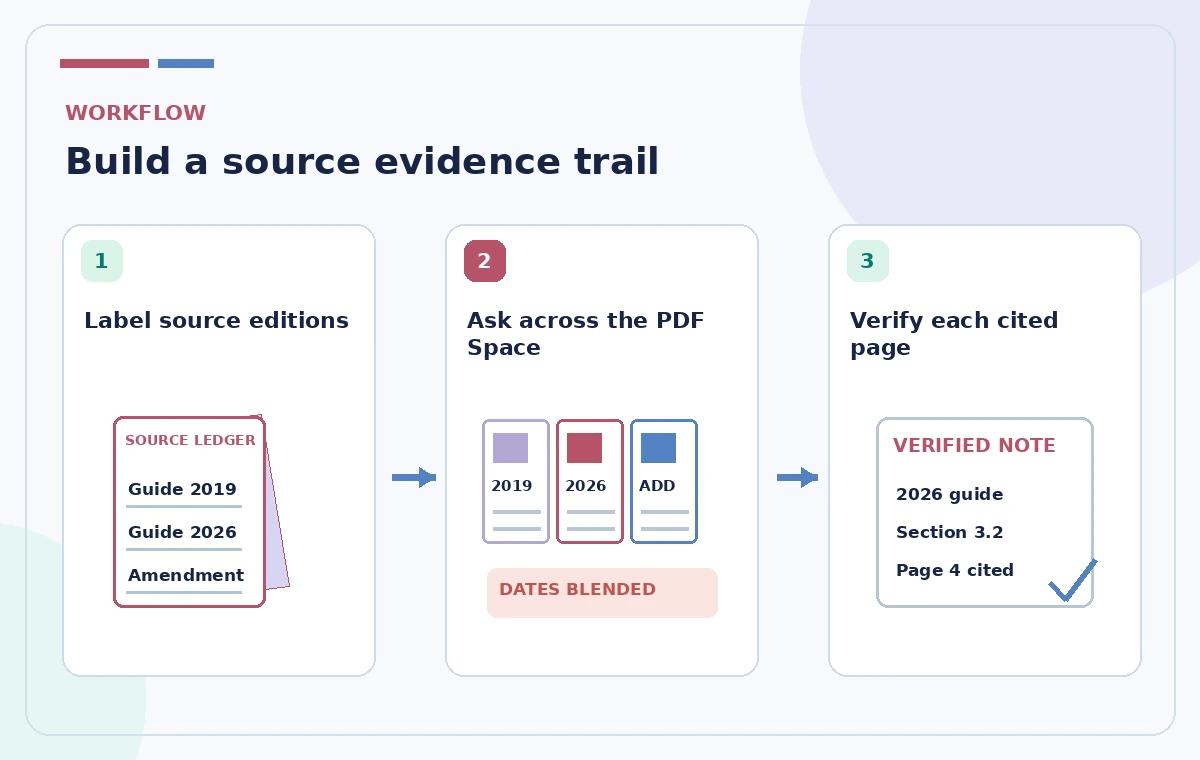
Before uploading anything, create a version ledger with document title, issuing body, date, scope, and whether the guide is current. Distinguish a public reference manual from a museum’s internal approved handling procedure. The latest date is not automatically the most authoritative source: a supplement may govern only a particular collection. Mark the 2019 procedure as archival if it has been replaced, and note which current document actually supersedes it. Remove drafts that were never approved from the source set or label them unmistakably. A PDF Space helps navigate many files, but it cannot independently infer an institution’s chain of authority from filenames alone.
Set up the Space with an explicit source inventory
Adobe documents PDF Spaces in the Acrobat desktop and web experiences, with ways to add files, text, cloud content, and web links. From the Acrobat home area, create a PDF Space and add the three designated documents, not a random folder of all conservation paperwork. Name files using their visible dates and revision codes so reviewers can recognize them in citations. Avoid adding personal donor records, protected collection locations, or credentials just because the interface accepts uploads. Check account and plan access before starting; PDF Spaces are tied to eligible Acrobat AI offerings and feature availability can evolve.
Ask for a comparison, not a single universal rule
Frame the research question narrowly: ‘Which document controls packaging for the ceramic collection, and what changed from the older memo?’ Ask the assistant to separate current requirements, superseded language, and unresolved conflicts. Request that each proposed statement point to its source document and location, then inspect those references in Acrobat. Do not request a made-up composite policy that tries to satisfy every edition simultaneously. If two guides describe different materials, keep their scopes distinct. A response that sounds like a coherent museum-wide procedure can still be incorrect when its source paragraphs applied to different objects.
Check the cited pages in their original context
Use Acrobat’s source-navigation controls to open the passages behind the answer. Read the sentence before and after each highlighted excerpt, including notes and exception tables. The wording ‘unless approved by the registrar’ may be as important as the highlighted storage instruction. Check units, revision marks, appendix references, and page headers. If an AI citation points to a table caption rather than the cells containing the rule, inspect the complete table manually. Copy verified quotations sparingly into a review memo with page references; don’t treat a generated summary as evidence merely because it contains a citation number.
Make a revision matrix before writing recommendations
Create a three-column comparison for the archivist: older instruction, current instruction, and status. Add a fourth field recording the exact document and page. Mark ‘same,’ ‘changed,’ ‘restricted to a different object type,’ and ‘not established.’ If a newer memo changes packing material but says nothing about temperature, do not infer that the earlier temperature guidance is still approved. Ask the responsible conservator which baseline applies. The output should preserve uncertainty and accountability. This is especially important when personnel will use the document to handle objects that cannot be replaced after a procedural mistake.

Use the overview as a signpost, not a final policy
PDF Spaces may generate an overview, summaries, and other creations automatically. Customize the overview to say which sources are approved and which are history before inviting colleagues. A useful opening note might direct staff to the signed 2026 guide for active handling and to the 2019 procedure only for background. Do not embed an unreviewed AI answer as the workspace’s headline recommendation. Any chart or audio overview is another derivative representation that requires checking. Keep the underlying signed files available so readers can navigate from an explanation to the actual governing requirement.
Check whether the link discloses internal material
Sharing controls vary by Space configuration. Adobe’s documentation describes invited collaborators, organization-scoped access, and link sharing, along with separate permissions for Knowledge Base collections where used. Before selecting a link setting, identify which files can be shown outside the institution and which are restricted. Choose the smallest allowed audience and a view-only permission when editing is unnecessary. Do not assume that giving someone a convenient overview will conceal files added to the same shared Space. Test access with an authorized colleague and review settings again after documents are replaced or new files are added.
Finalize a human-approved handling memo
Send the comparison matrix and source links to a conservator and the collection manager for review. Ask them to resolve conflicting versions and to authorize the exact revised wording, not merely the general direction. Record an approval date, revision number, and superseded version. Once signed, publish the memo through the museum’s normal controlled-document location; treat the PDF Space as supporting research. If later source updates arrive, reopen the evidence matrix rather than silently replacing text in an already approved instruction. Make it easy for handlers to know which document is binding on the day they work.

Respect document and model boundaries
AI research across PDFs can accelerate discovery of differences but cannot establish preservation safety or legal rights over a document. OCR errors, scanned amendments, incomplete appendices, and competing editions are serious limitations. Confirm supported file formats, number-of-file limits, language support, and subscription terms from Adobe’s current documentation. Do not claim that the illustration represents a real Acrobat screen or that the sample source comparison was successfully produced by the service. The quality bar is a traceable, human-approved memo with correctly scoped citations, not the length or confidence of the generated answer.
How We Research
We checked the following official product documentation for this tutorial: Adobe Help — Create PDF Spaces in Acrobat on the web; Adobe Help — PDF Spaces FAQ; Adobe Help — Share PDF Spaces. We compared feature names, workflow steps, potential plan and permission restrictions, and points where generated suggestions must be verified. We designed a hypothetical editorial scenario based on those supported capabilities; we did not run an account-specific product test, analyze real visitor or member data, obtain real third-party permissions, or measure model accuracy. All four images are original educational illustrations, not product screenshots or actual AI-generated results. Since interfaces and terms change, check the latest controls and prices in your own account. Any public directions, privacy decisions, operational authorization, or safety requirements need confirmation from their responsible human owner.
Frequently Asked Questions
Yes. Adobe documents AI questions across a Space containing files, links, and other supported material.
No. Check the cited page, document edition, scope, and approval authority manually.
Yes, if clearly labeled as historical or superseded and kept separate from governing text.
Depending on access settings it can; inspect the sharing scope and permission level before sending a link.
No. The approved handling memo must be reviewed by the responsible people.