
A cache check is not a build check
A museum kiosk website may rely on a cached dependency directory to make repeated CI runs quicker. A release coordinator wants to know whether a particular cache is available before launching a longer test job. GitHub’s actions/cache action supports lookup-only, which checks for a matching cache without downloading it. That is narrower than restoration, installation, vulnerability assessment, or building the site. Design a status page with separate labels for cache available, dependencies installed, tests completed, and deployment approved. A green cache indicator does not prove that the cached bytes are safe or that the current kiosk application is compatible with them.
Generate an exact key from controlled inputs
A reliable cache key should reflect the runner operating system, relevant dependency lockfile, and tooling version where appropriate. GitHub documents that cache lookup also depends on cache version and branch scoping. Use a stable naming convention, but do not put secrets, account identifiers, or patron information into cache keys. Record the key and repository commit used for the check. If the lockfile changes, a new exact key should normally be expected rather than implicitly accepting old dependencies. A cache hit is evidence of an available cache entry with matching lookup criteria, not a signed statement that the software supply chain has been audited.
Use lookup-only to avoid unnecessary downloads
The official actions/cache documentation lists lookup-only as an input that checks whether a cache entry exists and skips downloading its contents. For an audit job, this can provide a fast availability signal without materializing the dependency directory. A simple workflow uses a cache step with a chosen path and key and reads the cache-hit output afterward. Do not write later steps as if the path is populated: lookup-only intentionally leaves it unrestored. If the next step genuinely needs the packages, run a separate authorized restore or installation step. Keeping probe and restore responsibilities distinct avoids confusing existence checks with usable build environments.
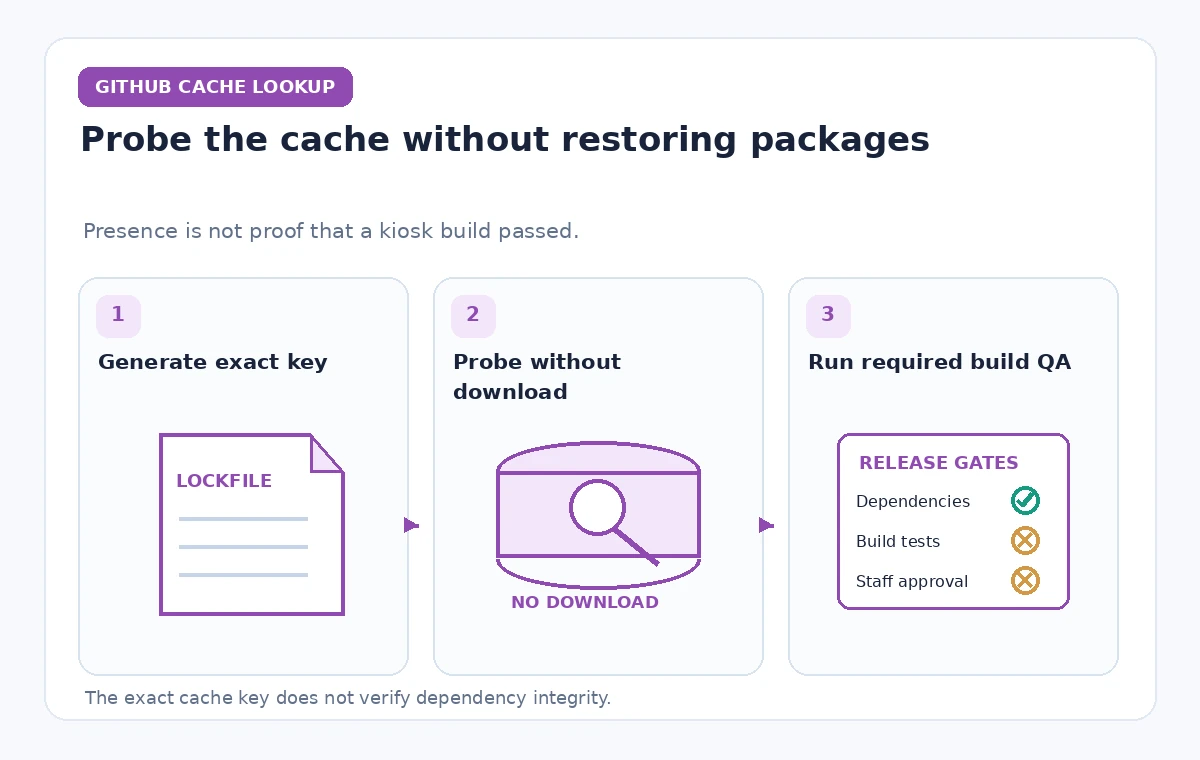
Interpret cache-hit with exact-match semantics
GitHub documents cache-hit as a value used to distinguish an exact key match; fallback matches through restore keys are not the same guarantee. Treat the output as a string and handle missing, false, and true explicitly rather than relying on a truthy expression that treats the text false as success. For a strict kiosk build, require the exact lockfile-derived key before skipping an installation; a prefix fallback may contain incompatible packages. A lookup-only probe should produce a clear status such as exact match, no exact match, or check failed. Do not silently fall through to deployment when the cache cannot be located.
Plan misses as normal CI states
An absent cache is not automatically a security incident. New branches, changed lockfiles, and changed runner environments routinely cause misses. Provide an approved fallback: install dependencies from pinned manifests, run integrity checks, build and test the kiosk, and optionally save a new cache only under the relevant permissions. Do not fail the entire release solely because a performance cache is empty unless availability is an explicit controlled requirement. Conversely, if the purpose of the job is to verify a prebuilt reproducible environment, fail-on-cache-miss can enforce a policy; explain that it checks presence, not content integrity or freshness.
Check branch scope and cache version
GitHub searches cache entries according to key, cache version, and branch rules. In documented workflows, a branch may be able to see accessible default-branch caches after local lookup attempts. A cache built on a different operating system, compression method, or path configuration may not match the expected version. When a lookup result surprises the team, inspect the actual key construction, execution branch, runner OS, and path used by the action before assuming the cache service lost data. Record a concise diagnostic summary. Restrict cache access for untrusted pull requests and understand the repository’s current cache access policy.

Never place credentials inside cached files
GitHub warns against caching sensitive information because cache contents may be accessible through workflows with repository access, including certain pull-request contexts. Do not cache API keys, repository tokens, visitor session data, or kiosk configuration files with private endpoints. A cache-probe job should use only harmless metadata about dependency availability. Even if lookup-only does not download content, it is not a data-loss-prevention system: a later restore could expose material saved by an earlier workflow. Audit the actual cache paths and use clean, reproducible build inputs. Secret rotation and least-privilege tokens remain separate from caching features.
Keep security attestations separate from cache reuse
Cache entries can improve performance but should not replace dependency lockfiles, package integrity checks, vulnerability review, or provenance evidence for a release artifact. If the kiosk uses open-source packages, run the appropriate dependency scanning and test suite after retrieving or installing them. A lockfile-based cache key helps align versions, but a key is just a lookup string; it is not a cryptographic proof of archive contents. Document the accepted dependency snapshot and the compiled build’s digest independently. A workflow can therefore show cache found while the security or accessibility tests remain pending or failed. That distinction should be obvious in every operational dashboard.
Rehearse three lookup states
In a test repository, prepare an exact matching key, a deliberately changed lockfile key, and a key that can match only a broader restore prefix. Confirm the behavior of the action version and the reported outputs, including whether the exact-match check differs from a fallback. Inspect the workspace to confirm that lookup-only did not download packages. These are suggested test cases, not a claim that this article ran GitHub Actions. Reproduce the checks on the exact runner image or self-hosted runner your organization uses, because action runtime requirements and cache policies may evolve. Capture real logs and use them to revise the workflow design.

Block release on real evidence, not on cache status
An approved kiosk release requires the correct source commit, installed dependencies, successful tests, content review, and the institution’s release authorization. A cache lookup can inform scheduling or performance estimates, but it must not waive the test suite. If a cache is unavailable or stale, choose an explicit installation path and record the resulting artifact digest. If a cache is found, still verify the final build and screen-reader or keyboard-accessibility checks that are relevant to the kiosk. The final release gate should show separate outcomes, with deployment disabled while required evidence is missing. A quick availability check is useful precisely because it remains narrow.
How We Research
We reviewed the named official developer references GitHub: actions/cache repository and inputs, GitHub Docs: Dependency caching reference. We compared their documented request and delivery behavior, accepted configuration patterns, and explicit limitations with the proposed hypothetical museum workflow. This article is a source-based implementation guide: we did not execute live customer API calls, inspect private cloud accounts, run production tests, or measure latency, cost, or accuracy. Readers should verify current limits and deployment settings with the original documentation and run their own controlled staging tests before changing public systems.
Frequently Asked Questions
No. The action checks for cache availability without restoring the contents.
No. It concerns cache lookup; build, test, and approval evidence are separate.
Yes. New lockfiles, branches, runners, or versions can produce an expected miss.
No. GitHub advises against caching secrets or sensitive information.
No. It is a lookup identifier, not a checksum or signed provenance record for the built software.